Key takeaways
- Craft cutting machines split into two camps that do very different jobs, and most wrong purchases come from mixing them up.
Craft cutting machines split into two camps that do very different jobs, and most wrong purchases come from mixing them up. Electronic cutters read a digital design, then drive a blade across vinyl, cardstock, or fabric on a mat. Manual die-cutters have no software at all; you crank a lever or roller to press a metal die through paper. The real question behind a search for the best craft cutting machines is how much of your crafting is custom lettering and decals versus repeatable shapes for cards and scrapbook pages.
This guide is written for hobbyists setting up a first craft table, card makers who want clean repeatable shapes, and small sellers weighing a vinyl cutter for labels and decals. Each pick is judged only on the specifications visible in its title, so details such as exact cutting force or supported materials should be confirmed on the listing. As 2026 gift and craft seasons approach, the goal here is to help you match the machine type to the project instead of buying the biggest name.
Quick Picks
Our top picks




As an Amazon Associate we earn from qualifying purchases at no extra cost to you.
| Product | Best for | Key spec from the title |
|---|---|---|
| Cricut Maker 4 | Crafters wanting the flagship smart machine | Smart cutting machine, 30 images in Design Space |
| Cricut Joy Xtra | Small, everyday projects | Smart cutting machine, digital content bundle |
| Cricut Joy 2 Essential Bundle | Starter kit buyers | Smart Vinyl, Smart Iron-On, cardstock, insert cards |
| Silhouette Cameo 5 Alpha | Print and cut work | AutoBlade, Studio software, cutting mat |
| Brother SDX125E ScanNCut | Scanning and cutting without a computer | Electronic cutting machine with scanner |
| Sizzix Big Shot | Die-cutting and embossing for paper crafts | 6 inch, machine only |
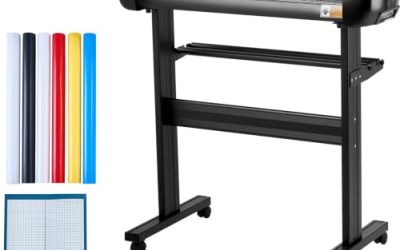
| VEVOR Vinyl Cutting Machine | Decals and personalized cards | 12 inch, 20000 designs, button screen control |
How to Choose
Decide between electronic and manual first
If you want unique names, custom decals, or any shape you can draw, you need an electronic cutter with software. If you mainly cut the same flowers, frames, and tags for cards, a manual die-cutter such as the Sizzix models costs less to run and needs no screen, app, or account. Many crafters eventually own both. Ignore any promise that one machine does everything equally well; each type has a clear sweet spot.
Check the cutting width and the mat size
Width limits what you can make in one pass. Small machines work with narrow materials and suit stickers, cards, and name tags, while the 12 inch class opens up banners, larger decals, and shirt designs. The VEVOR title lists 12 inch, and the manual Big Shot lists 6 inch. For other models, look up the mat sizes on the listing before assuming a project fits. Budget machines often cut corners on how long a design can run without repositioning.
Look at software, content, and connectivity
Smart machines depend on an app, and that app may require an account or a subscription for premium images. The Cricut titles mention a bundle with 30 images in the Design Space app, which is a starting library only. Silhouette lists Studio software, and the VEVOR title mentions compatibility with Mac, Windows, and Android. Check whether the software works offline, whether designs transfer by cable or wireless, and whether you can import your own files.
Match the machine to your materials
Vinyl, iron-on, cardstock, and fabric need different blades and pressure. A title that lists Smart Vinyl and Smart Iron-On points to heat transfer and decal work. A title that says AutoBlade suggests the blade adjusts for you. Die-cutting machines are best with paper, thin foam, and similar light stocks. Whatever you buy, confirm the supported material list on the listing instead of assuming. Mat replacements and spare blades are a running cost that cheap machines sometimes hide.
The 7 Best Options
Cricut Maker 4
The Maker 4 is described as a smart cutting machine in a Seashell color, with a digital content bundle including 30 images in the Design Space app. It sits at the top of the Cricut line in this list and suits crafters who want room to grow into more materials and larger projects over time. Think of someone who starts with cards and labels, then drifts toward custom apparel, home decor, and gifts. The spec sheet shows a Seashell color option, which matters if the machine will sit in plain view.
- Strength: smart machine design backed by a well-known software ecosystem.
- Strength: bundled digital content gives a starting library right away.
- Trade-off: likely the premium tier, with an app account needed for the full experience.
Skip it if you only make occasional greeting cards and want to avoid learning software.
Cricut Joy Xtra
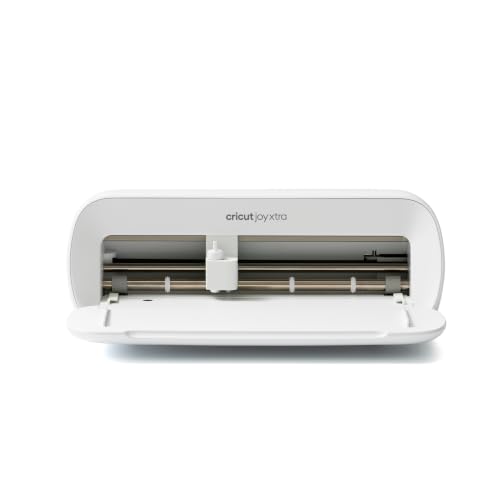
A compact smart cutting machine that comes with a digital content bundle and 30 images in Design Space. The Xtra name suggests a step up from the basic Joy, and it targets crafters with small projects such as labels, cards, and stickers who do not want a large machine taking over the desk. It also works as a second machine for crafters who already own a larger cutter and want something that can be pulled out for a quick label or gift tag without setting up a full workspace.
- Strength: small footprint is suitable for apartments and shared tables.
- Strength: starter images are included from day one.
- Trade-off: compact size limits how large a single design can be.
Skip it if you plan to make large banners or full-size shirt transfers.
Cricut Joy 2 Essential Bundle
This is a bundle rather than a bare machine: the Joy 2 comes with Smart Vinyl, Smart Iron-On, cardstock, insert cards, printable vinyl, and a rainbow sampler. Buyers who are starting from nothing may like having materials in the box. A parent helping a teenager start a small crafting hobby, or a gift giver who does not know which supplies to buy, would find the all-in-one package easier than picking each item separately.
- Strength: materials included means projects can begin immediately.
- Strength: the sampler lets beginners try several surfaces before buying full rolls.
- Trade-off: sampler quantities are modest, so refills will be needed soon.
Skip it if you already own a stash of materials and want the machine alone.
Silhouette Cameo 5 Alpha
The title highlights print and cut work, quiet operation, an AutoBlade, Studio software, and a cutting mat in matte black. Print and cut means printing a design on a home printer and letting the machine trace the outline, which is useful for stickers and planner pieces. Crafters who already print their own artwork will find the workflow familiar. The title also lists a cutting mat, so a basic accessory arrives in the box, though extra mats in other grips are a common add-on.
- Strength: print and cut workflow suits sticker and label projects.
- Strength: AutoBlade and quiet operation reduce setup fuss.
- Trade-off: software has its own learning curve, and some features may sit in paid tiers.
Skip it if you want a small cutter for quick paper shapes only.
Brother SDX125E ScanNCut
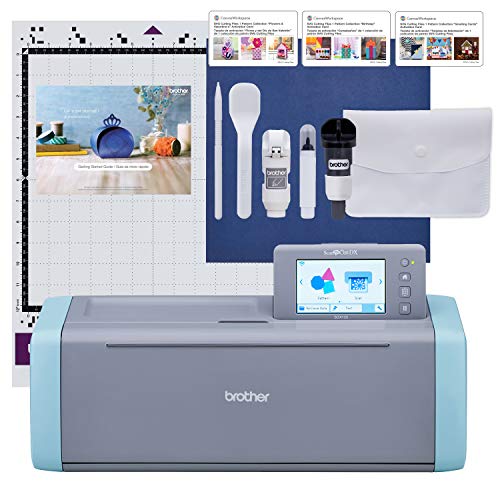
The SDX125E is an electronic cutting machine with a built-in scanner. The scanner lets you place a drawing or printed pattern on the mat and cut around it, which appeals to quilters, scrapbookers, and anyone who prefers working from paper originals. A child’s drawing, a stencil, or a pattern from a magazine can become a cut file without redrawing it in software. Check the listing for supported material thickness before ordering.
- Strength: scanning turns hand-drawn artwork into cut paths.
- Strength: the built-in scanner keeps the workflow close to the original artwork.
- Trade-off: limited detail in the title, so material and size limits need checking on the listing.
Skip it if you want to design everything on a laptop with a large online image library.
Sizzix Big Shot
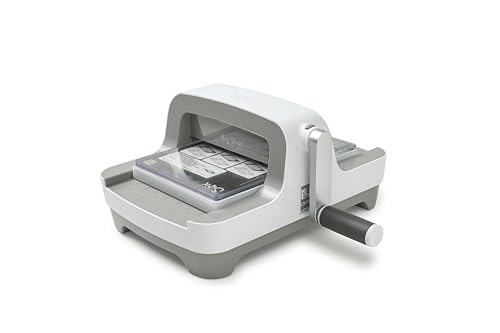
A 6 inch die-cutting and embossing machine sold as machine only. It is manual, so there is no software or power cord to manage. You still need to buy dies and plates separately, which is where the real cost lies. It suits card makers who already own a library of dies, for classrooms, and for craft groups that want a durable, noise-light tool that stays on a shelf between sessions.
- Strength: simple crank operation with no app to learn.
- Strength: handles both cutting and embossing for paper crafts.
- Trade-off: machine only, so dies and cutting plates add to the total.
Skip it if you need custom shapes drawn on screen or vinyl cutting.
VEVOR Vinyl Cutting Machine
A 12 inch vinyl cutter with a button screen, 20000 designs, and compatibility with Mac, Windows, Android, and iOS devices according to the title. It is aimed at personalized cards and decals, likely at the value tier among electronic cutters. A small shop owner making labels, a parent crafting party favors, or a hobbyist who just wants to try vinyl before committing to a pricier ecosystem would be the natural audience.
- Strength: the 12 inch width gives room for larger decals.
- Strength: on-device button screen reduces dependence on a laptop.
- Trade-off: a lesser-known brand, so buyers should review support and software details on the listing.
Skip it if you want a polished brand ecosystem with a large community.
Which One Fits Your Situation
Card makers on a small desk
The Sizzix Big Shot is the cleaner fit. It cuts repeatable paper shapes without software, and the crank keeps noise and setup to a minimum.
Sticker sellers using a home printer
The Silhouette Cameo 5 Alpha leads here because print and cut is called out directly in the title, along with Studio software and an AutoBlade.
A first-time buyer who wants everything in one box
The Cricut Joy 2 Essential Bundle comes with vinyl, iron-on, cardstock, and cards, so the first weekend of projects needs no extra shopping trip.
A decal maker on a budget
The VEVOR Vinyl Cutting Machine offers a 12 inch width and a screen on the machine. It is worth considering if brand ecosystems matter less than width and price.
Common Mistakes
- Buying an electronic cutter when a manual die-cutter would cover the actual projects.
- Forgetting that dies, mats, and blades are separate costs on many machines.
- Assuming the bundled digital images cover every future project.
- Ignoring workspace size, especially for 12 inch machines that need clearance front and back.
- Skipping the software requirements, including accounts and device compatibility.
Related guides
- Battery Powered Floodlight Camera With Local Storage
- Cordless Drill Brush Attachment For Bathroom Grout
- Rechargeable Emergency Lantern For Power Outages
Frequently Asked Questions
Is a computer required to use a craft cutter?
Not always. Some machines work from a phone or tablet app, some have built-in screens, and manual die-cutters need no device at all. Check the listing for connection details before buying.
Can one machine cut vinyl, paper, and fabric?
Some can, but supported materials differ by model and blade. Use the listing to see which materials the manufacturer names, and start with the material you will use most.
What is print and cut?
You print a design with registration marks on a home printer, then the machine reads those marks and cuts along the outline. It is popular for stickers and planner inserts.
Are die-cutters cheaper to run than electronic cutters?
The machine itself can be cheaper, but dies and plates add up. Electronic cutters spend more on software and mats instead, so compare total cost across a year of projects.
More from Amazon
Programs that pair well with the guide above. Offers and eligibility are set by Amazon and may change.
A free business account with business pricing and bulk-buying tools for work, shop or home office.
Create a business accountFree shipping on eligible items, Prime Video and more. Eligible new members can start with a free trial.
Start a Prime free trialAudiobooks and podcasts to listen to on the go. Eligible new members can start with a free trial.
Try Audible freeAd-free music streaming. Eligible new subscribers can start with a free trial.
Try Music Unlimited freeAs an Amazon Associate we earn from qualifying purchases.