Key takeaways
- A check engine light has a way of arriving on the one morning there is no time for a shop visit.
A check engine light has a way of arriving on the one morning there is no time for a shop visit. A Bluetooth OBD2 scanner turns that moment into a manageable one: plug a small adapter into the diagnostic port, open a phone app, and read the stored trouble code before deciding whether it is a loose gas cap or something that needs a mechanic. The question behind the best Bluetooth OBD2 scanners is therefore not raw power but fit, meaning which adapter pairs with your phone, which app you will tolerate, and how deep into the car’s modules you actually want to look.
This guide is written for home mechanics, first-car owners and anyone who wants to stop paying a diagnostic fee for a simple code read. Each pick is judged only on what its listing title states, such as phone compatibility, subscription terms, supported systems and extra features. As 2026 model-year vehicles arrive and older cars hang on, the listing wording matters, so always confirm vehicle compatibility on the listing before ordering.
Quick Picks
Our top picks


As an Amazon Associate we earn from qualifying purchases at no extra cost to you.
| Product | Best for | Key spec from the title |
|---|---|---|
| BlueDriver OBD2 Scanner | Owners who want extra systems and no app fees | No subscription, ABS, SRS and TPMS |
| Veepeak OBDCheck BLE | Simple code reading on iPhone or Android | BLE adapter for iOS and Android |
| Veepeak OBDCheck BLE+ | Drivers wanting live data on a Veepeak adapter | iOS and Android, live data |
| OBDLink MX+ | Cross-platform users including Windows | iPhone, Android and Windows |
| Panlong OBD2 Scanner | Android users on a tight budget | Android, read live data, clear codes |
| Innova 5210 | Mixed DIY tool with battery and oil features | Battery tester, live data, oil reset |
| TOPDON TopScan Lite | Advanced DIYers who want resets | Bidirectional, 8 resets, AI repair guides |
How to Choose
Phone Compatibility Comes First
Not every adapter works with every phone. Titles in this group split cleanly: the Panlong is listed for Android, the Veepeak and BlueDriver models for iPhone and Android, and the OBDLink MX+ adds Windows. iPhones generally need a low-energy Bluetooth adapter, which is why you see BLE in some product names. If you plan to use a laptop for deeper data logging, the Windows support on the OBDLink title becomes a deciding factor.
Subscriptions and App Costs
Some scanners rely on a free app, others on paid add-ons or ongoing fees for advanced features. Only the BlueDriver title states that no subscription is required. For the others, read the listing and the app store page to see which functions are free. Free apps often cover basic reading, while paid tiers may unlock enhanced data or reports, so budget for that possibility. Ignore the temptation to compare apps by screenshots; the more useful test is whether the app explains each code in plain language and lets you save or share a report.
Which Systems Can It Read
Basic emissions-related code reading covers the engine and powertrain. Reading ABS, airbag (SRS) and tire-pressure (TPMS) systems requires more capable software and hardware, which is why the BlueDriver title calls them out. The TOPDON title lists bidirectional control and eight reset functions, which is a different tier entirely. If you only want the check engine light explained, a basic adapter is enough; pay for extra systems only if you will use them. A good habit is to list the warnings your car has actually shown over the past few years. If the answer is only the check engine light, advanced modules are likely wasted money.
Vehicle Fitment and Where Budget Models Cut Corners
Fitment depends on the vehicle make, model and year, so confirm compatibility on the listing for your car, especially for older vehicles, diesels and hybrids. Budget adapters tend to cut corners on app polish, pairing reliability and long-term support, while premium units invest in software updates. A scanner does not repair anything; it reads and, depending on the model, clears codes. If a problem recurs after clearing, see a qualified mechanic. Also remember that a scanner shows what the car’s computer has recorded, not a full diagnosis, so a code is a starting point for research rather than a shopping list of parts to replace.
The 7 Best Options
BlueDriver Bluetooth Scanner
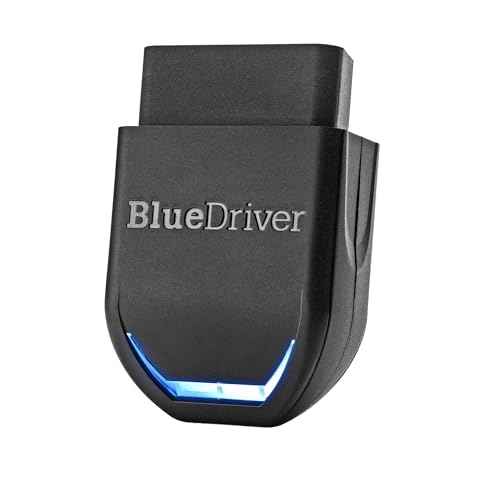
BlueDriver’s listing emphasizes that no subscription is required and that it reads ABS, SRS and TPMS in addition to engine codes, working with iPhone and Android. Two near-identical listings exist, so buyers should confirm which version they are viewing.
- Strength: reading ABS, airbag and tire-pressure systems goes beyond basic code readers.
- Strength: the stated no-subscription model avoids recurring app costs.
- Trade-off: it sits in the premium tier among the plain adapters here.
Skip it if you only need to read a single engine code once or twice. Check vehicle compatibility on the listing before buying. Many owners also appreciate that the model carries a recognizable name in the hobby, which usually means plenty of community discussion about app setup and supported cars.
Veepeak OBDCheck BLE
This Veepeak adapter is labeled for iOS and Android with BLE connectivity, aimed at reading check engine codes wirelessly. It reads as a focused adapter rather than a full multi-function tool.
- Strength: broad phone support in one adapter.
- Strength: a simple concept that suits first-time scanner owners.
- Trade-off: the visible title lists no advanced systems or resets.
Skip it if you want ABS or airbag readings. Choose an app that supports the adapter and confirm vehicle compatibility on the listing. It also makes sense for anyone who wants to try the idea of home diagnostics before committing to a larger purchase.
Veepeak OBDCheck BLE+
The plus model extends the basic adapter, with the title naming live data, an engine diagnostic code reader and compatibility with iOS and Android. Live data lets owners watch values update while the engine runs.
- Strength: live data adds context beyond a single stored code.
- Strength: iOS and Android support covers most households.
- Trade-off: the title is cut off before listing compatible vehicles, so check the listing.
Skip it if you want a bundled handheld tool with its own screen. Live data is most useful when you know which values to watch, so plan to read the app’s guides or a vehicle-specific forum thread before relying on the numbers.
OBDLink MX+
OBDLink positions the MX+ as an OBD2 Bluetooth scanner for iPhone, Android and Windows, a rare three-platform claim in this group. The short title keeps the focus on compatibility rather than features.
- Strength: Windows support suits laptop-based diagnostics.
- Strength: iPhone and Android coverage means family phones are covered.
- Trade-off: the title lists no extra systems or resets, so read the listing for scope.
Skip it if budget matters most or you want a tool with built-in repair guidance. Shoppers weighing it against the cheaper adapters should ask whether Windows logging is something they will actually use, since that is the main thing the title adds.
Panlong OBD2 Scanner
Panlong’s listing is aimed at Android users who want a wireless code reader that can read live data, clear error codes and turn off the check engine light, as the title puts it. It is the entry-level pick here.
- Strength: Android-focused with live data and code clearing in the title.
- Strength: a simple tool for occasional checks.
- Trade-off: the title mentions Android only, so iPhone owners should look elsewhere.
Skip it if you use an iPhone, or if you plan to rely on one adapter for years of updates. Budget adapters can vary in how well their apps are maintained, so read recent app store notes before buying.
Innova 5210
Innova’s 5210 mixes a code reader with a battery tester, live data and an oil reset function. The title states it is Bluetooth compatible, so check the listing to see how the app side works.
- Strength: the battery tester and oil reset broaden its uses for maintenance.
- Strength: live data and engine code reading cover the basics.
- Trade-off: the title is cut off before spelling out the exact Bluetooth app details.
Skip it if you only want a compact dongle that lives in the glovebox. It suits a garage shelf, where the oil reset and battery checks fit a routine maintenance day alongside tools and filters.
TOPDON TopScan Lite
The TopScan Lite is the most feature-heavy listing here, naming bidirectional control, eight resets, AI-powered repair guides, an AI assistant and a performance test.
- Strength: bidirectional control and resets extend what a home mechanic can do.
- Strength: built-in repair guides and an assistant help beginners interpret results.
- Trade-off: advanced functions are only useful if your vehicle supports them; check the listing.
Skip it if you want a simple code reader with minimal learning curve. Beginners can still grow into it, but expect to spend time with the repair guides and reset menus before the extras start to pay off.
Which One Fits Your Situation
First-Time Car Owner With an iPhone
The Veepeak OBDCheck BLE keeps things simple, with iOS and Android support in the title. Step up to the BLE+ if watching live data sounds appealing from day one.
Weekend Mechanic Who Wants More Than Engine Codes
The BlueDriver adds ABS, SRS and TPMS access with no subscription, while the TOPDON TopScan Lite goes further into resets and bidirectional control.
Laptop-Based Diagnostics
The OBDLink MX+ explicitly lists Windows alongside iPhone and Android, which suits a garage with an old laptop on the workbench and a family that uses both phone platforms.
Occasional Check on an Older Daily Driver
The Panlong is the straightforward Android pick, and the Innova 5210 suits a garage owner who also wants battery testing and oil resets.
If two options feel equal, let the phone decide. A scanner that pairs reliably with the device in your pocket will get used, while a more capable one that frustrates you at the curb ends up in a drawer. Reading recent app reviews for pairing complaints is a quick way to spot trouble before you commit.
Common Mistakes
- Buying an Android-only adapter and then discovering the household phone is an iPhone.
- Assuming every scanner reads ABS, airbag and tire-pressure systems.
- Skipping the listing’s vehicle compatibility check for your make, model and year.
- Clearing codes without noting them first, which erases the clues a mechanic would want.
- Ignoring app costs and paying for extras the adapter does not need.
Related guides
- Battery Powered Floodlight Camera With Local Storage
- Cordless Drill Brush Attachment For Bathroom Grout
- Rechargeable Emergency Lantern For Power Outages
Frequently Asked Questions
Will a Bluetooth OBD2 scanner fit any car?
Not necessarily. Fitment depends on the vehicle make, model and year, so confirm compatibility on the listing and in the app’s supported-vehicle information.
Is a subscription required to use one?
It depends on the app. The BlueDriver title states no subscription, while others do not say, so read the listing and app details before buying.
Can a scanner fix a car by itself?
No. It reads and, on some models, clears trouble codes. Repairs still require the right parts and skills, and persistent warnings call for a qualified mechanic.
Is it fine to leave the adapter plugged in?
Listings differ, and the titles here do not address this. Check the manufacturer’s instructions for guidance on leaving it connected between uses, and unplug it if the vehicle will sit unused for a long stretch.
More from Amazon
Programs that pair well with the guide above. Offers and eligibility are set by Amazon and may change.
A free business account with business pricing and bulk-buying tools for work, shop or home office.
Create a business accountFree shipping on eligible items, Prime Video and more. Eligible new members can start with a free trial.
Start a Prime free trialAudiobooks and podcasts to listen to on the go. Eligible new members can start with a free trial.
Try Audible freeAd-free music streaming. Eligible new subscribers can start with a free trial.
Try Music Unlimited freeAs an Amazon Associate we earn from qualifying purchases.