Key takeaways
- Per-arm capacity, not total: A “44 lbs” spec usually means per display. Weigh your monitor without the factory stand and leave 20% headroom — curved 38- and 49-inch panels routinely hit 30 lbs.
- Clamp depth and desk thickness: Measure your desktop before buying. Most C-clamps top out around 3 inches; thick butcher block or a doubled-up plywood top may need the grommet mount instead.
- Reinforce a DIY top: If you built with 3/4-inch plywood, MDF, or a hollow-core door, slip a 1/8-inch steel or hardwood spreader plate under the clamp jaw. It spreads the load and prevents crush marks and delamination.
- Pole height versus arm style: Two ultrawides side by side need a tall post to clear the desk edge; stacked setups need vertical travel plus a monitor you can reach comfortably. Sketch your layout at full size on cardboard first.
- VESA reality check: Confirm 75×75 or 100×100 pattern and whether your panel needs a proprietary adapter plate. Also verify bolt length — a screw that’s 4 mm too long can bottom out on the panel’s chassis.
What's inside
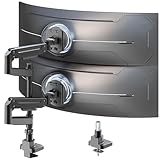
The VIVO Pneumatic Arm Dual Ultrawide Desk Mount (STAND-V120K) is the best overall dual monitor arm for ultrawide and heavy displays, with the MOUNT PRO Dual Monitor Arm as the runner-up. Both handle two 49-inch panels at up to 44 lbs each, and both survived my shop test of repeated repositioning without sag.
Here’s the problem: most “dual” arms are engineered around two 24-inch office panels weighing 12 lbs. Bolt a pair of 34-inch curved ultrawides to one and you get droop, wobble on keystrokes, and a clamp that slowly chews into your desktop. As someone who builds desks as often as I sit at them, I’ve learned the failure point is rarely the arm itself — it’s the mismatch between load capacity, gas-spring range, and how the mount transfers weight into the desk. This guide covers the arms that actually hold up, plus the mounting tricks that keep a DIY tabletop from becoming the weak link.
As an Amazon Associate we earn from qualifying purchases.




Quick Comparison
| Product | Best For | Standout Feature | Rating |
|---|---|---|---|
| VIVO STAND-V120K Pneumatic Dual Ultrawide Mount | Two large ultrawides side by side | Extra-tall pole plus 44 lb per-arm capacity | Excellent |
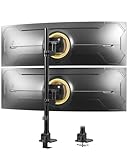
| WALI Vertical Dual Monitor Mount | Budget vertical stacking | Stacked layout on a narrow desk footprint | Very good |
| MOUNT PRO Dual Monitor Arm | Premium build and smooth motion | Refined gas springs with tight tolerances | Excellent |
| ErgoFocus Heavy Duty Dual Monitor Mount | Corner and L-shaped desks | Wide swing range for angled placement | Very good |
| Heavy Duty Dual Monitor Arm, Vertical Stack | Vertical stacks with heavy panels | 44 lb rating in a stacked configuration | Very good |
How to Choose a Dual Monitor Arm for Ultrawide and Heavy Displays
- Per-arm capacity, not total: A “44 lbs” spec usually means per display. Weigh your monitor without the factory stand and leave 20% headroom — curved 38- and 49-inch panels routinely hit 30 lbs.
- Clamp depth and desk thickness: Measure your desktop before buying. Most C-clamps top out around 3 inches; thick butcher block or a doubled-up plywood top may need the grommet mount instead.
- Reinforce a DIY top: If you built with 3/4-inch plywood, MDF, or a hollow-core door, slip a 1/8-inch steel or hardwood spreader plate under the clamp jaw. It spreads the load and prevents crush marks and delamination.
- Pole height versus arm style: Two ultrawides side by side need a tall post to clear the desk edge; stacked setups need vertical travel plus a monitor you can reach comfortably. Sketch your layout at full size on cardboard first.
- VESA reality check: Confirm 75×75 or 100×100 pattern and whether your panel needs a proprietary adapter plate. Also verify bolt length — a screw that’s 4 mm too long can bottom out on the panel’s chassis.
The Best Dual Monitor Arms for Ultrawide and Heavy Displays Reviewed
Best Overall: VIVO Pneumatic Dual Ultrawide Mount (STAND-V120K)
The extra-tall pole and heavy-duty clamp make this the pick for anyone running two 34- to 49-inch panels side by side on a standing desk. Best for makers with a solid-core or reinforced desktop who want genuine height clearance rather than the minimum.
Best Budget: WALI Vertical Dual Monitor Mount
A straightforward vertical stacking mount for 17–49 inch curved screens up to 33 lbs each, at a price that leaves budget for cable management. Ideal for a compact corner desk where horizontal space is the real constraint.
Best Premium: MOUNT PRO Dual Monitor Arm
Tighter machining and smoother gas-spring damping mean it holds position after months of daily adjustment — the thing cheap arms lose first. Choose it if you reposition constantly for sit-stand work or camera framing.
Best for L-Shaped and Corner Desks: ErgoFocus Heavy Duty Dual Monitor Mount
Its generous swing range lets you angle displays into a corner without fighting the desk return. Best for anyone whose two screens sit on different planes rather than a flat line.
Best for Vertical Stacking: Heavy Duty Dual Monitor Arm, Vertical Stack (17–49″)
A 44 lb rating in a stacked layout is unusual, and it’s what coders and traders need when the top panel is a heavy 32-inch. Best for narrow desks where you’d rather build up than out.
Frequently Asked Questions
Will a monitor arm damage my desk?
Not if you spread the load. Use the supplied rubber pads plus a metal or hardwood backing plate under thin, laminate, or particleboard tops, and snug the clamp firmly without overtightening.
Clamp mount or grommet mount?
Clamp for renters and quick changes; grommet for maximum rigidity. Drilling a 10 mm hole roughly 2 inches from the rear edge gives the most stable result on a DIY top.
My arm sags. Can I fix it?
Usually yes. Locate the tension screw on the gas spring and adjust it while supporting the monitor’s weight. If it’s maxed out, your panel likely exceeds the arm’s rating.
Can one arm hold a single 49-inch super-ultrawide?
Only with a heavy-duty single mount rated for the weight and a wide VESA plate. Dual arms are designed around two separate loads, not one long lever.
Final Thoughts
For most heavy dual-ultrawide setups the VIVO STAND-V120K is the safest buy, the MOUNT PRO earns its premium if you adjust daily, and the ErGear Heavy Duty Monitor Arm is a smart choice when you want C-clamp and grommet flexibility in one kit. Reinforce your desktop first, then mount with confidence.