Key takeaways
- Navigation type: LiDAR beats gyroscope and camera-only systems for repeatable, room-by-room coverage. If a model doesn’t specify LiDAR, expect wandering paths and missed patches under furniture.
- Brushroll design: Look for anti-tangle or dual-brush setups with rubber fins rather than dense bristles. Bristle rollers wind hair into a solid rope, and you’ll be reaching for scissors every other week.
- What the dock actually does: Self-emptying handles dust. Pad washing and drying handles the mop. Only a couple of models under $500 do both, and a damp pad left sitting in a dock will smell within days.
- Mop mechanics: Static drag pads wet the floor; spinning or vibrating pads apply pressure and lift residue. If you have kitchen grease or dried spills, pressure is the feature you want.
- Parts availability: Check that filters, side brushes, and pads are sold as multipacks from the brand. Orphaned models with no consumables pipeline become landfill fast, no matter how good the hardware is.
What's inside
Anyone who has pulled a robot vacuum apart on the workbench knows the sub-$500 category is where corners get cut. Manufacturers hit that price by trimming somewhere: a plastic brushroll that shreds after six months, a mop pad that just smears grime around, or a nav system that maps your hallway three different ways on three different runs. The specs on the box rarely tell you which compromise you’re buying.
This guide sorts through the current crop of 2-in-1 vacuum-and-mop robots that land under $500, with attention to the things that actually matter after month three: how the brush handles long hair, whether the dock does real work or just charges, and how serviceable the machine is when something clogs. Below are the models worth your money, plus the buying criteria I’d use if I were spending my own.
As an Amazon Associate we earn from qualifying purchases.



🛒 Best Price Today on Amazon
Prime members get fast, free shipping on everything above, plus member-only deals. New members get a 30-day free trial — cancel anytime.
How to Choose a Robot Vacuum And Mop Under $500 (2026)
- Navigation type: LiDAR beats gyroscope and camera-only systems for repeatable, room-by-room coverage. If a model doesn’t specify LiDAR, expect wandering paths and missed patches under furniture.
- Brushroll design: Look for anti-tangle or dual-brush setups with rubber fins rather than dense bristles. Bristle rollers wind hair into a solid rope, and you’ll be reaching for scissors every other week.
- What the dock actually does: Self-emptying handles dust. Pad washing and drying handles the mop. Only a couple of models under $500 do both, and a damp pad left sitting in a dock will smell within days.
- Mop mechanics: Static drag pads wet the floor; spinning or vibrating pads apply pressure and lift residue. If you have kitchen grease or dried spills, pressure is the feature you want.
- Parts availability: Check that filters, side brushes, and pads are sold as multipacks from the brand. Orphaned models with no consumables pipeline become landfill fast, no matter how good the hardware is.
The Best Robot Vacuum And Mop Under $500 (2026)s Reviewed
roborock Q7 L5
The 8,000Pa suction figure gets the headlines, but the dual anti-tangle system is the real upgrade over the older Q5 Pro, and it holds up in homes with long-haired pets. LiDAR mapping with multi-level support means you can run it upstairs and down without redrawing the floor plan every time.
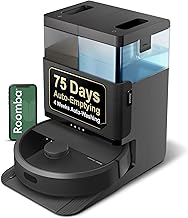
iRobot Roomba Plus 405 (G181)
The AutoWash dock is the standout here: it washes and dries the mop pads between runs, which eliminates the single worst maintenance chore in this category. Dual spinning pads apply actual downward pressure, and the 75-day self-empty bin means you can genuinely ignore it for weeks.
Shark Matrix Plus 2-in-1
Matrix Clean runs a cross-hatch pattern over problem areas instead of a single pass, and the sonic mopping head scrubs rather than wipes. The self-cleaning brushroll and 60-day HEPA base make it a solid pick for allergy households and homes with area rugs.
6000Pa Robot Vacuum and Mop Combo with Self-Emptying Station
A strong value proposition: LiDAR navigation plus a 90-day self-emptying base at a price where most competitors offer one or the other. App and Alexa control are responsive, and the mapping handles multi-room layouts without the constant re-scanning cheaper units suffer from.
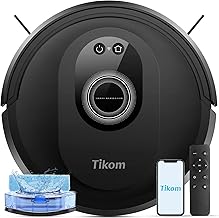
Tikom G8000 Max
At 5000Pa with a 150-minute runtime, this is the practical pick for apartments and mostly hard-floor homes where a dock is overkill. No LiDAR here, so coverage is less methodical, but the remote plus app combo makes it easy to direct manually.
Frequently Asked Questions
Can a robot mop replace mopping by hand?
For routine maintenance, yes. Spinning and vibrating pads handle daily dust film and light spills well. Dried-on messes and grout still need manual attention a few times a year.
How often do I need to replace pads and filters?
Plan on filters every two to three months and mop pads every two to three months with regular use. Side brushes last longer but deform over time, which shows up as debris left along baseboards.
Do these work on carpet?
All of the picks above vacuum carpet fine. Most lift or detach the mop pad on carpet detection, but low-pile rugs can still get damp edges. Models with carpet-boost logic handle mixed flooring best.
Is a self-emptying dock worth the extra cost?
If you have pets or allergies, yes. Emptying a small onboard bin every second run gets old fast, and the sealed transfer keeps dust out of the air. For a small apartment, the money is better spent on better navigation.
Final Thoughts
The roborock Q7 L5 is the best all-around buy in this bracket thanks to its anti-tangle brush and reliable LiDAR mapping. If hands-off mopping matters more, the Roomba Plus 405 with its AutoWash dock is worth the stretch, while the Shark Matrix Plus splits the difference with excellent scrubbing and a solid self-empty base.