Key takeaways
- Compare five stylus pens for iPad with tilt, palm rejection, battery life, charging options and replaceable tips from Apple, Logitech, ESR and more.
A tablet earns its keep on a home office desk when you can do more than tap on it. With the right stylus pen you can mark up a contract, sign a form, sketch a layout, or take handwritten notes without reaching for paper. The catch is that pen support is not universal: an active stylus only works with the tablet models its maker built it for, and features vary a lot between pens.
The five pens below are standalone active styluses for iPad, the tablet family with the broadest pen support. They suit anyone who owns a compatible iPad and wants to add pen input. They are a different group from the battery-free EMR pens bundled with drawing tablets and pen displays, which only work with the device they ship with. Each pick lists the specs its maker publishes, including battery life, charging method, tilt support, palm rejection, and weight.
Disclosure: As an Amazon Associate, we earn from qualifying purchases made through links on this page, at no extra cost to you.
How to Choose a Stylus Pen
Match the pen to your exact tablet model
Compatibility is the first filter, and it is strict. Every pen here works with iPads released in 2018 or later, but the fine print differs: some cover nearly the whole range, while others only support models with a magnetic charging edge. Before you buy, find your iPad model in the maker’s compatibility list and check the iPadOS version it needs. A pen that pairs and charges over USB-C covers more models than one that depends on the magnetic connector, which older and entry-level iPads lack.
Understand the pressure trade-off
Pressure sensitivity is the feature most often misunderstood in this category. Among third-party iPad pens it is rare, and none of the five pens here offers it: pressing harder does not make the line thicker. What they offer instead is tilt support, where angling the pen changes line weight or shading in apps that use it. For notes, markup, signing, and casual sketching, tilt plus low latency is plenty. If pressure-driven brush work is central to your day, you need one of Apple’s higher-end Pencils, where iPad pressure support lives.
Tilt and palm rejection do the daily work
Palm rejection lets you rest your hand on the glass while you write, the way you would on paper, and all five pens here include it. Tilt support keeps lines natural when you shade a sketch or angle the pen for calligraphy-style strokes. A fine, hard tip tracks closely for small handwriting, while softer tips feel quieter on glass. Every pen below uses replaceable tips, which matters because a worn tip is the most common cause of scratchy, uneven lines.
Charging style shapes your routine
There are two charging camps. USB-C pens plug into the same cable as a modern iPad or laptop, and the fastest fills up in about half an hour. Magnetic wireless pens snap onto the side of the iPad and charge there, keeping them topped up and stored in one motion, but only on models with the magnetic connector. Battery life runs from six and a half to ten hours on the pens that publish a figure, enough for several workdays of notes between charges. If your desk has a USB-C cable within reach, either camp works; if you hate cables, magnetic pens feel effortless.
Nibs, buttons and small extras
Spare nibs in the box save a second purchase later, and the count ranges from one spare to three in this group. Shortcut buttons are the other divider: the ZAGG pen pairs over Bluetooth so its controls can trigger app functions, while simpler pens skip buttons and rely on a power switch. Weight is worth a glance too: these pens run from 15 g to 41 g, and lighter ones feel closer to a ballpoint during long sessions.
The 5 Best Stylus Pens
1. Logitech Crayon (USB-C)

The Crayon is the pen to pick when you want zero setup. It uses Apple Pencil technology, so it connects the moment you switch it on, with no pairing menu to visit, and works across all iPads from 2018 onward that carry a USB-C port. The smart tip adjusts line weight as you tilt, and palm rejection keeps stray marks off the page. The flat body will not roll off a desk, and Logitech rates it for drops of up to 4 ft. Battery life is up to seven hours of writing, charged over USB-C, with indicator lights showing the remaining level.
Specs
- Model: 914-000070
- Compatibility: iPads with USB-C ports, 2018 and later
- Battery life: Up to 7 hours of writing
- Charging: USB-C
- Tilt support: Yes, smart tip adjusts line weight
- Pressure sensitivity: No
- Palm rejection: Yes
- Weight: 20 g
- Dimensions: 6.42 x 0.47 x 0.31 in
- Drop protection: Up to 4 ft
View the Logitech Crayon on Amazon
2. Apple Pencil (USB-C)
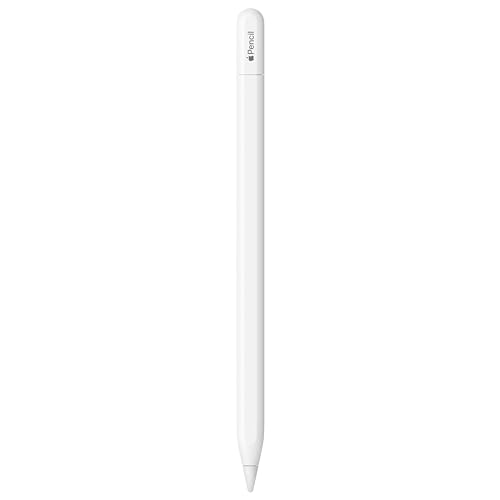
Apple’s own USB-C Pencil is the reference point for this category. It pairs and charges through a USB-C port hidden under the sliding cap at the end, and attaches magnetically to the side of compatible iPads for storage, though it does not charge there. Precision is pixel-perfect with low latency, tilt support handles shading, and on iPad Pro models with an M2 chip or later it adds hover, showing where the tip will land before it touches the glass. It covers a wide model range, from the 10th generation iPad up to the newest Pro and Air lines.
Specs
- Model: MUWA3AM/A
- Compatibility: iPad Pro 11 in, 12.9 in and 13 in; iPad Air 4 and later; iPad 10th gen and A16; iPad mini 6 and A17 Pro
- Battery life: Not published
- Charging: USB-C, pairs over USB-C; magnetic attach for storage only
- Tilt support: Yes
- Pressure sensitivity: No
- Palm rejection: Yes
- Hover: Yes, on iPad Pro with M2 chip and later
- Weight: 20.5 g
- Dimensions: 6.1 in long, 0.35 in diameter
View the Apple Pencil (USB-C) on Amazon
3. ESR Stylus Pen for iPad

The ESR pen stands out for charging flexibility. On iPads with a magnetic connector, it snaps to the side and charges wirelessly, much like Apple’s second-generation Pencil, taking about 120 minutes for a full charge that way. A USB-C port under the cap does the same job in about 30 minutes, which also covers iPads without the magnetic edge. Tilt sensitivity and palm rejection are both on board, and a button on top handles power and shortcuts. Three replacement nibs come in the box, the most generous count here. At 41 g it is the heaviest pen in the group, which some writers like for slow, deliberate strokes.
Specs
- Model: 6C0030101
- Compatibility: iPad Pro 11 in (1st to 4th gen), iPad Pro 12.9 in (3rd to 6th gen), iPad Air 4 and 5, iPad mini 6; USB-C charging covers more models
- Battery life: Not published
- Charging: Magnetic wireless (about 120 minutes) or USB-C (about 30 minutes)
- Tilt support: Yes
- Pressure sensitivity: No
- Palm rejection: Yes
- Spare nibs: 3 included
- Weight: 41 g
- Dimensions: 6.54 x 0.35 x 0.35 in
View the ESR Stylus Pen on Amazon
4. ZAGG Pro Stylus 2

The Pro Stylus 2 is built for people who switch between writing and tapping through apps. It has two working ends: a fine active tip for writing and drawing, and a capacitive tip at the back for scrolling and tapping without flipping your grip. It charges wirelessly on the magnetic edge of compatible iPads and pairs over Bluetooth, which enables its shortcut functions. Tilt recognition and palm rejection are included, and the active tip is replaceable. Battery life is up to six and a half hours, the shortest figure in this group, so it suits people who dock it on the iPad between sessions, where it quietly recharges.
Specs
- Model: 109912138
- Compatibility: iPad Pro 11 in and 12.9 in (3rd to 5th gen), iPad Air 10.9 in including M2, iPad 10.2 in and 9.7 in, iPad mini 5
- Battery life: Up to 6.5 hours
- Charging: Wireless, on the magnetic connector of compatible iPads
- Tips: Dual, active fine tip plus capacitive back tip
- Tilt support: Yes
- Pressure sensitivity: No
- Palm rejection: Yes
- Bluetooth pairing: Yes
- Weight: Not published
View the ZAGG Pro Stylus 2 on Amazon
5. Metapen Pencil A8

The A8 is the fast-charging, light-in-hand option. A full charge takes about 30 minutes over USB-C and returns up to ten hours of writing, and a one-minute top-up buys roughly 50 minutes of use, which rescues a forgotten charge before a meeting. At 15 g it is the lightest pen here, with an aluminum body that feels close to a regular pen during long note sessions. Tilt sensitivity and palm rejection are included, the LED indicator changes color with the battery level, and the pen shuts off after five idle minutes. It attaches magnetically to some iPad models for storage but does not charge that way.
Specs
- Model: ME-APP152
- Compatibility: iPad 6th to 11th gen, iPad Pro 11 in, 12.9 in and 13 in, iPad Air 3, 4, 5, M2 and M3, iPad mini 5 and 6
- Battery life: Up to 10 hours
- Charging: USB-C, full charge in about 30 minutes
- Tilt support: Yes
- Pressure sensitivity: No
- Palm rejection: Yes
- Spare nibs: 1 spare included, 2 total
- Weight: 15 g
- Dimensions: 6.53 x 0.35 x 0.35 in
View the Metapen Pencil A8 on Amazon
Comparison Table
| Product | Battery life | Charging | Tilt | Pressure | Weight |
|---|---|---|---|---|---|
| Logitech Crayon (USB-C) | Up to 7 hours | USB-C | Yes | No | 20 g |
| Apple Pencil (USB-C) | Not published | USB-C | Yes | No | 20.5 g |
| ESR Stylus Pen | Not published | Magnetic wireless or USB-C | Yes | No | 41 g |
| ZAGG Pro Stylus 2 | Up to 6.5 hours | Wireless | Yes | No | Not published |
| Metapen Pencil A8 | Up to 10 hours | USB-C | Yes | No | 15 g |
FAQ
Will these stylus pens work with an Android tablet or a Microsoft Surface?
No. All five pens here are built for iPad models from 2018 and later, and their listings state they do not support iPhone, Android, or Microsoft devices. Pen protocols differ between platforms, so check the maker’s compatibility list for your exact tablet model before ordering.
Which of these pens has pressure sensitivity?
None of them. Pressing harder will not change line thickness; they use tilt to vary line weight instead. If pressure-driven brushes are essential, look at Apple’s Pencil Pro or second-generation Pencil, the iPad pens with full pressure support.
Do I need to pair the pen over Bluetooth before writing?
Usually not. The Logitech Crayon and the Metapen A8 work as soon as you switch them on, and the Apple Pencil pairs through its USB-C connection. Bluetooth shows up on pens like the ZAGG Pro Stylus 2, where it powers shortcut functions rather than the writing itself.
How long does each pen last on a charge?
Of the pens that publish a figure, the Metapen A8 runs up to ten hours, the Logitech Crayon up to seven hours, and the ZAGG Pro Stylus 2 up to six and a half hours. Apple and ESR do not publish an hours figure for these models. The magnetic pens also top up whenever they sit on the iPad.
Can I rest my hand on the screen while I write?
Yes. Every pen here has palm rejection, so the iPad ignores your hand on the glass and only tracks the pen tip. It works in the standard notes and markup apps with no settings to change.
Conclusion
The right stylus pen depends on how your iPad fits into your desk routine. Pick the Logitech Crayon for a rugged pen that works the second you switch it on, the Apple Pencil (USB-C) for the official fit and hover support on newer iPad Pro models, and the ESR pen for magnetic wireless charging with a USB-C fallback. The ZAGG Pro Stylus 2 suits people who flip between writing and tapping through apps, while the Metapen A8 is the light, fast-charging pick for long days of notes. Confirm your iPad model against the compatibility list, and any of these five will earn its desk space.
More from Amazon
Programs that pair well with the guide above. Offers and eligibility are set by Amazon and may change.
A free business account with business pricing and bulk-buying tools for work, shop or home office.
Create a business accountFree shipping on eligible items, Prime Video and more. Eligible new members can start with a free trial.
Start a Prime free trialAudiobooks and podcasts to listen to on the go. Eligible new members can start with a free trial.
Try Audible freeAd-free music streaming. Eligible new subscribers can start with a free trial.
Try Music Unlimited freeAs an Amazon Associate we earn from qualifying purchases.