Sitting through an entire workday has become one of the most common complaints from remote and hybrid professionals, and stand up desks have moved from luxury office fixtures to everyday tools for anyone who spends hours at a keyboard. The category has matured enough that you no longer have to choose between a wobbly budget frame and a corporate-grade motor at a corporate-grade price. Even under $120 you can now find dual-motor frames that rise smoothly to standing height without the desktop swaying, which was a deal-breaker just a few years ago.
What still separates a good pick from a mediocre one comes down to desktop size relative to your workspace, top-panel thickness, motor configuration, and how stable the frame feels at its highest setting. A desk that looks impressive on paper can still vibrate under a monitor arm if the crossbar is thin or the feet are small. We compared published specs and aggregated owner feedback across the eight models below to sort the genuinely solid options from the ones that look cheap at full extension.
Our top picks






As an Amazon Associate we earn from qualifying purchases at no extra cost to you.
Quick Picks
| Product | Best for | Price |
|---|---|---|
| Veken 55″ White | Gamers who need width without spending over $110 | $109.99 |
| Veken 47.2″ Black | Smallest footprint with a large-surface feel | $89.99 |
| FEZIBO 48×24″ Maple | Warm wood tones at a mid-range price | $112.99 |
| DeskShow 60×28″ | Thickest tabletop in this roundup | $179.99 |
| ErGear 48×24″ | Balanced all-around performer | $119.99 |
| Cubiker 48×24″ | Cable management on a budget | $89.99 |
| AODK 55″ with Drawers | Home offices that double as storage spaces | $199.98 |
| HUANUO 32×19″ | Small apartments and tight corners | $89.99 |
How We Picked
We evaluated these eight stand up desks on four criteria: desktop dimensions relative to price (larger surfaces at lower cost score higher), tabletop construction (thickness and material affect long-term rigidity), motor and frame design (dual motors reduce strain and noise compared to single-motor units), and stability at extended heights based on recurring owner reports. A desk that wobbles noticeably at its top setting loses ground regardless of how generous its surface area is.
The 8 Best Stand Up Desks in 2026
Veken 55 Inch Large Electric Standing Desk, Gaming Table, White
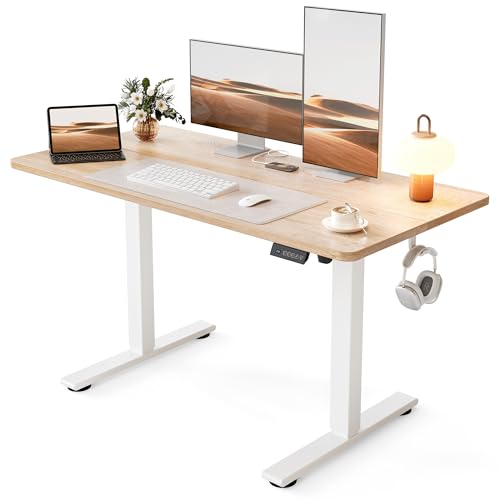
This is the widest desk in the group at 55 inches, and at just $109.99 it undercuts most competitors that offer comparable surface area. Owners praise how much room the full width gives for multi-monitor setups and large mouse pads without the frame feeling oversized in the room. The white finish resists showing dust better than darker options, and reviewers note the assembly takes under thirty minutes with the included tools. The main trade-off is that the desktop is a thinner engineered panel, so mounting a very heavy monitor directly to the surface without a riser can create a slight flex near the back edge over time. Skip it if you plan to attach multiple heavy articulating arms directly to the tabletop.
Veken 47.2 Inch Large Electric Standing Desk, Gaming Table, Black
At $89.99, this Veken shares the same motor platform as its larger sibling but in a more compact footprint. The black finish is the practical choice for anyone whose workspace collects fingerprints and dust, and the smaller desktop means less overhang on narrower frames, which contributes to better stability at height. Owners frequently mention the low motor noise as a standout for shared living situations where one partner sleeps or takes calls nearby. The con is straightforward: at 47.2 inches the usable surface gets tight if you run a keyboard, a notebook, and a monitor arm simultaneously. Skip this one if you need a dedicated gaming or drafting surface.
FEZIBO Standing Desk 48 × 24 Inch Electric Height Adjustable, Maple
FEZIBO earns its $112.99 price with a maple-finish top that reads warmer than the laminate surfaces common at this tier, which matters if your desk sits in a living room rather than a spare office. The 24-inch depth is genuinely useful for placing a laptop on a stand beside a full-size keyboard without crowding. Frame reviewers describe the rise and lower as smooth with minimal jerking at the range limits. The weakness is the standard single-motor configuration, which owners note takes slightly longer to reach the top of its range compared to dual-motor competitors. Skip it if you transition between heights frequently throughout the day and want the fastest possible cycle.
DeskShow Black 60×28 in Electric Standing Desk, 1 Inch Thick Tabletop
At $179.99 this is the most expensive non-accessory desk here, but the one-inch-thick tabletop is a meaningful step up in perceived solidity. Owners who upgrade from thinner panels consistently report the difference when leaning on the surface or typing with force—there is simply less give. The 60×28-inch dimensions make it one of the deepest options, which suits anyone placing books or reference materials flat beside their screen. The con is the weight and bulk during assembly; the thick top combined with a wide frame makes positioning alone awkward without a second pair of hands. Skip it if you live alone, your staircase is narrow, or you move your setup between rooms often.
ErGear 48 X 24 Inch Height Adjustable Electric Standing Desk, Black
ErGear sits at $119.99 and positions itself as the no-surprises middle option: full motorized height range, 48×24 surface, and a frame that owners describe as stable through the entire travel range without significant wobble at the top. It is a strong default if you want nothing flashy and just need reliable sit-stand behavior each day. The finish and design language are deliberately understated, which suits minimalist home offices. The recurring complaint centers on the control panel design—a few reviewers mention that the preset buttons sit in a position where they catch your knee when the desk is at its lowest setting. Skip it if you are shorter and plan to park the desk near its floor-level limit.
Cubiker Standing Desk, 48×24 Inches Sit Stand Home Office Desk, White Frame/Maple Top
At $89.99, the Cubiker ties for the lowest price while including a built-in splice board for routing cables behind the desktop, a feature normally found on desks costing fifty dollars more. Owners appreciate how the integrated channel keeps the back of the table visually clean without buying aftermarket clips or sleeves. The white-frame-and-maple-top combination reads brighter in rooms with limited natural light. The con is that the splice board, while useful, reduces the depth of the available cable tray area behind the surface, so a large power strip may not fit without hanging below the desk line. Skip it if your cable management needs are extensive and you require generous vertical space behind the tabletop.
AODK 55 Inch Standing Desk with Drawers & Keyboard Tray, Rustic Brown
The AODK at $199.98 is the only model here that bundles storage into the standing-desk platform itself, making it the right answer for anyone whose office is also a bedroom corner where a keyboard, notebooks, and a laptop charger need to disappear when not in use. Owners praise how the integrated drawers eliminate the need for a separate filing unit in small spaces. The rustic brown finish is warm and forgiving of minor surface scratches. The significant trade-off is total weight and shipping complexity; this is effectively furniture rather than a simple frame-and-top, and moving it after assembly is genuinely difficult. Skip it if you plan to rearrange your room layout more than once a year.
HUANUO 32×19 Inch Small Electric Standing Desk, Adjustable, Light Walnut
For $89.99, the HUANUO offers the smallest usable stand up desk footprint in this list, and its 32×19-inch top is sized for a laptop plus a compact mouse rather than a full desktop arrangement. Owners in dorm rooms, studio apartments, and shared workspaces call out how easily it tucks into a corner without dominating the room. The light walnut finish reads well against white walls. The obvious constraint is depth—nineteen inches is barely enough for a laptop stand and a keyboard without pushing the screen to the very back edge where your neck tilts down. Skip it if you work with a full-size monitor or multiple devices simultaneously.
Buying Guide
Desktop Size and Your Room
Width determines whether your monitors and keyboard fit without crowding; depth determines screen-to-face distance and therefore your posture at the correct viewing angle. Anything under twenty-two inches of depth forces you to mount the monitor close or sacrifice leg clearance under the surface. Measure the wall or corner where the desk will sit before deciding, because a 60-inch tabletop that is technically affordable still fails if it blocks your only walking path or sits flush against a radiator.
Motor Type and Stability at Height
Single-motor frames are simpler and cheaper but concentrate drive force at one end of the crossbar, which owners at tall settings sometimes report as a faint lateral flex. Dual-motor systems distribute the load evenly and tend to run quieter under load. If you are over six feet tall, check owner reports for wobble specifically at the desk’s maximum height rather than mid-range, since that is where frame rigidity matters most.
Tabletop Thickness and Material
Engineered laminate panels at the low end of the price range are adequate for keyboard work but will flex under the concentrated load of a monitor arm clamp or a heavy desktop object. Thicker tops—one inch or more—resist that deflection and feel more like real furniture over years of use. If you plan to clamp accessories directly to the surface, prioritize thickness over width; a narrower desk with a solid top outperforms a wide but thin panel every time.
Our Verdict
The DeskShow 60×28 wins as our top overall pick: the one-inch tabletop and 28-inch depth give it the most usable real-world surface in the group, and owners consistently single out its rigidity at standing height. For the budget slot, the Cubiker delivers the best value at $89.99 by including integrated cable management that most competitors charge extra for. That said, if your primary constraint is room width rather than price, the Veken 47.2-inch at the same $89.99 is the better physical fit without sacrificing motor quality.
FAQ
Do stand up desks need a special chair?
No, but you will want a stool or chair that supports your seated posture at whatever height you settle into. The point of a sit-stand desk is that you do not commit fully to one position, so having a supportive option for the seated half matters as much as standing comfort.
How much does noise matter when choosing between single and dual motors?
Single-motor units are not silent, but the difference is most noticeable in shared bedrooms or recording spaces where you raise or lower the desk while someone is working nearby. If you transition only once or twice a day, the noise gap is negligible; frequent transitions make dual motors more pleasant.
Can I mount a monitor arm to a stand up desk with a thin top?
You can, but thin laminate panels flex under the concentrated clamp load and may crack over months of micro-adjustment. A riser pad that spreads the clamp pressure across a wider area helps, though if you buy the desk knowing you will clamp an arm to it, a thicker top is the simpler solution.
What is the best way to build a sit-stand habit without forcing it?
Set the desk to seated height and only raise it when you notice your posture has slouched or your lower back starts aching, not on a rigid timer. Owners who build the habit naturally describe it as a response to physical feedback rather than an obligation, and that approach tends to stick far past the first week.