How to clean an air purifier: The sentence “wash the air purifier filter” is dangerous as generic advice: Blueair main Particle & Carbon media cannot be washed, Winix 5500-2 HEPA cannot be washed, but the Winix AOC carbon may be rinsed as stated. Winix 5500-2 manual explicitly says unplug before any cleaning or maintenance and allow unit to cool.
Quick Answer: Turn off and unplug the purifier, remove the cover, identify the washable pre-filter and non-washable main filter in its manual, then gently vacuum or wash only approved parts. Wipe accessible housing and intakes with a lightly damp cloth, remove dust from accessible sensor inlet as instructed, dry everything completely, and reassemble before powering on.
As an Amazon Associate we earn from qualifying purchases.
By DIY Ideas 4 Home Editorial Team
Before You Start: Tools, Materials and Safety
Cleaning an air purifier is primarily about accessible prefilters, grilles and sensor openings, not rinsing every filter. Consult the air-purifier maintenance manual and gather permitted materials before starting work. Safety requirements come before convenience
| Tool or Material | Size or Spec | Why You Need It | Substitute |
|---|---|---|---|
| Winix 5500-2 air purifier | Match model or installation | Relevant only if needed for this task | Verify manual compatibility |
| Blueair Blue Pure 211i Max | Match model or installation | Relevant only if needed for this task | Verify manual compatibility |
| Manufacturer instructions | Exact appliance or material | Confirm permitted steps and safety limits | Official technical support |
| Basic protective supplies | Appropriate for task | Protect nearby surfaces and collect debris | Use an approved equivalent |
Before you start: unplug, identify exact model and manual
Disconnect power and keep liquids away from fans, electronics and sensor circuitry. Do not vacuum a HEPA cartridge if the manual prohibits it
Winix America explains that winix 5500-2 manual explicitly says unplug before any cleaning or maintenance and allow unit to cool. A similar sign on another air-purifier maintenance model may follow a different control mechanism.
Apply this finding only to the documented air-purifier maintenance context, particularly air-purifier maintenance, and not as an all-brand performance promise. Your air-purifier maintenance equipment manual and the actual surroundings determine the relevance of this point.
Check which stages are washable on your exact model and keep powered electronics completely dry during maintenance.
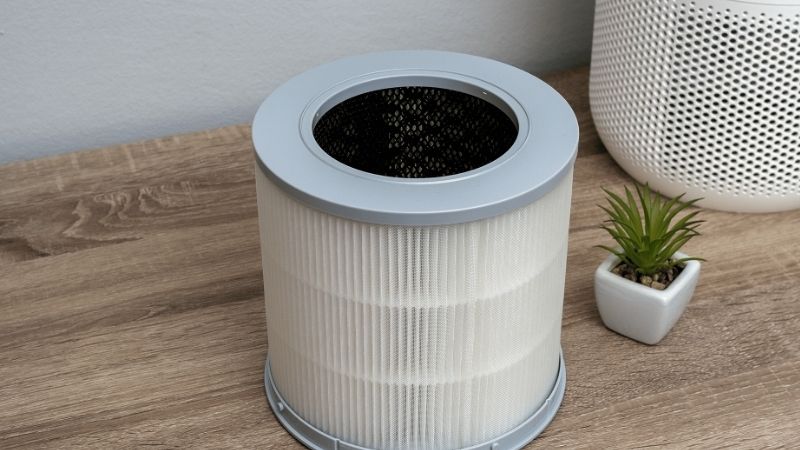
A removable prefilter and the main HEPA cartridge may have entirely different cleaning permissions. Winix 5500-2 documentation allows specific handling of its prefilter and provides model-specific care for its carbon stage. Blueair’s fabric prefilters have different cleaning instructions from the main filter. Never assume that a fabric cover being washable means the internal filter media can also be immersed.
What can be vacuumed or washed; what cannot
Winix America explains that winix 5500-2 True HEPA filter CANNOT BE WASHED; do not treat prefilter and main filter equally.
Identify whether the indicator refers to the room sensor, filter reminder or service warning. A color without its icon is not a diagnosis.
Manufacturer / agency guidance documents that blue Pure Max: fabric pre-filter may be vacuumed and machine-washed as label permits; hang dry. Main Particle & Carbon media: no water or vacuum cleaning.
Winix 5500-2 vs Blue Pure Max examples
Winix 5500-2 interior reports that vacuum accessible area, damp cloth and dry cloth; exterior/interior cleaning every 1 to 2 months under manual usage.
Disconnect power before maintenance and keep liquid away from electronics. Winix’s manual emphasizes unplugging before cleaning and documents particular dry-time requirements for wetted removable parts. The cited 24-hour-plus drying interval belongs to those model-specific instructions, not a universal waiting time for every prefilter. Reinstall components only when completely dry and seated correctly.
How to Do the Task Step by Step
These air-purifier maintenance actions avoid protected components and stay within owner-permitted maintenance, and each response should be judged against the device manual and the actual room condition
Step 1: Winix 5500-2 vs Blue Pure Max examples
Winix 5500-2 AOC carbon reports that rinse gently in room-temp water, no detergent; dry 24+ hours; water must not exceed 104°F. Match the air-purifier maintenance model, operating mode and exact location to the explanation.
Perform this air-purifier maintenance step only when the official manual expressly permits it. Lay out air-purifier maintenance materials ahead of time to avoid reaching into a dangerous work area.
Winix 5500-2 interior: vacuum accessible area, damp cloth and dry cloth; exterior/interior cleaning every 1 to 2 months under manual usage.
Step 2: Supplies: soft vacuum brush, lint-free cloth, clean
Blueair explains that recommends gentle care of visible sensor region on back and exterior with soft cloth/vacuum brush; avoid disassembly.
Begin with external air-purifier maintenance controls and observations available without dismantling the unit. Afterward, return the air-purifier maintenance system to its specified normal configuration and check its response.
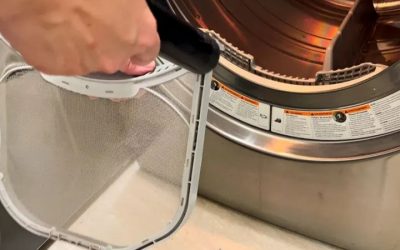
Winix 5500-2 pre-filter: clean every 14 days; brush/vacuum or rinse room-temperature water if heavily dirty; no soap.
Step 3: 1. Power off, unplug and cool if needed
EPA Guide reports that overfilled air-cleaner media work poorly; cleaning and replacement are separate maintenance operations.
The goal of this air-purifier maintenance step is a reliable observation, not repeated attempts to force operation. Follow the maker’s air-purifier maintenance procedure and record the display or mechanical response.
Blueair suggests vacuuming exterior and sensor air inlet after switching off if high readings persist due to accumulated sensor dust.
Air-quality sensors may have an accessible inlet or lens that collects dust, but opening the protected housing can cause damage. Follow the exact maker’s sensor-cleaning directions, using a permitted dry swab or soft tool only where the manual identifies access. A filter-change reset after cleaning is not warranted unless the manufacturer says a particular filter was replaced and the service counter must be restarted.
Step 4: 2. Remove cover and note correct filter order
Coway AP-1512HH reports that sensor lens dust may cause stuck pollution indicator; follow manufacturer sensor cleaning sequence.
Keep the air-purifier maintenance owner manual and specified materials at hand. Never force a air-purifier maintenance component that does not fit as shown.
Winix 5500-2 washed pre-filter: allow 24 hours or more to dry prior to use.
Step 5: 3. Gently vacuum or rinse allowed pre-filter
Winix 5500-2 pre-filter reports that clean every 14 days; brush/vacuum or rinse room-temperature water if heavily dirty; no soap.
Afterward, compare the air-purifier maintenance observation with the baseline you recorded. Watch for unusual air-purifier maintenance alarms, leaks, airflow restriction or power interruptions.
Winix 5500-2 AOC carbon: rinse gently in room-temp water, no detergent; dry 24+ hours; water.
Finish by checking the fit of grilles, fabric sleeves, and replacement cartridges. Gaps around a poorly seated cartridge can let air bypass the intended filter path. Use the manual’s orientation marks and reconnect power only when all parts are dry. The goal is restored normal airflow and control operation, not a claim that the entire unit has been disinfected or professionally performance-tested.
Step 6: 4. If model permits, service washable carbon separa
Blue Pure Max reports that fabric pre-filter may be vacuumed and machine-washed as label permits; hang dry. Use this air-purifier maintenance clue to distinguish ordinary cycles from recurrent abnormal operation. If a permitted air-purifier maintenance check helps, confirm the result remains stable in normal use.
Winix 5500-2 True HEPA filter CANNOT BE WASHED.
Step 7: 5. Wipe accessible housing, inlets and outlet
Blueair explains that suggests vacuuming exterior and sensor air inlet after switching off if high readings persist due to accumulated sensor dust.
Blueair recommends gentle care of visible sensor region on back and exterior with soft cloth/vacuum brush; avoid disassembly.
Products That Help
Winix 5500-2 air purifier and Blueair Blue Pure 211i Max are relevant here only when their dimensions, operating conditions, and intended purpose match the situation. Use the exact manual or official product listing to confirm compatibility rather than buying an unverified substitute.
Frequently Asked Questions
Can you wash an air purifier pre-filter?
Only when the exact manufacturer permits washing that component. Some outer fabric or mesh prefilters can be cleaned, while other filter layers must stay dry.
Can you vacuum a HEPA air purifier filter?
Not unless the model documentation allows it. A vacuum can damage a non-washable HEPA medium; manufacturer-approved external filter or grille care is different from cleaning the HEPA material itself.
How long should an air purifier filter dry?
Only a manufacturer-approved washable part should be wetted; reinstall it when completely dry per instructions. Do not guess a universal number of drying hours or start the purifier with a wet filter.
How do I clean an air purifier sensor?
Winix and Coway specify model-dependent sensor access and cleaning steps. Unplug first, locate the sensor opening in the manual, and never probe a protected electrical sensor cavity.
Final Thoughts
Separate washable outer covers from non-washable filters before bringing any water near the purifier. How to clean an air purifier should return the device to its original airflow path without risking the sensor or electrical housing. When the manual does not permit washing, replace the media instead of experimenting.