Key takeaways
- Shopping for a home security system under 200 dollars sounds like one decision, but it is really three.
Shopping for a home security system under 200 dollars sounds like one decision, but it is really three. You can buy a sensor-and-siren alarm kit that watches doors and windows, a set of cameras that records what happens, or a blend of both. The listings in this price tier cover all three, and they are not interchangeable. A kit with door contacts and a loud siren answers a different question than a four-camera outdoor bundle, so the first job is deciding what you actually want to know when you are away from home.
This guide is written for renters, first-time homeowners, and anyone assembling a do-it-yourself setup without a contract. It treats the budget as a layering exercise: one layer to detect entry, one to capture video, and a way to hear about both on your phone. No gear can promise an outcome, so the goal here is a sensible, affordable setup, judged only from the specs the product titles state. For 2026 shoppers, the practical filters are subscription terms, power source, and how many pieces come in the box.
Quick Picks
Our top picks


As an Amazon Associate we earn from qualifying purchases at no extra cost to you.
| Product | Best for | Key spec from the title |
|---|---|---|
| 24-piece WiFi+GSM/4G alarm kit (no pairing) | Whole-apartment entry sensing | 24 pieces, no monthly fees, Alexa or Google |
| 2K solar camera system | Wire-free outdoor video | Solar, 5GHz and 2.4GHz WiFi, two-way audio |
| 15-piece WiFi alarm kit | Smaller homes on a tight budget | 120dB alarm, 8-hour backup battery |
| Blink Outdoor 4 | Easy add-on camera | Two-year battery life, 1080p, Sync Module Core |
| GMK 4-pack camera system | Covering several sides of a house | 4 cameras, 2K video, IP65 waterproof |
| 24-piece WiFi+4G alarm with SOS | Households wanting a panic button | SOS button, Smart Life or Tuya app |
How to Choose
Decide between sensors, cameras, or both
Sensor kits (door contacts, motion detectors, a hub, and a siren) tell you that something opened or moved. Cameras show you what it was. Under 200 dollars, a kit with many small sensors usually costs about the same as a handful of cameras, so you are trading breadth for detail. A good rule: count the entry points you care about. If there are more than four, favor sensors; if the worry is a driveway or porch, favor cameras. Many buyers end up with a sensor kit indoors and one camera at the main door, which is a perfectly reasonable layered setup. It also keeps the first purchase small, so you can see how often you actually open the app before spending more.
Check how the system talks to you
Look for the connection path in the title. WiFi-only hubs go quiet if your router drops. Listings that mention GSM or 4G suggest a cellular path as a fallback, though you should confirm on the listing what the cellular link needs in order to work, since some require a SIM you supply. A backup battery matters too: 8 hours is a common stated figure, and it is the number to compare when comparing how a hub behaves during a power outage. Also note whether the siren is stated in decibels; 120dB is loud enough to be unmistakable indoors.
Look at power and installation
Wire-free cameras trade wiring for upkeep. Solar panels help only if the mounting spot gets daylight, and battery models need periodic recharging or replacement. Plug-in hubs need an outlet near the router. Adhesive-mounted door sensors suit renters; screw-mounted cameras are sturdier but leave holes in siding or trim. Pick the install style your lease or patience allows, and keep a ladder-height mounting spot in mind for anything outdoors.
Read the subscription language carefully
Phrases like “no monthly fees” and “no subscription” usually describe the core alerts, not every extra, such as extended cloud video history. Titles that name a storage method (built-in memory, SD card, a sync module) tell you where footage lives. Where a title is cut off, confirm on the listing before you assume a feature is included. What to ignore: piece counts padded with tiny stickers, and marketing words like “military grade” that carry no spec you can check.
The 6 Best Options
24-Piece WiFi+GSM/4G Alarm Kit (No Pairing Required)
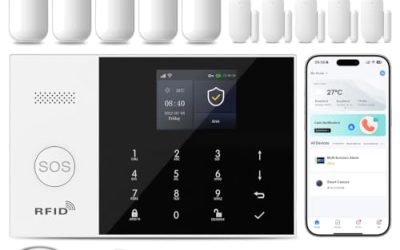
This is the broadest sensor package in the group, built for people who want doors and windows covered without wiring. The title promises no pairing step, which matters if setup frustration is your main worry, and it lists WiFi plus a GSM/4G path.
- Strength: 24 pieces give a large number of sensing points for a mid-sized home.
- Strength: Alexa and Google compatibility lets it slot into an existing voice-assistant routine.
- Trade-off: it has no camera, so you learn that something triggered, not what caused it.
Skip it if you mostly want video of a porch or driveway, or if you live in a studio where a handful of pieces would sit unused in a drawer. Buyers who like to tinker should also note that a larger kit means more batteries to track over time.
2K Security Camera System (Solar, Wire-Free)
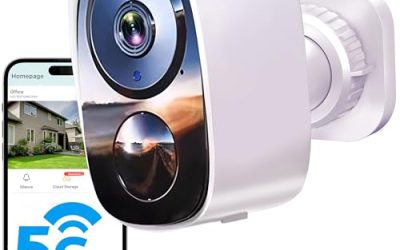
A camera-first option for a house where running cable is not realistic. The title lists dual-band WiFi, AI detection, two-way audio, and wire-free installation, so it targets outdoor walls, a shed, or a garage corner.
- Strength: solar charging reduces the chore of swapping batteries on a sunny wall.
- Strength: 2K resolution leaves more room to zoom in on a clip than 1080p.
- Trade-off: solar performance depends on placement, so a shaded porch may not keep up.
Skip it if your entry points are all indoors, or if you want a loud siren and door contacts rather than video. Likewise, confirm the included mounting hardware and panel size on the listing, because the title is trimmed and wire-free setups vary.
15-Piece WiFi Home Security System
The smaller kit for apartments and compact homes. It is described as a DIY wireless alarm kit with no subscription, a 120dB alarm, instant app alerts, and an 8-hour backup battery, which is a sensible set of basics for the size.
- Strength: 15 pieces are enough for a front door, back door, and a few windows.
- Strength: the stated backup battery lets the hub keep running through a short outage.
- Trade-off: the title mentions WiFi only, with no cellular path, so a router outage can interrupt alerts.
Skip it if your home has many doors and windows, or if you want outdoor video coverage as part of the same purchase. Larger households will outgrow it quickly, and it makes more sense as a first step than a final one.
Blink Outdoor 4
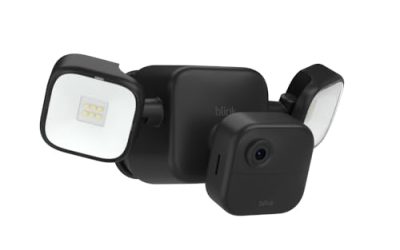
A single weather-ready camera that pairs with a Sync Module Core included in the listing. The title highlights a two-year battery life, 1080p video, infrared night view, and two-way talk, which suits a front door or garage.
- Strength: the long stated battery life means fewer trips up a ladder.
- Strength: it is easy to begin with one camera and add more to the same module later.
- Trade-off: 1080p is a step down from the 2K options in this group.
Skip it if you want a full multi-camera bundle in one box, or if sharper detail matters more to you than low upkeep. It also does not suit anyone who wants to keep all recordings on a card they physically hold, since the sync module handles storage.
GMK 4-Pack Camera System
The multi-camera bundle for homes with several sides to watch. The title lists 2K video, motion detection, color night vision, two-way talk, and IP65 waterproofing, along with the VicoHome app, and it is aimed at wireless outdoor use.
- Strength: four cameras cover front, back, and side yards without buying separate units.
- Strength: IP65 is a recognized splash and dust rating, useful on exposed walls.
- Trade-off: four cameras means four devices to charge, mount, and check.
Skip it if a single doorway is your only concern, or if you would rather spend the budget on door sensors than on video. Apartment dwellers with a single balcony door will find four cameras more than they can reasonably place.
24-Piece WiFi+4G Home Alarm with SOS Button
Another large sensor kit, this one pitched around instant app alerts, an SOS panic button, and Smart Life or Tuya app control. It is the version to consider when someone in the home may want a one-press way to sound the alarm.
- Strength: the SOS button suits households with older relatives who want a simple trigger.
- Strength: no monthly fee and no pairing step are both stated in the title.
- Trade-off: the Tuya-style app is functional rather than polished, and the title is truncated, so confirm included parts on the listing.
Skip it if you want camera footage, or if you prefer a single-brand app experience from one company. People who dislike third-party apps with long menus may find a simpler kit easier to live with.
Which One Fits Your Situation
A one-bedroom rental with two doors
The 15-piece WiFi kit is the right size. It covers the doors and a couple of windows, runs on adhesive sensors, and leaves room in the budget for a small camera later. Landlords rarely object to adhesive mounts, which is a practical point in its favor.
A house with a driveway and a back yard
Go with the GMK 4-pack for broad outdoor coverage. Add the 24-piece no-pairing alarm kit only if the combined spend stays inside the cap, since the two serve different layers and you can phase the second purchase.
A household with an aging parent
The 24-piece alarm with the SOS button fits best because the panic button is the headline feature. Pair it with a plug-in indoor camera later if you want to see the room, and place the hub where it is easy to reach.
A single front porch you want to watch
Start with the Blink Outdoor 4. One camera, a long stated battery life, and room to add more cameras to the same module make it a low-commitment way to begin.
Common Mistakes
- Buying a sensor kit when what you really want is video, or the reverse.
- Assuming “no monthly fee” covers cloud history; read what the listing says about storage.
- Mounting solar-powered cameras in permanent shade.
- Ignoring the router: WiFi-only systems depend on it staying online.
- Skipping the app review: a clumsy app turns a good kit into one you stop opening.
Related guides
- Battery Powered Floodlight Camera With Local Storage
- Cordless Drill Brush Attachment For Bathroom Grout
- Rechargeable Emergency Lantern For Power Outages
Frequently Asked Questions
Can a system under 200 dollars replace a professional one?
It can cover the basics, such as entry alerts and video, but it will not include professional monitoring. Treat it as a way to stay informed rather than a promise of any particular outcome. If your priorities change, the sensors and cameras in these kits can usually be supplemented later without starting over, which keeps the first purchase low-risk.
Do I need cameras and sensors together?
Not at this budget. Many buyers start with one layer and add the other later. Sensors answer whether something opened, while cameras answer what happened.
Are cellular fallbacks worth having?
If your internet is unreliable, a 4G or GSM path is a useful backup on paper. Confirm exactly what it requires, since some products need a separate SIM.
Will these work with Alexa or Google?
Several listings name Alexa or Google compatibility. Check the voice-assistant line on the listing for the exact features, since support varies between arming, camera views, and notifications.
More from Amazon
Programs that pair well with the guide above. Offers and eligibility are set by Amazon and may change.
A free business account with business pricing and bulk-buying tools for work, shop or home office.
Create a business accountFree shipping on eligible items, Prime Video and more. Eligible new members can start with a free trial.
Start a Prime free trialAudiobooks and podcasts to listen to on the go. Eligible new members can start with a free trial.
Try Audible freeAd-free music streaming. Eligible new subscribers can start with a free trial.
Try Music Unlimited freeAs an Amazon Associate we earn from qualifying purchases.