Key takeaways
- A cap of 700 dollars is far more than an indoor camera needs, and that is the useful thing to understand before you shop.
A cap of 700 dollars is far more than an indoor camera needs, and that is the useful thing to understand before you shop. Plug-in indoor cameras sit in the budget and mid-range tiers, and a single unit rarely strains a limit this generous. The real question for the best indoor security camera under 700 dollars is how many rooms you want to watch, who is in them, and where the footage should live. A nursery, a hallway with a dog, and a living room facing a window are three different jobs, and each one rewards a different camera.
This guide is written for people who want a camera pointed at the inside of the house: parents, pet owners, caregivers, and anyone checking on an empty apartment. It is not about porch coverage, which is a separate decision with weather and power concerns. Everything below is judged from the listed specs only, with no claims about real-world performance. In 2026 the useful differences between indoor cameras come down to pan-and-tilt range, resolution, storage options, and whether the vendor expects a subscription for the good features.
Quick Picks
Our top picks




As an Amazon Associate we earn from qualifying purchases at no extra cost to you.
| Product | Best for | Key spec from the title |
|---|---|---|
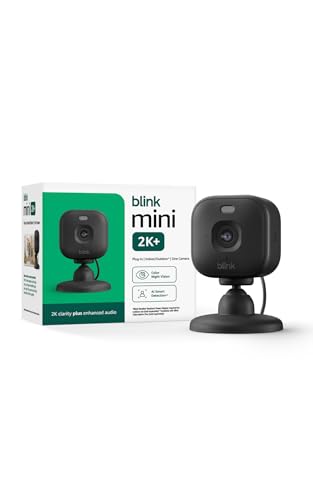
| Blink Mini 2K+ | Compact plug-in coverage | 2K video, night vision, enhanced audio |
| Tapo C100 | Entry-level pet or baby room | 1080P, siren, cloud and SD card storage |
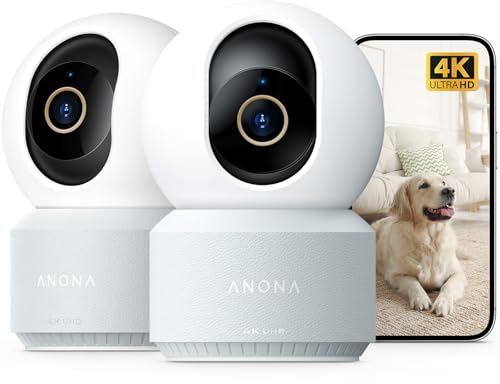
| Anona 4K indoor camera | Sharpest picture on the list | 4K UHD, 360 degree pan-tilt, Wi-Fi 6 |
| Tapo C211 2-pack | Two rooms at once | 2K, pan and tilt, 2-way audio, SD card |
| eufy Security E30 | No-subscription households | 4K, pan and tilt, AI tracking |
| Cinnado D1 | Elder or pet check-ins | 2K, 360 degree, 2-way audio |
| LaView 4-pack | Whole-house coverage | 4 cameras, 1080P, wired |
How to Choose
Fixed lens or pan and tilt
A fixed lens is a good fit for a small room, a door, or a shelf-height view of a pet bed. A pan-and-tilt camera covers a bigger room by turning, and many listings name 360 degree or auto-tracking features. The trade-off is a motor you will hear at night in a quiet bedroom. If you want one camera to follow a toddler across a playroom, motion tracking earns its place. If the shot never changes, skip it.
Resolution that matters for a room
Indoor distances are short, so 1080P is perfectly adequate for a bedroom. Step up to 2K or 4K if you want to zoom into a clip or watch from a corner of a large open space. Higher resolution also means larger files and more demand on your WiFi. Check whether the camera uses 2.4GHz only; a dual-band listing is more flexible in apartments with crowded networks.
Storage and subscriptions
Titles that mention an SD card or TF card slot mean you can keep recordings locally. Cloud storage is often an optional paid extra, and some listings say “no subscription” for the core features. Decide which you prefer before buying, and confirm on the listing what the free tier includes. For a camera in a private room, local storage also means fewer people with potential access to your video.
Privacy and placement
An indoor camera records the most personal space you own. Look for a physical privacy mode or a way to disable the lens through the app, and use strong, unique account credentials. Avoid pointing a camera at bathrooms or anywhere guests would expect privacy, and tell visitors when a camera is active. Mount away from windows to cut glare and keep it out of reach of curious pets.
The 7 Best Options
Blink Mini 2K+
A small plug-in camera aimed at homes and pets. The title lists 2K video, night vision, enhanced audio, and motion detection, and it is described as the newest model in the line, so it targets buyers who want a compact unit that disappears on a shelf.
- Strength: 2K resolution in a compact body suits shelves, desks, and window ledges.
- Strength: plug-in power means there is no battery to recharge or swap.
- Trade-off: the title does not mention pan and tilt, so you get one fixed view of the room.
Skip it if you need a camera that follows movement around a large room, or if you want a memory-card slot spelled out in the title. Confirm storage details on the listing before ordering.
Tapo C100
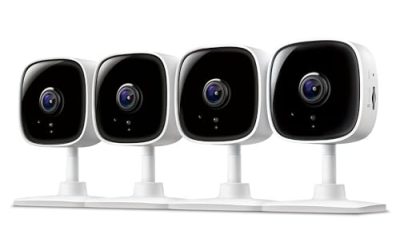
The simplest wired camera in the group, marketed for baby monitoring and dog watching. The title lists 1080P, motion detection, 2-way audio, a siren, night vision, and both cloud and SD card storage, which is a surprisingly complete feature set for an entry-level model.
- Strength: SD card plus cloud options give you a choice about where footage lives.
- Strength: a built-in siren is an unusual extra for a camera this basic.
- Trade-off: 1080P and a fixed view are modest next to the 2K and 4K options here.
Skip it if you want sharper detail or a camera that pans across a room. It suits a bedroom, hallway, or entryway where the view never changes and simplicity matters more than detail.
Anona 4K UHD Indoor Camera
The resolution leader on this list, with 4K UHD, 360 degree pan and tilt, dual-band Wi-Fi 6, and auto-tracking. The title also names detection for people, pets, and baby crying, so it is built for households that want alerts sorted by type.
- Strength: 4K lets you zoom into a saved clip without the picture falling apart immediately.
- Strength: Wi-Fi 6 and dual-band support help on busy home networks.
- Trade-off: 4K video takes more bandwidth and storage, so your upload speed matters.
Skip it if your router is old, or if you only need a basic check on a pet bed. The brand is less established, so read the support terms and the cut-off details on the listing.
Tapo C211 2-Pack
Two pan-tilt cameras in one purchase, listed as 2K with motion detection, 2-way audio, siren, night vision, and cloud plus SD card storage. It is the sensible answer for a nursery paired with a living room, or two floors of a small house.
- Strength: two cameras in a single pack lowers the effort of buying and setting up each room.
- Strength: pan and tilt lets each camera cover a larger area than a fixed lens.
- Trade-off: the title is cut off, so confirm which SD card sizes the cameras support.
Skip it if you only need one camera, or if you prefer a no-motor design that stays silent overnight in a light-sleeper’s bedroom. Buyers who only need a static view of a crib or a pet crate can save themselves the extra moving parts and the occasional motor noise.
eufy Security Indoor Camera E30
A 4K pan-and-tilt option with AI tracking, color night vision, and two-way audio. The standout phrase in the title is “no subscription,” which signals a local-first approach to storing video and keeps recurring costs off the table. Combined with the pan-and-tilt body, it gives one camera the reach of a few fixed ones.
- Strength: the no-subscription stance suits buyers who dislike monthly fees.
- Strength: 4K plus AI tracking makes it a capable single-camera room monitor.
- Trade-off: the title is truncated, so confirm the full list of detection types on the listing.
Skip it if you want a two-pack bundle for several rooms, or if a smaller fixed camera would handle the job with less fuss. A single capable camera often beats two weaker ones when the goal is to understand what is happening in one busy room, such as a playroom or a home office.
Cinnado D1
A 2K 360 degree camera framed for pets, babies, and elderly relatives. The title lists a phone app, a 2.4GHz Wi-Fi connection, two-way audio, and night vision, which together point to a caregiver-style check-in device rather than a general security unit, with the call-and-respond audio doing as much work as the picture.
- Strength: 2K resolution sits between basic 1080P and premium 4K.
- Strength: the elder-monitor framing suits a caregiver checking on a parent from a distance.
- Trade-off: the 2.4GHz label suggests single-band WiFi, which can feel slow on crowded networks.
Skip it if your router is 5GHz-only, or if you want a long-established brand with a deep support record behind it. People who plan to use the camera for a relative’s room should also read the app’s sharing and consent features before mounting it.
LaView 4-Pack
The multi-camera bundle for covering a full floor plan. Four wired 1080P indoor cameras for pets, with motion detection, two-way audio, night vision, and a phone app, all in one box, which makes it the most budget-friendly way on this list to watch every level of a house.
- Strength: four cameras cover several rooms without separate purchases.
- Strength: 1080P keeps file sizes manageable when several streams run together.
- Trade-off: four wired cameras need four outlets and four places to hide the cables.
Skip it if you only watch one room, or if you want higher resolution on a single camera instead of lower resolution on four. Renters should also consider where the cords will run. Four cameras also mean four app tiles to check, which some households find tedious after the first week.
Which One Fits Your Situation
A nursery plus a living room
The Tapo C211 2-pack handles both rooms and its pan-and-tilt motors can follow movement in a larger space. Put one in the nursery pointed at the crib area and the other at the main seating zone, then adjust the angles after a day of use.
A pet owner who just wants a quick look at the couch
The Blink Mini 2K+ or the Tapo C100 is enough. Both are small and plug-in, so they can sit on a shelf and need no mounting hardware at all.
A caregiver checking on an older parent
The Cinnado D1 is framed for exactly that job, with two-way audio and a 360 degree view. Pair it with a clear conversation about consent and privacy, since a camera that watches a relative should be set up with their agreement.
A large open-plan home
The eufy E30 or Anona 4K gives you the resolution and tracking to cover wide spaces, and the LaView 4-pack covers multiple rooms if you prefer 1080P. Whichever you choose, place it so it sees the room entrance as well as the center of the floor.
Common Mistakes
- Buying 4K for a tiny room where 1080P looks the same.
- Pointing a camera at a bright window and wondering why the image is washed out.
- Ignoring the storage model and discovering later that a feature needs a subscription.
- Placing cameras without telling the people who live in or visit the house.
- Forgetting the router: a camera on a weak 2.4GHz signal drops out when you need it.
Related guides
- Battery Powered Floodlight Camera With Local Storage
- Cordless Drill Brush Attachment For Bathroom Grout
- Rechargeable Emergency Lantern For Power Outages
Frequently Asked Questions
Do I need a subscription for an indoor camera?
Not always. Several listings name SD card storage or “no subscription,” but cloud history is often paid. Check the listing for what is free.
Is 2K noticeably better than 1080P indoors?
In a small room the difference is modest. The gain appears when you zoom into a clip or watch a larger space.
Can an indoor camera be hacked?
Any connected device carries risk. Use a unique password, enable two-factor sign-in if offered, and keep firmware updated.
Is it okay to point one at a nanny or guests?
Laws vary by location, especially for audio. Disclose cameras clearly and check local rules before recording in shared spaces.
More from Amazon
Programs that pair well with the guide above. Offers and eligibility are set by Amazon and may change.
A free business account with business pricing and bulk-buying tools for work, shop or home office.
Create a business accountFree shipping on eligible items, Prime Video and more. Eligible new members can start with a free trial.
Start a Prime free trialAudiobooks and podcasts to listen to on the go. Eligible new members can start with a free trial.
Try Audible freeAd-free music streaming. Eligible new subscribers can start with a free trial.
Try Music Unlimited freeAs an Amazon Associate we earn from qualifying purchases.