Key takeaways
- When the check engine light comes on, the choice is between a trip to the shop for a code reading and a small Bluetooth dongle that talks to your phone.
When the check engine light comes on, the choice is between a trip to the shop for a code reading and a small Bluetooth dongle that talks to your phone. Under 200 dollars, the dongle wins for most home mechanics, but the category is crowded with near-identical adapters that differ in one crucial way: which phones and operating systems they actually pair with. Buying the wrong one is the most common regret.
This guide is for drivers who want to read and clear engine codes, watch live data, and, in a few cases, look beyond the engine into ABS, airbag, and tire-pressure systems. It compares nine distinct listings by phone compatibility, subscription wording, extra-system coverage, and app support, so a 2026 buyer can match the adapter to an iPhone, an Android handset, or a Windows laptop. Each listing is judged only on what its title states, so where a spec is missing, treat that as a question to answer before you buy.
Quick Picks
Our top picks


As an Amazon Associate we earn from qualifying purchases at no extra cost to you.
| Product | Best for | Key spec from title |
|---|---|---|
| BlueDriver | Beyond-engine diagnostics | No subscription, ABS SRS TPMS |
| Bluetooth 5.4 Scanner | Newer phones | Bluetooth 5.4, iOS and Android |
| Panlong OBD2 Scanner | Android owners | Android, live data, clear codes |
| OBDLink MX+ | Windows laptop users | iPhone, Android, and Windows |
| UBOG OBD2 Scanner | Plain code reading | Engine check light codes |
| Veepeak OBDCheck BLE+ | iPhone owners | BLE, iOS and Android |
| iOS Android Windows Adapter | Torque app users | iOS, Android, Windows, Torque |
| Free App Scanner | Avoiding fees | No subscription, free app |
| Veepeak Mini | Android-only budgets | Android only, not for iOS |
How to Choose
Phone and Operating System Support
Classic Bluetooth adapters work on Android but are blocked on iPhone, which needs Bluetooth Low Energy (BLE) hardware. Read the title for iOS, iPhone, or Android-only wording before anything else, then look for Windows if you plan to use a laptop. One listing here states plainly that it will not work with an iPhone or iPad, and a mismatch there cannot be fixed with a software update.
Subscription and App Costs
Many scanners are cheap because the app sits behind a paywall. Phrases like no subscription or free app in the title show that the basic functions stay free. Still, check whether advanced features, such as enhanced diagnostics, need a separate app purchase, and read the app store page before you commit to a dongle.
Coverage Beyond the Engine
A generic scanner reads only emissions-related engine codes. Reaching the ABS, SRS airbag, and TPMS modules takes enhanced software, which is what the BlueDriver title advertises. If your warning light is a brake or airbag symbol, a basic code reader will show nothing useful, so match the tool to the light on your dash. A tire-pressure or brake symbol points to a different module than a check engine symbol, and the scanner has to reach that module to help.
Live Data and Build Quality
Live data means watching sensor values, such as coolant temperature, in real time. A compact adapter that stays plugged in can log trends, but a bulky one can snag a knee under the dash. Budget models often cut corners on the app interface and on firmware updates, so a brand that supports its app matters.
The 9 Best Options
BlueDriver
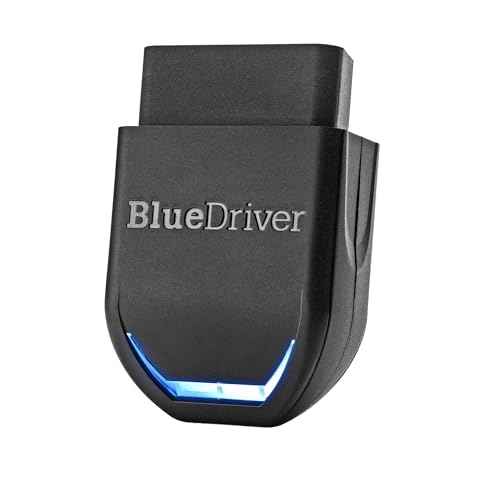
BlueDriver is the most capable listing here on paper. Its title promises no subscription, coverage of ABS, SRS, and TPMS systems, an OBDII scan tool and code reader function, and use with iPhone and Android. It fits a home mechanic who wants to diagnose a brake or airbag light before deciding whether to visit a shop, and who is tired of apps that nag for monthly fees. For a household with several cars, one adapter can move between them in a minute.
- ABS, SRS, and TPMS coverage goes beyond a plain engine reader.
- No subscription means the app does not demand ongoing fees.
- Trade-off: the title does not list a Windows option, so laptop users should look elsewhere.
Skip it if you only need to clear a loose gas cap code, because a simpler adapter does that job for less effort.
Bluetooth 5.4 Scanner
This diagnostic tool advertises Bluetooth 5.4 and works with iOS and Android as a code reader for cars and trucks, with live data and check engine code support. It targets someone with a recent phone who wants the newest wireless standard for steady pairing and a connection that does not drain the handset battery.
- Bluetooth 5.4 points to a modern, low-energy connection.
- Both iOS and Android are supported, so one adapter can serve a whole household.
- Trade-off: the title does not name a brand or enhanced system coverage.
Skip it if you want ABS or airbag diagnostics, since the listing speaks only to engine codes and live data.
Panlong OBD2 Scanner
Panlong is aimed squarely at Android owners, with wireless diagnostics, live data, and clearing of error codes to switch off the check engine light. It suits a driver with an Android phone who wants a straightforward tool for reading a code at the roadside and deciding whether the car can safely keep going.
- Live data and code clearing are both listed.
- The Android focus keeps the pairing process simple.
- Trade-off: the title says Android, so an iPhone will not connect.
Skip it if anyone in the household uses an iPhone, since the adapter would sit unused in the glove box.
OBDLink MX+
OBDLink MX+ has the shortest title in the group, listing only compatibility with iPhone, Android, and Windows. That breadth is the point: it is the choice for people who want to run diagnostic software on a laptop in the garage as well as on a phone in the driveway.
- Support for Windows alongside both phone platforms.
- One adapter covers every device you are likely to own.
- Trade-off: the listing gives no details on subscriptions or enhanced system coverage.
Skip it if you want a scanner that spells out its extra features in the title before you buy.
UBOG OBD2 Scanner
UBOG presents a general-purpose car code reader focused on the engine check light. The title is stuffed with generic terms, which signals a basic, low-frills adapter meant for plain code reading rather than deep diagnostics, and it suits the driver who just wants to know why the light came on.
- It targets the most common job: reading check engine codes.
- Its generic positioning keeps the purpose clear.
- Trade-off: the title does not mention phone platforms or live data.
Skip it if phone compatibility is a deciding factor, because you would have to confirm it elsewhere before ordering.
Veepeak OBDCheck BLE+
This Veepeak adapter uses BLE and supports iOS and Android, with live data and engine diagnostic code reading across various vehicles. It suits iPhone owners who need a Bluetooth Low Energy adapter that pairs reliably with their phone, and it is just as usable on an Android handset.
- BLE hardware is what iPhones need to connect.
- Android is supported too, so both phones in a household work.
- Trade-off: it focuses on engine codes, not ABS or airbag modules.
Skip it if you need brake or airbag diagnostics, which would call for enhanced software.
iOS Android Windows Adapter
This adapter works with iOS, Android, and Windows, and its title name-checks Torque, a well-known Android app for live gauges. It fits someone who already uses Torque or wants to try several apps on different devices without buying a second adapter.
- Windows support covers laptop software.
- Torque compatibility opens a familiar app option for Android users.
- Trade-off: the brand is not named, so support is hard to judge.
Skip it if you want a recognized manufacturer standing behind the hardware, since an unnamed brand leaves warranty and app updates as open questions.
Free App Scanner
This wireless diagnostic tool leads with no subscription and a free app, with live data and fault code reading for iPhone and Android. It is meant for buyers wary of recurring fees, and it suits anyone who just wants to know what the car is complaining about this week.
- The free app wording addresses the biggest hidden cost in this category.
- Both iPhone and Android are covered.
- Trade-off: the title does not promise ABS or airbag coverage.
Skip it if you want deeper system access than engine codes and live data. Free apps tend to focus on the basics, so a driver chasing an ABS fault would need a different tool.
Veepeak Mini
Veepeak Mini is clear about its limits, marked as for Android and not for iOS. It offers check engine light diagnostics and live data in a small form factor, which suits an Android user who wants an adapter that stays out of the way.
- The title states its compatibility honestly, which prevents a wrong purchase.
- A mini form factor keeps it tucked out of the way.
- Trade-off: iPhone and iPad users cannot use it at all.
Skip it if you may switch to an iPhone later, because the adapter would become dead weight. A household that shares one adapter across phones should pick a dual-platform listing instead.
Which One Fits Your Situation
You Have an iPhone
Veepeak OBDCheck BLE+ and the Free App Scanner both list iPhone support, and BlueDriver adds deeper diagnostics for those who want more than engine codes.
You Run Android and Torque
The iOS Android Windows Adapter mentions Torque directly, while Panlong and Veepeak Mini are Android-friendly choices that keep the setup simple.
A Brake or Airbag Light Is On
BlueDriver is the listing that names ABS, SRS, and TPMS coverage, so it is the logical starting point for warning lights outside the engine bay. Pair it with a quick online search of the code so you know what it means.
You Work from a Laptop
OBDLink MX+ supports Windows alongside phones, which suits diagnostics from a garage laptop where a larger screen helps with live data.
Common Mistakes
- Buying an Android-only adapter for an iPhone and discovering the mismatch after it arrives.
- Assuming every scanner reads ABS and airbag codes when many cover only the engine.
- Overlooking subscription wording in the listing and the app store page.
- Clearing codes without noting them down first, which erases clues a mechanic could use later if the fault returns.
- Leaving a poorly made adapter plugged in for weeks, which can drain a weak battery.
Related guides
- Battery Powered Floodlight Camera With Local Storage
- Cordless Drill Brush Attachment For Bathroom Grout
- Rechargeable Emergency Lantern For Power Outages
Frequently Asked Questions
Will a Bluetooth scanner work on my iPhone?
Only if it uses BLE or lists iOS support in the title. Classic Bluetooth adapters do not pair with iPhones, so check the wording carefully.
Can it turn off the check engine light?
Most scanners clear codes, but the light returns if the underlying fault remains. Read the code first and fix the cause.
Do I need a subscription?
Not always. Look for no subscription or free app wording, and confirm which features the free tier includes.
Is live data useful?
Yes. Watching sensor readings in real time helps you notice patterns, such as a temperature that climbs too fast, before a small issue becomes a breakdown. It is also handy for confirming that a repair actually fixed the problem.
More from Amazon
Programs that pair well with the guide above. Offers and eligibility are set by Amazon and may change.
A free business account with business pricing and bulk-buying tools for work, shop or home office.
Create a business accountFree shipping on eligible items, Prime Video and more. Eligible new members can start with a free trial.
Start a Prime free trialAudiobooks and podcasts to listen to on the go. Eligible new members can start with a free trial.
Try Audible freeAd-free music streaming. Eligible new subscribers can start with a free trial.
Try Music Unlimited freeAs an Amazon Associate we earn from qualifying purchases.