Key takeaways
- Pro: Two trays in one pack.
- Pro: Metal U channel holds outlets and chargers.
- Pro: Suits standing desks.
- Con: Weight rating not listed.
- Con: Mounting method not detailed in the listing.
For the best desk cable management kits under $50, the Delamu 2 Pack metal under-desk trays are the most practical start: two 31.5 inch U-channel trays that hold outlets and chargers. For a power strip on the floor, a cable box such as the D-Line hides it. Picks are compared from listing specifications.
Quick Comparison
| Model | Key specs per listing | Best for |
|---|---|---|
| Delamu 2 Pack Metal Tray | 2 trays, 31.5 in, black U channel, holds outlets and chargers | Standing desks, long runs |
| Univivi 36″ Fabric Tray | 36 in, clamp or screw mount, fabric, large capacity | Wide desks, lots of cables |
| LOVJOYSE 25.3″ Metal Tray | 25.3 in, no drill, clamp, black metal | Single power strip |
| Scanfield 2-Pack Tray | 17 in, no screws, adhesive, 3.5 in interior | Small desks, no drilling |
| BROWNLILY Cable Box (L) | Lid, cable ties, brown, open slots, for power strips and routers | Looks-first floor setups |
| D-Line Cable Management Box (L) | Power strip holder, black, covers cords, large | Floor power strips |
Delamu 2 Pack Metal Under Desk Cable Management Tray
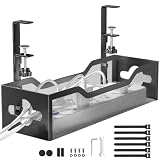
Listing specs: 2 pack of metal under-desk trays, black U channel, 31.5 inch, large capacity, holds outlets and chargers, for home office and gaming standing desks.
Two 31.5 inch metal trays in one pack are the biggest reason this tops the list: you can run one tray for the power strip and chargers and a second for excess cable length. The listing says it holds outlets and chargers, and the U channel shape keeps cables contained rather than draped. Metal also resists sagging better than fabric when a surge protector and a few power bricks sit in it. The listing mentions standing desks, where cable slack matters because the desk moves up and down, though it gives no weight rating. Check the maker page for the mounting method, since the listing does not detail it here. For most desks, it is the most practical single purchase.
- Pro: Two trays in one pack.
- Pro: Metal U channel holds outlets and chargers.
- Pro: Suits standing desks.
- Con: Weight rating not listed.
- Con: Mounting method not detailed in the listing.
Univivi 36″ Fabric Under Desk Cable Management Tray
Listing specs: 36 inch tray, clamp or screw mount, premium fabric cable management tray, large capacity, for office and home.
At 36 inches, this is the longest tray here, a natural match for wide desks where cables run from one monitor to the other side. It offers either clamp mounting or screw mounting, which is flexible: clamp to a thin edge or screw down on a solid desktop for a firmer hold. Fabric trays are softer on cables and avoid the hard edges of metal, but they hang lower and may sag if filled with heavy bricks. The listing describes large capacity, so it can take a power strip plus a router, though check dimensions before packing in a large UPS. If you want a cleaner look than open mesh, a fabric tray also hides cables more completely from the side.
- Pro: 36 inch length.
- Pro: Clamp or screw mounting.
- Pro: Fabric hides cables from view.
- Con: May sag with heavy bricks.
- Con: Weight rating not listed.
LOVJOYSE 25.3″ Under Desk Cable Management Tray
Listing specs: 25.3 inch metal cable tray, no drill, clamp mount, black, cord organizer for home office.
The LOVJOYSE is a single metal tray with a clamp, aimed at someone who wants an easy install without drilling into the desk. At 25.3 inches it fits a standard power strip and a few adapters, which is the usual contents of a home-office desk. A clamp attachment means it relies on the desk edge, so thin or very thick edges may not fit, and the listing gives no edge-thickness range. Check that on the maker page before ordering for a thick butcher-block top. Compared with the Delamu pack, you get one tray instead of two but a lower footprint, and it suits a desk where one power strip is the only thing to hide.
- Pro: No drilling, clamp mount.
- Pro: Metal construction.
- Pro: Suits a single power strip.
- Con: Edge thickness range not listed.
- Con: Only one tray.
Scanfield 2-Pack Under Desk Cable Management Tray, 17-Inch
Listing specs: 2-pack, 17 inch, black, no-screw adhesive mount (24-hour cure), 3.5 inch interior for power strips, chargers and bundled cords.
These two 17 inch trays use adhesive instead of screws, which suits cases where you cannot drill, such as in a rented apartment or on a glass or laminate desk. The listing calls for a 24-hour cure, so plan to leave the trays alone for a day before loading them. A 3.5 inch interior fits a compact power strip or chargers, but not a long surge protector. Two small trays make it possible to split a power strip on one side and a bundle of excess cable on the other. The trade-off is that adhesive depends on a clean, flat surface and the listing does not state a load rating, so keep the trays to light contents.
- Pro: No screws or drilling.
- Pro: Two trays in the pack.
- Pro: Fits compact desks.
- Con: 24-hour cure before use.
- Con: 17 inches is short for long power strips.
BROWNLILY Cable Management Box (L)
Listing specs: large cable management box with lid and cable ties, brown, handmade with open slots, covers power strips, TV, PC, router and chargers.
A box suits the floor rather than the underside of the desk: you set the power strip inside, close the lid and feed cables through open slots. The listing describes a handmade look in brown, so it blends into a room more than a black plastic box. Cable ties are included to bundle cords. A box is a good way to hide a surge protector, router or a charging hub where children or pets might reach, though ventilation is worth checking when hot devices sit inside. The listing does not state interior dimensions, so confirm that your power strip fits before ordering. It trades the invisible look of an under-desk tray for easy access.
- Pro: Lid and cable ties included.
- Pro: Blends into home decor.
- Pro: Good for floor power strips.
- Con: Interior size not listed.
- Con: Ventilation worth checking.
D-Line Cable Management Box (Large)
Listing specs: large cable management box, power strip holder, black, for desk cord organizing and covering TV wires, described as baby-proofing cables.
The D-Line is a plain, functional box for the same job as the BROWNLILY: hiding a power strip and plug connections. The listing includes use cases such as covering desk cords, hiding extension leads and protecting cables from small hands. That matters in a home with kids or pets where loose plugs are an annoyance and a safety concern. It is a more conventional, utilitarian look than a woven-style box, and black is easy to match with a dark desk setup. Check the maker page for interior size and ventilation before putting heavy surge protectors or hot adapters inside. It is a dependable option when function matters more than style.
- Pro: Straightforward power strip holder.
- Pro: Covers extension leads and plugs.
- Pro: Neutral black finish.
- Con: Plain styling.
- Con: Interior dimensions not detailed here.
Cable Management Kits for Home Office, Small Spaces and Gaming
Home office
A work desk usually needs one tray for a power strip and a way to bundle cables from the monitor and laptop dock. The Delamu pair or the LOVJOYSE tray handles that, and a fabric tray like the Univivi hides it more fully. Label cable ends so you can unplug the right one later.
Small spaces
Short desks benefit from compact trays like the 17 inch Scanfield pair, which avoid drilling and leave knee room. A small desk has less depth, so mount trays near the back edge and keep at least 4 inches of clearance below the desktop.
Gaming
Gaming setups add more cables than a normal desk: PC power, display cables, a hub, a headset and peripheral chargers. A 31 to 36 inch tray such as the Delamu or Univivi leaves space for a surge protector plus slack. A cable box handles the floor-level strip behind the tower.
How to Choose Under $50
Pick tray or box by where the power strip sits
A tray hangs under the desk and hides everything from view. A box sits on the floor and is easier to open. If your power strip is on the floor, choose a box. If it will mount to the desk, choose a tray. A good target is a tray at least as long as your strip plus 4 inches for plug clearance.
Match the mount to the desk
Clamps need a desk edge in the right thickness range, adhesive needs a clean flat surface, and screws need solid material. Glass, thin or metal desks usually rule out screws. Check the listing for edge thickness and read the maker page when it is not stated.
Allow for movement
On a standing desk, leave 6 to 12 inches of slack between the tray and the wall plug so cables do not pull when the top rises. Use the tray as the anchor and let the slack loop behind it. Fabric trays and Velcro ties allow more movement than rigid clips.
Think about heat and weight
Power strips and bricks are warm, so keep trays and boxes ventilated and avoid stacking items. Metal trays carry heavier loads than adhesive or fabric options, but none of these listings give a load rating. Keep to a strip and a couple of chargers unless the maker says otherwise.
Tidy as you install
Before mounting anything, unplug the setup, route each cable on its shortest clean path and bundle by function: power in one group, display and data in another. Keeping power and data cables a few inches apart also helps avoid interference and makes it easier to swap one device later without pulling the whole bundle out.
FAQ
What are the best desk cable management kits for a home office?
The Delamu 2 Pack and the Univivi 36″ tray are the best fits for a home office. One handles long power-strip runs, the other hides cables behind fabric.
Which desk cable management kits for small spaces work best?
The 17 inch Scanfield pair works best for small desks because it needs no drilling and takes little space. The 25.3 inch LOVJOYSE tray is another compact option.
Do these desk cable management kits work for gaming?
Yes, the Delamu and Univivi trays offer the most room for a PC and peripheral cables. A floor box such as the D-Line can hide the surge protector behind the tower.
Do under-desk trays need drilling?
Not all of them. The LOVJOYSE uses a clamp, the Scanfield uses adhesive, and the Univivi offers clamp or screw mounting. Check each listing for the mount type.
Can I use a cable box for a power strip?
Yes, that is its main use. Check the interior size and ventilation first, because hot adapters inside a closed box can trap heat.
Last updated: November 2026
More from Amazon
Programs that pair well with the guide above. Offers and eligibility are set by Amazon and may change.
A free business account with business pricing and bulk-buying tools for work, shop or home office.
Create a business accountFree shipping on eligible items, Prime Video and more. Eligible new members can start with a free trial.
Start a Prime free trialAudiobooks and podcasts to listen to on the go. Eligible new members can start with a free trial.
Try Audible freeAd-free music streaming. Eligible new subscribers can start with a free trial.
Try Music Unlimited freeAs an Amazon Associate we earn from qualifying purchases.