Key takeaways
- Pro: 33 lb capacity listed.
- Pro: 42 inch top with a wide keyboard tray.
- Pro: Simple manual adjustment.
- Con: Needs a wide desk.
- Con: 33 lbs rules out heavy monitor pairs.
For the best desk converters under $200, the VIVO 42″ Standing Desk Converter is the safest pick: a wide keyboard tray, manual height adjustment and a listed 33 lb capacity. For two screens, the VIVO 32″ model with a dual monitor mount is the better match. Picks are compared from listing specifications.
Quick Comparison
| Model | Key specs per listing | Best for |
|---|---|---|
| VIVO 42″ Standing Desk Converter | 42 in, holds 33 lbs, manual height, wide keyboard tray | Wide desks, one big monitor |
| VIVO 32″ with Dual Monitor Stand | 32 in, holds 33 lbs, wide keyboard tray, dual 13″-30″ mount | Two monitors |
| FLEXISPOT 40″ Converter | 40 in, wide keyboard tray, ergonomic height adjustable | Spacious setups |
| FLEXISPOT 36″ Converter | 36 in, height adjustable, laptop, keyboard and monitor setup | Mid-size desks |
| FITUEYES 32″ Converter | 32 in, dual monitor riser, tabletop workstation, easy assembly | Simple setup |
| JOY worker 32″ Converter | 32 in, white top, fixed keyboard tray, particle board | Light-colored rooms |
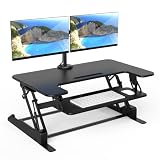
VIVO Standing Desk Converter, 42″ Black Top
Listing specs: 42 inch black top, manual height adjustable, holds 33 lbs, wide keyboard tray, black frame, model DESK-V042KB.
The 42 inch VIVO is the widest model on this list and the only one that states a 33 lb capacity alongside a wide keyboard tray. That spec matters because most converter listings skip the weight limit, so you can check a monitor or laptop against it directly. Manual height adjustment means you lift and lock the platform yourself, which avoids motors and cords but needs a little effort. The large top gives room for a single large monitor plus a laptop beside it. At 42 inches, it needs a desk at least 48 inches wide to look balanced. If you want a conventional, widely recognized design with a stated limit, this is the one to start with.
- Pro: 33 lb capacity listed.
- Pro: 42 inch top with a wide keyboard tray.
- Pro: Simple manual adjustment.
- Con: Needs a wide desk.
- Con: 33 lbs rules out heavy monitor pairs.
VIVO Standing Desk Converter with Dual Monitor Stand, 32″
Listing specs: 32 inch black top, holds 33 lbs, height adjustable, wide keyboard tray, dual 13 to 30 inch monitor mount, black frame, DESK-V000K-M2.
This model combines a 32 inch platform with a dual monitor mount that handles screens from 13 to 30 inches. The mount is the significant detail: instead of putting two monitors on the platform surface, it lifts them on arms above the keyboard tray, leaving more depth for the keyboard and mouse. The 33 lb capacity still applies to the whole system, so two heavy monitors could be a problem, and the listing does not say how the weight splits between mount and platform. Check the monitor weights and VESA compatibility on the maker page before ordering. For people with two screens and a smaller desk, it makes better use of space than the 42 inch model.
- Pro: Dual monitor mount for 13 to 30 inch screens.
- Pro: 33 lb capacity listed.
- Pro: Compact 32 inch width.
- Con: Weight limit is shared by monitors and platform.
- Con: VESA details not in the listing.
FLEXISPOT Standing Desk Converter, 40″ Large
Listing specs: 40 inch large desk riser, spacious desktop riser, sit-stand computer workstation, wide keyboard tray, ergonomic height adjustable, black.
FLEXISPOT is a recognized standing-desk maker, and this 40 inch model targets people who need a large surface. The listing highlights a wide keyboard tray and ergonomic height adjustment, so the keyboard drops below the monitor level when you stand. At 40 inches, the platform is close in size to the 42 inch VIVO but gives no capacity number in the listing, which is the main limit on comparing the two. That means you should check the maker page for the rated weight and height range before planning a heavy monitor. If you value the brand and want a spacious workstation without moving up to a full desk, it is a competent mid-range pick.
- Pro: 40 inch working area.
- Pro: Wide keyboard tray.
- Pro: Known standing-desk brand.
- Con: Weight limit not in the listing.
- Con: Large and heavy to place.
FLEXISPOT Standing Desk Converter, 36″ Desk Riser
Listing specs: 36 inch desk riser, height adjustable, sit-stand computer workstation, spacious design for laptop, keyboard and monitor setup, black.
The 36 inch FLEXISPOT sits between the compact and wide options and suits an average-size desk with a single monitor. The listing says it holds a laptop, keyboard and monitor setup, so you can think of it as a full mini-workstation with a stand for the screen on top and the keyboard below. It is slightly narrower than the 40 inch model, which makes it easier to fit on a standard 48 inch desk. The listing, however, gives no weight rating, so use the maker page to confirm limits. If you want something that doesn’t dominate the desk and still handles a normal home-office layout, 36 inches is a practical middle size.
- Pro: 36 inch size fits a standard desk.
- Pro: Laptop, keyboard and monitor use described.
- Pro: Leaves room for a lamp or notebook.
- Con: Weight rating not listed.
- Con: Not wide enough for a dual-monitor layout.
FITUEYES Height Adjustable Standing Desk Converter, 32″
Listing specs: 32 inch wide sit-to-stand converter, dual monitor riser, tabletop workstation for home office, easy assembly.
The FITUEYES listing focuses on ease: it advertises easy assembly and a tabletop workstation design for a home office. It also mentions dual monitor riser use, though a 32 inch platform leaves little extra space once two screens and a keyboard share it. That makes it a better fit for one monitor and a laptop than for two large displays. A converter that assembles quickly is a real convenience because the base and the platform are heavy to move around. The listing gives no capacity number, so the same precaution applies: check the maker page for the load rating. It is a plain, simple choice for a first sit-stand riser.
- Pro: Easy assembly is part of the listing.
- Pro: 32 inch size fits most desks.
- Pro: Simple tabletop design.
- Con: Capacity not listed.
- Con: Tight for two large monitors.
JOY worker 32″ Standing Desk Converter
Listing specs: 32 inch height-adjustable stand-up riser, white desktop, fixed keyboard tray, monitor and laptop workstation, particle board.
The white desktop makes this the most design-aware choice: it blends into bright rooms and light desks where black converters feel heavy. The keyboard tray is fixed rather than a pull-out or tilting design, so the keyboard sits at one level and angle relative to the monitor surface. The listing is also open about material, naming particle board, which is common at this tier but less rigid than solid wood or metal. It supports monitor and laptop use according to the listing, but gives no weight rating. Treat it as a good-looking option for light use, and check the capacity before loading it with a heavy screen.
- Pro: White finish for light rooms.
- Pro: Monitor and laptop workstation layout.
- Pro: Material is stated.
- Con: Fixed keyboard tray.
- Con: No weight rating in the listing.
Desk Converters for Home Office, Small Spaces and Gaming
Home office
For all-day work, a wide platform and a stable base matter most. The VIVO 42″ and FLEXISPOT 40″ offer the most room, while the 32 and 36 inch models suit standard desks. Put the monitor top at or slightly below eye level so you are not tilting your head.
Small spaces
Smaller desks do better with a 32 inch platform. The VIVO dual monitor model uses arms to hold two screens in less depth, and the FITUEYES and JOY worker are the same width. Remember that the converter sits on top of the desk, so it adds height and reduces the useful space around it.
Gaming
For gaming, check capacity first because gaming monitors and peripherals add weight. The VIVO models list 33 lbs, a number you can plan around. The others do not list a limit, so confirm it before putting a large monitor on the platform.
How to Choose Under $200
Start with the weight limit
Add up your monitor, laptop and accessories. A 27 inch monitor often weighs 10 to 15 lbs, and a laptop adds 3 to 5 lbs, so a 33 lb limit leaves a little room for one monitor and a laptop but not two large screens. If a listing gives no limit, find the rating on the maker page first.
Match width to the desk
A converter should be narrower than your desk by at least 6 inches so it does not hang over an edge. A 36 inch riser fits a 42 to 48 inch desk, while a 42 inch model wants 48 inches or more. Check the depth as well, since many converters need 24 inches or more.
Check the height range
Your keyboard should be at elbow height in both positions, roughly 24 to 28 inches seated and 38 to 46 inches standing for most adults. A converter has to add enough height at its top position to bring the desktop to that level, so use the maker’s range, not the listing alone.
Manual or gas lift
Manual and spring-assist mechanisms differ in effort and smoothness. The listings do not describe the lift mechanism in detail, so read buyer comments on how easy it is to raise and lower with a full load.
Plan the cables and monitor position
A converter raises the whole stack, so cables need enough slack to follow it from the lowest to the highest position. Leave 8 to 12 inches of extra length, keep the power strip on the desk or floor rather than on the platform, and set the monitor about an arm’s length away. Once the height is right, mark the settings so you can return to them quickly.
FAQ
What is the best desk converter for a home office?
The VIVO 42″ is the safest pick because it lists a 33 lb capacity and a wide keyboard tray. The FLEXISPOT 40″ is a good alternative with more brand recognition.
Which desk converters for small spaces should I choose?
The 32 inch models suit small desks best, particularly the VIVO dual monitor version, which holds two screens on arms rather than flat on the tray.
Are these desk converters good for gaming?
They suit light gaming setups. Gaming monitors and keyboards add weight, so check the capacity first. The VIVO models list 33 lbs, while the others do not list a limit.
Do these converters hold two monitors?
The VIVO 32″ with a dual monitor mount is built for it. The FITUEYES mentions a dual monitor riser, but its 32 inch platform is tight.
How wide should a desk converter be?
Choose one at least 6 inches narrower than your desk. A 32 to 36 inch converter fits a 42 to 48 inch desk, and a 40 or 42 inch model needs more room.
Last updated: November 2026
More from Amazon
Programs that pair well with the guide above. Offers and eligibility are set by Amazon and may change.
A free business account with business pricing and bulk-buying tools for work, shop or home office.
Create a business accountFree shipping on eligible items, Prime Video and more. Eligible new members can start with a free trial.
Start a Prime free trialAudiobooks and podcasts to listen to on the go. Eligible new members can start with a free trial.
Try Audible freeAd-free music streaming. Eligible new subscribers can start with a free trial.
Try Music Unlimited freeAs an Amazon Associate we earn from qualifying purchases.