Key takeaways
- Power source and cord routing: Plug-in clocks hold accurate time indefinitely, but you’ll be dealing with a cable across your finished top. Decide now whether you’re drilling a discreet grommet hole at the back edge or running the cord down a rear leg with adhesive clips. Battery-only units keep the surface clean at the cost of drift and dead-battery mornings.
- Real dimming range, not three settings: The lowest brightness matters far more than the highest. A clock that bottoms out at “still glowing” will keep you up. Look for multi-step dimmers with a genuinely dark low end, and test it in a fully dark room before you commit.
- Digit height versus viewing distance: Measure from your pillow to where the clock will sit. Roughly one inch of digit height reads comfortably at about ten feet without glasses. Undersized numbers are the single most common complaint, and no amount of brightness fixes them.
- Case material and how it ages: Wood-cased clocks sit far better on oiled walnut or white oak than glossy plastic, and they don’t collect fingerprints or scuff marks the same way. If you’re matching a stain, get the clock in hand before finishing your piece so you can adjust the tone toward it.
- Integrated charging that fits your footprint: A built-in USB port or wireless pad kills a separate charging brick and a second cable. Check the port type against your current phone, and confirm the pad’s charging surface clears whatever case you use.
What's inside
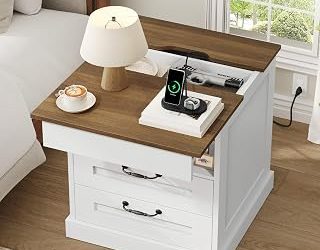
I’ve built enough bedside tables to know the clock is usually the last thing anyone thinks about, and the first thing that ruins the setup. You cut the joinery, sand the top to 220, rub in the oil, and then plop down a glowing blue brick that lights the whole room like a fire exit sign. Or worse: a battery model that drifts four minutes a month, so you’re squinting at a number you can’t trust at 3 a.m. The clock sits on that surface every single night, closer to your face than any other object in the room, and it either earns its spot or it doesn’t.
This guide comes at nightstand clocks the way I’d size up any piece of hardware for a build: how it’s powered, how it’s finished, whether the dimmer actually dims, and whether the cable situation will wreck the look of the top. I’ve pulled together the models worth putting on a surface you spent a weekend making, including wood-cased units that read as furniture rather than electronics, a wireless-charging option that collapses your whole bedside pile into one footprint, and a pocket-sized backup for guest rooms and travel bags.
As an Amazon Associate we earn from qualifying purchases.


How to Choose a/an Nightstand Clock (2026)
- Power source and cord routing: Plug-in clocks hold accurate time indefinitely, but you’ll be dealing with a cable across your finished top. Decide now whether you’re drilling a discreet grommet hole at the back edge or running the cord down a rear leg with adhesive clips. Battery-only units keep the surface clean at the cost of drift and dead-battery mornings.
- Real dimming range, not three settings: The lowest brightness matters far more than the highest. A clock that bottoms out at “still glowing” will keep you up. Look for multi-step dimmers with a genuinely dark low end, and test it in a fully dark room before you commit.
- Digit height versus viewing distance: Measure from your pillow to where the clock will sit. Roughly one inch of digit height reads comfortably at about ten feet without glasses. Undersized numbers are the single most common complaint, and no amount of brightness fixes them.
- Case material and how it ages: Wood-cased clocks sit far better on oiled walnut or white oak than glossy plastic, and they don’t collect fingerprints or scuff marks the same way. If you’re matching a stain, get the clock in hand before finishing your piece so you can adjust the tone toward it.
- Integrated charging that fits your footprint: A built-in USB port or wireless pad kills a separate charging brick and a second cable. Check the port type against your current phone, and confirm the pad’s charging surface clears whatever case you use.
The Best Nightstand Clock (2026)s Reviewed
DreamSky Wooden Digital Alarm Clock with Wireless Charging
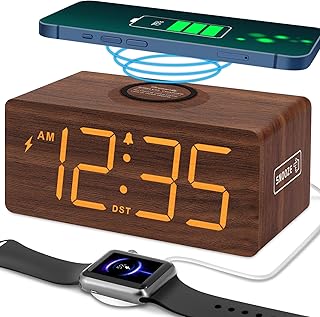
This is the one I recommend when someone wants a truly uncluttered nightstand: the wood case, the wireless pad, and a spare USB port consolidate three objects into one. The dimmer runs low enough for light sleepers, and the wood tone reads warm against oiled hardwood in a way plastic never manages.
DreamSky Small Digital Alarm Clock
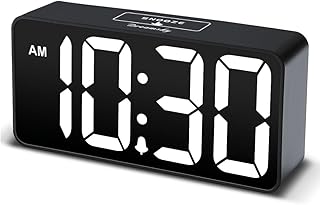
Big numbers in a genuinely compact shell, which is the combination that’s hardest to find. It runs off a USB-C adapter rather than a proprietary plug, so it’s easy to power from a hub or an existing bedside outlet strip, and the pass-through port handles your phone.
Amazon Basics Small Digital Oval Alarm Clock
At roughly 4.5 by 3.5 inches with battery backup, this is the pragmatic choice for guest rooms, cabins, or a nightstand with no nearby outlet. The nightlight is a real convenience for stairs and hallways, and losing power doesn’t reset your alarm.
DreamSky Wooden Digital Alarm Clock (Plug-in)
The straightforward wood-cased plug-in, and my default pick for heavy sleepers who don’t need charging features. The alarm gets genuinely loud with usable volume steps in between, so you can dial in something that wakes you without startling a partner.
Odokee Digital Alarm Clock
Built for across-the-room legibility, with five brightness levels, eight nightlight colors, and five alarm sounds to choose from. The silver finish leans modern rather than warm, so pair it with painted or metal-legged nightstands instead of natural wood.
Frequently Asked Questions
Will a plug-in clock lose time during an outage?
Most keep the current time briefly on internal backup, but alarm settings and the clock itself can reset on longer outages. If your power flickers often, choose a model with dedicated battery backup or keep a small battery clock as a fallback.
How do I hide the cord on a wooden nightstand?
Drill a 1-inch hole near the back edge, ease the rim with sandpaper, and drop in a plastic or brass desk grommet. Run the cable through and clip it to the inside of the rear leg. Ten minutes of work, and the top stays clean.
Is red or amber display better for sleep?
Warmer colors sit further from the blue wavelengths that suppress melatonin, so red and amber are the safer choice at the bedside. That said, a deeply dimmed display of any color beats a bright warm one.
Do wireless charging pads work through phone cases?
Thin silicone and plastic cases are fine. Thick wallet cases, metal plates, and magnetic mounts can block or slow the connection, so pull the card slot inserts if charging seems sluggish.
Final Thoughts
For most bedrooms, the DreamSky wooden clock with wireless charging earns its place by replacing a charging pad and a cable alongside doing its actual job. If you don’t need charging, the plug-in DreamSky wooden model delivers the same furniture-friendly look with a louder alarm for less money, and the Amazon Basics oval is the one I keep in the guest room for its battery backup and small footprint.