Key takeaways
- Rated capacity vs. real load: Add up monitors, arms, PC, and the desktop itself, then leave 40% margin. A 264 lb frame carrying 120 lbs lifts quietly for years; one carrying 240 lbs will not.
- Desk depth over width: Monitor arms need clamp clearance behind the top and viewing distance in front. Anything under 28″ deep forces you to sit too close to a large panel.
- Clamp edge thickness: Most arms grip 0.4″–2.6″. Check the rear edge for a lip or bevel before you commit, because a sloped edge makes clamps creep under load.
- Crossbar and foot design: A full-width crossbar plus wide feet kills front-to-back sway. Skip a crossbar only if you are pairing a thick, rigid custom top with the frame.
- Controller memory and collision sensing: Presets matter more with tall monitors, and anti-collision protects arms and shelving when the desk meets a windowsill.
What's inside
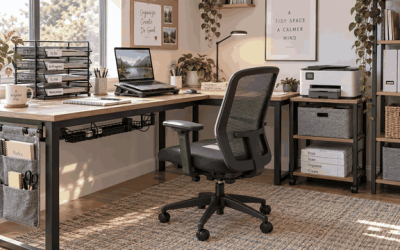
The FLEXISPOT 79″x32″ Electric Standing Desk in black is the best overall pick for heavy monitor setups, with the ErGear Dual Motor Standing Desk Legs as the runner-up for anyone building a custom top.
Here’s the problem nobody warns you about: a triple-monitor arm rig plus a 49″ ultrawide can push 90 lbs of gear onto a desk that also has to lift itself. Single-motor frames wobble, drift out of level, and give up early. Dual-motor frames put an independent gearbox in each leg, which means smoother travel, less racking, and real headroom above your actual load. As someone who has bolted together, re-shimmed, and load-tested more frames than I care to admit, I look at three things first: rated capacity, crossbar geometry, and whether the top can take repeated hardware changes. This guide covers six options that survive genuinely heavy setups.
As an Amazon Associate we earn from qualifying purchases.


Quick Comparison
| Product | Best For | Standout Feature | Rating |
|---|---|---|---|
| FLEXISPOT 79″x32″ Electric Standing Desk, Black | Triple-monitor and multi-arm rigs | Massive 79″ span with dual-motor stability | Excellent |
| FLEXISPOT 71″x32″ Electric Standing Desk, White | Value-focused dual-monitor builds | Big footprint at a lower entry point | Very good |
| FLEXISPOT 63″x28″ Electric Standing Desk, Black Walnut | Compact rooms with a premium finish | Walnut-look top that hides cable clutter | Very good |
| ErGear Dual Motor Standing Desk Legs, 264 lbs | Custom butcher-block or plywood tops | 264 lb capacity, fits 44–90″ desktops | Excellent |
| Grandder 55×32 Extra-Deep Electric Standing Desk | Single 49″ ultrawide setups | 32″ depth plus anti-collision sensing | Very good |
How to Choose a Dual-Motor Standing Desk for Heavy Monitor Setups
- Rated capacity vs. real load: Add up monitors, arms, PC, and the desktop itself, then leave 40% margin. A 264 lb frame carrying 120 lbs lifts quietly for years; one carrying 240 lbs will not.
- Desk depth over width: Monitor arms need clamp clearance behind the top and viewing distance in front. Anything under 28″ deep forces you to sit too close to a large panel.
- Clamp edge thickness: Most arms grip 0.4″–2.6″. Check the rear edge for a lip or bevel before you commit, because a sloped edge makes clamps creep under load.
- Crossbar and foot design: A full-width crossbar plus wide feet kills front-to-back sway. Skip a crossbar only if you are pairing a thick, rigid custom top with the frame.
- Controller memory and collision sensing: Presets matter more with tall monitors, and anti-collision protects arms and shelving when the desk meets a windowsill.
The Best Dual-Motor Standing Desks for Heavy Monitor Setups Reviewed
Best Overall: FLEXISPOT 79″x32″ Electric Standing Desk (Black)
The 79″ span gives you room for three panels on arms plus a keyboard tray without crowding the clamp zone, and the dual-motor frame lifts a loaded top without the shudder cheaper desks develop. Best for developers, traders, and editors running maximum screen real estate.
Best Budget: FLEXISPOT 71″x32″ Electric Standing Desk (White)
You give up eight inches of width but keep the same 32″ depth and dual-motor lift, which is the smart trade for a dual-monitor or ultrawide-plus-vertical setup. Best for first-time standing desk buyers who still want a serious footprint.
Best Premium: FLEXISPOT 63″x28″ Electric Standing Desk (Black Walnut)
The walnut finish reads far more like furniture than office equipment, so it works in a living room or guest-room office where the desk is on display. Best for smaller rooms where appearance matters as much as capacity.
Best for Custom DIY Tops: ErGear Dual Motor Standing Desk Legs (264 lbs)
This is the maker’s choice: a 264 lb frame that adjusts from 44″ to 90″ so you can mount reclaimed butcher block, a solid-core door, or laminated plywood and drill your own grommets. Best for anyone who wants a thicker, stiffer top than any bundled desk ships with.
Best for Ultrawide Monitors: Grandder 55×32 Extra-Deep Electric Standing Desk
The 32″ depth on a 55″ top is unusual and exactly what a curved 49″ panel needs for comfortable viewing distance, with two presets and anti-collision built in. Best for gamers and single-ultrawide users in tighter spaces.
Frequently Asked Questions
How much weight can a dual-motor desk really hold?
Quality frames rate 220–265 lbs, and that figure includes the desktop. Two 32″ monitors on arms plus a tower typically lands near 90–110 lbs, well inside spec.
Do I need a crossbar for a heavy setup?
For factory laminate tops, yes — it dramatically reduces sway. With a 1.5″+ solid wood custom top, the slab itself provides much of that rigidity.
Will monitor arms damage the desktop?
Use the supplied rubber pads and a thin hardwood backing plate under C-clamps. On particleboard cores, spread the load rather than over-tightening a small clamp face.
Can I reuse my old top on a new frame?
Usually. Confirm the frame’s width range and mark new pilot holes rather than reusing old ones, since offset brackets rarely line up.
Final Thoughts
For most heavy setups, the FLEXISPOT 79″x32″ is the safest buy — the space and stability are there from day one. Builders should go straight to the ErGear dual-motor legs and pair them with a thick custom top, while single-ultrawide users will get more comfort per inch from the extra-deep Grandder 55×32.