Our Short List of 3

- Extra screens: 1 x 14 inch IPS panel
- Resolution: 1920 x 1080
- Brightness: 300 nits
- Laptop fit: 13 to 17 inches

- Extra screens: 2 x 12 inch IPS panels
- Resolution: 1920 x 1080 per panel
- Brightness: 300 nits
- Contrast: 1000:1
- Extra screens: 2 x 14 inch IPS panels
- Resolution: 1920 x 1200 per panel, 16:10
- Brightness: 250 cd/m2
- Refresh: 60 Hz
All 4 Picks at a Glance
| Product | Specs | Action |
|---|---|---|
| 1. Teamgee S1 14″ Laptop Screen Extender |
| Check price on Amazon |
| 2. CopGain P2 Triple Portable Monitor |
| Check price on Amazon |
| 3. FQQ S7 14″ Laptop Screen Extender |
| Check price on Amazon |
 4. Teamgee S2 14″ Triple Portable Monitor |
| Check price on Amazon |
Key takeaways
- Compare the best laptop screen extenders for home office work, from a light 14 inch dual screen to triple 15.6 inch setups with USB-C and HDMI links.
A laptop screen extender clips or slides onto the back of your laptop lid and adds one or two extra displays that fold out beside the built-in screen. It is the fastest way to turn a single-screen laptop into a dual or triple monitor workstation at a kitchen table, a client site, or a spare desk at home, then fold flat and drop it into a bag when you move on.
This guide covers only attachable extenders that mount on the laptop itself, not freestanding portable monitors that sit loose on the desk. The five picks span a light 14 inch single screen, compact 12 inch triple setups, a taller 1200P triple frame, and a 15.6 inch triple unit with its own power bank. Every model connects over USB-C or HDMI and needs no permanent desk hardware.
Disclosure: As an Amazon Associate, we earn from qualifying purchases made through links on this page, at no extra cost to you.
How to Choose a Laptop Screen Extender
Decide between one extra screen and two
A dual extender adds a single panel on one side of your lid. It keeps the added weight low, draws power from one cable, and suits focused work where a reference window sits beside your main task. A triple extender adds a panel on each side, giving you a genuine three-screen layout for spreadsheets, code, chat, and documents side by side. The trade-off is weight, more cables, and a lid that has to support a wider frame. If you mostly work at one desk, a triple unit earns its bulk. If you move rooms several times a day, the single-screen design is easier to live with.
Check your USB-C ports before anything else
Most extenders run each panel from a full-function USB-C port that carries video, data, and power on one cable. Two extra screens usually call for two such ports, or one full-function USB-C port plus an HDMI port and a USB-A port for power. A USB-C port that only charges or only moves data will not light a panel. Look for a DisplayPort Alt Mode or Thunderbolt mark beside the port, and count your ports before you choose a triple model.
Know the Mac chip limits
Windows laptops with the right ports generally drive both added panels without fuss. MacBooks depend on the chip inside. Base M1, M2, and M3 chips feed only one external display, so a triple extender shows a single added screen on those machines. Pro and Max chips, and newer base chips on some models, handle two added panels. The product notes below flag this limit where the maker publishes it.
Match the frame to your laptop size
Every extender lists a fit range, most often 13 to 17 inches. Measure your laptop by its diagonal screen size and check the width of the lid as well, because the frame clamps or slides across the back of it. A frame stretched to its limit can sit loose, and an oversized frame on a small laptop makes the lid top-heavy. Stay inside the published range.
Weigh resolution, brightness, and bulk
Most panels in this class are IPS at 1920 x 1080, with a few 1920 x 1200 models that add vertical room for documents and code. Brightness near 250 to 300 nits is normal and works well indoors. Weight runs from about 2.3 pounds for a single panel to 3.5 pounds or more for triple frames, and that weight rides on your laptop hinges all day, so lighter is kinder to thin laptops.
The 5 Best Laptop Screen Extenders
1. Teamgee S1 14″ Laptop Screen Extender
- Extra screens: 1 x 14 inch IPS panel
- Resolution: 1920 x 1080
- Brightness: 300 nits
- Laptop fit: 13 to 17 inches
The Teamgee S1 is the lightest way into this category: a single 14 inch panel that mounts on a sliding rail at the back of the lid and swings out to either side. The 1920 x 1080 IPS screen runs at 300 nits, bright enough for indoor desks, and it connects over USB-C or HDMI with no driver to install on Windows or macOS. A built-in stand helps support the panel so the hinge does not carry the full load alone.
At 2.34 pounds, the S1 adds the least bulk of any pick here, and the carrying bag, three cables, and one-year warranty round out a tidy travel kit. It fits laptops from 13 to 17 inches, so it moves easily between a small ultrabook and a larger machine. Pick it if you want a second screen for reference work and calls, without a wide triple rig.
2. CopGain P2 Triple Portable Monitor
- Extra screens: 2 x 12 inch IPS panels
- Resolution: 1920 x 1080 per panel
- Brightness: 300 nits
- Contrast: 1000:1
The CopGain P2 packs two 12 inch panels into the smallest triple frame in this guide, a smart match for 13 and 14 inch laptops that would feel swamped by 14 inch side screens. Each panel is a 1920 x 1080 IPS display at 300 nits with a 1000:1 contrast figure and a 60 Hz refresh, and each carries its own pair of USB-C inputs, an HDMI input, and built-in speakers.
The frame opens to a maximum angle of 207 degrees, so the side panels can wrap slightly toward you or fold back to share content across the table. At 2.65 pounds it weighs barely more than the single-screen Teamgee above, yet delivers a full three-display layout. The box includes the bracket, a storage bag, and two each of the USB-C and HDMI cables you need.
3. FQQ S7 14″ Laptop Screen Extender
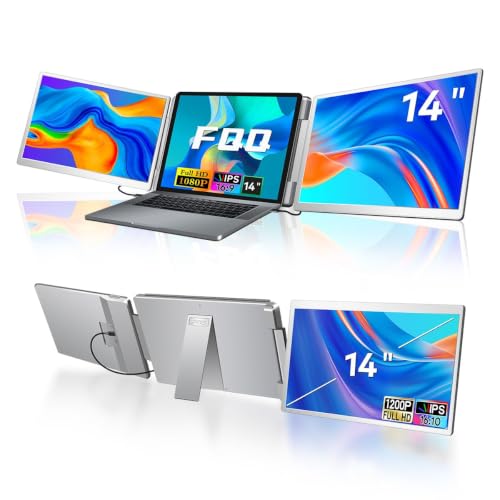
- Extra screens: 2 x 14 inch IPS panels
- Resolution: 1920 x 1200 per panel, 16:10
- Brightness: 250 cd/m2
- Refresh: 60 Hz
The FQQ S7 stands apart for its taller panels. Its two 14 inch IPS screens run at 1920 x 1200 in a 16:10 shape, which puts more lines of a document or code file on screen at once than a 1080p panel of the same size. The left screen flips a full 360 degrees, so it can fold flat behind the unit or turn outward to face a colleague.
The S7 is plug and play with no driver for most setups, and it connects through two USB-C cables, or a mix of USB-C, HDMI, and USB-A on laptops with fewer full-function ports. FQQ states plainly that base M1, M2, and M3 MacBooks are not supported for the full layout, while Pro and Max chips and the M4 are. At 3.54 pounds it is a midweight pick, and the carry bag and full cable set come in the box.
4. Teamgee S2 14″ Triple Portable Monitor
- Extra screens: 2 x 14 inch IPS panels
- Resolution: 1920 x 1080 per panel
- Laptop fit: 13 to 17 inches
- Connections: USB-C, USB-A, HDMI
The Teamgee S2 takes the same broad fit range as the S1 and stretches it into a triple layout, with two 14 inch Full HD IPS panels that fold completely flat at 180 degrees for packing. Built-in speakers mean one less thing to plug in during calls, and the adjustable stand helps the frame sit steady on uneven desks.
Connection options cover USB-C, USB-A, and HDMI, so the S2 works with a wide spread of Windows laptops, Macs within their chip limits, and even Android devices with desktop modes. The fit range runs from 13 to 17 inches, the widest in this guide. Teamgee does not publish a weight for this model, so if every ounce counts, weigh that unknown against the lighter CopGain above.
5. KEFEYA S5 15.6″ Laptop Screen Extender
The KEFEYA S5 is the big-screen option, with two 15.6 inch 1920 x 1080 IPS panels that match the size of a full laptop display on each side. That makes it the closest thing here to a fixed triple-monitor desk that still folds up and travels. It suits anyone whose work genuinely fills three large windows at once.
The standout detail is the included power bank, which lets the S5 run its panels without draining the laptop battery as fast during long sessions away from a wall outlet. Connections cover HDMI, USB-A, and Type-C, with hub functions built in, and the frame fits laptops from 13 to 17 inches. The folded unit measures 16.93 x 10.24 x 2.36 inches, so it needs a larger bag than the other picks. KEFEYA does not publish a weight for the S5.
Specs
- Extra screens: 2 x 15.6 inch IPS panels
- Resolution: 1920 x 1080 per panel, 16:9
- Laptop fit: 13 to 17 inches
- Connections: HDMI, USB-A, USB-C, built-in hub
- Power: power bank included in the box
- Dimensions: 16.93 x 10.24 x 2.36 inches
- Weight: not published
Comparison Table
| Model | Extra screens | Resolution | Laptop fit | Weight |
|---|---|---|---|---|
| Teamgee S1 | 1 x 14 inch | 1920 x 1080 | 13-17 in | 2.34 lb |
| CopGain P2 | 2 x 12 inch | 1920 x 1080 | 13-16 in | 2.65 lb |
| FQQ S7 | 2 x 14 inch | 1920 x 1200 | 12-16.5 in | 3.54 lb |
| Teamgee S2 | 2 x 14 inch | 1920 x 1080 | 13-17 in | not published |
| KEFEYA S5 | 2 x 15.6 inch | 1920 x 1080 | 13-17 in | not published |
FAQ
Do laptop screen extenders need drivers?
Most models in this guide are plug and play on Windows over a full-function USB-C cable, with no driver to install. Mac setups can differ by chip, and a few connection methods call for a one-time driver from the maker. Check the listing notes for your exact laptop before you buy.
Will a triple screen extender work with a MacBook?
It depends on the chip. MacBooks with Pro or Max chips can drive both added panels on the picks here. Base M1, M2, and M3 chips feed only one external display, so only one added panel lights up. The FQQ S7 notes support for the M4 and Pro and Max chips.
What ports does my laptop need for a screen extender?
The simple path is one full-function USB-C port per added screen, carrying video, data, and power together. With only one such port, most triple models fall back to USB-C for one panel and HDMI plus USB-A power for the other. A charge-only USB-C port will not work for video.
Can I use only one panel of a triple extender?
Yes. Each panel connects on its own cable, so you can plug in a single side screen and leave the other folded away for a lighter setup. The second panel draws no power while it stays disconnected.
How much weight does a screen extender add?
The picks here run from 2.34 pounds for the single-panel Teamgee S1 to 3.54 pounds for the FQQ S7, and the frame rides on the back of your laptop lid. Thin laptops with soft hinges feel that load most, so use the built-in stand where one is supplied.
Conclusion
For most home office workers, the Teamgee S1 is the sensible first step: one bright 14 inch panel, the lowest weight here, and a fit range that covers nearly any laptop. If you want three screens, the CopGain P2 keeps a triple layout light on smaller laptops, the FQQ S7 adds welcome height with its 1200P panels, the Teamgee S2 folds flattest for travel, and the KEFEYA S5 goes biggest with a power bank for long sessions. Match the frame to your laptop size, confirm your USB-C ports carry video, and any of these five turns one screen into a proper workstation.
More from Amazon
Programs that pair well with the guide above. Offers and eligibility are set by Amazon and may change.
A free business account with business pricing and bulk-buying tools for work, shop or home office.
Create a business accountFree shipping on eligible items, Prime Video and more. Eligible new members can start with a free trial.
Start a Prime free trialAudiobooks and podcasts to listen to on the go. Eligible new members can start with a free trial.
Try Audible freeAd-free music streaming. Eligible new subscribers can start with a free trial.
Try Music Unlimited freeAs an Amazon Associate we earn from qualifying purchases.