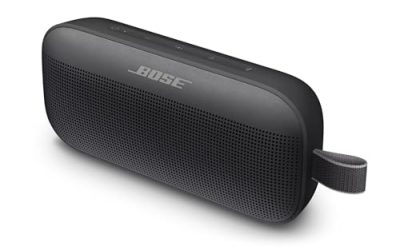
Our Short List of 3
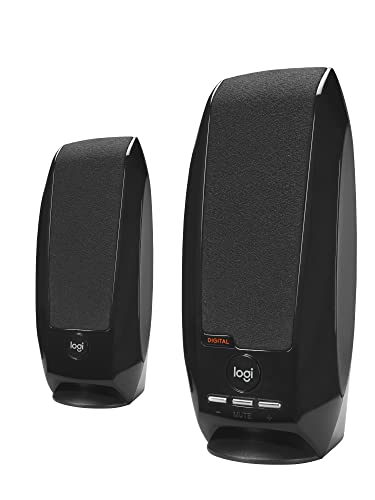
- Configuration: 2.0 stereo pair
- Connection: USB-A, digital audio and power on one cable
- Total output: 1.2 W RMS
- Frequency response: 90 Hz to 20 kHz
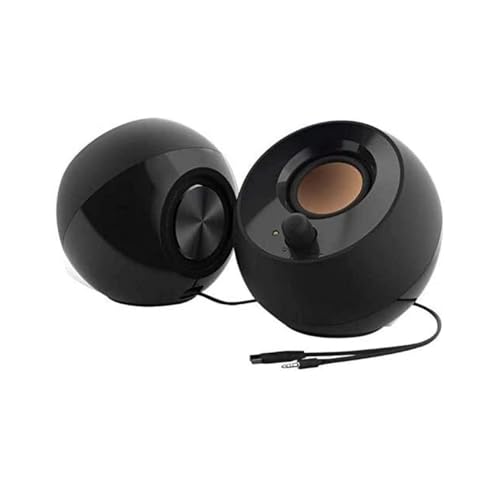
- Configuration: 2.0 stereo pair
- Connection: USB-A for power, 3.5 mm AUX-in for audio
- Total output: 4.4 W RMS (8.8 W peak)
- Frequency response: 100 Hz to 17 kHz

- Configuration: 2.0 stereo pair
- Connection: USB for power, 3.5 mm AUX-in for audio
- Total output: not published
- Frequency response: not published
All 3 Picks at a Glance
| Product | Specs | Action |
|---|---|---|
| 1. Logitech S150 |
| Check price on Amazon |
| 2. Creative Pebble |
| Check price on Amazon |
| 4. Amazon Basics Stereo 2.0 Speakers |
| Check price on Amazon |
Key takeaways
- Five USB speakers for laptops compared on connection, output, drivers and controls, from single-cable USB audio pairs to compact USB-powered desktop sets.
Laptop speakers usually fire downward or sideways through thin slots, and the sound matches that compromise: dialogue gets muffled, music flattens out, and video calls sound like they are coming from inside a drawer. A pair of USB speakers fixes that without adding a power brick to your bag. Every model here runs from a USB port alone, with no wall outlet involved. One pick carries both audio and power over a single USB cable, while the others draw power from USB and take the audio signal through a 3.5 mm plug. All five are compact stereo pairs sized for laptop desks and small home offices. What separates them is output, driver size, control layout and footprint.
Disclosure: As an Amazon Associate, we earn from qualifying purchases made through links on this page, at no extra cost to you.
How to Choose USB Speakers
Decide between USB audio and USB power
Two connection styles hide under the USB speaker label. True USB audio models, like the Logitech S150 below, send a digital signal through the USB cable and handle power through the same plug, so one cable does everything and the computer sees the speakers as its own sound device. The more common style splits the job: USB supplies power only, and a 3.5 mm cable carries the audio. That split design works with phones, tablets and older gear, but it means two cables to route and a headphone jack your laptop may not have. Check which style you are buying first, because it decides how the pair behaves with a modern USB-C laptop.
Keep output expectations realistic
A standard USB port delivers limited power, and that ceiling shapes what these speakers can do. Most USB pairs land between 1.2 W and 4.4 W RMS in total, plenty for one listener at a desk and a clear step up from built-in laptop drivers, but not enough to fill a living room. Treat wattage as a rough guide to headroom rather than a promise of volume, and pay closer attention to driver size and enclosure design, which shape fullness far more at this scale.
Look at drivers and radiators
Most USB speakers use full-range drivers between 1.5 and 2 inches across. Larger drivers move more air and sound fuller at low volume, which is where desk listening happens. Passive radiators help small cabinets sound bigger by reinforcing the low end without drawing extra power, and angled drivers aim the sound at your ears instead of the desk surface.
Check the controls and extra ports
Controls live in three places on USB speakers: a knob on one satellite, buttons on the front or back, or an in-line pod on the cable. A knob is the fastest to use without looking. A headphone jack on the speaker itself is worth having if you switch between speakers and headphones during calls, and a mute button matters for anyone who jumps on calls often.
Measure cables and footprint
The cable between the two satellites decides how far apart the pair can spread, and wide spacing improves the stereo image around a laptop or monitor. Around 3 to 4 feet of link cable covers most desks. Finally, look at the footprint: orb designs tuck beside a laptop, while taller satellites need clear space on both sides of the screen.
Match the plug to your ports
Older USB speakers end in USB-A, while newer ones use USB-C or include an adapter in the box. If your laptop only has USB-C ports, a bundled adapter saves a separate purchase. Remember that a USB-C plug used for power only still needs the 3.5 mm cable for sound on split-design models, and many thin laptops have dropped the headphone jack entirely.
The 5 Best USB Speakers
1. Logitech S150
- Configuration: 2.0 stereo pair
- Connection: USB-A, digital audio and power on one cable
- Total output: 1.2 W RMS
- Frequency response: 90 Hz to 20 kHz
The S150 is the purest expression of the USB speaker idea: one USB-A cable carries digital audio and power, and nothing else needs plugging in. The computer treats the pair as a USB sound device, so there is no dependence on a headphone jack, which makes this the simplest match for thin laptops. Each slim satellite stands about 6.2 inches tall with a 2 inch driver, and the right speaker carries volume buttons plus a mute button, with an amber LED showing the pair is live. Output is a modest 1.2 W RMS with a 90 Hz to 20 kHz response, tuned for clarity at close range rather than punch. Speech comes through cleanly for calls and videos. If you want the fewest possible cables and zero setup, this is the pair to beat.
2. Creative Pebble
- Configuration: 2.0 stereo pair
- Connection: USB-A for power, 3.5 mm AUX-in for audio
- Total output: 4.4 W RMS (8.8 W peak)
- Frequency response: 100 Hz to 17 kHz
The Pebble takes the split connection route, with USB-A for power and a 3.5 mm plug for audio, and spends its effort on sound instead. Each orb holds a 2 inch far-field driver tilted up at 45 degrees so the sound aims at your ears, backed by a passive radiator that gives the small cabinets surprising depth. The pair delivers 4.4 W RMS, the strongest output in this group, with a 100 Hz to 17 kHz response and an 86 dB signal-to-noise figure from the maker. A single knob on the front of the right speaker handles volume and power, and the 1.2 m cables keep routing simple. For music at a desk, this is the fullest sound here.
3. Creative Pebble SE
The Pebble SE updates the family formula for newer laptops. Power now arrives over USB-C at 5 V and 2 A, while audio still travels through a 3.5 mm AUX-in, and the 2 inch full-range drivers again produce 2.2 W per side for 4.4 W RMS in total. The headline addition is RGB lighting with seven presets, from a slow colour cycle to a steady glow, which suits gaming desks. The orb shape and compact footprint carry over. Creative does not publish a frequency response or dimensions for this model in the documents checked, so those fields are marked not published below rather than guessed. Choose the SE if your laptop is USB-C only; choose the original if you prefer the radiator-backed tuning and a plain finish.
Specs
- Configuration: 2.0 stereo pair
- Connection: USB-C for power, 3.5 mm AUX-in for audio
- Total output: 4.4 W RMS (8.8 W peak), 2.2 W per satellite
- Frequency response: not published
- Drivers: 2 in full-range
- Dimensions: not published
- Lighting: RGB with seven presets
- Model: MF1725
4. Amazon Basics Stereo 2.0 Speakers
- Configuration: 2.0 stereo pair
- Connection: USB for power, 3.5 mm AUX-in for audio
- Total output: not published
- Frequency response: not published
This Amazon Basics pair keeps the formula plain and compact. USB supplies the power and a 3.5 mm plug supplies the audio, with an in-line volume control on the cable so you can adjust sound without reaching behind a satellite. Each speaker measures roughly 3.9 x 2.6 x 2.8 in, small enough to sit beside a monitor on a crowded desk, and the pair weighs under a pound. A metal finish, a padded base, blue LED accent lighting and a bottom-mounted bass radiator round out the design. Amazon Basics does not publish an output wattage or frequency response for this model in the listing details checked, so both are marked not published below. This is the straightforward pick for a second monitor setup or a spare desk where simple, tidy sound matters more than features.
5. Logitech Z120
The Z120 is the travel-friendly veteran of this group. The hardwired USB cable handles power and the hardwired 3.5 mm cable handles audio, and the back of each speaker has a wrap-around groove that stores the spare cable length, so the pair packs without a tangle. A single knob on the right speaker covers power and volume. Output is 1.2 W RMS total, similar on paper to the S150, but the analog input keeps the Z120 compatible with phones and older computers that a digital USB model cannot serve. Each satellite measures 4.33 x 3.54 x 3.46 in and the set weighs about 0.55 lb, light enough to live in a laptop bag. Logitech does not publish a frequency response for the Z120 in its datasheet, so that field is marked not published.
Specs
- Configuration: 2.0 stereo pair
- Connection: USB for power, 3.5 mm for audio, both hardwired
- Total output: 1.2 W RMS
- Frequency response: not published
- Dimensions per satellite: 4.33 x 3.54 x 3.46 in
- Controls: power and volume knob on right satellite
- Model: 980-000513
Comparison Table
| Product | Connection | Total Output | Drivers | Controls |
|---|---|---|---|---|
| Logitech S150 | USB-A audio and power | 1.2 W RMS | 2 in | Buttons, with mute |
| Creative Pebble | USB-A power, 3.5 mm audio | 4.4 W RMS | 2 in, 45-degree tilt, radiators | Front knob |
| Creative Pebble SE | USB-C power, 3.5 mm audio | 4.4 W RMS | 2 in full-range | Knob, RGB lighting |
| Amazon Basics Stereo 2.0 | USB power, 3.5 mm audio | Not published | Not published | In-line volume |
| Logitech Z120 | USB power, 3.5 mm audio | 1.2 W RMS | Not published | Knob, cable storage |
FAQ
Do USB speakers need software or a wall outlet to work?
No. Every pair here draws power from the USB port itself. True USB audio models such as the S150 appear as a sound device as soon as they are plugged in, and split-design models simply play whatever arrives through the 3.5 mm cable.
Can USB speakers work with a laptop that only has USB-C ports?
Yes, with the right plug or adapter. The Pebble SE takes power over USB-C natively. USB-A models need a small USB-C adapter, and split-design pairs also need a headphone jack or a USB-C audio adapter for the 3.5 mm cable. A true USB audio model avoids that second problem entirely.
How much louder are USB speakers than built-in laptop speakers?
Noticeably, mainly because the drivers are bigger and point at you instead of the desk. Expect clearer dialogue and fuller music at arm’s length rather than room-filling volume. USB power limits output to a few watts, so these pairs suit personal listening at a desk.
Can I use USB speakers with a phone or tablet?
Split-design models work with any device that has a headphone jack, as long as USB power comes from a port or a powered hub. True USB audio models need a device that supports USB audio output, which most modern tablets and many phones do through an adapter, though support varies by model.
What is the difference between USB audio and USB power with a 3.5 mm cable?
USB audio sends a digital signal through the USB cable and the speaker converts it to sound, so one cable does everything. USB power with a 3.5 mm cable uses USB only for electricity, while the analog audio arrives separately. The digital route is tidier; the split route works with more devices.
Conclusion
For the simplest possible setup, the Logitech S150 runs audio and power through one USB cable and asks nothing of your headphone jack. For the fullest sound at a desk, the Creative Pebble pairs the strongest tuning here with radiator support, while the Pebble SE trades a little of that formula for USB-C power and RGB lighting. The Amazon Basics pair keeps things plain and compact, and the Z120 remains the one to throw in a bag thanks to its light build and cable storage. Match the connection style to your laptop first, then choose by space and sound.
More from Amazon
Programs that pair well with the guide above. Offers and eligibility are set by Amazon and may change.
A free business account with business pricing and bulk-buying tools for work, shop or home office.
Create a business accountFree shipping on eligible items, Prime Video and more. Eligible new members can start with a free trial.
Start a Prime free trialAudiobooks and podcasts to listen to on the go. Eligible new members can start with a free trial.
Try Audible freeAd-free music streaming. Eligible new subscribers can start with a free trial.
Try Music Unlimited freeAs an Amazon Associate we earn from qualifying purchases.