Key takeaways
- Measure before you buy: Sit in your chair, look straight ahead, and have someone mark where your gaze lands on the wall. Measure that height to your desk surface — that’s the lift you need, and it’s usually 4 to 6 inches, not the 10 inches many stands max out at.
- Check the vent geometry: Open frames and raised rails beat solid trays every time. If the underside of your laptop sits flush against a flat panel, you’ve just built an oven; look for gaps under the intake fans, not just decorative slots.
- Test the wobble factor: Press down on a front corner. Any stand with a single center hinge and no cross-brace will flex, and that flex transfers into your keystrokes. Aluminum with a folded-sheet base is stiffer than it looks; thin plastic with long legs is not.
- Match it to your input method: If you raise the screen you must lower your hands, which means an external keyboard. Only choose a stand with a wrist ledge if you plan to keep typing on the built-in keyboard at a mild 15-degree tilt.
- Plan the cable routing: Lifting the laptop puts your ports in the air. Look for an open rear so USB-C, HDMI, and power cables can drop straight down — then finish the job with adhesive clips or a cable sleeve, the cheapest ergonomic upgrade you’ll ever make.
What's inside
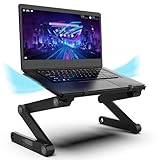
After building, shimming, and stress-testing risers on my own workbench, the Uncaged Ergonomics WorkEZ Adjustable Laptop Stand is the best overall laptop stand for desk ergonomics and cooling, with the LOXP Aluminum Laptop Riser with Wrist Support as the runner-up.
Most of us start the same way: a stack of hardcover books, maybe a scrap of plywood, and a laptop that still runs hot and still leaves our necks aching by 3 p.m. The problem is that a DIY stack fixes height but ignores tilt, airflow, and wrist angle — the three variables that actually decide whether your setup feels good after eight hours. This guide covers how to measure your correct screen height, what to look for in hinge and vent design, and which five stands survived real use on a home office desk, a standing desk, and a couch.
As an Amazon Associate we earn from qualifying purchases.




Quick Comparison
| Product | Best For | Standout Feature | Rating |
|---|---|---|---|
| Uncaged Ergonomics WorkEZ | Full ergonomic control | Independently adjustable height and tilt | See card above |
| LOXP Aluminum Laptop Riser | Value seekers | Built-in wrist support ledge | See card above |
| MAX SMART Laptop Lap Pad | Sofa and bed work | USB cooling fan with heat shield | See card above |
| Nulaxy Dual Foldable Riser | Posture correction on the move | Advanced heat-vent channel | See card above |
| Tonmom Adjustable Laptop Riser | Minimalist desks | Low-profile fold-flat frame | See card above |
How to Choose a Laptop Stands for Desk Ergonomics and Cooling
- Measure before you buy: Sit in your chair, look straight ahead, and have someone mark where your gaze lands on the wall. Measure that height to your desk surface — that’s the lift you need, and it’s usually 4 to 6 inches, not the 10 inches many stands max out at.
- Check the vent geometry: Open frames and raised rails beat solid trays every time. If the underside of your laptop sits flush against a flat panel, you’ve just built an oven; look for gaps under the intake fans, not just decorative slots.
- Test the wobble factor: Press down on a front corner. Any stand with a single center hinge and no cross-brace will flex, and that flex transfers into your keystrokes. Aluminum with a folded-sheet base is stiffer than it looks; thin plastic with long legs is not.
- Match it to your input method: If you raise the screen you must lower your hands, which means an external keyboard. Only choose a stand with a wrist ledge if you plan to keep typing on the built-in keyboard at a mild 15-degree tilt.
- Plan the cable routing: Lifting the laptop puts your ports in the air. Look for an open rear so USB-C, HDMI, and power cables can drop straight down — then finish the job with adhesive clips or a cable sleeve, the cheapest ergonomic upgrade you’ll ever make.
The Best Laptop Stands for Desk Ergonomics and Coolings Reviewed
Best Overall: Uncaged Ergonomics WorkEZ Adjustable Laptop Stand
This is the closest thing to a fully machine-adjustable rig, with separate height and tilt joints that let you dial in an exact angle instead of settling for a preset notch. It’s the pick for anyone who moves between a desk, a standing desk, and a bed, and who wants to fine-tune rather than adapt.
Best Budget: LOXP Aluminum Laptop Riser with Wrist Support
A single folded aluminum piece with a wrist ledge and a wide-open underside — simple, rigid, and cool-running. Best for someone typing on the laptop’s own keyboard who wants a modest, comfortable lift without buying a separate keyboard and mouse.
Best Premium: MAX SMART Laptop Lap Pad with Mouse Pad and USB Cooling Fan
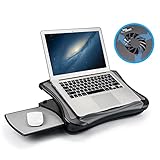
The cushioned base, non-slip heat shield, attached mouse pad, and powered fan make this a complete portable workstation rather than a bare riser. Choose it if a meaningful share of your work happens on a couch, in bed, or in a parked car and thermal throttling has become a real problem.
Best for Posture Correction: Nulaxy Dual Foldable Laptop Riser
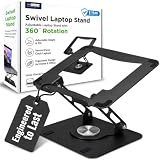
The dual-fold frame collapses flat for a bag while still hitting genuine eye-level height, and the heat-vent channel keeps airflow moving under 10-to-16-inch machines. Ideal for hybrid workers who need the same neck-saving geometry at home and at a shared desk.
Best for Minimalist Desks: Tonmom Adjustable Laptop Riser
Understated black finish, quick angle changes, and a footprint that disappears on an L-shaped or corner desk where surface area is precious. A smart choice if you already run an external monitor and want the laptop tucked alongside as a clean second screen.
Frequently Asked Questions
Do laptop stands actually lower operating temperatures?
Yes, when they lift the chassis and leave the intake vents unobstructed. Passive risers typically shave a handful of degrees under load; an active fan pad like the MAX SMART does more, particularly on soft surfaces where a laptop would otherwise suffocate.
Do I need an external keyboard with a laptop stand?
If you raise the screen to eye level, yes — otherwise your shoulders climb to reach the keys. For a lower, tilted setup such as the LOXP or the Thibault Aluminum Laptop Stand, the built-in keyboard remains workable.
Aluminum or plastic?
Aluminum wins on stiffness and passive heat dissipation, which is why most well-reviewed risers use it. Plastic and cushioned models make sense specifically for lap use, where rigidity matters less than comfort and insulation.
Can I just build my own riser?
You can, and a sanded plywood box works fine for height. What DIY rarely nails is adjustable tilt and a properly vented underside — that’s where a purpose-built hinge earns its cost.
Final Thoughts
For most home offices, the Uncaged Ergonomics WorkEZ delivers the widest adjustment range and the most honest ergonomic fit, while the LOXP Aluminum Riser covers the basics for far less. If your laptop time happens away from the desk, the MAX SMART Lap Pad is the one that solves both posture and heat at once.