Our Top Picks


For most people building an ergonomic desk around a laptop, the Basics Adjustable Laptop Stand is the best overall pick: it lifts the screen, lets you change the height, folds flat for a bag, and has a ventilated platform so the laptop is not sitting on a closed surface. An “ergonomic” laptop stand is a riser that raises the screen toward eye level so you stop looking down at it, and it only works properly when you add a separate keyboard and mouse. If you want a rigid metal look, the aluminum SOUNDANCE stand is the neat alternative, and the rotating and phone-holder models suit shared desks and small workspaces.
Quick List
- Basics Adjustable Laptop Stand – best for an adjustable, foldable all-rounder with ventilation
- BONTEC Wooden Monitor Riser – runner-up accessory for raising monitors, not a laptop stand
- LOXP 360 Rotating Laptop Stand – best for turning your screen to share it with a colleague
- 10-17 Inch Phone-Holder Laptop Stand – best for larger laptops up to a 16-inch MacBook Pro plus a phone nearby
- SOUNDANCE Aluminum Laptop Stand – best for a sturdy, open-cooling metal riser for 10 to 15.6 inch laptops
- Viozon Foldable Magnetic-Phone Stand – best for travel with a magnetic phone holder built in
Which One Is Right for You?
| If you… | Choose |
|---|---|
| Want one stand that adjusts, folds and ventilates for daily home-office use | Basics Adjustable Laptop Stand |
| Want a permanent metal riser that stays put on a desk with a 15-inch laptop | SOUNDANCE Aluminum Laptop Stand |
| Share your screen across the desk with a teammate or client | LOXP 360 Rotating Laptop Stand |
| Carry a large 16-inch laptop and want a phone parked beside it | 10-17 Inch Phone-Holder Laptop Stand |
| Work at cafes, hotels or coworking spaces and need something that packs small | Viozon Foldable Magnetic-Phone Stand |
| Already use an external monitor, or want to lift a pair of screens | BONTEC Wooden Monitor Riser (accessory, not for laptops) |
Start with how you work. If your laptop lives on one desk, a stable stand with a wide base matters most. If it travels, fold size and weight matter more than anything else. Whichever you pick, plan for an external keyboard and mouse, because raising the screen also raises your hands if you keep typing on the laptop keys.
All 6 Picks in Detail
1. Basics Adjustable Laptop Stand – Best for an Adjustable Everyday Riser
As an Amazon Associate we earn from qualifying purchases at no extra cost to you.

This is the stand to start with if you want to dial the screen height in rather than accept a single fixed angle. The listing describes a sturdy, portable, height-adjustable riser with ventilated cooling that folds, and it makes a broad claim about fitting all laptops, so it suits mixed households where one stand serves several machines. It is a straightforward desk tool rather than a design piece, which is exactly why it works as the default recommendation.
- Height-adjustable platform, so you can match the top of the screen to your eye line
- Ventilated surface described for cooling airflow under the laptop
- Foldable and portable construction for a bag or drawer
- Marketed as compatible with all laptop sizes; confirm the maximum screen size and weight limit on the listing
- Material and exact height range: confirm on listing
Pros
- Adjustability helps different users share it
- Folding design stores flat
- Ventilated platform keeps the underside open
Cons
- Adjustable joints are more moving parts to loosen over time
- Does not rotate like the LOXP model
Compared with the SOUNDANCE aluminum stand, this one trades a rigid fixed form for adjustability, so choose it when more than one person uses the desk.
2. BONTEC Wooden Monitor Riser – Runner-up Accessory for Raising Monitors

This product does not belong in a strict laptop stand category, and it is better to say so plainly. The listing describes it as a dual monitor stand riser with adjustable length and swivel angle, in white wood, doubling as a desktop organizer with a smartphone holder. It is built to lift desktop monitors off the desk surface, not to tilt a laptop for typing, so treat it as a runner-up accessory if your setup already includes external screens.
- Designed as a monitor riser with adjustable length for one or two screens
- Swivel angle adjustment mentioned in the listing
- White wooden look with an organizer area and smartphone holder
- Laptop compatibility, weight limit and riser height: confirm on listing
- Fixed riser, not a folding travel stand
Pros
- Useful for raising an external monitor to eye level
- Doubles as desk storage
- Warm wood style suits a home desk
Cons
- Not a dedicated laptop stand
- Not portable in the way a folding aluminum stand is
If a laptop riser is what you need, pick the Basics stand or the SOUNDANCE instead; keep this one for screens that stay on the desk.
3. LOXP 360 Rotating Laptop Stand – Best for Sharing Your Screen

The 360 degree rotating base is the headline feature here, and it makes sense for people who turn the laptop toward someone else during calls, tutoring, client reviews or design feedback. The listing describes an adjustable, foldable, portable riser, so it can also function as a regular desk stand when you are working alone. Rotation is a convenience, not an ergonomic requirement, so judge it on how often you actually turn the screen.
- Rotating base, listed at 360 degrees, to turn the laptop on the spot
- Adjustable height or angle, as stated in the listing name
- Foldable and portable for moving between rooms
- Maximum laptop size and weight capacity: confirm on listing
- Material and non-slip pads: confirm on listing
Pros
- Easy to angle the screen toward a second person
- Works for presentations and one-to-one meetings
- Folds for storage
Cons
- A swivel base adds a pivot that must stay tight under a heavier laptop
- More mechanism than you need if the laptop never turns
Next to the Basics stand it is the more social option, while the Basics model is the better fit for a fixed solo desk.
4. 10-17 Inch Phone-Holder Laptop Stand – Best for Larger Laptops
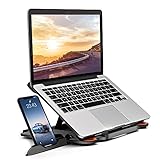
This unbranded-style stand is notable for its stated size range: 10 to 17 inch laptops, with a 16-inch MacBook Pro named in the listing. That makes it a good candidate if you use one of the bigger, heavier machines that smaller riser stands cannot cover. It also includes a phone holder and 360 degree rotation, giving it a feature set aimed at multitaskers who keep a phone in sight.
- Stated compatibility with 10 to 17 inch laptops, including a 16-inch MacBook Pro
- Built-in phone holder
- 360 degree rotation noted in the listing
- Foldable and portable, per the listing
- Weight limit, height range and material: confirm on listing
Pros
- Wide size range covers large laptops
- Phone holder keeps notifications visible
- Folds away when you are done
Cons
- Larger laptops put more load on any folding stand, so check the weight limit
- Phone holder adds clutter to a minimal desk
Choose it over the Viozon model when the laptop is 16 inches or bigger, and over the LOXP when a phone cradle matters.
5. SOUNDANCE Aluminum Laptop Stand – Best for a Rigid Open-Cooling Metal Riser

The SOUNDANCE stand is the clean, minimal option. The listing describes an aluminum ergonomic desk riser for 10 to 15.6 inch laptops, with 6 inches of elevation and an open design for cooling, in a gold finish. A solid metal frame is attractive if you want something that looks permanent and does not rock when you type, and a 6-inch lift is meaningful for many seated users.
- Aluminum construction, stated in the listing
- Fits 10 to 15.6 inch laptops, so 16-inch models fall outside its stated range
- 6 inches of elevation, as listed; confirm on the product page whether the height is fixed or adjustable
- Open cooling design under the laptop
- Gold color shown in the listing; weight capacity: confirm on listing
Pros
- Rigid metal frame feels stable on a desk
- Open layout supports airflow
- Good fit for 13 to 15 inch laptops
Cons
- Size range stops at 15.6 inches
- Less flexible than an adjustable model if several people share it
Compared with the Basics stand it is the sturdier-looking, less configurable choice, so buy it for one dedicated desk.
6. Viozon Foldable Magnetic-Phone Stand – Best for Travel and Quick Setups
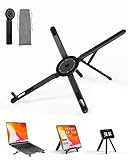
The Viozon is aimed at people who set up and break down a workspace often. The listing describes a portable, foldable and adjustable aluminum riser with a magnetic phone holder for 10 to 16 inch laptops, which gives it a middle range between the SOUNDANCE and the 17-inch stand. If you bounce between a home desk, a cafe and a hotel, a compact aluminum fold-up is easier to live with than a fixed platform.
- Aluminum construction, per the listing
- Fits laptops from 10 to 16 inches
- Magnetic phone holder included
- Foldable, adjustable and portable design
- Folded size, weight and weight limit: confirm on listing
Pros
- Packs down for a laptop bag
- Covers 16-inch laptops
- Magnetic phone holder is quick to use
Cons
- Magnetic phone holders suit phones with magnetic backs or a metal plate; check compatibility
- Folding hinges are a long-term wear point
It sits closest to the 10-17 inch phone-holder stand, and it is the one to pick when you want aluminum and portability over the biggest size range.
Specs Compared
| Product | Type | Stated laptop size | Material | Adjustable | Folds | Extras |
|---|---|---|---|---|---|---|
| Basics Adjustable Laptop Stand | Laptop riser | Marketed as fitting all laptops; confirm on listing | Confirm on listing | Yes, height | Yes | Ventilated platform |
| BONTEC Wooden Monitor Riser | Monitor riser (accessory) | Not a laptop stand; confirm on listing | Wood, per listing | Length and swivel angle | Confirm on listing | Organizer, phone holder |
| LOXP 360 Rotating Laptop Stand | Laptop riser | Confirm on listing | Confirm on listing | Yes | Yes | 360 degree rotating base |
| 10-17 Inch Phone-Holder Laptop Stand | Laptop riser | 10 to 17 inches | Confirm on listing | Yes | Yes | Phone holder, 360 degree rotation |
| SOUNDANCE Aluminum Laptop Stand | Laptop riser | 10 to 15.6 inches | Aluminum | 6-inch elevation listed; confirm on listing | Confirm on listing | Open cooling design |
| Viozon Foldable Magnetic-Phone Stand | Laptop riser | 10 to 16 inches | Aluminum | Yes | Yes | Magnetic phone holder |
How We Chose These
This guide is a research-based comparison, not a lab report. We began with the product set drawn from current catalog listings and read each listing name and specification field for the details that matter on a desk: stated laptop size range, material, whether the height adjusts, whether the stand folds, and whether extras such as rotation or a phone holder are included. We then checked those traits against published workstation guidance on screen height and keyboard use, and we flagged anything the listing does not state instead of guessing. One listed item is a monitor riser rather than a laptop stand, so it is labeled as a runner-up accessory. Always confirm weight limits and compatibility on the product page before buying.
What to Look For
Screen Height and Eye Line
The reason people buy an ergonomic laptop stand is to get the screen up to a comfortable viewing height. The US Occupational Safety and Health Administration guidance for computer workstations says the monitor should be directly in front of you at a height where you can look straight ahead without tilting your head, and that the top of the screen should not sit above your horizontal line of sight. Oregon OSHA adds that the top line of the screen should be at or slightly below eye level and the screen about an arm’s length away, roughly 16 to 29 inches. A laptop sitting flat on a desk is usually well below that line, which is why a riser helps.
Here is a rule of thumb with example numbers. If your eyes sit about 16 inches above the desktop when you are seated upright, and the open laptop screen is about 9 inches tall from the hinge to the top edge, you want the base of the screen raised roughly 5 to 7 inches. A fixed 6-inch riser lands in that zone for that person, while a taller or shorter user may need an adjustable stand. Your own numbers will vary, so measure your seated eye height above the desk once before you shop.
Fixed Versus Adjustable Stands
A fixed rigid riser is simple and stable. An adjustable stand has hinges or telescoping legs that let you change both height and angle, which matters if you share the desk, sit and stand at different heights, or alternate between a 13-inch and a 16-inch machine. The trade-off is that every joint is a place that can loosen, so check the locking mechanism and stated weight capacity. For a heavy 16-inch laptop, look for a base that is wide enough to stay stable and non-slip pads at every contact point.
Size Range and Weight Capacity
Match the stand to your laptop, not the other way around. Several listings in this guide state size ranges: 10 to 15.6 inches, 10 to 16 inches and 10 to 17 inches. A 16-inch MacBook Pro is a heavy laptop, so a stand that lists it by name or states a 17-inch maximum is a safer match than one that only says it fits all laptops. Weight capacity is often missing from the short listing name, so find it in the product details. Also think about the lip or stopper at the front of the platform: it should hold the laptop without blocking ports on the sides.
Ventilation and Heat
Open platforms and perforated surfaces let air reach the underside of the laptop. That helps when you push the machine hard, but a stand does not replace the laptop’s own fans, and no stand will fix a blocked vent. Avoid soft surfaces under the laptop and keep side and rear vents clear.
The Keyboard and Mouse Rule
Raising a laptop screen to eye level puts the keyboard higher and farther away than your elbows want. OSHA workstation guidance recommends providing an external keyboard and input device for laptop users, because laptop keyboards are generally not suitable for prolonged typing. Plan on a separate keyboard and mouse placed close together at elbow height, with the laptop on the stand as the display. If you do not want that, a stand is probably not the right tool, and a lower, flat laptop with frequent breaks would be a better compromise.
Portability and Desk Footprint
Think about where the stand will live. A folding aluminum stand that weighs little is easier to carry, while a bigger platform with a wide base is better left on a desk. Measure the free depth behind your keyboard too, because a stand lifts the laptop up and back, and you need space for the keyboard in front of it.
A Simple Setup Checklist
Once the stand arrives, a few minutes of setup makes a visible difference. First, sit the way you normally work, with your back supported and your feet flat on the floor. Second, place the stand so the screen is about an arm’s length away, then raise it until the top edge sits at or just under your eye line. Third, bring the external keyboard and mouse close together so your elbows stay near your sides and your wrists stay straight. Fourth, check that the stand does not wobble when you tap the screen or lean on the desk. If it rocks, move it to a flatter spot or add a thin mat under the feet. Finally, give yourself a week: if your neck or shoulders still feel tight, change the height by an inch and try again, because the right height is personal and depends on your chair, desk and body.
It also helps to keep cables tidy. A stand that lifts the laptop will pull its ports away from the desk, so a charging cable or hub cable can hang in midair and tug on the connector. Route cables along the back edge of the stand, leave a little slack, and avoid draping heavy adapters off the side of the laptop. If the stand has a front lip, make sure it does not press on a port or the trackpad edge.
Questions
Do I need an external keyboard with a laptop stand?
Yes, in almost every case. Once the screen is at eye level, the laptop keyboard sits too high for comfortable typing, so use a separate keyboard and mouse at elbow height. Workstation guidance from OSHA recommends this for anyone who uses a laptop heavily.
How high should my laptop screen be?
The top of the screen should be at or slightly below your eye level, with the screen about an arm’s length away. The part of the screen you read most should fall a little below eye level, so you can keep your neck straight. Adjust the stand in small steps until you can read without tilting your head.
Will a laptop stand help my laptop run cooler?
An open or ventilated stand can improve airflow around the underside of the laptop, which may help in long sessions. It will not change fan behavior or fix heavy workloads, so treat cooling as a side benefit rather than the reason to buy.
Can a monitor riser be used as a laptop stand?
Only if the weight, platform size and height suit the laptop, and most monitor risers are not designed to tilt the laptop or hold its weight at the edge. Use a purpose-built laptop stand for the laptop and keep a monitor riser for monitors.
Are aluminum stands better than plastic ones?
Aluminum is generally stiffer and dissipates heat better, which is why many riser stands use it. Plastic can still work if the design is stable and the weight limit fits your laptop. The listing’s stated material and capacity matter more than the label alone.
Will these stands fit a 16-inch laptop?
Two stands in this guide state support for a 16-inch class machine: the 10 to 17 inch phone-holder stand and the 10 to 16 inch Viozon model. The SOUNDANCE lists 15.6 inches as its maximum, so check size and weight on the product page before pairing it with a bigger laptop.
Update History
- October 20, 2026 – Initial publication; product set drawn from current catalog listings.
- Check the product page for current specifications and availability before buying.
Sources
- Retailer listing titles and specification fields for each listed stand
- US OSHA Computer Workstations eTool pages on monitor placement, laptops and external keyboards
- Oregon OSHA guidance on evaluating a computer workstation, for viewing distance and screen height