Key takeaways
- Compare six of the best desk pads for home offices, from PU leather blotters to a floral XXL mat, with sizing, material and care tips for any desk.
For a classic home office, the Aothia PU leather desk pad is the best overall starting point, because it protects the desktop, gives a smooth surface for writing and mouse use, and wipes clean in seconds. A desk pad is a large mat that covers the working area of your desk, replacing a small mouse pad with a single surface for keyboard, mouse and paper. If you want a softer, decorative look, the dark green floral XXL mat is the style pick, and the YSAGi pads cover the same leather approach in several variations.
Quick List
- Dark green floral XXL desk mat – best for a decorative, extra-large mouse-pad-style mat with a stitched edge.
- Aothia PU leather desk pad – best overall for a waterproof, wipe-clean laptop and writing surface.
- YSAGi leather office desk pad – best for protecting a wood desk while writing and typing.
- YSAGi leather desk pad (office desk mat) – best for a large mouse area and laptop work.
- Aothia black leather office desk pad – best for a plain black blotter look in a professional office.
- YSAGi 31.5-inch leather pad – best for a clearly sized mid-length pad that fits most desks.
Which One Is Right for You?
| If you… | Choose |
|---|---|
| want a spill-proof surface that wipes clean and suits most offices | Aothia PU leather desk pad |
| want a plain, professional black pad | Aothia black leather office desk pad |
| need a pad with a stated size so you can plan the layout | YSAGi 31.5-inch leather pad |
| write by hand a lot and want to protect the desk finish | YSAGi leather office desk pad |
| use a laptop and a mouse and want one big surface | YSAGi leather desk pad (office desk mat) |
| prefer a floral, softer look over a leather blotter | Dark green floral XXL desk mat |
Five of the six listings are PU leather pads and one is a patterned mouse-pad-style mat, so your first decision is the look and feel you want. The second decision is size: measure your desk, keyboard and mouse area, and confirm the exact dimensions and colors on the product page, since several listings in this group read almost the same.
A quick way to decide: if the desk is the thing you want to protect, go leather. If your wrists and mouse hand are the priority, a soft mat with a stitched edge is gentler. If you have both a laptop and a monitor on the desk, favor the longer pads so the whole working area sits on one surface and nothing catches the edge. And if your desk is small, a pad that hangs over the front edge can snag sleeves, so measure twice.
All 6 Picks in Detail
1. Dark Green Floral XXL Desk Mat – Best for Style
As an Amazon Associate we earn from qualifying purchases at no extra cost to you.

This is the odd one out in a group of leather pads, and it appeals to a different buyer. The listing describes an extra-large mouse pad desk mat with an anti-slip base and stitched edges, in a dark green floral pattern, aimed at home office use. Stitched edges are a practical detail because they stop the fabric from fraying and lifting at the corners. It is a mat for people who want a cozy, decorative workspace rather than a polished blotter.
- Design: dark green floral pattern, per the listing
- Size: described as XXL; confirm exact dimensions on the listing
- Base: anti-slip, per the listing
- Edges: stitched, per the listing
- Surface material and thickness: confirm on the listing
Pros
- Adds color and a distinctive look to a plain desk
- Stitched edges and a grippy base help it stay in place
Cons
- Fabric-style surfaces are harder to wipe clean than leather
- Waterproofing is not stated in the visible listing text
Because the listing leans on style, it is also a fair pick for a shared or student desk where personality matters as much as protection. Who should pick it: people who value design and want a large mat for mouse and keyboard movement. Check how the surface handles spills before you rely on it near a drink. Compared with the leather pads in this list, it offers a softer feel for your wrists and mouse, but a less formal look.
2. Aothia PU Leather Desk Pad – Best Overall

The Aothia pad is the all-rounder. The listing describes a PU leather desk pad protector that doubles as a mouse pad, with a non-slip base, a waterproof surface and a size suited to laptop and writing use. PU leather gives you a smooth, even surface that lets a mouse glide and a pen write cleanly, and it wipes clean after a spill. The listing text does not state the size in the visible part, so confirm it against your desk.
- Material: PU leather, per the listing
- Base: non-slip
- Waterproof: described as waterproof
- Uses: desk protector, mouse pad, laptop pad and writing pad
- Size and colors: confirm on the listing
Pros
- Wipe-clean surface that protects the desk from spills and scratches
- Works for writing, typing and mouse use
Cons
- PU leather can have a smell when new and may need airing out
- Very hot items can mark the surface
Think of it as the default choice: nothing about it is unusual, and that is exactly why it works. A neutral leather pad also pairs well with most monitors, lamps and keyboards, so you do not have to design the rest of the desk around it. Who should pick it: remote workers, students and home offices that need a general-purpose surface. It suits a keyboard, a mouse and a notebook at once. Compared with the black Aothia office pad, the two listings are close relatives, so choose between them by the sizes and colors on offer.
3. YSAGi Leather Office Desk Pad – Best for Protecting Wood Desks

This YSAGi listing is for a leather office desk pad protector with a large mouse pad surface, a non-slip base and a waterproof writing pad. The wording points to a blotter-style pad that sits under the keyboard and mouse and protects the desktop from scratches, rings and scuffs. The materials are PU leather, per the listing, and the pad is intended for both the office and the home.
- Material: PU leather, per the listing
- Base: non-slip
- Waterproof: described as waterproof
- Uses: desk protector, large mouse pad, laptop blotter and writing pad
- Size and colors: confirm on the listing
Pros
- Protects a wood or veneer surface from scratches and moisture
- Clean, formal look for an office
Cons
- The listing is similar to other YSAGi options, so the differences are in size and color
- Leather-look surfaces show fingerprints more than matte fabric
If you often write with a ballpoint pen, put a sheet of paper under your hand, since firm pen pressure through a thin paper can leave marks on any soft surface. Who should pick it: anyone with a nice desk who wants a barrier between it and daily use. Pens, coffee mugs and laptops can scratch or mark finishes, so a pad is a simple safeguard for a desk you care about. Compared with the other YSAGi pad that carries an office desk mat label, the two share the same core features.
4. YSAGi Leather Desk Pad (Office Desk Mat) – Best for Mouse and Laptop Work

The second YSAGi listing reads almost the same as the first, with an office desk mat, a large mouse pad, a non-slip PU leather blotter and a waterproof laptop writing pad. In practice, that means a large mat that gives your mouse a reliable glide and your laptop a stable base. If you move a laptop between a dock and the desk, a pad like this protects the surface under the machine from heat marks and scratches, though very hot chargers should still sit off the pad.
- Material: PU leather, per the listing
- Base: non-slip
- Waterproof: described as waterproof
- Uses: office desk mat, large mouse pad and laptop writing pad
- Size and colors: confirm on the listing
Pros
- Large surface for a mouse and laptop
- Easy to wipe clean
Cons
- Smooth leather can feel cool to the touch in cold rooms
- Details such as size are not visible in the listing text provided
If you share the desk with a partner or child, the wipe-clean surface is also forgiving of snacks and drinks, which is hard to say about fabric. Who should pick it: people who spend most of the day with a mouse and want a single large surface. Compared with the first YSAGi listing, it emphasizes the mouse pad and laptop role, so check the available sizes to find the real difference.
5. Aothia Black Leather Office Desk Pad – Best Plain Black Option

This Aothia listing covers a black PU leather office desk pad with a non-slip base, a waterproof surface and a role as a laptop writing pad and mouse pad. Black is the neutral choice that suits dark desks and professional offices, and it hides stray marks better than lighter colors. As with the other Aothia pad, confirm the available sizes on the product page.
- Material: PU leather, per the listing
- Color: black, per the listing
- Base: non-slip
- Waterproof: described as waterproof
- Size: confirm on the listing
Pros
- Neutral black look that suits most offices
- Same wipe-clean surface as the other leather pads
Cons
- Dark surfaces show dust and lint
- May not suit a light desk or a bright room
It also works well on a camera-facing desk, because a dark, matte-looking surface avoids bright reflections in video calls. Who should pick it: professionals and anyone who wants the pad to disappear into the desk. Compared with the first Aothia pad, it is mainly a color decision.
6. YSAGi 31.5-Inch Leather Pad – Best for a Clearly Sized Pad
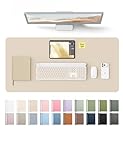
Of the six, this listing gives the clearest size cue in its title: a 31.5-inch wide pad with a depth of about 15 inches, with the exact figure to confirm on the product page. That is a practical mid-length size that spans a keyboard and a mouse and leaves room for a notepad. The pad is described as PU leather with a non-slip base and a waterproof writing surface.
- Width: 31.5 inches, per the listing title
- Depth: about 15 inches; confirm the exact figure on the listing
- Material: PU leather, per the listing
- Base: non-slip
- Waterproof: described as waterproof
Pros
- Stated width makes it easier to plan around
- Mid-length size fits most desks
Cons
- Depth is modest if you also want a laptop on the pad
- Color options should be confirmed on the page
The mid-length shape leaves space on either side for a desk lamp, a coaster or a phone stand without crowding the pad. Who should pick it: buyers who want to know the footprint in advance. Compared with the other YSAGi listings, it is the one that states a dimension in the visible title.
Specs Compared
| Product | Material | Size | Base | Water resistance | Color |
|---|---|---|---|---|---|
| Dark green floral XXL mat | Confirm on listing | XXL; confirm on listing | Anti-slip, stitched edges | Confirm on listing | Dark green floral |
| Aothia PU leather pad | PU leather | Confirm on listing | Non-slip | Waterproof | Confirm on listing |
| YSAGi leather office pad | PU leather | Confirm on listing | Non-slip | Waterproof | Confirm on listing |
| YSAGi leather desk pad | PU leather | Confirm on listing | Non-slip | Waterproof | Confirm on listing |
| Aothia black office pad | PU leather | Confirm on listing | Non-slip | Waterproof | Black |
| YSAGi 31.5-inch pad | PU leather | 31.5 in wide; depth about 15 in, confirm | Non-slip | Waterproof | Confirm on listing |
How We Chose These
This guide is based on research into catalog listings and general desk ergonomics, not on physical trials. We compared the materials, base type, water resistance, stated sizes and intended uses across the six listings, and we noted that several of them are close relatives with differences mainly in size and color. We favored pads that describe a non-slip base and a surface that suits both writing and mouse use, and we flagged every size, color or thickness that the visible listing text does not state. Because the leather pads read so similarly, we kept the descriptions factual and ask you to confirm sizes and finishes on the product page.
What to Look For
Size and coverage
Measure your desk and your gear before you choose. A full-size keyboard is about 17 to 18 inches wide, and a mouse needs roughly 8 inches of side-to-side travel, so you need at least 25 to 26 inches of width for both. Worked example: a 31.5-inch pad on a 48-inch desk covers about two thirds of the width, leaving room at the sides for a lamp or a monitor stand. For depth, a keyboard is about 5 to 6 inches deep, a mouse needs 6 to 8 more, and a pad around 15 inches deep covers both with a little spare. Larger pads can hold a laptop or a notepad as well, but make sure they do not run off the back edge or hit your monitor stand.
Material and surface feel
PU leather is smooth, resists spills and cleans with a damp cloth. It feels slightly cool and gives pens and mice a consistent surface, but it can show fingerprints and may smell for the first day or two. Fabric or microfiber mats feel softer under your wrists and grip a mouse well, but they absorb liquid and are harder to clean. If you use an optical mouse, a very glossy surface can occasionally confuse the sensor, so a matte or lightly textured finish is the safer choice. Check whether the surface is smooth enough for handwriting without leaving impressions on the page beneath.
Base and edges
The base keeps the pad from sliding around when you move your mouse. Rubber-like or textured bases grip well on wood and laminate, but check that they will not leave marks on a polished finish, especially in warm conditions. Stitched or smoothly finished edges stop the corners from lifting. New pads that have been rolled up in a box may curl at the edges at first, and laying them flat with books on the corners for a day usually helps. Some pads also curl if the room is cold, so unroll them before use.
Choosing between near-identical listings
Several of these leather pads share the same feature list, so the real differences are size, color, thickness and the exact feel of the surface, which you will find on the product page rather than in the title. Start by writing down the width and depth you need, then filter to the options that meet both. Next choose a color that suits your desk and monitor: black and dark brown hide wear, while lighter colors brighten a dim room but show dirt sooner. Finally, check that the thickness is enough to feel substantial without lifting your wrists too high, since a very thick pad can raise the mouse and keyboard level slightly.
Setting the pad up
Unroll the pad as soon as it arrives and leave it flat for a day. Clean the desk first, because dust trapped under a non-slip base can scratch the surface over time. Position the pad so the front edge sits a few inches back from the edge of the desk, where your forearms rest comfortably without pressing on a hard corner. Place the keyboard centered on your body, with the mouse on the same pad at the same height so your wrist stays neutral. If the pad creeps during use, wipe both the base and the desktop with a damp cloth and let them dry fully before putting it back.
Protection and maintenance
A desk pad protects against scratches, rings from mugs and light moisture. It is not a heat shield, so do not set hot pans, soldering irons or very hot charger bricks on it. Wipe spills quickly with a damp cloth and avoid harsh solvents, which can damage the surface. Dust the pad regularly, since grit under a mouse can scratch the pad. If you use a standing desk, check that the pad does not shift as the desk moves, and consider a size that stays clear of the monitor stand and power cables.
Questions
Will a desk pad damage my desk?
Most pads are safe on sealed wood, laminate and glass, but a rubber base can mark some finishes if left in place for a long time in warm conditions. Lift the pad occasionally and wipe the surface underneath, and avoid placing a pad on a freshly oiled or waxed desk until the finish has fully cured.
Is PU leather a good desk pad material?
It is a popular choice because it is smooth and easy to clean, and it gives a tidy look. It is less soft under the wrists than fabric and can show fingerprints, so it suits people who value a polished surface. It is also a fair fit for shared desks, where spills are more likely.
How big should a desk pad be?
Aim for at least 25 to 26 inches of width to cover a full-size keyboard and mouse, and around 12 to 15 inches of depth. Go larger if you want the pad to hold a laptop or notepad as well, and smaller if your desk is shallow and the pad would otherwise hang over the front edge.
Will my mouse work on a leather pad?
Most optical mice track fine on smooth, matte surfaces. If your mouse skips on a glossy pad, try changing the mouse feet, moving to a fabric mat or checking the sensor type on the product page.
Does the new-pad smell go away?
Usually it fades in a day or two when the pad is unrolled and left in a ventilated room. If a strong odor persists, leave the pad out longer before use, or contact the seller about a return.
How do I clean a desk pad?
For leather and PU leather pads, wipe with a damp cloth and mild soap, then dry with a soft cloth. Avoid soaking the pad or using abrasive cleaners, and check the listing for any cleaning guidance specific to the material.
Update History
- October 20, 2026 – Initial publication; product set drawn from current catalog listings.
- Check the product page for current specifications and availability before buying.
Sources
- Retailer listing titles and specification fields for each product named above.