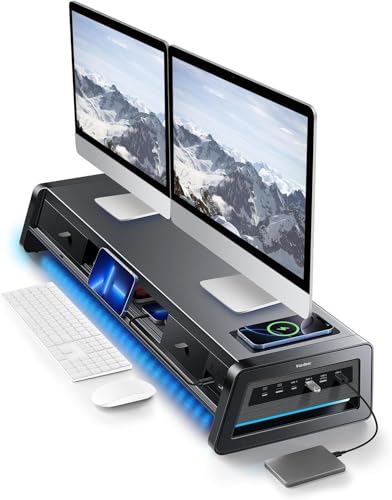
The Vaydeer All-in-One Dual Monitor Stand Riser (39.3″, Black) is the best overall pick for anyone who wants one slab of metal to replace a hub, a charging pad, and a drawer full of clutter, while the meatanty 3-in-1 Monitor Stand Riser (21″) is the runner-up for single-monitor desks and tighter budgets.
If you have ever built your own riser out of scrap plywood, you know the moment the project falls apart: the wood is easy, but the wiring is not. You end up screwing a cheap USB hub to the underside, hot-gluing a wireless pad on top, and running six feet of cable through a hole you drilled slightly too small. It works, but it looks like it works. That is exactly the gap these all-in-one risers fill — they give you the height gain of a DIY build with the integrated ports and Qi charging already engineered in, plus grounded metal frames that will not sag under a 30-pound iMac. Below I break down which models earn their desk space, what to check before you buy, and where a DIY hybrid still makes sense.
Our top picks




As an Amazon Associate we earn from qualifying purchases at no extra cost to you.
Quick Comparison
| Product | Best For | Standout Feature | Rating |
|---|---|---|---|
| Vaydeer Dual Monitor Riser 39.3″ (Black) | Dual-monitor command centers | 8 USB ports, 2 drawers, LED strip | Highly rated |
| meatanty 3-in-1 Riser 21″ | Single monitor, small desks | 4 USB ports with data transfer | Well rated |
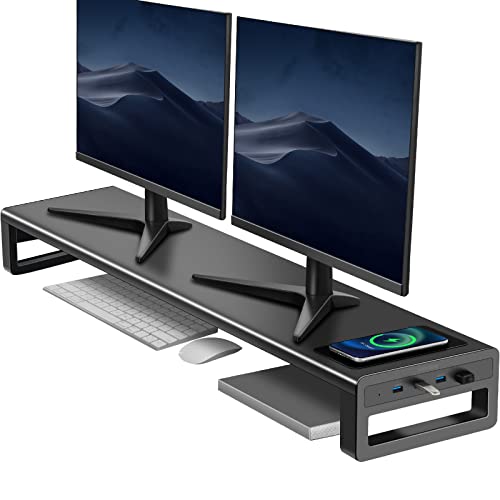
| Monitor Riser USB 3.0 + Type-C 27″ (Black) | Fast data and fast charging | USB 3.0, Type-C, 15W Qi pad | Highly rated |
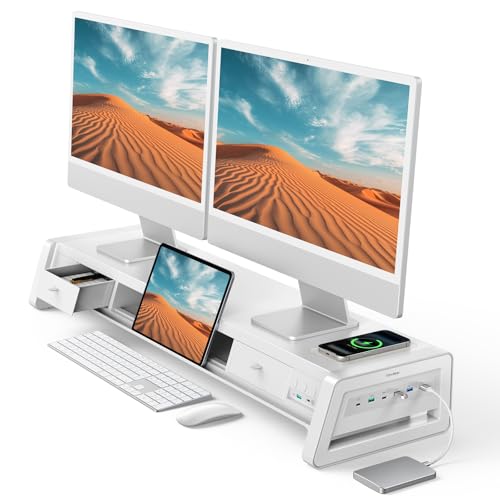
| Vaydeer Dual Monitor Riser 39.3″ (White) | Light-toned and Scandi desk builds | Matched white metal finish | Highly rated |
| Monitor Riser USB 3.0 + Type-C 27″ (White) | Streaming and on-camera desks | RGB lighting with clean white shell | Well rated |
How to Choose a Monitor Riser With a USB Hub and Wireless Charging
- Measure the span, not the monitor: Put a tape measure across your two stands’ feet before you shop. A 39.3″ riser needs a desk at least 47″ wide to look intentional; a 21″ unit suits a single 24–27″ panel.
- Check the height gain against your eye line: Most of these add roughly 3–4 inches. Sit down, look straight ahead, and mark where your gaze lands — the top third of the screen should meet it. If you need more, stack a hardwood spacer underneath rather than tilting the riser.
- Know your hub’s power source: Ports that pass real USB 3.0 data need a dedicated adapter, not just a single upstream cable. Confirm the included power brick and whether the ports are charge-only or data-capable.
- Test the load rating honestly: Metal frames handle 40+ pounds; particleboard bends. Weigh your monitors (spec sheets list it) and add your laptop if you plan to park it in the shelf gap.
- Plan the cable exit first: Look for a rear channel or notch. If there isn’t one, a $6 pack of adhesive cable clips along the back edge will keep the hub’s tail from becoming the ugliest part of your desk.
The Best Monitor Risers With USB Hubs and Wireless Charging, Reviewed
Best Overall: Vaydeer All-in-One Dual Monitor Riser (39.3″, Black)
Eight ports, two drawers, a Qi pad, and an LED strip on a metal deck long enough to span two monitors — this is the model that finally retired my plywood build. Best for anyone running a dual-screen setup who wants every peripheral cable terminating in one place.
Best Budget: meatanty 3-in-1 Monitor Riser (21″)
Four data-capable USB ports, a wireless charging module, and two drawers in a compact 21-inch metal frame. Best for single-monitor desks, dorm setups, or a second workstation where you don’t need eight ports.
Best Premium: Monitor Riser with USB 3.0 Hub & Type-C, 15W Wireless Charging (27″, Black)
The 15W pad and genuine USB 3.0 plus Type-C make this the pick for people moving real files, not just charging a mouse. Best for photographers, editors, and anyone who plugs in an external SSD daily.
Best for White Desk Builds: Vaydeer All-in-One Dual Monitor Riser (39.3″, White)
Identical hardware to the black version in a matte white finish that disappears against light oak or white laminate tops. Best for makers who already painted or veneered their desk and refuse to break the color scheme.
Best for Streaming Setups: Monitor Riser with USB 3.0 Hub & RGB Lighting (27″, White)
The RGB glow reads as accent lighting on camera rather than gamer overkill against the white shell. Best for streamers and video callers who want ambient fill light and fast ports in one footprint.
Frequently Asked Questions
Do these risers need to be plugged into the wall?
Yes, if you want wireless charging and full-speed data. The USB hub and Qi pad draw more current than a laptop port can supply, so plan on an outlet and a power adapter.
Will a wireless charging pad work through a thick phone case?
Usually up to about 4mm of plastic or silicone. Metal plates, credit cards, or PopSockets will block or overheat the coil — pull the case off and test before you blame the riser.
Can I mount a monitor arm through the riser?
No. These are platform risers, not clamp surfaces. If you use an arm, mount it to the desk edge behind the riser and use the riser purely as a hub-and-storage shelf.
Is a DIY riser still worth building?
Only if you want a custom width or a specific wood tone. Once you price a decent powered USB 3.0 hub and a Qi pad separately, the integrated units cost about the same and look far tidier.
Final Thoughts
For most home offices, the Vaydeer All-in-One Dual Monitor Riser (39.3″) is the buy — it consolidates the most hardware into one metal deck and comes in black or white to match your build. Choose the 27″ USB 3.0 and Type-C model if data speed matters more than width, or the meatanty 3-in-1 if you have one monitor and a modest budget.