Best Smart Light Switches: the right pick depends on your wiring
The best smart light switch is a neutral-wire model if your switch box has a neutral and you want the widest choice of dimmers, multi-way controls, and hub-free setups; choose a no-neutral model only when the wiring requires it, and check its bulb and hub requirements before buying.
Before choosing, turn off the circuit and inspect the switch box—or ask an electrician to identify the wires. A white wire is not automatically a neutral, and older homes may have switch loops with no neutral in the box. Product compatibility varies by model and region, so confirm the exact model’s wiring diagram, supported bulbs, and voice-platform listing.
Our top picks
 Kasa Smart Light Switch
- App-Guided Install: The Kasa or Tapo app guides…
- Control from Anywhere: Monitor your light status
- Voice Control: Enjoy the hands-free convenience of controlling…
 Amazon Basics Smart Light Switch
- Transform your home by upgrading to a smart…
- Enjoy a guided installation with our step-by-step video…
- Take control of your home lighting by scheduling…
 TP-Link Tapo Matter Smart Light Switch: Voice
- 【Matter: All-Round Compatibility】With Matter, users are no longer…
- 【Matter: Smooth LAN Control】With Matter, all devices in…
- 【Matter: Multi-Admin】Matter also allows you to control devices…
| Product | Key specs | |
|---|---|---|
| Kasa Smart Light Switch | App-Guided Install: The Kasa or Tapo app guides… Control from Anywhere: Monitor your light status Voice Control: Enjoy the hands-free convenience of controlling… | Check price |
| Amazon Basics Smart Light Switch | Transform your home by upgrading to a smart… Enjoy a guided installation with our step-by-step video… Take control of your home lighting by scheduling… | Check price |
| TP-Link Tapo Matter Smart Light Switch: Voice | 【Matter: All-Round Compatibility】With Matter, users are no longer… 【Matter: Smooth LAN Control】With Matter, all devices in… 【Matter: Multi-Admin】Matter also allows you to control devices… | Check price |
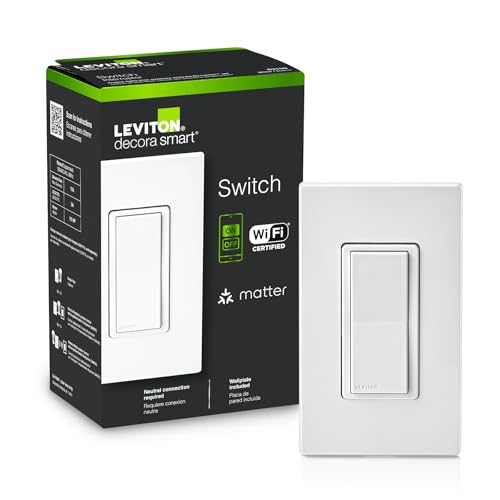 Leviton Decora Smart Switch Leviton Decora Smart Switch | Schedule exterior lights to turn on at sunset… USE YOUR VOICE FOR HANDS‑FREE CONTROL Check if lights are on and adjust them… | Check price |
As an Amazon Associate we earn from qualifying purchases at no extra cost to you.
Quick comparison by situation
| Your situation | Best fit | Check before buying |
|---|---|---|
| Neutral wire present; want the broadest selection | Neutral-wire smart switch | Whether it is a dimmer, needs a hub, and supports your voice platform |
| No neutral in the box | Purpose-built no-neutral switch or dimmer | Minimum load, compatible bulb types, and any required bypass or hub |
| One light controlled from two or more locations | Multi-way kit or switch explicitly rated for that circuit | Whether the kit uses a companion switch, a wired traveler, or wireless remotes |
| Smart-home system already uses a hub | Switch compatible with that hub and its radio protocol | Exact hub model, region, and whether the switch also needs a manufacturer bridge |
| Small or crowded switch box | A compact switch with a documented box-depth requirement | Device body, wire connectors, and room to fold conductors safely |
Neutral-wire vs. no-neutral: the main decision
Neutral-wire models
Most smart switches need a small amount of power even when the light is off. Neutral-wire models use the neutral conductor to power their electronics, so they generally work with a wider range of LED loads and are easier to find as straightforward on/off switches or dimmers. They are usually the least complicated choice when the correct wiring is available.
Neutral-wire models are not automatically compatible with every circuit. Check whether the switch requires a ground, supports the circuit’s voltage and amperage, and is approved for the load type. A smart dimmer also needs compatible dimmable bulbs; a standard smart switch should not be used to dim a lamp unless it is specifically designed to do so.
No-neutral models
No-neutral switches are designed for boxes without a neutral conductor. Some draw a tiny current through the light when it is off, which can cause low-wattage LEDs to glow, flicker, or fail to switch cleanly. Depending on the model and lighting load, the manufacturer may require a compatible bulb, a minimum load, or a bypass component installed at the fixture.
This makes no-neutral switches useful for older wiring, but less universal. Read the model’s compatibility list rather than assuming that any LED bulb will work. If the instructions call for a bypass at the ceiling fixture and that wiring is inaccessible, factor in the extra work or choose another solution.
Hub, voice control, and ecosystem compatibility
Some switches connect directly to a home Wi-Fi network. Others use protocols such as Zigbee, Z-Wave, or Thread and need a compatible hub, border router, or manufacturer bridge. A hub can improve reliability and reduce the number of Wi-Fi devices, but it adds setup and another piece of equipment. Do not assume that a hub supporting one protocol supports every device using it.
Check the exact switch listing for Amazon Alexa, Google Home, Apple Home, or other platform support, and distinguish basic voice control from advanced features such as adaptive lighting or energy reporting. Matter support can make cross-platform setup easier, but it does not remove wiring requirements or guarantee that every feature appears in every app.
Dimming, multi-way circuits, and box depth
- Dimming: Match the switch to the bulb. Look for explicit support for dimmable LEDs and, where stated, the bulb’s dimming method or minimum load. A dimmer that works with incandescent lamps may behave poorly with some LEDs.
- Multi-way control: A light controlled from two locations is often called a 3-way circuit in North America; three or more locations require additional switching arrangements. Some smart switches replace one wired switch and use a companion, while others pair with wireless remotes. Confirm the wiring diagram for your circuit before purchase.
- Installation depth: The switch body is only part of the space requirement. Wire nuts or other connectors, stiff conductors, and existing wiring also occupy the box. Measure the box and compare it with the manufacturer’s installation instructions; never force the device or crush wires to make it fit.
| Planning check | Useful number or rule | Why it matters |
|---|---|---|
| U.S. single-gang box volume | Common listed volumes include 18, 20, and 22 cubic inches | Box-fill rules count conductors and devices; the stamped volume alone does not guarantee room for a bulky smart switch. |
| Switch-box depth | Measure the usable depth in inches and compare it with the switch body | Leave space for connectors and conductors to sit without pressure; there is no one depth that fits every installation. |
| Two-location lighting | 2 control points typically indicate a 3-way arrangement | Buy a model and companion setup specifically rated for the existing circuit. |
| LED dimming | Use only bulbs labeled dimmable and listed as compatible with the dimmer | Compatibility affects flicker, low-end dimming, and whether the light turns fully off. |
Box-fill limits depend on the box, conductor sizes, devices, and applicable electrical code—not just the box’s cubic-inch marking. If the switch does not fit without force, stop and have the box or wiring assessed by a qualified electrician.
Product families worth comparing
These established product lines illustrate the main trade-offs; availability and feature sets vary by generation and region, so verify the exact model number.
- Lutron Caséta: A strong category to compare when reliability and multi-way options matter. Many Caséta setups use a bridge for smart-home integration, and certain dimmer configurations use wireless Pico remotes rather than adding another wired smart switch. Check the specific dimmer’s neutral requirement and bulb compatibility.
- Leviton Decora Smart: Offers different switch and dimmer models across connectivity types, including Wi-Fi and hub-based options. It can suit buyers who want familiar wall controls, but wiring, platform support, and multi-way arrangements differ by model.
- TP-Link Tapo: A practical family to compare for app- and Wi-Fi-oriented setups. Confirm whether the selected switch needs a neutral, whether it is a dimmer or on/off model, and which voice platforms its exact version supports.
- Inovelli: Worth considering for buyers who want advanced controls and are comfortable matching a specific model to a hub and wiring situation. Some models are designed for no-neutral installations, but load and bypass requirements still matter.
There is no universal winner among these lines: a well-matched basic switch is a better buy than a feature-rich model incompatible with the box, bulbs, or hub.
Installation realities to plan for
Smart switches are larger and have more wiring connections than many basic switches. A crowded box can turn a quick replacement into a job that needs a deeper box or an electrician. Before starting, identify the breaker, verify power is off with an appropriate tester, photograph the existing connections, and follow the manufacturer’s diagram. Wire colors alone are not a reliable way to identify function.
Installation should stop if the wiring differs from the diagram, the box has no safe space, or you are unsure which conductor is line, load, neutral, or traveler. Electrical rules vary by location, and some work may require a licensed electrician. After installation, test local operation first, then configure the app, hub, and voice assistant.
Bottom line
Choose a neutral-wire switch when the box has a confirmed neutral and you want the simplest path to broad bulb and dimmer options. Choose a no-neutral model only after checking its minimum load, bulb list, and bypass needs. For multi-way lights, crowded boxes, or an established smart-home hub, prioritize circuit-specific compatibility over brand or headline features.