Key takeaways
- Measure depth before width: A 32-inch converter needs roughly 20–24 inches of usable depth once the keyboard tray extends. Tape the footprint on your desk with masking tape and sit at it for an hour before you buy.
- Check what your desk can actually hold: Converters concentrate 25–35 lbs of hardware plus their own weight onto a small area. Hollow-core and particle-board tops flex — add a plywood spreader board underneath or reinforce with a cleat if you built the desk yourself.
- Match the lift to your habits: Gas-spring risers move in one motion, ideal if you switch positions six times a day. Pneumatic and X-frame riser designs are cheaper and fine if you change once or twice.
- Decide on one tier or two: Two-tier models get your keyboard lower than your screens, which is better ergonomics. Single-top models like the VIVO 26-inch look cleaner and suit anyone using a laptop or a low-profile keyboard.
- Plan cable slack now, not later: Add 12–18 inches of travel to every monitor and USB cable and anchor a service loop with adhesive clips under the desk. If you run a wide L-shaped setup, the VIVO 42-inch DESK-V042KB gives you the span for triple monitors.
What's inside
The best overall standing desk converter for most existing desks is the TechOrbits 32-inch Sit-to-Stand Workstation, with the VIVO 32-inch Converter (DESK-V000K) as the runner-up. Both drop onto a desk you already own and turn it into a sit-stand setup in about ten minutes with nothing more than a tape measure and a level.
The problem is that most of us don’t want to throw out a perfectly good desk — especially a solid-wood or custom-built one — just to stand up while we work. Full standing desks mean disassembling your whole office, re-routing cables, and eating a $400+ bill. A converter sits on top of your existing surface and lifts your monitors and keyboard together, which is far cheaper and infinitely more reversible. This guide covers what actually matters when you’re retrofitting a desk you built or bought years ago: footprint, keyboard tray depth, lift mechanism, weight capacity, and the shop-floor details nobody mentions in product photos.
As an Amazon Associate we earn from qualifying purchases.



Quick Comparison
| Product | Best For | Standout Feature | Rating |
|---|---|---|---|
| TechOrbits 32″ Converter | Dual-monitor home offices | Wide top with separate keyboard tray | See card above |
| VIVO 32″ DESK-V000K | Budget retrofits | Gas-spring lift, tool-light assembly | See card above |
| VIVO 26″ DESK-V001J | Clean single-surface builds | One-piece top, no tray gap | See card above |
| Adjustable Height Keyboard Riser 23.6″ | Laptop-only workflows | Compact, lightweight frame | See card above |
| Keyboard Riser 23.6″ (Height Adjustable) | Shallow or corner desks | Smallest footprint here | See card above |
How to Choose a Standing Desk Converter for an Existing Desk
- Measure depth before width: A 32-inch converter needs roughly 20–24 inches of usable depth once the keyboard tray extends. Tape the footprint on your desk with masking tape and sit at it for an hour before you buy.
- Check what your desk can actually hold: Converters concentrate 25–35 lbs of hardware plus their own weight onto a small area. Hollow-core and particle-board tops flex — add a plywood spreader board underneath or reinforce with a cleat if you built the desk yourself.
- Match the lift to your habits: Gas-spring risers move in one motion, ideal if you switch positions six times a day. Pneumatic and X-frame riser designs are cheaper and fine if you change once or twice.
- Decide on one tier or two: Two-tier models get your keyboard lower than your screens, which is better ergonomics. Single-top models like the VIVO 26-inch look cleaner and suit anyone using a laptop or a low-profile keyboard.
- Plan cable slack now, not later: Add 12–18 inches of travel to every monitor and USB cable and anchor a service loop with adhesive clips under the desk. If you run a wide L-shaped setup, the VIVO 42-inch DESK-V042KB gives you the span for triple monitors.
The Best Standing Desk Converters for Existing Desks Reviewed
Best Overall: TechOrbits 32-Inch Sit-to-Stand Workstation
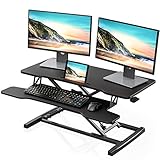
The 32-inch top swallows two monitors while the separate keyboard tray keeps your wrists at the right height, which is the combination most home-office setups need. It’s the pick for anyone with a standard 60-inch desk who wants a proper ergonomic two-tier posture rather than a compromise.
Best Budget: VIVO 32-Inch Converter (DESK-V000K)
You get the same generous 32-inch width and a smooth spring-assisted lift for noticeably less money, with an assembly process that takes one Allen key and about fifteen minutes. Best for makers kitting out a second workstation or testing whether standing suits them before committing further.
Best Premium: VIVO 26-Inch Single Top Converter (DESK-V001J)
The one-piece top is the most solid-feeling platform in this group — no tray wobble, no gap for pens to vanish into — and it looks intentional on a nice wood desk. Choose it if you value a clean, minimal build and work primarily from a laptop or slim keyboard.
Best for Laptop Users: Adjustable Height Keyboard Riser, 23.6 Inch
At under two feet wide it lifts a laptop and mouse without dominating your desk, and it’s light enough to move between rooms or a workbench. Ideal for anyone who works from a single portable machine and hates permanent hardware.
Best for Small and Corner Desks: Height-Adjustable Keyboard Riser, 23.6 Inch
This is the one to buy when depth is the constraint — it tucks into the corner of an L-shaped desk or a shallow apartment desk where a 32-inch unit would overhang. Best for tight rooms and secondary writing stations.
Frequently Asked Questions
Will a converter damage my desk surface?
Rarely, but the risk is dents from the base feet on softer woods. Cut felt or cork pads to size and stick them to the base — a two-minute fix that also stops the unit sliding.
How high should the keyboard sit when I’m standing?
Elbows at roughly 90 degrees, forearms parallel to the floor. Measure that height from your floor, subtract your desk height, and confirm the converter’s maximum lift covers it — tall users on 30-inch desks should double-check.
Can I reinforce a flexing desk top instead of replacing it?
Yes. A 3/4-inch plywood panel screwed underneath the loaded area, or two hardwood cleats running front-to-back, will stiffen most particle-board tops for a few dollars.
Do I need a monitor arm as well?
Not usually — the riser handles the height. Add an arm only if your screens sit too low even at full extension, or if you want to reclaim tray space.
Final Thoughts
For most existing desks, the TechOrbits 32-inch converter is the best all-round retrofit thanks to its dual-monitor top and dedicated keyboard tray. The VIVO 32-inch DESK-V000K delivers nearly the same capability at a lower price, and the VIVO 26-inch single-top is the one to pick if you want a tidy, rock-solid platform on a desk you’re proud of.