Key takeaways
- Compare three AIO liquid CPU coolers for desktop PCs by radiator size, socket fit and pump-block features, using specs printed on each Amazon listing.
Picking a liquid cooler for a desktop PC comes down to three checks that have nothing to do with marketing: whether the radiator physically fits your case, whether the mounting hardware matches your CPU socket, and whether the pump block carries extras you will actually use, such as a screen or a fan aimed at the motherboard. A 360 mm radiator in a case with only 240 mm mounts is money spent on a return, and a beautiful display block is wasted in a closed case.
This guide is for builders assembling a new gaming or workstation PC, owners of older air-cooled systems planning a first move to liquid, and anyone choosing between a compact 240 mm unit and a full-size 360 mm one. Every pick below is a sealed all-in-one liquid CPU cooler, and every specification is taken from the names and details printed on its Amazon product page.
Quick Picks
As an Amazon Associate we earn from qualifying purchases
| Product | Best for | Key spec from title |
|---|---|---|
| ARCTIC Liquid Freezer III Pro 360 | High-core-count CPUs in roomy cases | 360 mm radiator, 38 mm thick, VRM fan |
| NZXT Kraken Elite 240 | Compact builds with a windowed case | 240 mm radiator, 2.72-inch IPS LCD |
| NZXT Kraken Elite 360 | Showcase builds in full-size cases | 360 mm radiator, 2.72-inch IPS LCD |
How to Choose
Radiator Size and Case Fit
Start with the case, not the cooler. A 240 mm radiator needs two adjacent 120 mm fan mounts, usually at the top or front, while a 360 mm unit needs three in a row, which many mid-towers only provide at the front. Thickness matters just as much: the ARCTIC radiator in this guide is 38 mm deep before its fans are added, so the full stack can crowd memory slots or the top of the motherboard in a shallow case. Measure the mount area, add the fan depth, and check the listing’s printed dimensions against your case manual before ordering anything.
Socket Compatibility, Stated on the Listing
Never assume a cooler fits your processor because the brand is familiar. The two NZXT listings in this guide state support for AMD AM5 and AM4 plus Intel LGA 1851, 1700, 1200 and 115X, while the ARCTIC listing states AM5 and AM4 on the AMD side and LGA 1851 and 1700 on the Intel side, with an included contact frame for those Intel sockets. If you are carrying a cooler across a platform upgrade, read the socket list printed on the exact listing, because brackets in the box follow that list, not the product family’s general reputation.
Pump and Fan Control
Every cooler here uses PWM control, which lets the motherboard raise and lower pump and fan speeds with temperature instead of running flat out. The NZXT listings describe a single breakout cable and a Zero RPM Mode that stops the radiator fans completely under light loads, which suits a quiet desk setup. ARCTIC takes the opposite route to tidiness: the fan cables are integrated into the tubing sleeving, so only one visible cable reaches the motherboard. Decide which wiring style your build tolerates, and confirm your board has the fan headers and internal USB connection a display block requires.
Pump-Block Extras: Screen or VRM Fan
The pump block is where these coolers differ most. NZXT puts a 2.72-inch IPS LCD on the block, driven through its CAM software, showing temperatures, images or animated files while you work. ARCTIC instead mounts a small PWM fan in the pump housing that blows air over the motherboard’s voltage regulation area, a part that gets little airflow once a tower air cooler is removed. Neither extra changes the radiator’s job, so choose by build: a windowed showcase case shows off a screen, while a hard-working machine in a closed case benefits more from airflow around the socket.
The 3 Best Options
ARCTIC Liquid Freezer III Pro 360

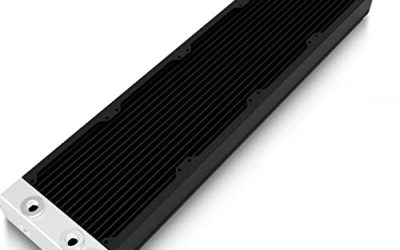
Builders running many-core processors for rendering, compiling or long gaming sessions are the audience for this one. Its radiator is thicker than most at 38 mm, and the pump housing carries a small fan that cools the voltage regulators around the socket, a detail aimed at sustained loads rather than short bursts. The mounting design shifts the cold plate toward the processor’s hotspot, and the fan wiring hides inside the tubing sleeves, keeping the inside of the case tidy without extra cable channels.
Specs
- Radiator: 360 mm, 398 x 120 x 38 mm, aluminium
- Fans: 3 x 120 mm P12 Pro, PWM controlled
- Pump: PWM controlled, 800 to 2,800 rpm as printed in the listing specifications
- VRM fan: integrated in the pump housing, 400 to 2,500 rpm, PWM controlled
- Cold plate: copper, micro-skived fins
- Tube length: 450 mm
- Sockets stated on the listing: AMD AM5, AM4; Intel LGA 1851, LGA 1700, with contact frame included
- Thermal compound: MX-6, 0.8 g, as printed in the listing specifications
Best for: Sustained heavy workloads on high-core-count AMD or current Intel builds in cases with a genuine 360 mm mount.
Watch out for: The thick radiator plus its fans needs generous clearance above the motherboard, and the listing states no support for older Intel sockets such as LGA 1200, so check both before ordering.
NZXT Kraken Elite 240
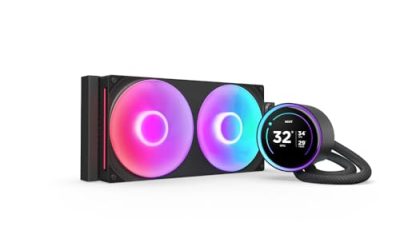
A smaller case does not have to mean giving up the display block. This 240 mm version carries the same 2.72-inch IPS screen as its bigger sibling, showing system temperatures or your own images through NZXT’s CAM software, and its two static-pressure fans can stop entirely under light loads thanks to the Zero RPM Mode described on the listing. Installation is simplified with pre-applied thermal paste and tool-free brackets, and the stated socket list is the widest in this guide, reaching back to older Intel platforms.
Specs
- Radiator: 240 mm
- Fans: 2 x F120P, static pressure design
- Display: 2.72-inch IPS LCD, 640 x 640 resolution, 60 Hz refresh as printed on the listing
- Pump: NZXT Turbine pump
- Sockets stated on the listing: AMD AM5, AM4; Intel LGA 1851, 1700, 1200, 115X
- Installation: pre-applied thermal paste, single breakout cable, tool-free mounting brackets
- Fan behaviour: Zero RPM Mode stops the fans under low loads, as described on the listing
- Model number: RL-KN24E-B2
Best for: Compact or mid-size windowed builds that need 240 mm fit and still want a pump-block screen.
Watch out for: The screen and its lighting ring are managed through NZXT CAM, and the block needs an internal USB connection on the motherboard, so confirm a spare header before buying.
NZXT Kraken Elite 360
This is the full-size version of the same idea: a 360 mm radiator for cases that can take one, paired with the 2.72-inch IPS display on the pump block. It suits a showcase build where the cooler is part of the view through the side panel, and where a flagship processor deserves the larger radiator’s extra surface. The listing repeats the family formula of pre-applied paste, a single breakout cable and tool-free brackets, and its stated socket coverage matches the 240 mm model, including the older Intel mounts.
Specs
- Radiator: 360 mm
- Fans: F120P static pressure fans, as described on the listing
- Display: 2.72-inch IPS LCD, 640 x 640 resolution, 60 Hz refresh as printed on the listing
- Pump: NZXT Turbine pump
- Sockets stated on the listing: AMD AM5, AM4; Intel LGA 1851, 1700, 1200, 115X
- Installation: pre-applied thermal paste, single breakout cable, tool-free mounting brackets
- Fan behaviour: Zero RPM Mode stops the fans under low loads, as described on the listing
- Model number: RL-KN36E-B2
Best for: Full-size windowed cases and flagship processors where the build is meant to be seen as well as used.
Watch out for: A 360 mm radiator only fits where the case provides three 120 mm mounts in a row, and front mounting can limit space for long graphics cards, so measure both runs before ordering.
Which One Fits Your Situation
A Compact Case With a Glass Side Panel
Pick the NZXT Kraken Elite 240. Two-fan radiators fit the top mounts of most compact and mid-size cases, and the pump-block screen faces the window where it can actually be seen. Its stated socket list also covers the widest range in this guide, which helps if the small build reuses an older Intel processor rather than a current one.
Long Rendering or Compiling Sessions
Pick the ARCTIC Liquid Freezer III Pro 360. Sustained loads are where its thicker 360 mm radiator and the pump housing’s VRM fan earn their place, since the motherboard area around the socket gets extended airflow during hours-long work. Choose it for a closed or workstation-style case where a screen would never be seen and cooling hardware matters more than decoration.
A Showcase Build in a Full Tower
Pick the NZXT Kraken Elite 360. A full tower gives the long radiator a proper front or top mount, and the 2.72-inch display becomes part of the build’s presentation, showing temperatures or artwork through the panel. Pair it with a current flagship processor on AM5 or LGA 1851 and the stated mounting hardware covers the job without extra kits.
Upgrading an Older Intel Machine
Pick one of the NZXT models, in the size your case accepts. Their listings state support for LGA 1200 and 115X alongside the current sockets, while the ARCTIC listing in this guide names only LGA 1851 and 1700 for Intel. That printed difference decides the purchase for anyone moving a cooler onto a few-years-old board, so read the socket line on the listing rather than assuming family-wide coverage.
Common Mistakes
- Ordering a 360 mm radiator for a case that only has 240 mm mounts, without checking the case manual first.
- Forgetting that radiator thickness and fan depth together decide clearance over memory slots and motherboard heatsinks.
- Assuming socket support from the brand name instead of the socket list printed on the exact listing.
- Buying a display-block cooler for a case with no window, or without a spare internal USB header to run the screen.
- Mounting the radiator so the pump sits at the highest point of the loop, which can leave the pump working against trapped air.
Frequently Asked Questions
Is a 240 mm liquid cooler enough for a gaming PC?
For most gaming builds, yes. A 240 mm radiator like the Kraken Elite 240 handles a mainstream gaming processor comfortably, and the real limit is usually case space rather than cooling need. Move to a 360 mm model when the processor is a flagship part, the case already has the mounts, or you plan long sessions of work that keep every core busy.
Will these coolers fit both AMD and Intel processors?
Each listing here covers both brands, but the exact sockets differ. The NZXT listings state AMD AM5 and AM4 plus Intel LGA 1851, 1700, 1200 and 115X. The ARCTIC listing states AM5 and AM4 with Intel LGA 1851 and 1700, and includes a contact frame for those Intel sockets. Match your processor’s socket against the list printed on the product page before ordering.
What does the screen on the NZXT pump block actually do?
The 2.72-inch IPS LCD shows real-time system information such as temperatures, and it can also display your own images or animated files, with an RGB ring that can sync with the picture. It is controlled through NZXT’s CAM software and needs an internal USB connection. It adds nothing to cooling capacity, so treat it as a display feature you are choosing on purpose, not a performance part.
Can an all-in-one cooler be refilled or serviced at home?
These are sealed units that arrive filled and are not designed to be opened, topped up or serviced by the owner. If a pump fails or a tube is damaged, the path is the maker’s support process rather than a home repair, which is why it pays to read the coverage terms printed with the listing and to route the tubing without sharp bends or strain on the fittings.
More from Amazon
Programs that pair well with the guide above. Offers and eligibility are set by Amazon and may change.
A free business account with business pricing and bulk-buying tools for work, shop or home office.
Create a business accountFree shipping on eligible items, Prime Video and more. Eligible new members can start with a free trial.
Start a Prime free trialAudiobooks and podcasts to listen to on the go. Eligible new members can start with a free trial.
Try Audible freeAd-free music streaming. Eligible new subscribers can start with a free trial.
Try Music Unlimited freeAs an Amazon Associate we earn from qualifying purchases.