Key takeaways
- Compare the best 280mm water coolers for AM4, with verified 280mm radiators and AM4 socket support, fan and pump specs, case fit notes, and clear buying advice for Ryzen builds.
As an Amazon Associate we earn from qualifying purchases.
If you are keeping an AM4 Ryzen system running for gaming, streaming, video work, or a home workstation, a 280mm all-in-one liquid cooler is a sensible middle path. It gives you more radiator surface than a 240mm unit, so the two 140mm fans can usually move the required air at lower speeds, and it avoids the case-fit demands of a 360mm radiator that needs three fan mounts in a row. For a Ryzen 5, Ryzen 7, or Ryzen 9 chip on an AM4 motherboard, that balance of cooling headroom and manageable size is exactly why the 280mm format remains popular even as newer sockets arrive.


This guide is deliberately narrow. Every cooler below is a closed-loop liquid CPU cooler with a 280mm radiator, and every listing names AMD AM4 among its supported sockets. That second point matters more than it sounds. Many current coolers are sold mainly for AM5 and newer Intel sockets, and AM4 hardware is not always in the box. A cooler that fits AM5 does not automatically mount on AM4, so socket support was treated as a hard requirement here, not as an assumption. If a model did not clearly state both 280mm and AM4, it was left out.
Most AM4 systems still in service live in mid-tower cases in bedrooms, studies, and living rooms, where fan noise carries and space is limited. A 280mm cooler lets a larger, slower-turning fan pair sit at the top or front of the case, suiting a machine you sit next to for long sessions. The picks below cover four priorities: maximum radiator thickness, a linked-fan ecosystem, a display pump head, and a simple no-frills design.
Disclosure: This article contains affiliate links. If you buy through a link on this page, we may earn a commission at no extra cost to you.
Quick Picks
- Best for cooling headroom: ARCTIC Liquid Freezer III Pro 280 — a thick 38mm radiator, two 140mm fans, a PWM pump, and an integrated VRM fan, with AM5 and AM4 support stated in the listing.
- Best for a tidy linked-fan build: CORSAIR iCUE Link Titan 280 RX RGB — a 280mm radiator, two RX140 RGB fans, the FlowDrive cooling engine, and an included iCUE Link system hub, with AM5 and AM4 support.
- Best for a display build: NZXT Kraken Elite 280 RGB (2024) — a 280mm radiator, a single-frame F280 RGB Core fan unit, the NZXT Turbine pump, and a customizable 2.72-inch IPS LCD, with AM5 and AM4 support.
- Best for simple value-focused builds: ID-COOLING FROSTFLOW X 280 — a 280mm radiator, two 140mm PWM fans rated up to 76.8 CFM, and white LED lighting, with AM4 and AM5 support.
1. ARCTIC Liquid Freezer III Pro 280 — Best for Cooling Headroom
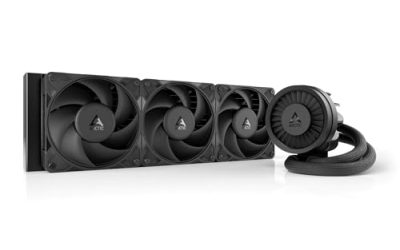
The ARCTIC Liquid Freezer III Pro 280 is the performance-first option in this group, and its defining feature is radiator thickness. Where most 280mm radiators are around 27mm thick, this one is listed at 38mm. A thicker core gives the coolant more surface area to shed heat, which is useful on higher-core-count AM4 processors that hold boost clocks under sustained loads such as rendering, compiling, or long gaming sessions. Check that thickness carefully before ordering, because a 38mm radiator plus a 140mm fan needs more clearance than a slim unit, especially for a top mount above tall memory or a bulky motherboard heatsink.
ARCTIC also adds a small fan in the pump housing that blows air over the voltage regulation area around the socket, which can help the components around the processor on an older AM4 board. The pump is PWM controlled, so its speed follows demand instead of running at one fixed setting. The listing states compatibility with AMD AM5 and AM4 as well as Intel LGA1851 and LGA1700. For an AM4 build, the relevant point is simple: AM4 is named directly, so you are not relying on an adapter ordered separately.
This is the cooler to choose when temperatures and headroom matter more than lighting. The black version keeps styling plain and functional, suiting a workstation-style AM4 machine as well as a gaming PC. The trade-off is that the thick radiator is the most demanding fit in this guide, and there is no pump-head display for a showcase build.
Specifications
- Radiator: 280mm, 38mm thick
- Fans: 2 x 140mm PWM fans
- Pump: PWM controlled, with integrated VRM fan on the pump housing
- Socket support: AMD AM5, AM4; Intel LGA1851, LGA1700
- Lighting: none on the black version listed
- Product page: View on Amazon
Pros
- Thick 38mm radiator offers more cooling surface than slim 280mm designs
- Integrated VRM fan adds airflow around the AM4 socket area
- AM4 support is stated directly in the product listing
- Plain styling and PWM control suit quiet workstation builds
Cons
- Thick radiator and fan stack needs careful clearance checks
- No display or decorative lighting for showcase builds
- Top mounting may conflict with tall memory in compact cases
2. CORSAIR iCUE Link Titan 280 RX RGB — Best for a Tidy Linked-Fan Build
The CORSAIR iCUE Link Titan 280 RX RGB is built around convenience inside the case. Its two RX140 RGB fans connect through the iCUE Link system, and the listing says an iCUE Link system hub is included. That system is designed to reduce the tangle of separate fan and lighting cables that a traditional build creates, because linked fans pass power and control signals from one unit to the next. If you are rebuilding an aging AM4 system and want the interior to look cleaner when you finish, that cabling approach is the main reason to pick this cooler over a conventional design.
The radiator is a 280mm unit with two 140mm fans, and Corsair describes a FlowDrive cooling engine at the pump. The listing names Intel LGA1851 and LGA1700 and AMD AM5 and AM4, so AM4 support is explicit. Control runs through Corsair iCUE software, where fan behaviour and lighting are managed together — an advantage if your other parts already live in the same software, and a complication if you prefer to set a fan curve in the BIOS and never open a control app again.
For a home gaming PC on or beside a desk, the Titan 280 RX is the polished, ecosystem-led option, and its RGB fans suit a windowed case. Keep two checks in mind. First, confirm a genuine 280mm mount with room for radiator and fans together, not just two separate 140mm positions with an obstruction between them. Second, plan where the included hub will sit, because the tidiness benefit only appears if it is placed sensibly.
Specifications
- Radiator: 280mm
- Fans: 2 x RX140 RGB 140mm fans
- Pump: FlowDrive cooling engine
- Control: iCUE Link, with system hub included in the listing
- Socket support: AMD AM5, AM4; Intel LGA1851, LGA1700
- Product page: View on Amazon
Pros
- iCUE Link connections reduce separate fan and lighting cabling
- System hub is included, according to the listing
- AM4 support is named directly alongside AM5
- RGB fans suit windowed gaming cases
Cons
- Best experience depends on using Corsair iCUE software
- Hub placement and cable routing still need planning
- Linked-fan ecosystem parts are specific to this system
3. NZXT Kraken Elite 280 RGB (2024) — Best for a Display Build
The NZXT Kraken Elite 280 RGB in its 2024 form is the choice for a builder who wants the pump head itself to be part of the build. The listing describes a customizable 2.72-inch IPS LCD on the pump housing, which can show system information or images through NZXT CAM software. That screen is the headline feature, but it sits on a conventional and correctly specified foundation: a 280mm radiator, an NZXT Turbine pump, and a single-frame F280 RGB Core fan unit that covers the radiator as one piece rather than as two separate fans.
Socket support is stated clearly: AMD AM5 and AM4, plus Intel LGA1851, LGA1700, 1200, and 115X. The single-frame fan design also simplifies mounting and wiring, since there is one fan assembly to attach instead of two individual frames. Combined with the display, the unit is aimed at a clean, deliberate-looking installation.
This is the most presentation-focused cooler here. If your case has no window or sits out of sight, the LCD adds little, and a simpler pick will serve you better. If the PC is a visible part of a desk setup, the screen and tidy fan frame give the build a focal point the other coolers do not try to provide. As with every 280mm model, measure the mount first.
Specifications
- Radiator: 280mm
- Fans: F280 RGB Core single-frame fan unit, 140mm class
- Pump: NZXT Turbine pump
- Display: customizable 2.72-inch IPS LCD on the pump head
- Socket support: AMD AM5, AM4; Intel LGA1851, LGA1700, 1200, 115X
- Product page: View on Amazon
Pros
- Large pump-head LCD can show system information or custom images
- Single-frame radiator fan simplifies mounting and wiring
- AM4 support is stated directly in the listing
- Turbine pump and CAM control suit a tidy display build
Cons
- Display is wasted in a closed or hidden case
- Relies on NZXT CAM software for screen and control features
- Presentation features are the focus rather than radiator thickness
4. ID-COOLING FROSTFLOW X 280 — Best for Simple Value-Focused Builds
The ID-COOLING FROSTFLOW X 280 takes the opposite approach to the display and ecosystem models. It is a straightforward 280mm liquid cooler with two 140mm PWM fans, white LED lighting, and a listing that states airflow up to 76.8 CFM. Compatibility is spelled out for Intel LGA1700, 1200, 115X, and 2066, and for AMD AM4 and AM5. For someone refreshing a family PC, a spare-parts Ryzen build, or a first liquid-cooled system on an AM4 board, that plain specification sheet is exactly what is needed: the right radiator size, the right socket, PWM fan control, and no extra system to learn.
PWM control lets the motherboard raise and lower fan speed with processor temperature, so the machine stays unobtrusive during browsing or media playback and still moves air during a game. The white LED lighting is fixed rather than part of a software platform, which keeps setup simple: mount the radiator, connect the fans and pump, set a fan curve, and you are done.
The compromises are clear. There is no pump-head screen, no linked-fan cabling, and no thick radiator core, so this is not the pick for a showcase build or for chasing the lowest temperatures on a heavily loaded Ryzen 9. It is the pick for getting a correctly fitting 280mm AM4 cooler installed with the least fuss. Before ordering, check for a true 280mm mount, enough depth for radiator and fans together, and tubing that reaches the socket without a sharp bend.
Specifications
- Radiator: 280mm
- Fans: 2 x 140mm PWM fans, up to 76.8 CFM stated in the listing
- Lighting: white LED
- Pump: integrated all-in-one pump and water block
- Socket support: AMD AM4, AM5; Intel LGA1700, 1200, 115X, 2066
- Product page: View on Amazon
Pros
- Simple design with PWM fans and no extra control ecosystem required
- AM4 support is stated directly alongside AM5
- White LED lighting keeps the look clean without software setup
- Straightforward fit for a first liquid-cooled AM4 build
Cons
- No pump-head display or addressable lighting system
- Standard radiator thickness offers less headroom than the thick ARCTIC design
- Fewer refinements for builders who want linked cabling
How to Choose a 280mm Water Cooler for AM4
Start with the socket, in writing. Confirm that the exact listing names AM4. AM5 mounting is different, and a cooler described only for AM5 and Intel sockets should not be assumed to fit an AM4 board. All four coolers in this guide state AM4 in their listings, and that check should be the first thing you repeat on the product page before ordering, because listings and box contents can change over time.
Measure the case mount, not the fan count. A 280mm radiator needs two adjacent 140mm positions with enough continuous length for the radiator body, which is longer than 280mm once the end tanks are included. Check the case manual for a stated 280mm radiator position at the top or front, then check depth: radiator thickness plus one fan thickness has to clear memory, motherboard heatsinks, and cables. The 38mm ARCTIC radiator needs the most room; the slimmer models are easier top mounts.
Decide how much software you want. The Corsair and NZXT models are at their best inside their own control applications, which handle fan behaviour, lighting, and in the NZXT case the display. The ARCTIC and ID-COOLING models lean on motherboard PWM control instead. Neither approach is wrong, but mixing several lighting platforms in one PC can turn a simple build into a maintenance chore, so it is worth choosing deliberately.
Think about where the PC lives. In a bedroom or shared space, two 140mm fans turning slowly are easier to live with than a smaller radiator working harder. A top exhaust keeps heat moving out of the case, while a front intake can help processor temperatures but warms the air reaching the graphics card. For most home AM4 systems, top exhaust is the balanced default when the case allows it.
Plan the installation order. Fit the radiator fans before the radiator goes into the case, route the pump cable before the graphics card blocks access, and check tubing slack with the pump head resting on the socket. Keep the radiator at or above the pump level where the case allows, avoid sharp tubing bends, and tighten mounting screws evenly in a cross pattern so the cold plate sits flat on the processor.
FAQs
Does a 280mm cooler fit every mid-tower case?
No. The case needs a stated 280mm radiator mount and enough depth for the radiator and fans together. Check the case manual for radiator support rather than counting fan positions, and pay extra attention to top mounts above tall memory.
Is AM4 support the same as AM5 support?
No. They are different sockets with different mounting arrangements. For an AM4 motherboard, choose a cooler whose listing names AM4 directly, as all four coolers in this guide do, and keep the included AM4 hardware identified during the build.
Is a 280mm cooler better than a 240mm cooler for Ryzen?
A 280mm radiator has more surface area and uses larger 140mm fans, so it can generally move the same air at lower fan speeds. That suits sustained loads and quieter rooms. A 240mm unit fits more cases, so the better choice depends on your case first and your processor second.
Can I reuse one of these coolers on a later build?
Each listing here also names AM5 support, along with several Intel sockets, which gives these coolers a documented path to a newer platform. Keep the full mounting hardware kit and instructions if you think you will move the cooler to another system later.
Should the radiator go at the top or the front?
Either can work. A top exhaust removes heat from the case directly and is a good default for a home gaming PC. A front intake can feed the radiator cooler room air but adds warmed air inside the case. Follow the case layout, keep the pump below the highest point of the radiator where possible, and avoid kinking the tubes.
Do I need to refill or maintain an all-in-one cooler?
These are closed-loop units, so there is no routine refilling. Maintenance is external: keep the radiator fins and fan blades free of dust, check that fans and pump cables stay seated, and confirm temperatures remain stable after any case move or hardware change.
Conclusion
For most AM4 owners, the right 280mm water cooler is the one that states AM4 support clearly, fits the case with room to spare, and matches how much software and presentation you actually want. Choose the ARCTIC Liquid Freezer III Pro 280 for radiator thickness and socket-area airflow, the CORSAIR iCUE Link Titan 280 RX RGB for a tidy linked-fan build, the NZXT Kraken Elite 280 RGB for its pump-head display and single-frame fan, or the ID-COOLING FROSTFLOW X 280 for a simple PWM design that just does its job. Repeat the two hard checks on the product page before you order — 280mm radiator, AM4 named in the listing — measure your mount once, and any of these four will give an aging Ryzen system a quieter, cooler second life.
More from Amazon
Programs that pair well with the guide above. Offers and eligibility are set by Amazon and may change.
A free business account with business pricing and bulk-buying tools for work, shop or home office.
Create a business accountFree shipping on eligible items, Prime Video and more. Eligible new members can start with a free trial.
Start a Prime free trialAudiobooks and podcasts to listen to on the go. Eligible new members can start with a free trial.
Try Audible freeAd-free music streaming. Eligible new subscribers can start with a free trial.
Try Music Unlimited freeAs an Amazon Associate we earn from qualifying purchases.