For most buyers, an NZXT Kraken Elite is the pick if you want a pump-head screen and strong looks, while a standard Kraken without a display suits buyers who want NZXT styling and CAM control for less, and a larger 360 mm size is the better fit for high-power Ryzen or Intel chips. NZXT liquid coolers are built around the CAM software, so your choice should balance appearance, radiator size and how you feel about relying on that software.
Our top picks


As an Amazon Associate we earn from qualifying purchases at no extra cost to you.
NZXT CPU Water Coolers at a Glance
NZXT has refreshed its Kraken lineup more than once, so model names and generations overlap in listings. Use the table as a guide to the lineup structure, and match the exact name, radiator size and socket support on the maker product page before buying.
| Line | Best for | Features the maker highlights | Limits to know |
|---|---|---|---|
| Kraken Elite (240, 280, 360 mm) | Builders who want a high-resolution pump display | LCD pump cap that can show temperatures, images or animations, CAM control | Display adds cost; CAM is needed for full features |
| Kraken (non-Elite, 240, 280, 360 mm) | Buyers who want NZXT styling with less spend | Customizable pump cap or ring lighting, CAM control | Fewer display options than Elite |
| Kraken Plus and similar newer lines | Builders wanting the current generation | Updated pump and fan options as listed by the maker | Naming and availability vary; confirm the details on the model page |
| Older Kraken Z and X series | Buyers matching existing parts | Previous-generation designs with similar CAM support | Previous generation; may be phased out |
What NZXT Is Known For
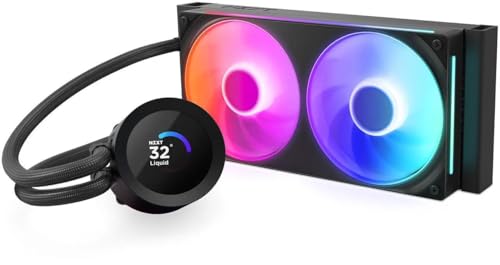
NZXT coolers are sealed all-in-one units designed to look cohesive with its cases and fans. The signature feature on the Elite line is the circular LCD on the pump head. Reviewers praise the display for its brightness and customization, and some note that the pump head is larger than average, so check case and motherboard clearance. Cooling performance is typically described as competitive with other good AIOs of the same radiator size, rather than better than them, so the extra cost goes toward the display and finish.
CAM Software and Control
CAM is the control app for fan speeds, lighting and the display. It runs on Windows and works with other NZXT parts. Many users find it capable, but some dislike running background software. It is worth deciding in advance whether you are comfortable with that. Fan curves can be saved to the cooler in some cases, but check the maker description for the model you choose. Keep the software updated and follow the maker instructions for firmware updates on the pump.
Radiator Size and Case Fit
NZXT lists 240 mm, 280 mm and 360 mm sizes. A 240 mm suits compact cases and mainstream CPUs. A 280 mm gives better acoustic performance at similar temperatures when a case allows it. A 360 mm gives the most headroom for heavy workloads. NZXT cases such as the H-series and the airflow-oriented models typically support the common radiator sizes, but check the case manual because top and front mounting limits differ. Measure the radiator, fan and tube space and confirm that your RAM and VRM heatsinks will not collide with the pump head.
Ryzen and Intel Socket Compatibility
NZXT states support for current AMD and Intel sockets in its Kraken listings, including AM5, AM4 and recent LGA sockets. Brackets are included for the sockets the maker lists, but always confirm the specific model. For Ryzen on AM5 the mounting spacing matches AM4, and the supplied bracket is what matters. Some builders also report that the pump-head size means it may sit near tall memory modules on small boards.
Fans and Noise
NZXT Kraken coolers come with the maker fans, and several lines use NZXT fan models designed for radiators and thick fins. Reviewers generally describe the fans as quiet at moderate speeds and louder at maximum. The pump can produce a tone that some users hear in quiet rooms. A custom fan curve in CAM or the BIOS helps keep the noise predictable.
Budget, Mid-Range and Premium Tiers
Mid-range tier
A non-display Kraken 240 or 280 mm sits at the lower end of the NZXT range. It provides the NZXT look and CAM control without paying for the LCD. This is the best match for mainstream Ryzen and Intel builds.
Premium tier
The Elite models sit higher in the range and are aimed at showpiece builds. A 360 mm Elite is the option for heavy workloads where you also want the display.
Budget note
NZXT does not generally compete at the lowest budget tier. If cost is the main concern, Arctic, DeepCool and Thermalright offer cheaper AIOs, and a good air cooler can match the performance of a smaller AIO.
Pick X If Decision Table
| Pick this if you… | Choose | Why |
|---|---|---|
| Want a pump-head screen | Kraken Elite | LCD with customization |
| Want NZXT looks for less | Standard Kraken | Same ecosystem without the LCD |
| Have a compact case | 240 mm model | Radiator fits more cases |
| Run a Ryzen 9 or Core Ultra 9 | 360 mm model | More thermal headroom |
| Dislike background software | Non-NZXT or air cooler | Less reliance on CAM |
| Want the lowest cost | Another brand | NZXT carries a design premium |
Care and Safety Notes
Power down and unplug the PC before installing or removing the cooler. Do not tamper with the sealed loop, and do not use the cooler if you see leaking coolant. Keep the display and pump head away from moisture. If the pump makes grinding or stops, shut the PC down, since a stopped pump can cause the CPU to overheat. Follow the NZXT manual for mounting torque and tube routing. Keep the radiator clear of dust.
Alternatives to Consider
- Corsair iCUE Link Titan: Comparable display and software features and a different design style.
- Arctic Liquid Freezer III: Strong cooling without a display for a lower tier.
- Lian Li Galahad II or Hydroshift: Showy lighting and easy fan install.
Design and Build Considerations
NZXT coolers are marketed as much for appearance as for cooling. The pump cap is a visible part of the build, so buyers often match it to a white or black case and to NZXT or third-party fans. Cable management is also part of the appeal: the maker designs its fans and pump to connect through a small number of cables, which reviewers say keeps the build tidy. If you plan to show the display through a glass side panel, check that the pump head orientation lets the screen be read in the right direction, because the screen can be rotated in software to match the mounting position.
Case matching
NZXT cases such as the H-series and the airflow models list radiator support for the common sizes, so a Kraken in an NZXT case is the simplest pairing. In another maker case, read the radiator support table and the depth limits before buying a thick 360 mm unit.
Upgrade path
If you start with a 240 mm and later move to a hotter processor, you may need to replace the whole AIO, since the loops are sealed. Think about the processors you may use in the next few years, not just today.
Warranty and support
The maker lists a warranty period for each cooler, and it is worth reading what it covers, including the pump, the radiator and the display. Keep the packaging and the mounting hardware until you are sure the installation works, since returns and repairs are easier with the original parts.
Frequently Asked Questions
Is the NZXT Kraken Elite worth it over a standard Kraken?
It is worth it if you want the LCD display and the polish it adds, and reviewers describe cooling as similar to other good AIOs. If you do not care about the screen, a standard Kraken or another brand costs less.
Do NZXT coolers work with Ryzen CPUs?
The maker lists AMD socket support, including AM5 and AM4, for its current Kraken models. Confirm the exact model and included brackets before you buy.
Do I need CAM to use a Kraken?
The cooler runs without it, but features like the display, lighting and custom fan curves need CAM. You can control fans through the motherboard in many cases.
Which radiator size should I choose?
Use 240 mm for compact cases, 280 mm for quieter operation where supported and 360 mm for heavy workloads and high-power chips.
How do I install the radiator?
Follow the NZXT manual, mount the pump to the CPU first, then attach the radiator so the pump does not sit at the highest point of the loop. Plug the pump and fans into the headers named in the manual.
How long does an NZXT AIO last?
The maker lists a warranty period for each model, and real life depends on use and handling. Replace the unit if temperatures climb or the pump fails.
More from Amazon
Programs that pair well with the guide above. Offers and eligibility are set by Amazon and may change.
A free business account with business pricing and bulk-buying tools for work, shop or home office.
Create a business accountFree shipping on eligible items, Prime Video and more. Eligible new members can start with a free trial.
Start a Prime free trialAudiobooks and podcasts to listen to on the go. Eligible new members can start with a free trial.
Try Audible freeAd-free music streaming. Eligible new subscribers can start with a free trial.
Try Music Unlimited freeAs an Amazon Associate we earn from qualifying purchases.