Our Short List of 3

- Best for: sustained rendering, compiling and other all-core workloads on high-end Intel or Ryzen processors.
- Radiator: 360mm, aluminum, 398 x 120 x 38 mm
- Fans: 3 x P12 Pro A-RGB, 600 to 3000 RPM, 77 CFM airflow
- Pump: 800 to 2800 RPM, PWM controlled
- VRM fan: 400 to 2500 RPM, PWM controlled

- Best for: windowless or understated builds where low noise and simple cabling matter more than lighting.
- Radiator: 360mm, 15.59 x 4.72 x 1.06 inches per the listing
- Fans: 3 x RS120, magnetic dome bearings, daisy-chained
- Pump noise: 20 dBA per the listing
- Noise level: 36 decibels per the listing technical details

- Best for: glass-panel builds where the cooler is part of the display and lighting sync matters.
- Radiator: 360mm, 27mm thick
- Dimensions: 15.65 x 4.69 x 1.06 inches per the listing
- Fans: 3 x UNI Fan SL-INF 120mm, fluid dynamic bearings, pre-installed
- Pump cap: three interchangeable designs, dual light rings
All 5 Picks at a Glance
| Product | Specs | Action |
|---|---|---|
| ARCTIC Liquid Freezer III Pro 360 A-RGB (White) |
| Check price on Amazon |
| Corsair Nautilus 360 RS (Black) |
| Check price on Amazon |
| Lian Li Galahad II Trinity 360 SL-INF (Black) |
| Check price on Amazon |
 ASUS ROG Ryujin III 360 ARGB Extreme (Black) |
| Check price on Amazon |
 ID-COOLING FX240 PRO (Black) |
| Check price on Amazon |
Key takeaways
- Compare five AIO liquid CPU coolers for gaming PC builds, from a compact 240mm pick to 360mm flagships with thick radiators, LCD screens and VRM fans.
Choosing an all-in-one liquid cooler is mostly a fit and noise decision, not a brand decision. The radiator has to match a mount your case actually offers, the pump block has to clear your memory and VRM heatsinks, and the fans have to stay quiet enough to live with at desk distance. A 360mm radiator buys real thermal headroom for flagship processors, while a 240mm unit is the honest answer for compact cases and mid-range chips that never run flat out for hours.
This roundup is written for five kinds of builders: performance-first users who want the thickest radiator they can fit, tidy builders who hate fan cabling, showcase builders with glass panels, enthusiasts who want a live display on the pump block, and compact-case builders shopping the budget tier. Every pick below is drawn from the product names and specifications published on its Amazon product page, and each one is keyed to a single exact listing.
Quick Picks
As an Amazon Associate we earn from qualifying purchases.
| Product | Best for | Key spec from title |
|---|---|---|
| ARCTIC Liquid Freezer III Pro 360 A-RGB (White) | Long all-core workloads on flagship CPUs | 38 mm thick 360mm radiator |
| Corsair Nautilus 360 RS (Black) | Clean builds with minimal fan wiring | Daisy-chained RS120 fans on one header |
| Lian Li Galahad II Trinity 360 SL-INF (Black) | Glass-panel showcase builds | Interchangeable pump caps, SL-INF fans |
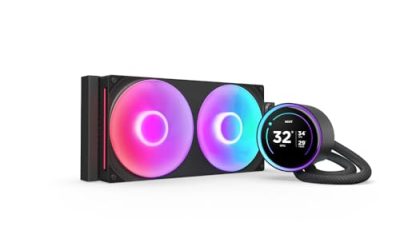
| ASUS ROG Ryujin III 360 ARGB Extreme (Black) | Builders who want a live system display | 3.5-inch LCD at 640 by 480 |
| ID-COOLING FX240 PRO (Black) | Compact cases and mid-range CPUs | 240mm radiator, Gen 7 pump |
How to Choose
Radiator Size and Case Clearance
Start with the mount, not the marketing. A 360mm radiator needs a case position rated for three 120mm fans in a row, plus room for the radiator’s full length, which is always longer than 360mm once end tanks are counted. Thickness matters just as much: a 38mm radiator with 25mm fans stacked on it eats far more vertical space than a slim 27mm design, and it can collide with motherboard heatsinks or tall memory in a top mount. Measure the mount, check the listed radiator dimensions, and only then fall in love with a model.
Socket Support and Mounting Hardware
An AIO only cools a processor it can physically mount to. Current listings split between Intel LGA1700 and LGA1851 on one side and AMD AM5 and AM4 on the other, and not every cooler covers all four. Check the socket list on the exact listing you are buying, because support changes between generations of the same product line. Also look at what the box includes: some kits ship a contact frame for Intel sockets or an offset bracket for Ryzen chips, and those small parts change both installation effort and cold plate contact.
Pump Design, Noise and Control
The pump runs constantly, so its noise character matters more than peak fan speed. Listings quote pump figures in different ways, from a rotational speed range to a decibel figure measured who knows how, so treat any single number as a rough guide rather than a promise. What you can compare honestly is the control path: a PWM pump on a motherboard header behaves differently from one tied to vendor software. Extra features live here too, including small VRM fans inside the pump housing and screens that need a USB header and software to do anything useful.
Fans, Cabling and Lighting
Three radiator fans can mean three separate cables or one daisy-chained run, and that difference decides how clean a build looks and how long it takes to assemble. Daisy-chain designs that land on a single motherboard PWM header simplify everything downstream, while individually cabled fans give finer control at the cost of clutter. Lighting splits buyers the same way: addressable RGB fans need a compatible header or controller, and a lighting-free cooler is a feature, not a missing extra, if your case has no window. Match the fan plan to the headers your motherboard actually provides.
The 5 Best Options
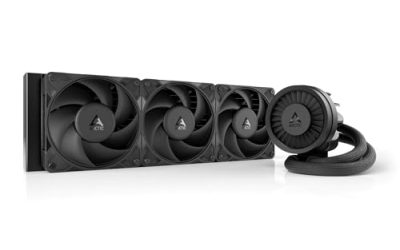
ARCTIC Liquid Freezer III Pro 360 A-RGB (White)
- Best for: sustained rendering, compiling and other all-core workloads on high-end Intel or Ryzen processors.
- Radiator: 360mm, aluminum, 398 x 120 x 38 mm
- Fans: 3 x P12 Pro A-RGB, 600 to 3000 RPM, 77 CFM airflow
- Pump: 800 to 2800 RPM, PWM controlled
- VRM fan: 400 to 2500 RPM, PWM controlled
sustained rendering, compiling and other all-core workloads on high-end Intel or Ryzen processors.
the thick radiator plus its fans needs generous case clearance, and the listing’s weight figures differ between fields, so confirm dimensions on the current listing before ordering.
This is the pick for builders whose processor spends its life under sustained all-core load. The radiator is 38mm thick where most rivals use a much slimmer core, and the pump housing hides a small VRM fan that pushes air over the motherboard’s power delivery and the top SSD area. An offset mounting position for Ryzen processors and an included tube of MX-6 paste round out a package that spends its budget on cooling hardware instead of decoration, with addressable RGB on the fans for builders who still want some light.
Corsair Nautilus 360 RS (Black)
- Best for: windowless or understated builds where low noise and simple cabling matter more than lighting.
- Radiator: 360mm, 15.59 x 4.72 x 1.06 inches per the listing
- Fans: 3 x RS120, magnetic dome bearings, daisy-chained
- Pump noise: 20 dBA per the listing
- Noise level: 36 decibels per the listing technical details
windowless or understated builds where low noise and simple cabling matter more than lighting.
there is no RGB and no included controller, and iCUE control needs an optional adapter cable that is sold separately.
Corsair built this cooler for people who open a case side panel and wince at the wiring. Its three RS120 fans daisy-chain together and land on a single 4-pin PWM header, with no lighting controller required and no RGB anywhere in the design. The pump is rated by the listing at a whisper-level 20 dBA, the cold plate is slightly convex with thermal paste pre-applied in an optimized pattern, and the fans use magnetic dome bearings with AirGuide technology to push air through the radiator fins.
Lian Li Galahad II Trinity 360 SL-INF (Black)
- Best for: glass-panel builds where the cooler is part of the display and lighting sync matters.
- Radiator: 360mm, 27mm thick
- Dimensions: 15.65 x 4.69 x 1.06 inches per the listing
- Fans: 3 x UNI Fan SL-INF 120mm, fluid dynamic bearings, pre-installed
- Pump cap: three interchangeable designs, dual light rings
glass-panel builds where the cooler is part of the display and lighting sync matters.
the listing’s socket list stops at LGA1700, so Core Ultra builders on LGA1851 should confirm fit before ordering.
Showcase builders get the cooler designed to be looked at. The pump cap ships with three interchangeable designs, each carrying two rings of individually controllable lighting, and the pre-installed UNI Fan SL-INF units daisy-chain across the radiator so the visible cabling stays minimal. Under the styling there is substance: a 27mm radiator, a copper cold plate with wider fin spacing intended to slow buildup over time, enlarged tubing for flow, and a 45-degree connector that lets the tubes rotate a full circle to suit awkward case layouts.
ASUS ROG Ryujin III 360 ARGB Extreme (Black)
- Best for: premium showcase builds that treat the pump block as a system information display.
- Radiator: 360mm
- Pump: Asetek Gen8 V2, three-phase motor
- Display: 3.5-inch LCD, 640 by 480
- Fans: magnetic snap-together ARGB fans
premium showcase builds that treat the pump block as a system information display.
this is the premium tier of the category, and the screen needs a USB connection plus ASUS software setup time to earn its place.
The Ryujin III Extreme is the flagship end of this roundup, built around a 3.5-inch LCD on the pump block running at 640 by 480 for animated images or live readouts of temperature, voltage, fan speed and coolant flow. Its Asetek Gen8 V2 pump uses a three-phase motor for higher flow and lower impedance, an embedded fan in the pump housing cools the motherboard VRMs, and the thickened ARGB fans snap together magnetically to shorten installation. Software control extends to pump and fan speeds, with AIDA64 integration for the display.
ID-COOLING FX240 PRO (Black)
- Best for: compact and mid-tower builds running six or eight core gaming processors.
- Radiator: 240mm, 276 x 120 x 27 mm
- Fans: 2 x 120mm PWM, 500 to 1800 RPM
- Pump: Gen 7, up to 2800 RPM
- Maker-rated cooling capacity: 300W
compact and mid-tower builds running six or eight core gaming processors.
confirm the exact mounting kit for your socket on the listing before ordering, since the title does not name individual sockets.
Not every case can take a 360mm radiator, and not every processor needs one. The FX240 PRO answers with a 240mm radiator that fits the top or front mounts of most compact and mid-tower cases, driven by the maker’s Gen 7 pump at up to 2800 RPM and a pair of PWM fans that idle down to 500 RPM. The pump cap carries a CD-style pattern for a little visual character without a screen’s cost or software, and the maker rates the unit at a 300W cooling capacity aimed at mainstream gaming processors.
Which One Fits Your Situation
Your Case Only Fits a 240mm Radiator
Plenty of compact and older mid-tower cases top out at a 240mm mount, and forcing anything larger ends in returned boxes. The ID-COOLING FX240 PRO is the pick here: its slim 27mm radiator and standard footprint suit tight top mounts, and its pump and fan speeds are sized for mainstream processors rather than flagship heat. Check that your case also clears the pump block height above the socket before you commit.
You Run Long Renders or Shader Compiles
Sustained all-core work is where radiator volume stops being a spec-sheet argument. The ARCTIC Liquid Freezer III Pro 360 pairs the thickest radiator in this roundup with a VRM fan that looks after the motherboard around the socket, and its six-year warranty suits a machine that earns its keep. If your workload is bursty gaming instead, the Corsair Nautilus 360 RS gives you the same radiator class with less wiring and no lighting to manage.
You Want the Build to Look Finished Through Glass
A windowed case turns the cooler into furniture. The Lian Li Galahad II Trinity SL-INF brings interchangeable pump caps and tidy daisy-chained infinity fans, while the ASUS Ryujin III Extreme goes further with a full LCD that can mirror your system stats. Pick the Lian Li for lighting design, the ASUS for information display, and budget the extra setup time either way, because both reward builders who enjoy the configuration process.
You Hate Cable Clutter More Than Anything
Every extra fan cable is a small tax on building and cleaning a PC. The Corsair Nautilus 360 RS reduces its three fans to a single daisy-chained PWM connection with no controller box at all, which makes it the cleanest install in this group. The Lian Li Trinity also daisy-chains its fans, but its lighting rings ask for an addressable RGB connection as well, so the Corsair stays the simpler answer for a truly minimal wiring plan.
Common Mistakes
- Buying a 360mm radiator before measuring the case mount, then discovering the end tanks or fan stack collide with the motherboard or memory.
- Assuming every AIO fits every socket, when LGA1851 and AM5 support varies between product generations sold under similar names.
- Mounting the radiator so the pump sits at the highest point of the loop, which invites air to collect in the pump housing.
- Forgetting to count headers: pumps, fans and pump-block screens can need PWM, ARGB and USB connections at the same time.
- Comparing coolers by fan diameter alone and ignoring radiator thickness, tube length and the mounting hardware included in the box.
Frequently Asked Questions
Is a 360mm AIO always better than a 240mm?
No. A 360mm radiator offers more cooling surface, which helps flagship processors under sustained load, but a mid-range gaming chip rarely saturates a good 240mm unit. Case fit decides first: a 240mm cooler installed correctly beats a 360mm cooler that forces bent tubes, blocked mounts or a returned order.
How long does an AIO cooler last?
Service life tracks the warranty more honestly than any other figure, and the listings here range from unstated terms to a six-year warranty on the ARCTIC model. Pumps are sealed and not user-serviceable, so when temperatures climb or pump noise changes character, replacement rather than repair is the realistic path.
Can I refill or top up an AIO cooler?
Most all-in-one coolers are sealed at the factory and are not designed to be opened, and none of the listings in this roundup advertises a refill port. Treat the loop as a closed unit for its whole life. If coolant loss ever becomes visible or audible, that is a warranty conversation with the maker, not a maintenance task.
Do these coolers fit both Intel and AMD processors?
Mostly, but not universally. Four of the five picks list both current Intel sockets and AMD AM5 and AM4, while the Lian Li Trinity’s listing stops at LGA1700 on the Intel side. Always read the socket list on the exact listing you are buying, because support changes between generations.
More from Amazon
Programs that pair well with the guide above. Offers and eligibility are set by Amazon and may change.
A free business account with business pricing and bulk-buying tools for work, shop or home office.
Create a business accountFree shipping on eligible items, Prime Video and more. Eligible new members can start with a free trial.
Start a Prime free trialAudiobooks and podcasts to listen to on the go. Eligible new members can start with a free trial.
Try Audible freeAd-free music streaming. Eligible new subscribers can start with a free trial.
Try Music Unlimited freeAs an Amazon Associate we earn from qualifying purchases.