Our Short List of 3

- Best for: Two-monitor corner setups in a bedroom or spare room.
- 60 inch L-shaped desktop
- Single-piece tabletop
- Tabletop holds up to 170 lbs
- L-shaped layout for corner placement
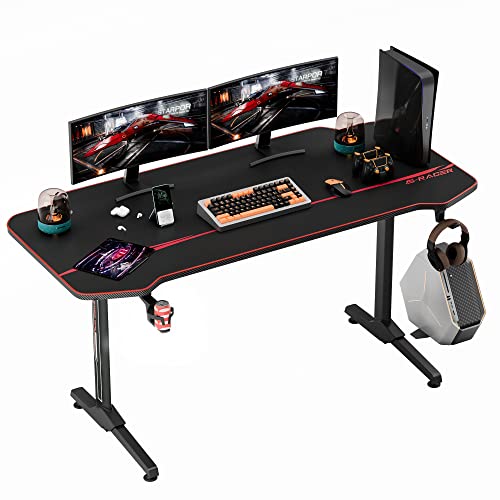
- Best for: Single-monitor stations against one wall in a small room.
- 55 inch wide desktop
- T-shaped frame
- Designed for gaming setups
- Straight desktop layout

- Best for: Players who mix gaming with study or work at the same desk.
- 60 inch L-shaped desktop
- L-shaped layout for corner placement
- Gaming desk for computer setups
- Wide desktop for dual monitors
All 5 Picks at a Glance
| Product | Specs | Action |
|---|---|---|
| EUREKA ERGONOMIC L60 |
| Check price on Amazon |
| Homall 55 Inch Gaming Desk |
| Check price on Amazon |
| DESINO 60 Inch Gaming Desk |
| Check price on Amazon |
 MOTPK 40 Inch Gaming Desk |
| Check price on Amazon |
 Atlantic Gaming Desk Pro |
| Check price on Amazon |
Key takeaways
- Our guide to the best gaming desks for under 200 compares five sturdy desks for single and dual monitor setups, with sizes, frames and extras compared.
A gaming desk has to hold a monitor or two, a keyboard, a mouse and everything else in reach, without wobbling every time you lean on it. That is the real decision here, because a desk that looks right in photos can still feel wrong after a week of long sessions. The five desks in this guide were picked for the way they handle that daily load, not for how many extras they list.
This guide is for first-time setup builders, students fitting a station into a bedroom, and players who want a second screen without rebuilding the room. Each desk below was chosen from the names and specifications shown on its Amazon product page, with its size, shape and frame described as the listing shows it.
Quick Picks
As an Amazon Associate we earn from qualifying purchases.
| Product | Best for | Key spec from title |
|---|---|---|
| EUREKA ERGONOMIC L60 | L-shaped corner setups with two monitors | 60 inch L-shaped desktop |
| Homall 55 Inch Gaming Desk | Straight-wall setups with one wide monitor | 55 inch T-shaped frame |
| DESINO 60 Inch Gaming Desk | Wide L-shaped layouts for work and play | 60 inch L-shaped desktop |
| MOTPK 40 Inch Gaming Desk | Tight rooms, dorms and single-monitor stations | 40 inch top with monitor shelf |
| Atlantic Gaming Desk Pro | Gear-heavy stations with speakers and accessories | Carbon-fiber desktop with monitor platform |
How to Choose
Measure the Room First
Measure the wall, the floor space and the chair before you look at any desk, because a desk that fits the room on paper can still block a door or leave no space to push the chair back. Allow at least 30 inches behind the chair for movement, and check the depth as well as the width, since a shallow top forces the monitor too close to your eyes. Note where power outlets sit, because a cable that has to stretch across a walkway becomes a daily trip hazard. Sketch the layout with tape on the floor if the room is small, and confirm the desk can be carried through the door on delivery day.
Frame Strength and Stability
A gaming desk earns its keep through its frame, so look at how the legs join the top and whether the frame uses crossbars or a shaped leg design for rigidity. Steel frames with adjustable feet cope better with uneven floors than fixed plastic feet, and a desk that can be levelled in place will wobble less during long sessions. Check the listed weight capacity against everything you plan to put on top, including the monitor, the PC case if it sits on the desk, speakers and books. A top that flexes under a heavy monitor arm will sag over time, so a thicker desktop and a solid frame matter more than any cosmetic finish.
Surface Size and Layout
Surface size decides how your gear actually sits, so count the monitors first and then the keyboard, mouse pad and any console or controller that also needs a home. A single 27 inch monitor fits on a 40 inch top with room to spare, while two monitors usually need at least 55 inches or an L-shaped return. Depth matters too: 24 inches of depth lets you sit an arm’s length from the screen, while a narrower top pushes the screen into your face. L-shaped desks suit corners and give a second work zone, but they need wall space on two sides, so confirm which side the return sits on before ordering.
Storage and Extra Features
Extras are only useful when they match the way you play, so judge each one against your actual setup rather than the feature list. A monitor shelf lifts the screen to eye level and frees the space beneath it, a cup holder keeps drinks off the desktop, and a headphone hook stops a headset from sliding onto the floor. Cable grommets and trays keep cords out of the way, which matters more once a second monitor and a console join the setup. Skip extras you will never use, because each one adds bulk and another part to assemble, and a plain sturdy desk often serves a focused setup better than a crowded one.
The 5 Best Options
EUREKA ERGONOMIC L60
- Best for: Two-monitor corner setups in a bedroom or spare room.
- 60 inch L-shaped desktop
- Single-piece tabletop
- Tabletop holds up to 170 lbs
- L-shaped layout for corner placement
Two-monitor corner setups in a bedroom or spare room.
The L-shape needs wall space on two sides, so measure both runs before ordering.
The EUREKA ERGONOMIC L60 suits a player who wants a proper corner station with room for two monitors and a full-size keyboard, without the desk dominating the whole room. Its L-shaped top turns an unused corner into the main gaming zone, and the single-piece tabletop gives a continuous surface for a monitor arm, a mouse pad and a console. The shape also leaves a second arm of the desk free for homework, streaming notes or a second device, so the station works for more than gaming alone. Assembly takes patience because of the size, but once the frame is tightened the desk feels planted.
Homall 55 Inch Gaming Desk
- Best for: Single-monitor stations against one wall in a small room.
- 55 inch wide desktop
- T-shaped frame
- Designed for gaming setups
- Straight desktop layout
Single-monitor stations against one wall in a small room.
Confirm the listed width against your monitor and speaker layout, since 55 inches fills quickly with two screens.
The Homall 55 Inch Gaming Desk suits a player who wants a straightforward straight desk against one wall, with enough width for a wide monitor and a full keyboard. Its T-shaped frame keeps the design simple, and the 55 inch top leaves space for a mouse pad beside the keyboard without crowding the monitor base. The desk works well in a bedroom or shared living space where an L-shaped model would eat too much floor, and the open frame leaves legroom clear for a chair with armrests. It is a practical pick for a first gaming station that may later gain a second monitor on an arm.
DESINO 60 Inch Gaming Desk
- Best for: Players who mix gaming with study or work at the same desk.
- 60 inch L-shaped desktop
- L-shaped layout for corner placement
- Gaming desk for computer setups
- Wide desktop for dual monitors
Players who mix gaming with study or work at the same desk.
Check which side the L return sits on, because the layout cannot be flipped after assembly.
The DESINO 60 Inch Gaming Desk suits a player who wants the extra surface of an L-shape for both gaming and everyday computer work. The 60 inch top gives room for a monitor, a laptop stand or a notebook, and a keyboard, so the desk can shift between play and study without rearranging gear. Its L-shaped layout fits a corner and opens up floor space in the middle of the room, which helps in a shared bedroom or a small apartment. The wide surface also suits a dual-monitor arm, letting both screens sit at the same height without separate stands crowding the top.
MOTPK 40 Inch Gaming Desk
- Best for: Single-monitor stations in dorm rooms and tight bedroom corners.
- 40 inch desktop
- Monitor shelf included
- Compact footprint for small rooms
- Gaming desk design
Single-monitor stations in dorm rooms and tight bedroom corners.
Two monitors crowd a 40 inch top, so plan for one screen or a compact second display.
The MOTPK 40 Inch Gaming Desk suits a player working in a tight space who still wants a desk built for gaming rather than a generic small table. Its 40 inch top fits a single monitor, a keyboard and a mouse pad, and the monitor shelf raises the screen to a better viewing height while freeing the space beneath for a keyboard or a notebook. The compact footprint works in a dorm room, a bedroom corner or a closet nook, and the shelf keeps the screen off the desktop surface. It is the right scale when the room decides the desk size, not the other way around.
Atlantic Gaming Desk Pro
- Best for: Gear-heavy stations with speakers, a phone dock and controllers.
- Carbon-fiber desktop
- X-legs frame
- Detachable monitor platform
- Tablet and phone holder
Gear-heavy stations with speakers, a phone dock and controllers.
The monitor platform adds height, so check your seated eye level before fitting it.
The Atlantic Gaming Desk Pro suits a player whose station has grown beyond a monitor and a keyboard into speakers, a phone, a tablet and a stack of controllers. Its carbon-fiber desktop sits on X-legs, and the detachable monitor platform lifts the screen while the tablet and phone holder keeps a second screen in view. Speaker stands built into the design keep audio off the work surface, and the wire racks hold games and controllers where they can be reached. The desk turns a cluttered setup into an organised station, which matters when every session starts with finding the right controller.
Which One Fits Your Situation
One Monitor in a Small Room
Pick the MOTPK 40 Inch Gaming Desk when the room is small and one monitor is enough. The compact top fits a dorm corner or a bedroom nook, and the monitor shelf lifts the screen to eye level without needing a separate riser. The small footprint leaves floor space for the chair to move. It is the sensible choice when space, not screen count, is the limiting factor.
Two Monitors in a Corner
Pick the EUREKA ERGONOMIC L60 or the DESINO 60 Inch Gaming Desk when two monitors are part of the plan. Both give a 60 inch L-shaped top that holds two screens with keyboard room, and the corner layout keeps the middle of the room clear. The Eureka suits a setup with heavier gear because its tabletop holds up to 170 lbs, while the DESINO suits a desk that also serves as a study space.
A Straight Desk Against One Wall
Pick the Homall 55 Inch Gaming Desk when the desk must sit flat against a single wall with no corner available. The 55 inch straight top fits a wide monitor and a full keyboard, and the T-shaped frame leaves legroom open for a chair with armrests. The simple shape also makes it easier to slide the desk along the wall later, which matters in a rented room where the layout may change.
Speakers, Phone and Controllers
Pick the Atlantic Gaming Desk Pro when the station has speakers, a phone, a tablet and controllers that need homes of their own. The monitor platform, speaker stands and tablet holder keep each item off the work surface, so the keyboard and mouse pad keep their space. The carbon-fiber desktop and X-legs give the station a finished look, and the built-in storage stops controllers from ending up in a drawer.
Common Mistakes
- Measuring only the width and forgetting the depth, so the monitor ends up too close to your eyes.
- Ignoring the monitor stand footprint, which can eat several inches of usable desktop on a small top.
- Forgetting cable routing, then running power and video cables across the floor to reach the outlet.
- Ordering an L-shaped desk without checking which side the return sits on, and finding it faces the wrong wall.
- Loading the desk past its listed weight capacity with a PC case, speakers and books, then wondering why the top sags.
Frequently Asked Questions
What size desk do I need for two monitors?
Two monitors usually need at least 55 inches of width, or an L-shaped desk with a 60 inch top, so both screens sit side by side with space for a keyboard. A monitor arm helps because it removes the stands from the desktop. Measure both screens before ordering, and leave a few inches at each end for speakers.
Do gaming desks need a monitor shelf?
A monitor shelf is not required, but it helps: it lifts the screen to eye level, and it frees the space beneath for a keyboard or notebook. On a compact 40 inch desk the shelf makes a difference. On a wide desk a monitor arm gives the same result, so treat the shelf as a useful extra, not a must-have.
Is an L-shaped desk better than a straight desk?
An L-shaped desk is better when you have a free corner and want a second work zone for study, streaming notes or a console. A straight desk is better against a single wall or in a narrow room where a return would block movement. The right choice depends on the room shape, not on which style looks more impressive.
How do I stop a gaming desk from wobbling?
Start by levelling the desk with its adjustable feet and tightening every bolt after the first week of use, since bolts settle as the frame beds in. Place the desk on a flat floor rather than thick carpet where possible, and keep the heaviest gear centred over the legs. If the wobble persists, check that the frame crossbars are fitted correctly.
More from Amazon
Programs that pair well with the guide above. Offers and eligibility are set by Amazon and may change.
A free business account with business pricing and bulk-buying tools for work, shop or home office.
Create a business accountFree shipping on eligible items, Prime Video and more. Eligible new members can start with a free trial.
Start a Prime free trialAudiobooks and podcasts to listen to on the go. Eligible new members can start with a free trial.
Try Audible freeAd-free music streaming. Eligible new subscribers can start with a free trial.
Try Music Unlimited freeAs an Amazon Associate we earn from qualifying purchases.