Our Short List of 3

- Best for: builders who want daisy-chained RGB radiator fans and minimal cabling.
- Radiator: 360mm, 27mm thick
- Fans: three pre-installed 120mm UNI FAN SL-INF, 25mm thick, fluid dynamic bearings
- Socket support: Intel LGA 1700, 1200, 115X; AMD AM5, AM4
- Pump cap: three interchangeable designs with two individually controlled lighting rings

- Best for: ROG builds that want a rotatable illuminated pump block and quiet low-load behavior.
- Pump: Asetek Gen7 v2
- Fans: ROG ARGB fans, 70.38 CFM airflow, 36 dB noise level
- Water block: 360-degree rotatable ROG logo with 10+ Aura lighting effects
- Fan feature: 0dB technology for silent low-load operation

- Best for: builders who want a customizable pump cover and the quietest stated fan figures here.
- Pump: dual chamber design
- Fans: three pre-installed SickleFlow Edge PWM, 690 to 2,500 RPM, 70.7 CFM airflow
- Noise level: 25 dB, as printed in the listing details
- Radiator dimensions: 394 x 119.6 x 27.2mm
All 4 Picks at a Glance
| Product | Specs | Action |
|---|---|---|
| Lian Li Galahad II Trinity 360 |
| Check price on Amazon |
| ASUS ROG Strix LC III 360 ARGB |
| Check price on Amazon |
| Cooler Master MasterLiquid 360 Atmos |
| Check price on Amazon |
 Thermaltake TH360 V2 Ultra ARGB Sync |
| Check price on Amazon |
Key takeaways
- Compare four sealed 360mm triple-fan AIO liquid CPU coolers for a DIY build, with socket support, fan and pump specs, and case fit checks inside.
Choosing a triple-fan AIO is less about the radiator itself and more about everything around it. Every sealed 360mm unit moves a similar amount of air across a similar fin stack, so the real decision is whether your case has a mount that fits the radiator plus fans, whether the box holds the bracket your socket needs, and how much pump and fan noise you will accept at your desk. The differences that matter day to day are fan design, mounting hardware, and the extras built into the pump block.
This guide is for DIY builders cooling a high-core-count desktop processor, anyone moving up from a smaller cooler for a quieter system, and builders who want the pump block to be part of the build’s look. Every pick below is a sealed all-in-one liquid CPU cooler with a 360mm radiator and three fans, and each one was chosen from the names and specifications printed on its Amazon product page.
Quick Picks
As an Amazon Associate we earn from qualifying purchases
| Product | Best for | Key spec from title |
|---|---|---|
| Lian Li Galahad II Trinity 360 | Daisy-chained RGB fans with tidy cabling | 360mm radiator with pre-installed UNI FAN SL-INF fans |
| ASUS ROG Strix LC III 360 ARGB | ROG builds with a rotatable pump logo | Asetek Gen7 v2 pump and ROG ARGB fans |
| Cooler Master MasterLiquid 360 Atmos | A customizable pump cover and quiet fans | Dual chamber pump with SickleFlow Edge PWM fans |
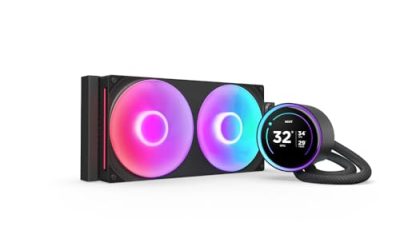
| Thermaltake TH360 V2 Ultra ARGB Sync | White builds that want a pump-block screen | 2.1-inch LCD water block with three ARGB fans |
How to Choose
Radiator and Case Clearance
A 360mm radiator is the longest common AIO size, and it only fits where a case gives it a full three-fan mount at the top or front. Measure the mount area before ordering, and add the fan thickness on top of the radiator thickness, because listings state the two separately. Front mounting also needs enough tube length to reach the CPU socket without strain. Check the graphics card length as well: a front radiator with fans can eat into the space a long card needs, and some cases only accept a 360mm unit at the front, not the top.
Socket Support and Mounting Hardware
The listing title or specification table is the only safe place to confirm socket support, because bracket sets change between production runs. Look for your exact socket in print, such as Intel LGA 1700 or AMD AM5, rather than assuming a family name covers it. Some coolers ship every bracket in the box, while others cover older sockets with a separate kit. If you plan to move the cooler to a future build, a model whose listing states both current Intel and AMD sockets keeps that option open without extra parts.
Fan Design and Noise Control
Three 120mm fans do the actual work on every cooler here, and their stated speed range and bearing type shape the sound of the system. A wide PWM range lets the fans idle slowly during desktop work and ramp only under load. Daisy-chained fans reduce cable clutter and simplify control, while individually cabled fans are easier to replace one at a time. Compare the airflow and noise figures the listing prints, and remember that a fan rated quiet at low speed can still be loud at its maximum, so the control range matters as much as the headline number.
Pump Block Extras and Software
The pump block is where these coolers differ most. Some carry a plain cap, others add swappable covers, a rotatable logo, or a small LCD that shows temperatures and images. Each extra usually brings a software requirement and often an internal USB header connection, so count your board’s headers before choosing a screen model. Lighting ecosystems also differ by brand, and mixing brands can mean running two control programs at once. If you prefer a set-and-forget build, a simpler block with standard fan headers is often the easier long-term choice.
The 4 Best Options
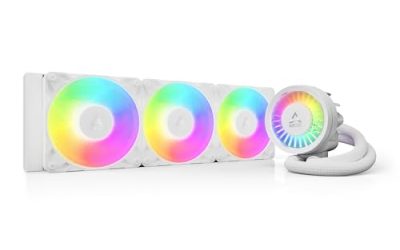
Lian Li Galahad II Trinity 360
- Best for: builders who want daisy-chained RGB radiator fans and minimal cabling.
- Radiator: 360mm, 27mm thick
- Fans: three pre-installed 120mm UNI FAN SL-INF, 25mm thick, fluid dynamic bearings
- Socket support: Intel LGA 1700, 1200, 115X; AMD AM5, AM4
- Pump cap: three interchangeable designs with two individually controlled lighting rings
builders who want daisy-chained RGB radiator fans and minimal cabling.
the radiator and fans together need a mount with real depth, and the SL-INF fans use Lian Li’s own connection system rather than standard individual fan leads.
The Galahad II Trinity 360 suits builders who want the radiator fans to look like one continuous light strip instead of three separate units. Its pre-installed UNI FAN SL-INF fans daisy-chain together, which keeps the cabling around the radiator short and tidy. The pump cap comes with three interchangeable designs, so the block’s appearance can change without replacing the cooler. A 45-degree tubing connector that rotates a full circle helps route the tubes in tighter cases. The stated socket list covers current Intel and AMD platforms, making it a practical pick for a fresh build on either side.
ASUS ROG Strix LC III 360 ARGB
- Best for: ROG builds that want a rotatable illuminated pump block and quiet low-load behavior.
- Pump: Asetek Gen7 v2
- Fans: ROG ARGB fans, 70.38 CFM airflow, 36 dB noise level
- Water block: 360-degree rotatable ROG logo with 10+ Aura lighting effects
- Fan feature: 0dB technology for silent low-load operation
ROG builds that want a rotatable illuminated pump block and quiet low-load behavior.
lighting control runs through ASUS software, so check that it fits alongside any other brand’s control program you already run.
The Strix LC III 360 ARGB is aimed at ROG-themed builds where the pump block is meant to be seen. Its water block carries a ROG logo that rotates a full 360 degrees, so the branding sits upright whatever direction the block is mounted, and the listing counts more than ten custom Aura lighting effects. Under the cap sits an Asetek Gen7 v2 pump, a widely used design with a strong parts and support trail. The ROG ARGB fans include a 0dB mode that stops them at low load, which helps keep a lightly loaded system silent.
Cooler Master MasterLiquid 360 Atmos
- Best for: builders who want a customizable pump cover and the quietest stated fan figures here.
- Pump: dual chamber design
- Fans: three pre-installed SickleFlow Edge PWM, 690 to 2,500 RPM, 70.7 CFM airflow
- Noise level: 25 dB, as printed in the listing details
- Radiator dimensions: 394 x 119.6 x 27.2mm
builders who want a customizable pump cover and the quietest stated fan figures here.
confirm the bracket set in the box matches your socket before you start, since the listing’s headline support focuses on the newest Intel platform.
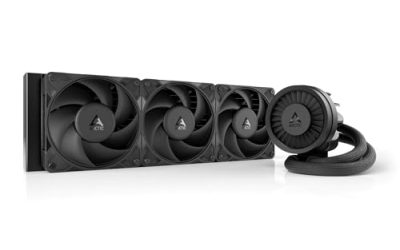
The MasterLiquid 360 Atmos fits builders who like to personalize their hardware. Its pump top cover is designed to be customized with your own 3D-printed designs over the addressable RGB lighting, which makes the block a small project in itself. The dual chamber pump is built to direct flow at the CPU hotspot, and the three SickleFlow Edge fans arrive pre-installed to shorten setup time. The stated fan speed range starts low for quiet desktop use, and the printed noise figure is the lowest in this group. Socket support in the listing covers AMD AM5 and AM4 plus Intel LGA 1851 and 1700.
Thermaltake TH360 V2 Ultra ARGB Sync
- Best for: white builds that want a customizable LCD on the pump block.
- Radiator: 360mm
- Fans: three 120mm ARGB fans, PWM 500 to 1,500 RPM
- Water block: 2.1-inch LCD display
- Pump: PWM controlled, 1,500 to 3,300 RPM
white builds that want a customizable LCD on the pump block.
the LCD needs an internal USB connection and Thermaltake’s software to configure, so make sure a header is free on your motherboard.
The TH360 V2 Ultra in white is the pick for a snow-themed build that wants a screen on the pump. Its water block carries a 2.1-inch LCD that can show system information or images, which turns the block into the visual center of the case. Three 120mm ARGB fans handle the radiator, with a stated PWM range that starts low enough for quiet idle running. The pump itself is PWM controlled across a wide speed range. As the only white cooler in this group, it also solves the common problem of finding a triple-fan AIO that matches a white case and motherboard.
Which One Fits Your Situation
Your Case Only Just Fits a 360mm Radiator
Measure the mount twice and favor the cooler whose stated dimensions leave room to spare. The MasterLiquid 360 Atmos prints its full radiator dimensions in the listing, which makes the fit check straightforward before ordering. If the top mount is tight, a front mount with the tubes routed downward is the fallback, and the Lian Li’s rotating 45-degree connector gives extra freedom when the tubes need to turn sharply in a confined space.
You Are Building a White Showcase PC
The Thermaltake TH360 V2 Ultra is the natural center of a white build, pairing a white radiator and fans with an LCD block that can display an image matching the theme. Its screen does ask for a spare USB header and some setup time in Thermaltake’s software. Builders who want white hardware without a screen can still use the other picks, but they will need to accept black radiators against the white interior.
You Want the Quietest Desk Setup
Start with the MasterLiquid 360 Atmos, which prints the lowest noise figure in this group and a fan range that begins at 690 RPM for gentle idle speeds. The ASUS Strix LC III is the alternative if fan stop matters more: its 0dB technology lets the fans halt entirely at low load. Either way, set a custom fan curve after installation, because the motherboard’s default profile often spins AIO fans faster than the temperatures require.
You Are Cooling a High-Core-Count CPU for Long Workloads
Any of these 360mm units has the surface area for sustained loads, so choose on mounting and control. The Lian Li Galahad II Trinity 360 is a strong default with its stated support for both current platforms and fans built for continuous running on fluid dynamic bearings. The ASUS model adds the reassurance of an Asetek pump and a six-year warranty stated in its title, which suits a workstation that cannot afford cooling downtime.
Common Mistakes
- Ordering a 360mm cooler before measuring the case mount, then finding the radiator fits but the fans clash with the motherboard or memory.
- Mounting the radiator so the pump sits at the highest point of the loop, which can trap air at the pump and add noise over time.
- Choosing an LCD or controller model without checking that the motherboard has a free internal USB header for it.
- Mixing fan ecosystems from different brands and ending up with two lighting programs fighting over the same hardware.
- Assuming every socket bracket is in the box, when the listing’s stated support is the only guarantee of what is included.
Frequently Asked Questions
Does a 360mm AIO cool better than a 240mm model?
Generally yes for sustained loads, because the larger radiator gives more fin area and a third fan to move air across it. The gap shows most on high-core-count processors under long workloads. For a mid-range processor used in short bursts, the practical difference is small, and case fit should decide.
Where should the radiator be mounted, top or front?
Top mounting is the common first choice because heat exhausts straight out of the case and the pump stays below the radiator’s high point. Front mounting works when the top lacks a three-fan mount, but it feeds warmed air toward the graphics card. Follow the case layout and keep the pump below the top of the radiator either way.
Do sealed AIO coolers need refilling or maintenance?
No. A sealed all-in-one arrives filled and closed, and the models here are not designed to be opened or topped up. Maintenance is limited to dusting the radiator fins and fans and checking that the fans and pump still respond to their control curves. If a sealed unit loses performance, that is a warranty matter rather than a service task.
Will a triple-fan AIO fit in a mid-tower case?
Many current mid-towers accept a 360mm radiator at the front, and some accept one at the top, but it is never guaranteed. Check the case specification for a stated 360mm mount, then compare it against the radiator dimensions and fan thickness in the cooler listing. Allow extra room for the tubes to bend without kinking.
More from Amazon
Programs that pair well with the guide above. Offers and eligibility are set by Amazon and may change.
A free business account with business pricing and bulk-buying tools for work, shop or home office.
Create a business accountFree shipping on eligible items, Prime Video and more. Eligible new members can start with a free trial.
Start a Prime free trialAudiobooks and podcasts to listen to on the go. Eligible new members can start with a free trial.
Try Audible freeAd-free music streaming. Eligible new subscribers can start with a free trial.
Try Music Unlimited freeAs an Amazon Associate we earn from qualifying purchases.