
Key takeaways
- Genuinely affordable with no compromise on basic fax and scan functionality
- Compact form factor suits small desks and apartments
- Slower print and scan speeds limit productivity for heavier workloads
A fax scanner sits at an awkward intersection: you still need to send and receive documents electronically, but you do not want a dedicated fax machine collecting dust on a shelf. The problem most buyers face is finding a single device that handles scanning, printing, and faxing without the bulk, the cost, or the setup headaches that come with office-grade equipment. Many people discover this need late — a lawyer demands a signed contract by fax, a medical office requires one, a government agency will not accept a PDF upload — and suddenly the all-in-one printer conversation becomes urgent.
What separates a good fax scanner from a frustrating one comes down to a handful of things: whether the fax modem actually works reliably on modern VoIP lines, whether the document feeder can handle multi-page jobs without jamming, and whether the software setup matches your operating system without requiring a support call. Price matters too, but the cheapest option that jams or drops a transmission costs more in time than a device at twice the budget that simply works every time.
Our top picks


As an Amazon Associate we earn from qualifying purchases at no extra cost to you.
Quick Picks
| Product | Best for | Price |
|---|---|---|
| Canon PIXMA TR4720 | Light home use on a budget | $69 |
| Epson EcoTank ET-4800 | Home office with high page counts | $199.99 |
| HP LaserJet Pro MFP 3101fdw | Small office shared use | n/a |
| Canon PIXMA TR8620a | Print quality and versatility | $199.99 |
| Brother MFC-L2820DW | Duplex faxing in a compact package | $279.99 |
| Brother DCP-L2640DW | Monochrome document workflow | $209.99 |
| Canon Canoscan Lide 300 | Scanning only, fax via software | $69.99 |
| Canon imageCLASS MF462dw II | Office-grade speed and volume | $299 |
How We Picked
We compared published specifications, current pricing, and patterns in owner feedback across all eight candidates. The criteria that matter most in this category are fax reliability (especially over VoIP), document feeder capacity and jam resistance, cost per page over a year of typical use, and setup friction — whether the device connects cleanly to Windows, macOS, and mobile without dedicated IT support. A device that looks great on paper but frustrates owners during initial configuration gets downgraded regardless of its spec sheet.
The 8 Best Fax Scanner in 2026
Canon PIXMA TR4720
This is the entry point for anyone who needs fax capability without a serious commitment. The TR4720 covers printing, scanning, and faxing in a footprint small enough to sit on a desk or a shelf. Owners consistently note how easy the initial setup is, which is unusual at this price. The auto document feeder handles modest multi-page jobs without complaint. The main limitation is throughput — this is not a machine for anyone sending dozens of pages per day, and print quality on photos trails behind the higher-end Canon options.
- Genuinely affordable with no compromise on basic fax and scan functionality
- Compact form factor suits small desks and apartments
- Slower print and scan speeds limit productivity for heavier workloads
Skip it if you need duplex printing or handle more than a few pages per day.
Epson EcoTank ET-4800
The ET-4800 solves the ink cost problem that plagues most budget all-in-ones. Its supertank system delivers a dramatically lower cost per page, which matters if you are printing and faxing documents regularly. The wireless setup is straightforward, Ethernet is included for more stable networking, and the ADF handles multi-page scanning without babysitting. It prints in color, which the monochrome laser options in this list cannot match. The trade-off is that inkjet print heads can clog if you go weeks without printing, and the upfront price is roughly triple the Canon TR4720.
- Supertank design keeps running costs well below cartridge-based competitors
- Ethernet plus wireless gives flexible network options for home offices
- Prone to head clogging during extended idle periods
Skip it if your primary need is occasional faxing and you want the lowest possible upfront cost.
HP LaserJet Pro MFP 3101fdw
HP positions this squarely as a small-office device, and the build quality reflects that. It is monochrome laser, so print speeds and cost efficiency suit document-heavy environments. The wireless connectivity is stable, and HP’s software ecosystem handles multi-user setups more gracefully than consumer-grade alternatives. Price is not publicly listed on major retail pages as of 2026, which makes comparison shopping essential. Owners praise reliability but note the machine is larger and heavier than the compact alternatives here.
- Laser engine delivers consistent output without clogging concerns
- Designed for shared office use with robust multi-user support
- Availability and pricing fluctuate, complicating purchase decisions
Skip it if you need color output or have very limited desk space.
Canon PIXMA TR8620a
This Canon sits at the same price point as the Epson ET-4800 but takes a different approach. It uses individual cartridges rather than a supertank system, which means higher long-term ink costs, but it earns that trade-off with noticeably better photo and document print quality. The ADF, wireless connectivity, and Alexa integration make it a solid home-office hub. Fax functionality works as expected. Owners who value print quality over cost efficiency tend to favor this model.
- Superior print quality for both documents and photos in this price range
- Alexa and AirPrint support streamline smart-home workflows
- Cartridge costs add up faster than supertank or laser alternatives
Skip it if you print large volumes and cost per page is your priority.
Brother MFC-L2820DW
Brother’s monochrome laser units have a reputation for no-nonsense reliability, and this one includes duplex printing and scanning out of the box. The ADF feeds both sides of a document, which eliminates the manual flipping that frustrates owners of simpler machines. Fax and scan speeds are competitive, and the wireless connection is stable. The Refresh subscription trial is a bonus for users who want digital fax options. The price is the second-highest in this roundup, and it prints only in black and white.
- Duplex ADF means two-sided documents scan and fax without reinsertion
- Bulletproof build quality typical of Brother’s laser line
- Monochrome only — not an option for color needs
Skip it if color printing is a requirement.
Brother DCP-L2640DW
Think of this as the MFC-L2820DW minus the fax modem. It handles copy, scan, and duplex printing at a lower price than its sibling. The omission of a traditional fax modem is a meaningful limitation if you specifically need hardware-based faxing. However, if you are open to software-based fax solutions, this becomes a capable and affordable compact laser for document workflow. Owners appreciate the small footprint and reliable laser output.
- Lower price than the MFC-L2820DW with similar print and scan quality
- Compact size suits tight workspaces without sacrificing laser reliability
- No built-in fax modem limits direct faxing capability
Skip it if you require a hardware fax connection rather than software alternatives.
Canon Canoscan Lide 300
This is not a printer or a fax machine in the traditional sense — it is a flatbed scanner. The “fax” functionality comes through software and an online service, not a built-in modem. If your need is high-quality document scanning to PDF with the ability to transmit via email or an internet fax app, this delivers exceptional value under $70. The compact lid design means it fits in a drawer when not in use. There is no ADF and no print capability.
- Outstanding scan quality for the price with simple software setup
- Minimal footprint and low power draw make storage trivial
- No printing, no hardware fax, no document feeder
Skip it if you need to physically print or send fax without third-party software.
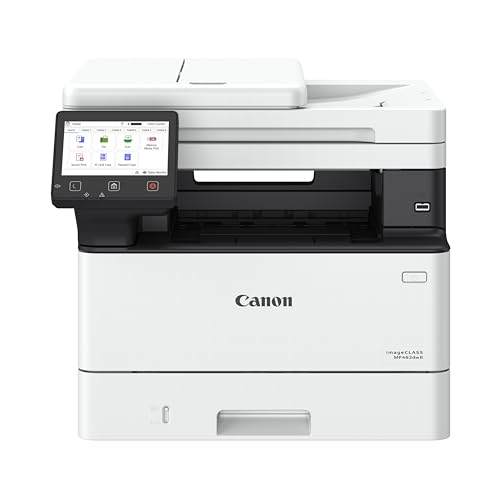
Canon imageCLASS MF462dw II
This is the highest-priced unit in the list and the closest to a true office machine. It delivers monochrome laser printing with duplex support, a fast ADF, and reliable wireless networking. Canon’s imageCLASS line is designed for environments where other people share the device and expect it to work without complaints. Owners report few issues with reliability or print quality. The $299 price reflects that positioning — you are buying durability and speed, not compactness.
- Office-grade build with fast print and scan speeds
- Duplex printing and scanning handle professional document workflows
- Largest footprint and highest cost in this comparison
Skip it if you need color output or have limited space and a light workload.
Buying Guide
Fax Modem vs. Internet Fax: Which Do You Actually Need?
Traditional fax modems connect to a phone line, including VoIP services like Vonage or MagicJack. Many users discover their device cannot fax over VoIP without adjusting settings or adding an analog telephone adapter. If you have a landline or can configure a VoIP ATA, a hardware fax modem works fine. If you have no phone line and want to avoid one, look for devices with companion apps that send faxes over the internet. This distinction eliminates roughly half the candidates on this page for some buyers.
Document Feeder Capacity and Duplex Support
An ADF that handles one-sided sheets is a starting point, but duplex ADF — where the machine scans both sides automatically — saves real time on contracts and multi-page documents. Check the page capacity: 20 sheets suits light use, while 35 to 50 is more appropriate for small offices. Also verify whether the ADF is front-loading or flatbed, as front-loading units are easier to feed and less prone to skewed pages.
Cost Per Page Over the Life of the Device
Inkjet cartridges can cost more in the first year than the printer itself. Laser toner typically lasts longer but costs more upfront per replacement. Supertank systems like Epson’s offer the lowest ongoing cost but require a higher initial investment. For fax-scanner use specifically, you are mostly scanning and sending rather than printing, so ink costs may be lower than you expect — but factor in toner replacement for laser models if you also print receipts or copies regularly.
Our Verdict
The top pick for most home-office buyers is the Brother MFC-L2820DW. Its duplex ADF, reliable laser engine, and stable wireless connection handle the practical demands of faxing multi-page documents without the frustration of inkjet maintenance. At $279.99 it is not cheap, but the cost-per-page economics and lack of clogging risk make it a long-term choice. The budget pick is the Canon PIXMA TR4720 at $69, which covers essential fax and scan needs for anyone sending only a handful of documents per month. The exception that changes the recommendation: if your primary workload is high-volume scanning and color printing rather than faxing, the Canon PIXMA TR8620a offers better output quality at the same price as the Brother.
FAQ
Can I use a fax scanner with VoIP phone service?
Yes, but not always reliably without adjustment. VoIP compresses audio, which can corrupt fax tones. You may need to enable a passthrough mode on your VoIP adapter or request an uncompressed codec from your provider. Some devices have a built-in “Fax over VoIP” setting that reduces modem speed to compensate.
Do I need a dedicated phone line for faxing?
Not necessarily. You can connect a fax device to an existing landline extension or to a VoIP adapter. The key requirement is a stable analog or compatible digital signal at the moment you send or receive, not a separate line dedicated solely to faxing.
What is the difference between a fax scanner and a software fax app?
A hardware fax scanner includes a modem that communicates directly with phone lines. Software fax apps route transmissions over the internet through a provider’s servers, eliminating the need for a physical phone connection. Hardware is better for high-volume or legal-required transmissions; software is simpler for occasional use.
How long do fax modems typically last in a home device?
The fax modem is one of the more durable components in an all-in-one printer. It should last the full lifespan of the device, typically five to seven years under normal home use. Most failures in fax function trace back to phone line quality or settings rather than hardware degradation.









