
An L shaped PC desk is one of those purchases that either saves your daily workflow or quietly collects clutter in a corner. The premise is simple: two perpendicular surfaces let you run a monitor, a keyboard, a laptop stand, and a stack of reference material without shoving anything off the edge. But the category is crowded with near-identical listings that differ on features that matter only once the box is open.
What separates a good L shaped PC desk from a mediocre one comes down to three things most product pages gloss over: the actual usable surface after legs and frame geometry eat into the dimensions, whether the built-in power outlets are genuinely convenient or just a marketing checkbox, and how the drawer or shelf configurations handle real-world weight after six months of use. This guide compares published specs, list prices, and aggregated owner feedback across eight models available in 2026 to help you shortlist before you spend.
Our top picks

 ODK 53" L Shaped Gaming Desk with
- 【Computer Desk with Powerful Storage Function】This L-shaped computer…
- 【Built-in USB Charging Ports & Power Outlets 】Equipped…
- 【L Gaming Desk with Adjustable LED Lighting】The gaming…

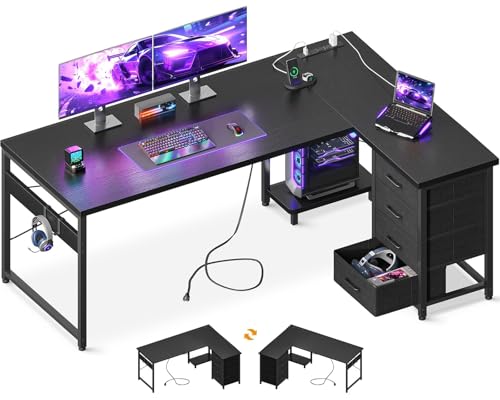
 PRAISUN L Shaped Gaming Desk with LED
- 【Computer Desk with 7 Charging Ports】This desk with…
- 【Gaming Desk with Immersive LED Lights】Set your perfect…
- 【3-Level Height-Adjustable Pegboard】Upgrade your battle station gaming computer…


As an Amazon Associate we earn from qualifying purchases at no extra cost to you.
Quick Picks
| Product | Best for | Price |
|---|---|---|
| AODK with LED Light & Power Outlet | LED lighting on a tight budget | $109.99 |
| ODK 53″ | Smallest footprint | $105.99 |
| Korfile 66″ | Max surface area with drawers | $129.99 |
| AODK 61″ | Drawer-focused organization | $129.99 |
| PRAISUN | RGB aesthetic on a budget | $109.99 |
| SEDETA with Hutch | Full workstation with hutch storage | $179.99 |
| SEDETA 67″ | Pegboard customization | $119.99 |
| Huuger 63″ | Thickest desktop panel | $119.99 |
How We Picked
We narrowed this list using four criteria that consistently drive owner complaints or praise in the budget L shaped PC desk segment. First, listed dimensions versus reported usable space, because frame legs and shelf supports can steal two or three inches per side. Second, the presence and placement of power outlets and USB ports, since a single accessible outlet strip beats two buried behind a panel. Third, storage configuration, meaning how many drawers or shelves the desk includes and whether they hold up under typical office weight. Fourth, surface thickness and material quality as reported in long-term owner reviews, which is where cheaper particleboard reveals itself fastest.
The 8 Best L Shaped Pc Desk in 2026
AODK L Shaped Desk Gaming Desk with LED Light & Power Outlet
This is the entry point for anyone who wants integrated lighting and a power outlet without paying over $110. Owner feedback highlights the LED strip as a genuine ambience upgrade for evening sessions, and the built-in outlet eliminates one cable-management problem out of the box.
- Pros: LED lighting and power outlet included at the lowest price tier; straightforward assembly per multiple owner reports.
- Con: No listed dimensions for the surface thickness, which means durability claims are harder to verify against pricier competitors.
- When to skip: If you need drawers or shelving for more than a slim keyboard and a pair of headphones.
ODK 53″ L Shaped Gaming Desk with Shelves, LED & Outlets, Black
At 53 inches on its longest side, this is the compact option for anyone whose room geometry forbids a larger footprint. The integrated shelves add vertical storage without demanding extra floor space, and the dual-outlet strip handles a monitor plus a laptop charger simultaneously.
- Pros: Smallest footprint in this list, ideal for tight corners; shelves and LED combine storage and lighting in one unit.
- Con: The reduced surface means dual-monitor setups will feel cramped at this width.
- When to skip: If your primary use case involves two or three screens side by side.
Korfile 66” L Shaped Gaming Desk with Storage Drawers, Power Outlets, LED
The Korfile targets users who want maximum horizontal surface and enclosed storage in a single purchase. At 66 inches, it clears the threshold where dual-monitor layouts become comfortable, and the combination of drawers plus power outlets plus LED means fewer accessory add-ons.
- Pros: Widest surface among budget-tier options here; drawers provide closed storage that keeps the visual field clean.
- Con: Owner reports note the unit is physically demanding to assemble due to its size and panel count.
- When to skip: If your room cannot accommodate a 66-inch arm plus the perpendicular return without blocking a walkway.
AODK 61″ L Shaped Gaming Desk with 4 Drawers and Power Outlets, Black
This AODK model differentiates itself with four drawers, the highest drawer count in this comparison. For people who store notebooks, peripherals, or cables in physical form rather than digitally, that configuration is the practical reason to choose it over single-drawer competitors.
- Pros: Four drawers offer segmented organization; 61-inch arm fits most rooms that cannot handle a 66-inch model.
- Con: No LED lighting is listed, so ambient styling requires a separate purchase.
- When to skip: If integrated lighting is non-negotiable for your setup aesthetic.
PRAISUN L Shaped Gaming Desk with LED Lights & Power Outlets
The PRAISUN competes directly with the first AODK on price and feature set. Owner feedback suggests the LED system offers multiple color modes that go beyond simple on/off, appealing to users who treat their desk as part of a gaming-room identity rather than purely functional furniture.
- Pros: Multi-color LED system adds visual customization; power outlets positioned for reach without leaning over the edge.
- Con: No storage configuration (drawers or shelves) is listed, so everything must live on the surface.
- When to skip: If you accumulate physical items and need closed storage to keep the desk visually manageable.
SEDETA L Shaped Gaming Desk with Storage Shelves, Hutch, Drawers
At $179.99, the SEDETA with hutch is the most feature-complete option here. The hutch adds a second vertical plane of shelving above the desk surface, and combining it with drawers creates a layered storage system that no other desk in this list matches.
- Pros: Hutch plus shelves plus drawers give the deepest storage capacity; the hutch keeps monitors and books off the primary surface.
- Con: It is the most expensive option by a meaningful margin, and the hutch adds height that may not suit low-ceiling rooms.
- When to skip: If your budget cap is $130 or if you already own a separate bookcase.
SEDETA 67″ L Shaped Gaming Desk with Pegboard LED Lights and Power Outlet
The pegboard is the reason this model exists on your shortlist. Rather than fixed shelves, the wall-mounted pegboard lets you reposition hooks, bins, and holders as your accessory load changes over time. The 67-inch length puts it at the wide end of this comparison.
- Pros: Pegboard offers the most flexible storage customization in this group; at $119.99 it undercuts the hutch model by $60.
- Con: No drawers are listed, so enclosed storage still requires a separate solution.
- When to skip: If you prefer the security of closed drawers over the openness of a pegboard display.
Huuger 63 Inch L Shaped Desk with Power Outlets & 0.95 Inch Thicker Desktop
The 0.95-inch desktop thickness is the standout spec here. In a category where most budget panels hover at 0.6 to 0.7 inches, nearly a full inch means less flex under heavy monitors and better screw-hold over years of reassembly.
- Pros: Thickest panel listed in this comparison, which owners consistently tie to rigidity and long-term durability; power outlets built into the surface.
- Con: No LED lighting or storage drawers are mentioned, making it a surface-and-outlet desk without the extras.
- When to skip: If integrated lighting or enclosed storage are must-haves and you cannot compromise.
Buying Guide
Surface Thickness and Long-Term Rigidity
Desktop thickness is the single spec most budget desks understate. Panels below 0.7 inches often flex noticeably under a 32-inch monitor, especially at the outer corners of the perpendicular arm. A 0.95-inch panel, like the Huuger advertises, resists that sag and holds screws more securely when you mount cable trays or monitor arms later. If your setup includes more than one screen or a heavy mechanical keyboard, prioritize thickness over color options.
Power Outlet Placement and Count
Every desk on this list includes power outlets, but placement varies enormously. An outlet strip recessed into the rear edge of the surface keeps cables short and out of sight. An outlet bolted to the underside of a shelf requires reaching behind panels to plug anything in. Check owner photos and video reviews for the actual position before ordering, because product images rarely show the cord-routing path clearly.
Storage Configuration Versus Room Size
Drawers and hutch shelves add functionality but also add bulk that fights against small rooms. A four-drawer unit like the AODK 61-inch needs floor clearance under each drawer front for full extension. A hutch like the SEDETA adds height that can crowd a low-ceiling space. If your room is under 120 square feet, favor open shelves or a pegboard, which store vertically without encroaching on your legroom or headroom.
Our Verdict
For most people assembling an L shaped PC desk for a home office with two monitors and moderate accessories, the Huuger 63 Inch is the top pick because its 0.95-inch panel addresses the failure mode that ruins budget desks fastest: surface sag. The AODK with LED Light & Power Outlet at $109.99 is the best budget pick for anyone who wants ambient lighting and an outlet without spending over $110. The SEDETA 67-inch with pegboard wins outright if your accessory load changes seasonally, because repositioning hooks on a pegboard beats swapping between fixed drawers or shelves.
FAQ
What size room do I need for an L shaped PC desk?
The longest arm ranges from 53 to 67 inches in this comparison, and the perpendicular return typically adds 40 to 50 inches. Measure your wall space and subtract at least four inches per side for cable routing and chair clearance. A 53-inch model fits a room where a standard 48-inch straight desk would, while a 67-inch unit needs roughly the footprint of a small two-drawer filing cabinet plus the desk.
Are LED strips on these desks practical or just decorative?
Owner feedback treats integrated LED strips as genuinely useful for reducing eye strain during late-night sessions by adding ambient backlighting without a separate lamp. They are not bright enough to replace task lighting, but they eliminate the harsh contrast between a glowing screen and a dark room.
Do built-in power outlets on these desks replace a surge protector?
Most include basic outlets rated for standard 120V loads but do not list joule ratings or surge protection. If you connect expensive equipment like a workstation GPU or an external drive array, plug the desk’s outlets into a separate surge-protected strip rather than relying on the desk alone.
How long does assembly typically take for these models?
Owner reports cluster around 40 to 90 minutes depending on model complexity. The single-panel AODK and PRAISUN models sit at the shorter end, while the SEDETA hutch model and the Korfile with its multiple drawer panels sit at the longer end. A second pair of hands helps with the wider units during the frame-alignment step.









