Our Short List of 3

- Type: Condenser, three-capsule array
- Polar patterns: Cardioid, stereo, omnidirectional, bidirectional
- Connection: USB (Mini-USB port on the microphone)
- Stand: Desktop stand included; threaded mount fits a boom arm (arm not included)
- Type: Condenser
- Polar pattern: Cardioid
- Connection: USB (USB-C port on the microphone)
- Stand: Tripod stand included, with shock mount and pop filter in the box

- Type: Condenser, three 14 mm capsules
- Polar patterns: Cardioid, stereo, omnidirectional, bidirectional
- Connection: USB (Mini-USB port on the microphone)
- Stand: Desk stand with anti-vibration shock mount; boom mount adapter included
All 5 Picks at a Glance
| Product | Specs | Action |
|---|---|---|
| 1. Blue Yeti USB Microphone |
| Check price on Amazon |
| 2. FIFINE Ampligame A8 USB Microphone |
| Check price on Amazon |
| 3. HyperX QuadCast USB Microphone |
| Check price on Amazon |
 4. Rode NT-USB Mini |
| Check price on Amazon |
 5. Audio-Technica ATR2100x-USB |
| Check price on Amazon |
Our Top Picks
- Logitech Creators Blue Yeti USB Microphone for PC1 Count (Pack of 1)4.92 x 4.72 x 11.61 inches3.51 poundsCheck on Amazon
- RØDE NT-USB Mini Studio-Quality USB Condenser Microphone4.257.3 x 2.4 x 2 inches1.3 poundsCheck on Amazon
A built-in laptop microphone sits far from your mouth, picks up keyboard clatter, fan noise and room echo, and leaves you sounding thin and distant on every call. A dedicated desk microphone fixes most of that in one move: it sits close to you, aims at your voice instead of the whole room, and gives you hardware controls a laptop lid never will. Whether your desk time is back-to-back video meetings, podcast recording, voiceovers or streaming, the right microphone makes you easier to understand.
The five models below cover the main desk setups: a multi-pattern condenser for people who record more than meetings, a compact condenser for small desks, a shock-mounted option for lively workspaces, a tiny magnetic-stand model, and a dynamic USB/XLR hybrid that forgives noisy rooms and grows with your setup.
Disclosure: As an Amazon Associate, we earn from qualifying purchases made through links on this page, at no extra cost to you.
How to Choose a Desk Microphone
Condenser or dynamic. Condenser microphones are sensitive and detailed. They capture the full texture of a voice and work beautifully in a quiet, soft-furnished room, but they also hear the dog, the doorbell and the air conditioner. Dynamic microphones are less sensitive, reject more off-axis sound, and need to sit closer to your mouth. In an untreated room with hard walls and nearby household noise, a dynamic model often produces the cleaner call recording.
Pickup pattern. The pattern describes where the microphone listens. Cardioid listens to the front and rejects sound from the back and sides, which is why nearly every desk microphone leads with it: your voice is in front, your keyboard and monitor are behind. Omnidirectional hears all around, useful for two people sharing one mic. Bidirectional hears front and back for face-to-face interviews. Stereo captures a left-right image for music. If you only ever speak alone into the mic, cardioid alone is enough; extra patterns earn their keep when you record other people or instruments.
Connection. USB microphones plug straight into a computer and need no extra hardware, which is why they dominate home office desks. A model that adds an XLR output alongside USB gives you a second path: run it over USB today, then plug it into an audio interface or mixer later. Check the connector on the mic itself too, since some use USB-C and older designs use Mini-USB.
Stand and placement. A microphone sounds best six to eight inches from your mouth, slightly off to one side so breath blasts pass by it. A desk stand is the simplest route and every pick here includes one, but a stand places the mic low and near desk vibrations. A boom arm lifts the mic to mouth height and frees desk space, and a shock mount suspends the capsule to soften typing knocks before they reach the recording.
Mute and headphone jack. A hardware mute button or tap sensor lets you cough, sip coffee or answer the door without hunting for the on-screen control. A 3.5 mm headphone jack on the mic body gives zero-latency monitoring: you hear your own voice as you speak, with none of the delayed echo software monitoring produces. On long meeting days, that instant feedback helps you keep a steady distance and volume.
The 5 Best Desk Microphones
1. Blue Yeti USB Microphone
- Type: Condenser, three-capsule array
- Polar patterns: Cardioid, stereo, omnidirectional, bidirectional
- Connection: USB (Mini-USB port on the microphone)
- Stand: Desktop stand included; threaded mount fits a boom arm (arm not included)
The Blue Yeti is the long-running default for desks that do a bit of everything. Its three-capsule condenser array delivers four pickup patterns from one microphone, so the same unit handles solo calls in cardioid, a two-person podcast in bidirectional, a group around a table in omnidirectional, and basic music capture in stereo. On the front you get a mute button plus knobs for headphone volume and pattern selection, with the gain dial on the back, all reachable without opening any software.
It is a large microphone, and the included stand holds it well above a typical desk surface, so measure your monitor clearance first. The body also has a threaded mount underneath, so it can move to a boom arm later. For a home office that doubles as a recording corner, this is the most flexible single purchase on the list.
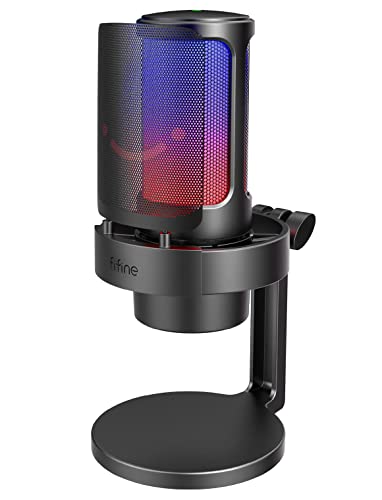
2. FIFINE Ampligame A8 USB Microphone
- Type: Condenser
- Polar pattern: Cardioid
- Connection: USB (USB-C port on the microphone)
- Stand: Tripod stand included, with shock mount and pop filter in the box
The Ampligame A8 is built for desks where calls blend into streaming and recording sessions. It is a cardioid condenser with a tap-to-mute sensor on top: touch it once and the RGB lighting changes to show you are muted. A gain knob on the body adjusts your level, and the headphone jack gives real-time monitoring while you talk.
The box is generous for a compact mic: a tripod stand, a shock mount that softens desk bumps, and a pop filter that tames hard consonants. The gradient RGB glow will not suit every office, though muting the mic turns the light show off along with the audio. For a single-pattern desk mic with everyday controls placed where your hands already are, the A8 covers the essentials well.
3. HyperX QuadCast USB Microphone
- Type: Condenser, three 14 mm capsules
- Polar patterns: Cardioid, stereo, omnidirectional, bidirectional
- Connection: USB (Mini-USB port on the microphone)
- Stand: Desk stand with anti-vibration shock mount; boom mount adapter included
The QuadCast pairs a three-capsule condenser with the most desk-friendly mounting hardware in this group. It arrives in an anti-vibration shock mount with an internal pop filter, and the mount adapter in the box fits common boom arm threads, so moving it off the desk later takes minutes. Like the Yeti, it offers four pickup patterns on a dial, covering solo calls through to stereo recording.
Its signature control is the tap-to-mute sensor on top: tap once and the red LED ring goes dark, so your mute state is visible at a glance. The gain dial hides on the bottom of the mic, which keeps the face clean but means reaching under it to adjust levels. If your desk gets bumped and typed on all day, the shock mount and clear mute indicator make this the most forgiving condenser here for busy shared spaces.
4. Rode NT-USB Mini
- Type: Condenser
- Polar pattern: Cardioid
- Connection: USB-C
- Stand: Detachable magnetic desk stand; thread mount for stands and boom arms
The NT-USB Mini is the small-desk answer. It is a compact cardioid condenser in a metal body with a built-in pop filter, and its desk stand attaches magnetically: lift the mic off to move it onto a boom arm, then click it back onto the base when you want the desk clear. The footprint is a fraction of the bigger models here, which matters when monitors, notebooks and coffee already compete for space.
Controls are deliberately minimal. There is a single dial for headphone volume, the 3.5 mm output delivers zero-latency monitoring, and there is no mute button on the body, so muting happens in your meeting app or with a keyboard shortcut. In exchange you get a tidy, warm vocal tone and a microphone that disappears into a small setup instead of dominating it. Podcasters who record one voice at a time in a reasonably quiet room will find very little missing.
5. Audio-Technica ATR2100x-USB
- Type: Dynamic
- Polar pattern: Cardioid
- Connection: USB-C and XLR (both outputs on the microphone)
- Stand: Tripod desk stand included; handheld body also fits mic clips
The ATR2100x-USB is the dynamic option, and it solves the problem condenser mics cannot: a noisy room. Its cardioid dynamic capsule hears far less of the room around you, so untreated walls, nearby family life and a humming PC fade into the background, provided you keep the mic a few inches from your mouth. The handheld-style body feels different from the studio shapes above, but the included tripod stand turns it into a normal desk mic in seconds.
Its party trick is the pair of outputs. USB-C connects straight to your computer for meetings today, and a full XLR socket on the base lets the same microphone plug into an interface or mixer when your setup grows. An on/off switch, a headphone volume dial and a 3.5 mm jack with direct monitoring round out the controls. If your office is a corner of a busy living room, this is the safest voice-first pick here.
Comparison Table
| Microphone | Type | Patterns | Connection | Mute control | Headphone jack |
|---|---|---|---|---|---|
| Blue Yeti | Condenser | Cardioid, stereo, omni, bidirectional | USB | Button | Yes, 3.5 mm |
| FIFINE Ampligame A8 | Condenser | Cardioid | USB | Touch sensor | Yes, 3.5 mm |
| HyperX QuadCast | Condenser | Cardioid, stereo, omni, bidirectional | USB | Tap sensor | Yes, 3.5 mm |
| Rode NT-USB Mini | Condenser | Cardioid | USB-C | None on body | Yes, 3.5 mm |
| Audio-Technica ATR2100x-USB | Dynamic | Cardioid | USB-C and XLR | On/off switch | Yes, 3.5 mm |
FAQ
1. Should I choose a condenser or a dynamic microphone for a home office?
Choose a condenser if your room is quiet and reasonably soft, because it captures more vocal detail at a comfortable distance. Choose a dynamic model like the ATR2100x-USB if the room echoes or other people share the space, since it rejects far more background sound when you speak close to it.
2. Do I need a boom arm, or is the included desk stand enough?
A desk stand is enough for most people, and every microphone here includes one. A boom arm helps if desk space is tight, if you want the mic at mouth height without hunching, or if desk vibrations keep reaching your recordings. All five models can move to an arm later.
3. Why does cardioid matter for desk use?
A cardioid microphone listens mainly to what is in front of it and rejects sound from behind. Your voice is in front; your keyboard, monitor fans and the room are behind. That single trait removes a large share of desk noise before any software settings get involved, which is why cardioid leads on nearly every model in this guide.
4. What is zero-latency monitoring, and do I need it?
It means plugging headphones into the microphone itself so you hear your voice instantly, with no delay. Software monitoring routes your voice through the computer and back, adding an echo-like lag many people find distracting. If you present, teach or record for long stretches, monitoring through the mic keeps your volume and distance consistent.
5. Will these microphones work with my meeting and recording apps?
Yes. USB microphones appear as a standard audio input on Windows and macOS, so video call apps, recording software and browsers can select them directly with no drivers in most cases. The ATR2100x-USB adds an XLR output as well, which connects through an audio interface for larger setups.
Conclusion
For most home office desks, the choice comes down to your room. In a quiet space, a condenser such as the Blue Yeti or HyperX QuadCast gives you detail, multiple patterns and polished on-body controls, while the FIFINE Ampligame A8 covers similar ground in a smaller package and the Rode NT-USB Mini suits tight desks. In a lively household, the Audio-Technica ATR2100x-USB keeps your voice in front and the room behind you, with an XLR socket waiting for the day your setup grows. Pick the pattern and connection that match how you work today, place the mic close, and your calls will sound clearer right away.
More from Amazon
Programs that pair well with the guide above. Offers and eligibility are set by Amazon and may change.
A free business account with business pricing and bulk-buying tools for work, shop or home office.
Create a business accountFree shipping on eligible items, Prime Video and more. Eligible new members can start with a free trial.
Start a Prime free trialAudiobooks and podcasts to listen to on the go. Eligible new members can start with a free trial.
Try Audible freeAd-free music streaming. Eligible new subscribers can start with a free trial.
Try Music Unlimited freeAs an Amazon Associate we earn from qualifying purchases.