Key takeaways
- The best keyboard brushes sweep dust and crumbs from between keys without scratching. Compare retractable brushes, wool dusters and anti-static sets.
Crumbs, dust and pet hair work their way between the keys of any desk keyboard, and a cloth or a fingertip only pushes the debris deeper. A dedicated keyboard brush solves the problem properly: slim bristles slip into the gaps between keycaps, loosen whatever has settled there and sweep it clear before it packs down around the switches.
This roundup is limited to brushes and brush sets, meaning single-purpose tools that do nothing but brush. Multi-function cleaning kits with keycap pullers, spray bottles, gels and cleaning pens are covered in a separate guide on this site and are left out here on purpose. The five picks below range from a pocket-size retractable brush for a laptop bag to a ten-piece anti-static set built for longer cleaning sessions.
Disclosure: As an Amazon Associate, we earn from qualifying purchases made through links on this page, at no extra cost to you.
How to Choose a Keyboard Brush
Bristle softness and material. Soft bristles are the safe default for keycaps and laptop decks, because they lift loose dust without marking the finish. Wool is the gentlest option here and picks up fine dust well, but it should stay dry. Nylon bristles are firmer, better for debris that has packed along the edges of a board, and they can be rinsed clean under a tap. Match the bristle to the job: light weekly dusting needs little force, while a board that sits near a kitchen or a workshop needs a firmer sweep.
Anti-static design. Static matters most when you clean around exposed electronics, such as an open PC case, a bare circuit board or a keyboard with its keycaps removed. Brushes sold as anti-static or ESD designs use materials chosen to bleed charge away instead of building it up. For a closed desk keyboard used as-is, anti-static is a welcome bonus rather than a must, but it costs nothing in everyday use.
Retractable or fixed handle. A retractable brush slides its bristles into the body when you put it away, so they stay straight and clean inside a drawer or laptop bag. A fixed handle gives a firmer grip and holds up better when you scrub at an angle. If the brush will travel, retractable wins; if it will live on the desk and work hard, fixed handles are hard to beat.
Head shape and reach. Narrow heads fit between tall mechanical keycaps and into the seams around a trackpad. Wider heads clear a full-size board in fewer passes and suit laptop decks. Think about the tightest gap you actually clean, because a head that cannot enter the gap cannot clean it.
One brush or a set. A single brush covers routine upkeep for one keyboard. A set earns its drawer space when you also clean fans, vents, ports and camera gear, since each size and stiffness suits a different gap. Sets also make sense for a household with several machines, where one brush per desk ends the hunt for the shared one.
The 5 Best Keyboard Brushes
1. OXO Good Grips Sweep & Swipe Laptop Cleaner

The Sweep & Swipe is the pocket pick of this group, a double-sided tool about the size of a chunky marker. One end holds a retractable soft brush that sweeps dust and crumbs from between keys, and the other end carries a microfiber pad for wiping smudges off a screen or the deck around the keys. A storage cover protects both ends, so the brush can ride in a laptop bag or a desk drawer without collecting lint of its own.
Because the brush head is short, this one suits laptop keyboards and low-profile boards best. On a tall mechanical board it handles surface dust well, though the deepest gaps between high keycaps are beyond its reach. For anyone whose cleaning routine is a quick sweep before the laptop lid closes, it is the simplest tool here to keep close at hand.
Specs
- Model: 12246100
- Design: Double-sided tool, retractable brush with microfiber pad
- Bristle material: Not published
- Dimensions: 1 x 3 x 3 in (2.54 x 7.62 x 7.62 cm)
- Weight: 45 g (1.6 oz)
- Color: White
2. OXO Good Grips Electronics Cleaning Brush
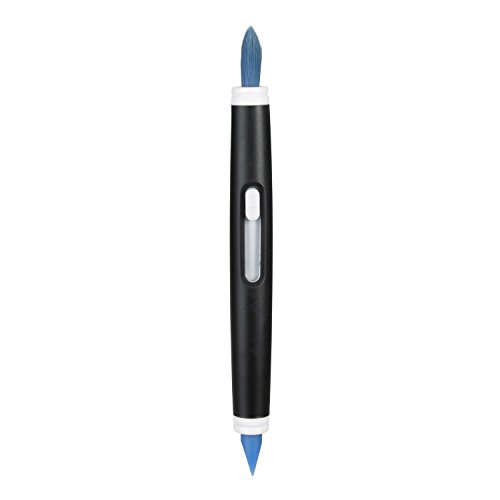
OXO’s second entry is a pen-style brush aimed at tight spaces. Soft bristles retract into the body with a slide lock, and the opposite end hides a slim silicone wiper under a cap. The wiper is the detail that sets this brush apart: it slides into the seams around keys, into charging ports and along the edge of a trackpad, lifting the grime that bristles alone push around.
The body is wrapped in silicone for grip, and the orange finish makes it easy to spot in a crowded drawer. There is no pad for screens here, so pair it with a cloth if smudges are part of the job. As a precision tool for ports, seams and the gaps a wider brush skips, it fills a niche the other picks do not.
Specs
- Model: 12274200
- Bristles: Soft, retractable with slide lock
- Wiper: Silicone, protected by a cap
- Body: Silicone-wrapped grip
- Dimensions: Not published
- Color: Orange
3. Patelai 6 Pack Retractable Keyboard Cleaning Brushes

Patelai sells the opposite idea to a single premium brush: six small retractable brushes, three in black and three in silver, so one can live at every desk you use. Each brush slides open for cleaning and slides shut to protect the bristles in a drawer, a bag or a car console. The bristles are medium-soft wool, which lifts fine dust from keys, vents and speaker grilles without scratching the surfaces around them.
Wool needs gentle handling and should stay dry, so these are dusting brushes rather than scrubbing tools. Within that role they are hard to fault: the multipack suits households with several computers, anyone who cleans camera gear and phones as well as keyboards, and anyone tired of carrying one brush from room to room.
Specs
- Count: 6 brushes (3 black, 3 silver)
- Bristles: Wool, medium-soft
- Design: Retractable slide body
- Model number: Not published
- Dimensions: Not published
4. Haojiaho Anti Static ESD Cleaning Brush Set, 10 Pieces

The Haojiaho set is the deep-clean option, with ten brushes in graded shapes and sizes. Handles are ABS plastic and the bristles are nylon, a pairing that tolerates firmer work than wool and can be rinsed when the bristles load up with dust. The set is built for electronics work in general, so beyond keyboards it covers fans, vents, printer gaps and exposed boards.
The anti-static design is the reason to pick this set over a generic one: if you remove keycaps, open a PC case or clean around components, brushes made for ESD-sensitive work are the safer habit. The widest brushes clear a full-size board quickly, while the narrow ones reach under keycaps and around ports. For a single laptop it is more than you need; for a workbench it is the right scale.
Specs
- Count: 10 brushes
- Handle material: ABS plastic
- Bristle material: Nylon
- Set weight: 0.14 kg (140 g)
- Model number: Not published
5. TIESOME Keyboard Brush Set of 7

TIESOME lands between the single brushes and the ten-piece Haojiaho set: six brushes plus a pair of tweezers. The handles are PP plastic with a curved, anti-slip shape that stays comfortable when you work along a row of keys at an angle, and the nylon bristles come in different profiles for gaps of different widths. The tweezers earn their place by lifting the hair and larger crumbs that bristles tend to push from one gap to the next.
Everything in the set is black, and the brushes are sized for keyboards, cameras and other small electronics rather than for household scrubbing. If you want more range than one brush gives but do not clean inside machines, this is the balanced pick of the two sets here.
Specs
- Count: 7 pieces (6 brushes, 1 pair of tweezers)
- Handle material: PP (polypropylene), curved anti-slip shape
- Bristle material: Nylon
- Color: Black
- Model number: Not published
Comparison Table
| Brush | Type | Bristles | Pieces | Best for |
|---|---|---|---|---|
| OXO Sweep & Swipe | Retractable, double-sided | Soft brush, microfiber pad | 1 | Laptops and travel |
| OXO Electronics Cleaning Brush | Pen-style with wiper | Soft, retractable | 1 | Ports, seams and tight gaps |
| Patelai 6 Pack | Retractable mini brushes | Wool | 6 | One brush at every desk |
| Haojiaho 10PCS Set | Fixed-handle brush set | Nylon | 10 | Deep cleaning and PC work |
| TIESOME Set of 7 | Fixed-handle brush set | Nylon | 7 | Mixed gaps, tweezers for hair |
Frequently Asked Questions
How often should a keyboard be brushed out?
A quick sweep once a week keeps loose dust from packing down between the keys. Keyboards near food, pets or open windows benefit from a deeper session once a month, when you work along each row slowly and tip the board to let debris fall clear.
Can a keyboard brush harm keycaps or switches?
Soft and medium bristles will not scratch common keycap plastics, and brushing needs so little force that switches are safe. Keep firmer nylon brushes for the frame, the edges and the gaps, and brush with the computer off or the keyboard unplugged so stray key presses do nothing.
Do you need an anti-static brush for a desk keyboard?
For a closed keyboard cleaned from the outside, no. Anti-static brushes matter when keycaps come off, a case opens or bare boards are exposed, because they are made to avoid building up charge near sensitive components.
What is the difference between a keyboard brush and a cleaning kit?
A keyboard brush does one job: sweeping debris out of gaps. Cleaning kits bundle several tools together, often a keycap puller, spray, cloths and gels alongside a brush. This guide covers brushes and brush sets only, for readers who want the single tool without the extras.
How do you clean the brush itself?
Tap the head against a bin edge after each use to knock debris loose. Nylon bristles can be rinsed with mild soap, shaken dry and left to air before storage. Wool bristles should stay dry; shake them out and comb them straight with your fingers instead.
Conclusion
The right keyboard brush depends on the habit it has to fit. If cleaning happens wherever the laptop lands, one of the two OXO tools is the easy answer: the Sweep & Swipe if you also wipe screens, the Electronics Cleaning Brush if ports and seams are the problem. The Patelai six-pack spreads wool dusters across every desk in the house. For deeper work, the Haojiaho ten-piece set covers anti-static cleaning inside and outside the case, while the TIESOME set splits the difference with six brushes and tweezers for the debris bristles leave behind.
More from Amazon
Programs that pair well with the guide above. Offers and eligibility are set by Amazon and may change.
A free business account with business pricing and bulk-buying tools for work, shop or home office.
Create a business accountFree shipping on eligible items, Prime Video and more. Eligible new members can start with a free trial.
Start a Prime free trialAudiobooks and podcasts to listen to on the go. Eligible new members can start with a free trial.
Try Audible freeAd-free music streaming. Eligible new subscribers can start with a free trial.
Try Music Unlimited freeAs an Amazon Associate we earn from qualifying purchases.