Key takeaways
- Compare the best keyboard covers for laptops and desktop boards, from thin TPU skins to rigid acrylic dust covers, with fit, material and care notes.
A keyboard collects more grime than almost anything else on a desk. Crumbs slip between the keys during lunch, coffee sits one careless elbow away, and dust settles into every gap overnight. On a laptop, that mess lands on a keyboard that is expensive to repair. On a desktop board, it shortens the life of switches and makes a good keyboard feel gritty long before its time.
A keyboard cover is a cheap layer of defense, but the name covers two very different products. Fitted skins sit on the keys while you type, sealing out spills and dust. Rigid dust covers work the other way: they sit over the keyboard while it rests, then lift off when you sit down to work. This guide rounds up five strong options across both styles, for MacBook laptops, full-size desktop keyboards, and compact mechanical boards.
Disclosure: As an Amazon Associate, we earn from qualifying purchases made through links on this page, at no extra cost to you.
How to Choose a Keyboard Cover
Decide on the style first. If you eat or drink at your desk, a fitted skin is the safer pick because it guards the keys while you type. If your main enemy is dust, pet hair, or a cat that treats the keyboard as a bed, a rigid cover does the job without touching your typing feel at all, since it comes off before you work.
Match the fit to your exact model. Laptop skins are molded for specific machines and keyboard layouts. A cover cut for one generation of MacBook will bunch up or leave gaps on another, so check the model numbers in the listing against the ones printed on your machine or shown in its system information. US ANSI and European ISO layouts differ too, and a skin made for one will not sit right on the other.
Pick a material that suits your habits. Silicone skins feel soft and grippy, dampen typing noise a little, and come in colors and printed shortcut designs. TPU skins are thinner and clearer, so backlit keys shine through and the typing feel stays closer to bare keys. Acrylic covers are rigid shells: no typing feel to consider, but they shrug off dust, splashes, and curious paws better than any skin.
Think about thickness. On a laptop skin, every fraction of a millimeter counts. Very thin TPU, around 0.12 mm, is barely noticeable under your fingers. Silicone at 0.26 to 0.3 mm feels more present but cushions better. Thick covers can also leave marks on a laptop screen if the lid closes on them, so follow the maker guidance on removing the skin before you shut the lid for travel.
Plan for cleaning. Every cover on this list can be washed or wiped down, which matters more than it sounds. A cover you never clean just moves the grime around. Skins rinse under a tap and air dry in minutes; acrylic shells wipe clean with a damp cloth.
The 5 Best Keyboard Covers
1. UPPERCASE GhostCover Original Keyboard Cover
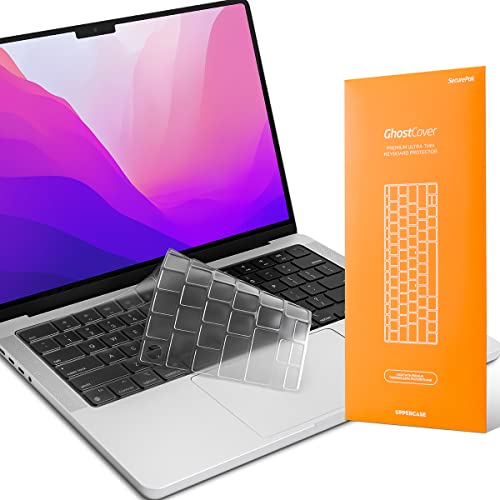
The GhostCover Original is the skin to pick if you want protection you can forget is there. It is molded from TPU rather than silicone, which lets UPPERCASE make it exceptionally thin while keeping it tough and tear resistant. The clear finish keeps the keyboard looking stock, and the backlight shows through cleanly at night. It is cut for the current MacBook Pro 14 and 16 inch models with M-series Pro and Max chips, plus the MacBook Air 13 and 15 inch, in the US ANSI layout, with a proper opening so Touch ID keeps working.
Because the material is so thin, key travel feels close to typing on the bare keyboard, and the cover sits flat without the wavy edges cheaper silicone skins develop. When it gets grubby, you lift it off, rinse it, let it dry, and lay it back down. If you own a recent MacBook and want spill and dust protection with the least change to typing feel, this is the one to get.
Specs
- Compatibility: MacBook Pro 14 inch and 16 inch (M1 to M5 Pro/Max, models including A2442, A2485, A2779, A2780) and MacBook Air 13 inch and 15 inch (M2 and later), US ANSI layout
- Material: Thermoplastic polyurethane (TPU)
- Thickness: 0.12 mm
- Washable: Yes, rinse with water and air dry
- Type: Fitted skin, type-through
2. MOSISO Silicone Keyboard Cover for MacBook Pro

MOSISO sells this silicone skin in a long list of colors, which makes it the fun pick as much as the practical one. The silicone is thicker than a TPU film, and that extra body gives it a soft, slightly cushioned feel that quiets typing noise a touch. Each key cap is molded to match the board, so the skin hugs the keys instead of floating over them, and the backlight still glows through the legends.
This version fits the MacBook Pro 13 inch from 2020 to 2023 and the MacBook Pro 16 inch from 2019 to 2020, the Touch Bar generation with Touch ID. MOSISO makes near-identical skins for other MacBook generations, so match the model list in the listing to your machine before ordering. The skin lifts off in seconds and washes clean with soap and water, then goes back on once dry. Pick it if you want color, a softer feel, and easy cleaning for an older Touch Bar MacBook.
Specs
- Compatibility: MacBook Pro 13 inch 2020 to 2023 (A2338, A2289, A2251) and MacBook Pro 16 inch 2019 to 2020 (A2141) with Touch Bar, US layout
- Material: Silicone
- Thickness: 0.3 mm
- Washable: Yes, soap and water
- Type: Fitted skin, type-through
3. ProElife Ultra Thin Keyboard Cover Skin

ProElife takes the middle path between the two skins above. Its Ultra Thin cover is silicone, so it has that soft, flexible feel, but at 0.26 mm it is slimmer than most silicone skins and lands closer to a TPU film under your fingers. The Ombre Blue finish fades from deep blue to pale across the board, which gives a plain silver laptop a bit of personality without printed legends shouting for attention.
The fit covers the MacBook Pro 13 inch from 2020 onward (M1 and M2 models A2338, A2289, A2251) and the MacBook Pro 16 inch A2141 from 2019. Every key is individually molded, including the Touch Bar area, so the skin stays put while you type. It peels off for a wash with soapy water, and ProElife notes it can be disinfected as well, a handy trait for shared desks and hot-desk offices. Choose it if you want silicone softness in a thinner profile, plus a color that is not basic black.
Specs
- Compatibility: MacBook Pro 13 inch 2020 to 2022 (A2338, A2289, A2251) and MacBook Pro 16 inch 2019 (A2141), US layout
- Material: Silicone
- Thickness: 0.26 mm
- Washable: Yes, wash with soapy water and pat dry
- Type: Fitted skin, type-through
4. VAOLLO Clear Acrylic Keyboard Cover

The VAOLLO cover ignores typing altogether and guards your keyboard while it sits idle. It is a clear acrylic bridge, 20 inches long, that spans a full-size desktop keyboard like a little roof. Dust lands on the acrylic instead of the keycaps, splashes roll off, and a cat can nap on top without typing a word or shedding straight into the switches. The maker even includes an optional back panel and rubber bumpers, so paws cannot sneak in from behind and the cover does not slide around.
When you sit down to work, you lift the bridge off and set it aside, or flip it into its second job as a small monitor stand. At 50 by 17 by 12 cm it fits most standard desktop boards with room to spare, and the polished edges keep it from feeling sharp. It wipes clean or rinses under a tap. If your desktop keyboard lives in a dusty room or shares the desk with a pet, this rigid style solves problems no skin can.
Specs
- Compatibility: Desktop keyboards up to 20 inches (50 cm) long; standard full-size boards
- Material: Acrylic
- Thickness: Not published
- Washable: Yes, fully washable and reusable per the maker
- Type: Rigid dust cover bridge, storage only, doubles as a monitor stand
5. Geekria 75% Keyboard Dust Cover

Compact mechanical keyboards need a cover cut to their smaller footprint, and Geekria makes exactly that. This clear acrylic dome is sized for 75 percent boards with a rotary knob, including the Keychron Q1 family (Q1 HE, Max, and Pro), the EPOMAKER TH80, and the Glorious GMMK PRO 75 percent, among a long list of 84-key models. The knob cutout clearance means the dome seats properly instead of rocking on the dial.
The shell measures 31.4 by 12.5 by 2.3 cm and weighs about 140 g, light enough to lift off with one hand, sturdy enough to keep dust, pet hair, and stray splashes off your switches the rest of the day. Edges are heat bent and polished so they will not snag or scratch an anodized case. Geekria sells sibling sizes for 60 percent, tenkeyless, and full-size boards, so measure your board and order the size that matches.
Specs
- Compatibility: 75 percent 84-key boards with knob, including Keychron Q1 HE/Max/Pro, EPOMAKER TH80, Glorious GMMK PRO 75 percent, and similar models
- Material: Acrylic
- Thickness: Not published
- Washable: Yes, wipe clean
- Type: Rigid dust cover, storage only
Comparison Table
| Product | Type | Material | Fits | Thickness | Washable |
|---|---|---|---|---|---|
| UPPERCASE GhostCover Original | Fitted skin | TPU | MacBook Pro 14/16, Air 13/15 (M-series) | 0.12 mm | Yes |
| MOSISO Silicone Keyboard Cover | Fitted skin | Silicone | MacBook Pro 13/16, Touch Bar models | 0.3 mm | Yes |
| ProElife Ultra Thin Skin | Fitted skin | Silicone | MacBook Pro 13 (2020 onward), Pro 16 2019 | 0.26 mm | Yes |
| VAOLLO Acrylic Keyboard Cover | Rigid bridge | Acrylic | Desktop boards up to 20 in long | Not published | Yes |
| Geekria 75% Dust Cover | Rigid dome | Acrylic | 75% 84-key boards with knob | Not published | Yes |
Frequently Asked Questions
Can I close my laptop lid with a keyboard skin on?
It depends on the skin and the laptop. Thin TPU skins are often left in place, but thicker silicone can press against the screen and leave marks, and Apple advises removing covers before closing the display. When in doubt, lift the skin off before you shut the lid, especially before travel.
Do keyboard covers change the typing feel?
Skins do, a little. TPU at around 0.12 mm feels close to bare keys, while silicone at 0.26 to 0.3 mm feels softer and slightly quieter. Rigid acrylic covers never touch your typing at all, because you remove them before you work.
How do I know which size of dust cover to buy?
Measure your keyboard’s length, width, and height, including any knob, then compare those numbers with the cover’s listed dimensions. Layout labels such as 75 percent or tenkeyless narrow the search, but the measurements make the final call.
How often should I wash a keyboard cover?
Every few weeks works for most desks, or sooner after a spill. Silicone and TPU skins rinse under a tap with a drop of soap and air dry in minutes. Acrylic covers just need a wipe with a damp cloth.
Will a cover fit a keyboard with a different layout, such as ISO instead of ANSI?
No. Skins are molded to a specific layout, and an ANSI skin will misalign on an ISO board with its different return key and extra key. Check the layout in the listing title and match it to your machine before ordering.
Conclusion
The right keyboard cover depends on when you need the protection. If spills and crumbs threaten you mid-sentence, a fitted skin is the answer: the UPPERCASE GhostCover Original keeps the typing feel nearly untouched on current MacBooks, the MOSISO brings color and a softer touch to Touch Bar models, and the ProElife splits the difference in a slim ombre silicone. If dust and pets are the problem, go rigid: the VAOLLO bridge shelters a full-size desktop board and earns its keep as a stand, while the Geekria dome is cut precisely for 75 percent mechanical boards. Any of the five costs little next to a keyboard repair, and each one keeps your desk cleaner with almost no effort.
More from Amazon
Programs that pair well with the guide above. Offers and eligibility are set by Amazon and may change.
A free business account with business pricing and bulk-buying tools for work, shop or home office.
Create a business accountFree shipping on eligible items, Prime Video and more. Eligible new members can start with a free trial.
Start a Prime free trialAudiobooks and podcasts to listen to on the go. Eligible new members can start with a free trial.
Try Audible freeAd-free music streaming. Eligible new subscribers can start with a free trial.
Try Music Unlimited freeAs an Amazon Associate we earn from qualifying purchases.