Key takeaways
- Compare the best LCD writing tablets for home office notes and lists, from letter-size boards to compact pads, with screen sizes and erase locks.
A home office desk tends to collect paper: sticky notes along the monitor bezel, a scratch pad buried under the keyboard. An LCD writing tablet replaces most of that clutter with one thin, pressure-sensitive board. You write on it with the bundled stylus, the line stays put with no power draw, and one press of a button clears the whole surface so you can begin again. There is no ink and no charging cable to manage.
These boards are not drawing tablets or pen displays. They do not connect to a computer, and most cannot store anything once you erase. They are closer to a reusable sheet of paper: made for call notes, to-do lists, quick sums and phone messages. The five picks below cover the main shapes of the category, from a letter-size board with templates and an erase lock to small pads that live on the fridge door. Each runs on a replaceable coin-cell battery.
Disclosure: As an Amazon Associate, we earn from qualifying purchases made through links on this page, at no extra cost to you.
How to Choose an LCD Writing Tablet
Pick a screen size that matches the job
The writing surface is the whole product, so size comes first. Boards at 8.5 inches suit short lists, phone messages and quick calculations, and they slide into a drawer or laptop sleeve. A 10 or 11.5 inch board gives a to-do list room to breathe and handles a page of meeting notes more comfortably. Letter-size boards at 8.5 x 11 inches match a sheet of paper, which helps if you sketch layouts, mark up figures or work through longhand drafts. Measure the desk space where the board will live before you buy.
Decide between single-color and rainbow film
Most boards write in one color, usually a pale green or blue-green line on a dark surface. Single-color film tends to give the cleanest, most even line for plain note-taking. Rainbow film changes hue as the stylus moves across zones of the screen, which children enjoy and which can help separate sections of a list by color band. For adult desk work the rainbow effect is a matter of taste; for a shared family board it often wins people over. The screen is reflective rather than backlit, so it reads best under ordinary room light.
Look for an erase lock
Every board here erases the full screen at the press of a button, which is fast but unforgiving. An erase lock switch disables that button so a bump, a curious child or a pet on the desk cannot wipe a list you still need. If the board will hold a list for days at a time, treat the lock as close to essential. One board below goes further: its stylus has an eraser end that rubs out single words or lines, which suits longer notes that need small corrections.
Check the battery type and how it is secured
These boards sip power only at the moment of erasing, so a coin cell lasts a long time: makers quote figures from about six months of daily use up to five years, or tens of thousands of erase cycles. What matters more is whether the cell is replaceable (all five picks below use replaceable cells) and how the battery door closes. A door held by a small screw keeps the cell away from small children and stops it popping open in a bag.
Know how you will keep notes you want to save
Erasing is permanent on a basic board. If a note matters, photograph it with a phone before clearing the screen. Two boards below come from a maker with free companion apps that straighten and tidy those photos into saved pages. If you need searchable text or cloud syncing, you want a different category of device; if you need a scratch surface that never fills up, these boards do that job with almost no upkeep.
Consider magnets, stands and cases
Small details decide where a board ends up living. Built-in magnets let a pad ride on a fridge or a metal filing cabinet, which suits shared lists. A stylus that doubles as a kickstand props the board up so a message faces the room. A bundled case protects the screen in a work bag and, on one pick below, works with a sensor in the board itself. None of these changes how the board writes, but each keeps it in reach.
The 5 Best LCD Writing Tablets
1. Boogie Board Jot 8.5
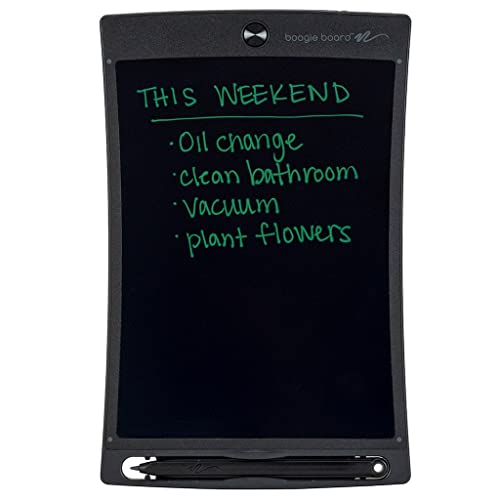
The Jot 8.5 is the board that defined this category, and it remains the reference point for a desk or fridge pad. Its 8.5 inch screen draws a bright single-color line whose thickness follows stylus pressure, and two magnets on the back let it sit flat against a fridge door or a steel cabinet. The stylus docks at the base of the frame and doubles as a kickstand, propping the board at a reading angle on a desk. A free Jot app for phones can scan and save a page before you clear it. The maker rates the replaceable coin cell for up to 50,000 erases. If you want one board for lists and messages, this is the safe, well-proven shape of the idea.
Specs
- Screen: 8.5 in, single-color LCD
- Model: J31020001 (Gray)
- Dimensions: 10.8 x 6.8 x 0.6 in
- Weight: 3.98 oz
- Battery: 1 CR2016 coin cell, replaceable; maker-rated up to 50,000 erases
- Extras: Built-in magnets, stylus dock with kickstand, free Jot app scanning
2. Boogie Board Blackboard Letter

The Blackboard Letter is the pick for people who think on full pages. Its writing surface matches a letter sheet at 8.5 x 11 inches, and the surface is semi-transparent: slide one of the four included templates behind it and you get ruled lines, a dot grid, a blank sheet or a weekly planner, or lay the board over a document to trace and annotate. The stylus carries an eraser end that powers the Exact-Erase feature, rubbing out a word or a line without clearing the page, and a lock switch guards the full-erase button. The free Blackboard app scans pages to a phone for saving and sharing. A replaceable CR2032 cell is rated by the maker at up to five years.
Specs
- Writing surface: 8.5 x 11 in, semi-transparent Liquid Crystal Paper
- Model: BD0110001
- Dimensions: Not published
- Weight: Not published
- Battery: 1 CR2032 coin cell, replaceable; maker-rated up to 5 years
- Extras: Exact-Erase stylus eraser, erase lock switch, 4 templates, Blackboard app scanning
3. YOLIPULI LCD Writing Tablet, 11.5 Inch

This 11.5 inch board is aimed squarely at adults rather than the toy aisle. The screen runs nearly edge to edge across the front, leaving more usable writing room than the diagonal figure suggests, and the listing puts the pressure response at 2,048 levels, so line weight varies as you write. A leather case comes in the box to protect the screen in a bag, and the design works with a Hall switch tied to that case. The stylus is magnetic and clips to the side of the board, which lowers the odds of it wandering off between meetings. For a home office worker, this is the most grown-up design in this group.
Specs
- Screen: 11.5 in, full-screen LCD
- Model: 115AP
- Dimensions: Not published
- Weight: Not published
- Battery: Not published
- Extras: Leather case included, Hall switch, magnetic stylus, 2,048 pressure levels per the listing
4. TEKFUN LCD Writing Tablet, 10 Inch

TEKFUN’s 10 inch board is the family and travel entry in this group. The rainbow screen lays down lines that shift color as you write, which keeps younger writers interested, and at about 150 g the board is light enough to live in a car seat pocket. A lock key on the back protects whatever is on screen from an accidental press of the erase button. The maker rates the replaceable battery for around 100,000 writings and roughly six months of typical use, and describes the casing as water resistant and drop resistant.
Specs
- Screen: 10 in, rainbow-color LCD
- Model: LCD01 (Blue)
- Dimensions: Not published
- Weight: About 150 g
- Battery: Replaceable coin cell; maker-rated around 100,000 writings
- Extras: Erase lock key, stylus included, water and drop resistant casing per the maker
5. Mafiti LCD Writing Tablet, 8.5 Inch
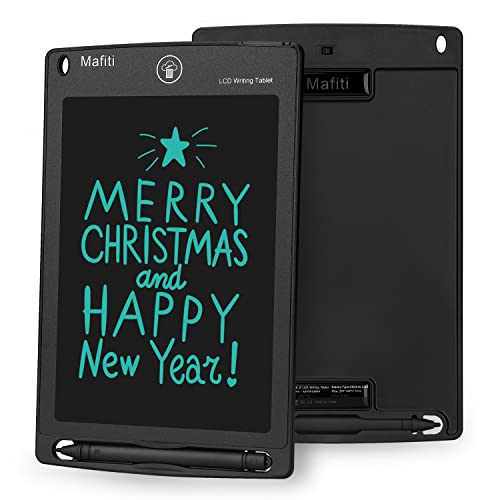
The Mafiti MP100 is the simple, slim option: an 8.5 inch board, about a third of an inch thick and under 4 oz, that does the basics without fuss. The current version writes a thicker, easier-to-read line than the earlier one, and the stylus pulls double duty as a kickstand so the board can stand on a counter. A lock switch on the back guards the erase button, and the CR2016 cell is replaceable, with the maker quoting more than 100,000 erasures from a battery. It lacks magnets and app support, but as a memo pad for a counter or bench it covers the core job neatly.
Specs
- Screen: 8.5 in LCD
- Model: MP100 (Black)
- Dimensions: 9.06 x 5.91 x 0.31 in
- Weight: 3.84 oz
- Battery: 1 CR2016 coin cell, replaceable; maker-rated over 100,000 erases
- Extras: Erase lock switch, stylus doubles as kickstand
Comparison Table
| Product | Screen | Battery | Erase lock | Standout feature |
|---|---|---|---|---|
| Boogie Board Jot 8.5 | 8.5 in, single color | CR2016, replaceable | No | Magnets and kickstand stylus |
| Boogie Board Blackboard Letter | 8.5 x 11 in, semi-transparent | CR2032, replaceable | Yes | Templates and partial erase |
| YOLIPULI 11.5 Inch | 11.5 in, full screen | Not published | Hall switch with case | Leather case, magnetic stylus |
| TEKFUN 10 Inch | 10 in, rainbow color | Coin cell, replaceable | Yes | Light build for travel |
| Mafiti 8.5 Inch | 8.5 in, single color | CR2016, replaceable | Yes | Slim body, stylus kickstand |
FAQ
Can an LCD writing tablet save or send my notes?
Not by itself. On most boards, pressing the erase button clears the screen for good. The common habit is to photograph a page with a phone before erasing. The two Boogie Board picks above offer free companion apps that tidy up those photos into saved pages, but neither board has storage or a connection of its own.
How long does the battery last, and can I change it?
A long time, because the board only draws power when it erases. Makers quote anything from about six months of daily use to five years, or tens of thousands of erase cycles. All five boards here use a replaceable coin cell, so a fresh cell revives the board when the screen stops clearing.
Will the writing fade if I leave a list on the board?
No. The image sits on the screen without using power and stays until you press the erase button or, on boards with the feature, rub part of it away with the stylus eraser. Leaving a list up for weeks is normal use. An erase lock switch is still worth having, since it protects against the button being pressed by accident.
Can I write with anything besides the included stylus?
Most boards respond to any smooth, firm point that will not scratch the film, and a fingernail works in a pinch. The bundled stylus is shaped to give the most even line, and it is the only tool that works with the Blackboard’s partial-erase feature. Keep sharp metal points away from the screen, since a scratched film cannot be repaired.
Are these boards a good fit for young children?
They are popular with children because there is no ink and no mess, and the rainbow-screen models are aimed at that audience. Two cautions apply: pick a board whose battery door is held by a screw, since coin cells are a swallowing hazard, and remember the screens are not shatterproof, so a board that gets thrown around needs a sturdy casing.
Conclusion
For most home office desks, the Boogie Board Jot 8.5 is the board to beat: proven, magnetic, and sized for daily lists and messages. Choose the Blackboard Letter if you work in longhand and want templates plus the ability to fix a single line. The YOLIPULI suits adults who want maximum room and a case, the TEKFUN is the light board a household can share, and the Mafiti keeps things simple and slim. Pick by screen size first and erase lock second.
More from Amazon
Programs that pair well with the guide above. Offers and eligibility are set by Amazon and may change.
A free business account with business pricing and bulk-buying tools for work, shop or home office.
Create a business accountFree shipping on eligible items, Prime Video and more. Eligible new members can start with a free trial.
Start a Prime free trialAudiobooks and podcasts to listen to on the go. Eligible new members can start with a free trial.
Try Audible freeAd-free music streaming. Eligible new subscribers can start with a free trial.
Try Music Unlimited freeAs an Amazon Associate we earn from qualifying purchases.