Key takeaways
- Compare the best video lights for desk setups, from compact USB panels to app-controlled key lights, with output, color range, CRI and mounts.
A ceiling light can leave your face shadowed and uneven on camera, even when the room feels bright to your eyes. A video light fixes that by putting a soft, directional source in front of you, so calls, streams and recordings look clear without a full studio build. The five picks below are LED panels and key lights made for desks: they sit on a monitor, clamp to the desk edge or stand beside your screen, and each one adjusts for brightness and color temperature to match your room.
This roundup covers flat panels only. Ring lights shape light differently and have their own guide on this site, and monitor light bars light your desk surface rather than your face. Sizes run from a pocket panel for a camera or mini tripod to a wide key light for a permanent desk setup, with power from USB, wall adapters or built-in batteries.
Disclosure: As an Amazon Associate, we earn from qualifying purchases made through links on this page, at no extra cost to you.
How to Choose a Video Light
Panel size and placement. A larger panel wraps light around your face and softens shadows, which is why wide key lights tend to flatter. Small panels work well when they sit close, roughly an arm’s length away, but their light hardens as you move them farther back. Think about where the light will live: above the monitor is the simplest spot for calls, while a clamp or stand beside the screen gives a more angled, dimensional look.
Output. Makers quote output in lumens, the total light produced, or in lux, the light landing on a surface at a set distance, and the two figures cannot be compared directly. As a rough guide, a few hundred lumens is plenty for a panel near your face, while a big key light placed several feet away needs well over a thousand. Every pick here dims smoothly, so extra output simply buys placement freedom.
Color temperature and CRI. A bi-color panel adjusts from warm tones near 2700K to daylight near 6500K, which lets you match window light or room lamps instead of fighting them. CRI describes how faithfully colors render on camera; look for 90 or above if natural skin tones matter to you, and check the figure each maker publishes in the Specs blocks below.
Power and controls. USB power is the tidy option for a single monitor-top panel, since it runs from the computer and needs no spare outlet. Bigger panels need a wall adapter, and a built-in battery helps when the light doubles as a portable fill for recordings away from the desk. Onboard dials are the quickest route for daily calls, while app and remote control earn their keep when the light sits out of reach or you run two panels at once.
The 5 Best Video Lights
1. Elgato Key Light

The Key Light is the anchor pick for a dedicated streaming or recording desk. Its edge-lit panel pushes 160 OSRAM LEDs through layered diffusion, so the light reaching your face is soft and even, not a grid of harsh points. Output reaches 2,800 lumens, the highest in this group, and the color range runs from 2900K to 7000K, wide enough to blend with warm room lamps or cool daylight from a window.
There are no dials on the panel itself. Brightness and color temperature are set over Wi-Fi in the Control Center app on Mac, PC, iOS or Android, and it also works with Stream Deck for one-touch scene changes. The metal pole mount clamps to the desk edge and holds the panel above your monitor, keeping the desk clear. It needs a wall outlet and draws up to 45W, so treat it as a fixed part of the setup rather than a portable light.
Specs
- Output: up to 2,800 lumens
- Color temperature: 2900–7000K
- CRI: 80+
- LEDs: 160 OSRAM, edge-lit with layered diffusion
- Power: AC adapter, up to 45W
- Control: Wi-Fi via Control Center app, Stream Deck support
- Mount: metal pole with desk clamp
- Panel size: 13.77 x 9.84 x 1.18 in
2. Logitech Litra Glow

The Litra Glow is the simplest upgrade for everyday video calls. It is a small frameless panel with Logitech’s TrueSoft diffusion, which spreads its 250 lumens evenly so your face is lit without hard edges or bright spots. Color temperature adjusts from 2700K to 6500K, and the published CRI of 93 keeps skin tones looking natural on camera.
Power comes over USB-C from your computer, so there is no battery to charge and no adapter to hide. The included three-way monitor mount adjusts for height, tilt and rotation, and it lifts off to reveal a 1/4-20 thread for a tripod. Buttons on the back of the light handle brightness and color temperature, and Logitech’s G HUB software can hold presets. Output is modest, so it works best close to the monitor, exactly where most people will put it.
Specs
- Output: up to 250 lumens
- Color temperature: 2700K–6500K
- CRI: 93
- Power: USB-C, 1.5 m USB-C to USB-A cable included
- Mount: 3-way monitor mount, 1/4-20 thread for tripods
- Control: onboard buttons, Logitech G HUB presets
- Weight: 177 g with mount
3. Godox ES45 Kit

The ES45 Kit sits between the compact monitor panels and a full studio light. Its edge-guide design throws light sideways through the front diffuser, which keeps the panel slim while softening shadows. Output tops out at 2,500 lumens with a color range of 2800K to 6500K, and the color accuracy figures are the strongest here, with CRI at 96 or above and TLCI at 97 or above.
The kit includes an extendable desk stand that clamps to edges up to 1.85 inches thick. A small magnetic controller pulls off the panel to work as a 2.4G wireless remote for brightness and color temperature, then snaps back onto the light to recharge. The Godox Light app adds phone control and can run several lights together. A built-in battery gives roughly two hours away from an outlet per the maker, and the AC adapter covers long sessions at the desk.
Specs
- Output: up to 2,500 lumens
- Color temperature: 2800K–6500K
- CRI: 96+, TLCI: 97+
- LEDs: 176
- Power: built-in battery (about 2 hours per maker) and AC adapter
- Control: detachable magnetic 2.4G remote, Godox Light app, onboard dials
- Mount: extendable desk stand with clamp, for desks up to 1.85 in thick
- Panel size: 14.4 x 9.1 x 1.8 in, 2.93 lb
4. Neewer NL660 Bi-Color LED Video Light

The NL660 is the traditional studio panel in this group, built for a recording corner rather than a monitor perch. A metal frame holds 660 LEDs, split evenly between white and yellow sets, giving a color range of 3200K to 5600K with a published CRI of 96+. Barndoors on the front shape the beam and keep light off your backdrop, and a white diffuser panel is included for softer output.
It mounts on a standard light stand through its U bracket, which also sets the tilt angle. This single-light package does not include a stand, so budget for one if you do not own one yet. Power comes from the included DC adapter, and the panel can also run on NP-F series batteries bought on their own, which suits longer recording sessions away from the desk. Two rear knobs handle brightness and color temperature, with no app or remote in the loop.
Specs
- Illuminance: 3,360 lux at 1 m (maker figure)
- Color temperature: 3200K–5600K
- CRI: 96+
- LEDs: 660 (330 white, 330 yellow)
- Power: 40W, DC adapter included, NP-F series batteries supported (not included)
- Mount: U bracket for a standard light stand (stand not included)
- Build: metal frame with barndoors and white diffuser
- Size: 13.7 x 12 x 3.4 in, 4.4 lb
5. Lume Cube Panel Pro 2.0
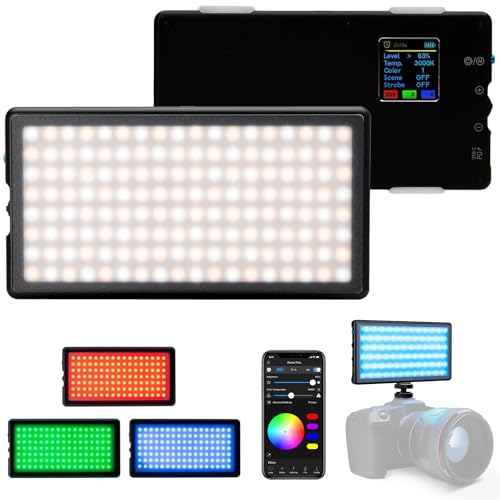
The Panel Pro 2.0 is the pocket option, a slim RGB panel about the size of a phone that works as a small key light, a fill, or a splash of background color. White output reaches 595 lumens with a color range of 2700K to 7500K, and full RGB control opens up millions of hues plus built-in effects. The published CRI is 96+, high for a panel this small.
A built-in rechargeable battery frees it from cables, charging runs over USB-C, and the panel can even top up a phone like a small power bank. Lume Cube quotes up to four hours of run time at half brightness. Controls sit on the panel itself, with a dial and a small LCD screen, and the Bluetooth connection adds full control through the Lume Control app. The box includes a cold shoe mount and a softening diffuser, and a 1/4-20 thread takes any mini tripod.
Specs
- Output: up to 595 lumens
- Color temperature: 2700K–7500K, plus full RGB color
- CRI: 96+
- Dimming: 1–100%
- Power: built-in rechargeable battery, USB-C charging, up to 4 hours at 50% brightness (maker figure)
- Control: onboard dial and LCD, Bluetooth via Lume Control app
- Mount: cold shoe adapter included, 1/4-20 thread
- Size: about 6 x 3.1 x 0.43 in
Comparison Table
| Product | Max output | Color temperature | CRI | Power | Mount |
|---|---|---|---|---|---|
| Elgato Key Light | 2,800 lumens | 2900–7000K | 80+ | AC adapter | Desk clamp pole |
| Logitech Litra Glow | 250 lumens | 2700K–6500K | 93 | USB-C | Monitor mount |
| Godox ES45 Kit | 2,500 lumens | 2800K–6500K | 96+ | Battery and AC | Clamp stand |
| Neewer NL660 | 3,360 lux at 1 m | 3200K–5600K | 96+ | AC or NP-F battery | Light stand (not included) |
| Lume Cube Panel Pro 2.0 | 595 lumens | 2700K–7500K + RGB | 96+ | Built-in battery | Cold shoe, 1/4-20 |
Frequently Asked Questions
Where should a video light sit for video calls?
Place it just above or just behind your monitor, close to the camera, and angled slightly down toward your face. That position fills in shadows without blasting light into your eyes. If the panel sits beside the screen instead, keep the angle modest, around 45 degrees, so one side of your face does not fall much darker than the other.
How bright does a desk video light need to be?
It depends on distance. A panel within arm’s reach of your face can look great at a few hundred lumens, which is why compact USB models work for calls. If the light will sit a meter or more away, or you record in a bright room, look for 1,000 lumens and up so the light shapes your face at that range.
What color temperature works best in a home office?
Match the light already in the room. Near a window in the daytime, a setting between 5000K and 6500K blends with daylight. In the evening under warm lamps, 3000K to 4000K looks more natural. A bi-color panel covers both cases, which is why every pick in this guide adjusts across a range rather than fixing one tone.
Can one video light cover both calls and recording?
Yes. A key light that flatters you on calls is the same light you would use as the main source for recorded videos, tutorials or streams. Add a second, dimmer panel later only if you want to lift background shadows or add color behind you. For most desks, one well-placed panel is the whole upgrade.
Do video lights work with any webcam or camera?
Yes, because the light and the camera are independent pieces of gear. Nothing plugs into the camera or needs to pair with it. What matters is the mount: check that the panel fits your monitor, desk edge or stand, and that its power source, USB, battery or wall adapter, suits where it will live.
Conclusion
For most home office desks, the Logitech Litra Glow is the easy first step: USB power, a monitor mount in the box and soft, accurate light for daily calls. If your desk doubles as a recording space, the Elgato Key Light brings the output and app control to anchor the setup, while the Godox ES45 Kit offers similar reach with a battery and a clever magnetic remote. The Neewer NL660 suits a stand-mounted recording corner, and the Lume Cube Panel Pro 2.0 adds portable RGB fill that travels anywhere. Pick by where the light will live and how you will power it, and your camera feed improves the same day.
More from Amazon
Programs that pair well with the guide above. Offers and eligibility are set by Amazon and may change.
A free business account with business pricing and bulk-buying tools for work, shop or home office.
Create a business accountFree shipping on eligible items, Prime Video and more. Eligible new members can start with a free trial.
Start a Prime free trialAudiobooks and podcasts to listen to on the go. Eligible new members can start with a free trial.
Try Audible freeAd-free music streaming. Eligible new subscribers can start with a free trial.
Try Music Unlimited freeAs an Amazon Associate we earn from qualifying purchases.