Key takeaways
- Smart displays look similar on a store shelf, but they split into three camps that serve different households.
Smart displays look similar on a store shelf, but they split into three camps that serve different households. Voice-assistant displays such as the Echo Show line and the Nest Hub answer questions, play media, and control connected devices. Wall-mounted control panels like the Shelly Wall Display are built for switching lights and relays from a fixed spot. Calendar and photo displays are closer to a family command center than a speaker. The best smart displays are the ones that match the ecosystem you already live in and the room where the screen will sit, not the one with the longest feature list.
This guide is for shoppers in 2026 choosing a kitchen counter display, a bedside screen, a hallway control panel, or a family organizer. Each pick relies on the facts in its listing title: screen size, assistant compatibility, audio claims, and storage or mounting details. Anything not stated, such as camera presence, app support, or software update policy, should be confirmed on the listing. Smart displays contain microphones, so review the privacy controls and local regulations before placing one in a bedroom or nursery.
Quick Picks
Our top picks


As an Amazon Associate we earn from qualifying purchases at no extra cost to you.
| Product | Best for | Key spec from the title |
|---|---|---|
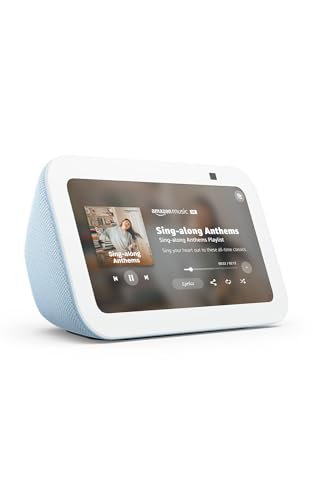
| Echo Show 5 | Nightstands and small counters | Designed for Alexa+, 2x the bass, clearer sound |
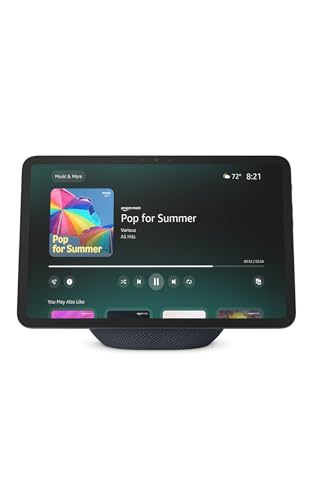
| Echo Show 11 | Kitchens and living rooms | 11 inch Full-HD display, spatial audio, Alexa+ |
| Google Nest Hub 7 inch | Google Assistant households | 7 inch display, 1st Gen, bulk packaging |
| Shelly Wall Display XL | Wall-mounted smart home control | 10.1 inch touchscreen, WiFi, 5A relay |
| Divoom Times Frame | Photos and ambient display | 10.1 inch, WiFi 6, 64GB, no subscription |
| 10.1 Inch Digital Calendar | Family organizing | Full HD touchscreen, chore chart, wall or desk mount |
How to Choose
Pick the ecosystem first
A display tied to Alexa works best with Alexa-compatible lights, locks, and speakers, while a Nest Hub works with Google Assistant. Neither is useful for controlling devices from the other ecosystem without extra bridging. Wall panels like the Shelly list compatibility with multiple assistants and platforms, but check which integrations you need. Ignore feature lists that mention generic “smart home” support without naming the platforms you own. A household with a mix of devices may do better with a wall panel or an organizer that sits outside the assistant wars, while a household that already talks to one assistant every day should stay with it. Switching later means re-pairing every bulb, plug, and thermostat.
Screen size and placement
A 5 inch screen fits a nightstand and shows clock, weather, and alarms. A 7 inch screen suits a kitchen counter for recipes and timers, while 10 to 11 inch screens work better across a room, for video calls, recipes you can read from the stove, and photo slideshows. Consider viewing distance, because small text on a 5 inch panel is hard to read at arm’s length. Check whether the display includes a stand, wall mount, or both. Bright rooms and kitchen windows can wash out a glossy screen, so a display placed opposite a window is a poor match for a small, low-brightness model, and a wall panel should sit at eye level for the shortest person who uses it.
Audio and media
Speaker claims such as “2x the bass” or “spatial audio” are comparisons from the seller and are best treated as relative. If music is a priority, check whether the display can pair with an external speaker. Budget models usually cut corners on speaker size, so a small display makes a better alarm clock and kitchen assistant than a stereo. If video streaming is the goal, check which services the assistant supports in your region. Ignore marketing about concert-hall sound on a screen this size, and pay more attention to practical details such as whether the speakers face forward and whether a headphone or Bluetooth connection is possible.
Subscriptions, storage, and updates
Some displays rely on a cloud service or subscription for advanced features, while others, like the Divoom listing, advertise no subscription. Look for stated storage if you plan to load your own photos and videos, such as 64GB. Older generation models may stop receiving feature updates sooner, so check the manufacturer’s policy. Mind the cost of any plans tied to voice assistants and the long-term availability of the ecosystem. For picture-frame style displays, find out how photos reach the device: an app, an email address, or a USB drive all work differently, and the easiest method is the one relatives will actually use.
The 6 Best Options
Echo Show 5 (Newest Model)
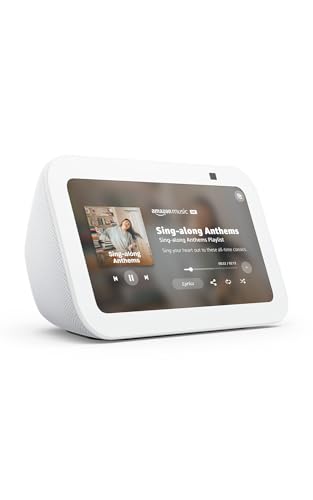
The compact member of the Echo Show family, listed as designed for Alexa+, with 2x the bass and clearer sound. The 5 inch screen is small by design, aimed at nightstands, desks, and kitchen corners, where it can show the time, weather, alarms, and a few controls. Because the title mentions the newest Alexa+ branding, it suits buyers who plan to stay inside the Alexa ecosystem.
- Strength: the compact size fits almost anywhere.
- Strength: the listing highlights stronger bass and clearer sound.
- Trade-off: a 5 inch screen is limited for recipes and video.
Skip it if you want a screen to read from across a room. The title also appears on multiple color listings, so pick the one that matches your decor.
Echo Show 11 (Newest Model)
The larger Echo Show, with a Full-HD 11 inch display, more viewing area, spatial audio, and Alexa+ compatibility. It is the pick for a kitchen or living room where the screen is a focal point. The Full-HD label means the 11 inch panel can show recipes, photos, and video with more detail than the compact model, and the listing pairs it with more viewing area.
- Strength: a bigger display makes recipes, video, and photos easier to see.
- Strength: spatial audio is listed for fuller sound.
- Trade-off: it takes more counter or wall space and costs more than the compact model.
Skip it if you need something for a small nightstand. Check the listing for stand and mounting details.
Google Nest Hub 7 Inch (1st Gen)
A 7 inch Google Assistant display, listed as a 1st Gen model in bulk packaging. The title emphasizes Google Assistant and does not list modern audio or screen claims. For households that already use Google Assistant to control lights and speakers, that familiarity may matter more than newer specs, though it is a trade-off to weigh against newer models.
- Strength: a mid-size screen works for recipes and timers.
- Strength: it suits Google Assistant households.
- Trade-off: it is a first-generation model, and bulk packaging can mean no retail box or accessories.
Skip it if you want the latest features or a retail box for gifting. Confirm current support for this generation before buying.
Shelly Wall Display XL
A black 10.1 inch touchscreen with WiFi and a built-in 5A relay, billed as a smart home control panel that works with Alexa, Google, HomeKit, and Home Assistant. It is designed for fixed installation, not countertop use. The 5A relay figure is from the title, and the maximum load it can safely switch should be confirmed in the manufacturer’s documentation before connecting anything.
- Strength: the built-in relay can switch a connected load, subject to local wiring rules.
- Strength: multi-platform compatibility is a rarity.
- Trade-off: wall installation usually calls for an electrician, and it is not a voice assistant.
Skip it if you want a plug-and-play speaker display. Follow the manufacturer’s wiring instructions and local electrical code.
Divoom Times Frame 10.1-Inch
A WiFi 6 digital picture frame and desk display with a 10.1 inch screen, 64GB of storage, and no subscription, with weather and calendar features. It is meant to show photos and videos you send to it. The title also mentions AI styles, which refers to display or photo effects and not to a voice assistant, so treat it as a decorative piece for a shelf or desk.
- Strength: 64GB of storage and no subscription are clearly stated.
- Strength: weather and calendar make it more than a photo frame.
- Trade-off: it is a picture frame first, not a voice assistant.
Skip it if you want hands-free voice control or smart home integration.
10.1 Inch Digital Calendar Family Organizer
A Full HD touchscreen designed as a family organizer, with a chore chart, meal and to-do lists, and a photo frame mode, mountable on a wall or placed on a desk. It serves as a household planning hub. It is a fit for families who still write the week on a paper calendar and would like a shared screen instead, but check how the device syncs events with phones, since that detail is outside the visible title.
- Strength: the touchscreen supports calendars, chores, and lists.
- Strength: wall or desk mounting gives flexible placement.
- Trade-off: the brand is not visible in the title, so check support and warranty.
Skip it if you want voice assistant features.
Which One Fits Your Situation
You want a bedside display
The Echo Show 5 is the compact choice, with its small footprint and bass and clarity claims. A bedside display should have its microphone and any camera controls reviewed before it goes in a bedroom.
You cook with a screen nearby
The Echo Show 11 or Nest Hub 7 inch both show recipes. The 11 inch is easier to read from a distance, while the Nest Hub suits a Google Assistant home.
You want a wall control panel
The Shelly Wall Display XL is meant for fixed installation, with relay control for lights and compatibility across several platforms. Plan on a licensed electrician if the install involves mains wiring.
You manage a busy household schedule
The 10.1 inch Digital Calendar and the Divoom Times Frame both focus on calendars and photos instead of voice assistants.
Common Mistakes
- Buying a display from the wrong ecosystem for your existing devices.
- Expecting a photo frame or calendar to act as a voice assistant.
- Choosing a first-generation model without checking its support status.
- Treating speaker claims as a replacement for a proper speaker.
- Skipping privacy settings for microphones and cameras in bedrooms.
Related guides
- Battery Powered Floodlight Camera With Local Storage
- Cordless Drill Brush Attachment For Bathroom Grout
- Rechargeable Emergency Lantern For Power Outages
Frequently Asked Questions
Do smart displays need a subscription?
Basic functions usually work without one, but some features may need an account or plan. Check the listing and the manufacturer’s terms. The Divoom listing explicitly says no subscription, which is worth noting for photo and video storage on the device.
Is a bigger screen better?
Not always. A small screen suits a nightstand, while a larger one suits kitchens and shared rooms where readability from a distance matters. Measure the shelf or wall spot first, because a 10 inch panel can overwhelm a small counter, and decide whether you will mostly glance at it or interact with it by touch.
Can a smart display control lights?
Voice-assistant displays can control compatible lights through their ecosystem, and wall panels like the Shelly can switch loads through a relay. Confirm compatibility with your devices.
What about privacy?
These devices include microphones, and some include cameras. Review the physical privacy controls and software settings on the listing, and follow local rules on recording.
More from Amazon
Programs that pair well with the guide above. Offers and eligibility are set by Amazon and may change.
A free business account with business pricing and bulk-buying tools for work, shop or home office.
Create a business accountFree shipping on eligible items, Prime Video and more. Eligible new members can start with a free trial.
Start a Prime free trialAudiobooks and podcasts to listen to on the go. Eligible new members can start with a free trial.
Try Audible freeAd-free music streaming. Eligible new subscribers can start with a free trial.
Try Music Unlimited freeAs an Amazon Associate we earn from qualifying purchases.