
Controls are where vibration plates quietly succeed or fail. The machine itself is a motor and a deck; the interface is what you interact with every single session. A plate whose only controls sit at floor level means bending down mid-workout, or worse, stepping off a moving platform to change a setting. A remote that vanishes into the sofa means running the same speed forever. An app that requires a login and a firmware update before it will change a number is an app nobody opens twice.
None of this appears in a specification comparison, but it decides how the machine feels to live with. Some of the six plates below are governed by a simple two-button remote, some by presets that run a program for you, and some by phone connectivity that promises more than it delivers. Here is how those interfaces actually work in practice, and which approach suits which kind of user.
Our top picks


As an Amazon Associate we earn from qualifying purchases at no extra cost to you.
Quick Comparison
| Product | Best For | Standout Feature | Watch Out For |
|---|---|---|---|
| SEDOZIK Vibration Plate | Adjusting without breaking position | Bluetooth plus a handheld remote | App duplicates the remote rather than extending it |
| Lifepro Waver | Users who want the machine to decide | 10 presets that run a full session | Presets cannot be customized |
| 130-Level Vibration Plate | People who like manual precision | Direct numeric speed selection | Scrolling through 130 levels is tedious |
| MERACH CV30 Pro Curved | Simple, uncluttered daily use | Clear display readable from standing | Fewer programmed options than rivals |
| HVX Vibration Platform | Straightforward gym-style operation | Large buttons usable with bare feet | Basic display with limited feedback |
| Renoj 3D Vibration Platform | Quick sessions with minimal setup | Starts at a sensible default every time | Small remote is easy to misplace |
How to Choose
- Insist on control from a standing position: Either a remote or foot-operable buttons. Anything that requires bending to a floor-level panel while the deck is moving will annoy you within a week and change how you use the machine.
- Treat presets as convenience, not programming: A preset is a fixed speed ramp on a timer. That is genuinely useful for removing decisions, but it is not personalized training and it will not adapt as you progress.
- Judge an app by what it adds: If it only mirrors the remote, it adds a pairing step and nothing else. Apps earn their place when they log sessions over time or offer guided routines you would otherwise have to invent.
- Check display legibility from standing: You are reading a screen at your feet from five and a half feet up, often without glasses. Large high-contrast digits are worth more here than on almost any other piece of home equipment.
- Plan for the remote going missing: If the remote is the only interface, confirm the unit also has physical buttons. Otherwise a lost remote or a dead coin cell takes the whole machine out of service.
Top Picks Reviewed
Most Flexible Control: SEDOZIK Vibration Plate
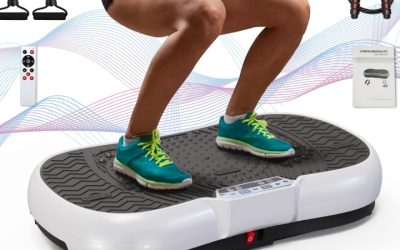
Having both a remote and phone control means you can change speed from a stretch position or a plank without interrupting what you are doing, which makes structured routines flow properly.
The app is a disappointment on its own terms. It largely replicates the remote’s functions rather than adding session history or guided programs, so treat it as a bonus rather than a reason to buy.
Best Hands-Off Sessions: Lifepro Waver
Ten presets mean you press one button and the machine handles the ramp and the timing. For anyone who finds decision-making the barrier to starting, that is worth real money.
You cannot edit them. If a preset’s intensity is slightly wrong for you, your only options are to endure it or drop back to manual, which undermines the point.
Most Precise Manual Control: 130-Level Vibration Plate
If you like knowing exactly what setting you used last time and repeating it, direct numeric selection is satisfying and repeatable in a way that presets never are.
Getting from level 8 to level 60 involves a lot of button presses. In practice most owners find three or four settings they like and stop exploring.
Clearest Interface: MERACH CV30 Pro Curved
The display is legible from standing height without glasses, and the control scheme is short enough to learn in one session. Combined with quiet running, it is the least fussy machine here.
It offers fewer programmed modes than rivals. If you want the machine to structure your session, look elsewhere.
Best Barefoot Operation: HVX Vibration Platform
Large buttons that can be operated with a toe are a small, sensible touch on a machine you use barefoot, and they avoid the awkward crouch that plagues smaller units.
Feedback is minimal. You get a speed number and a timer, and nothing that would help you track progress week to week.
Fastest to Start: Renoj 3D Vibration Platform
It powers up at a sensible default, so a ten-minute recovery session takes one button press and no configuration. That low startup friction is why it gets used.
The remote is small and easily lost in a room with soft furnishings. Attach a strap or keep it in a fixed spot from the beginning.
Frequently Asked Questions
Do I need Bluetooth on a vibration plate?
Rarely. Unless the app logs sessions over time or provides guided routines, connectivity adds a pairing step and an extra component to fail without changing what the machine does.
What happens if the remote breaks?
On units with onboard buttons, nothing serious. On remote-only designs, the machine is unusable until you source a replacement, so check for physical controls before buying.
Are preset programs worth using?
They are useful for removing decisions and providing a timer, which helps consistency. They are not personalized and should not be treated as coaching.
Can I use headphones or watch something while using it?
Yes, and most people do. Just make sure the speed control is reachable so you are not fumbling for a remote while the deck is running.
Final Thoughts
Choose the interface you will actually use every session. A reliable remote plus clear onboard buttons beats an app you will pair once and forget. Presets are worthwhile if decision fatigue is your barrier, and precise manual control suits anyone who likes repeatability. Whatever you pick, make sure you can change the speed while standing on the plate, because everything else follows from that.



Write Your Review
No reviews yet. Be the first to share your experience!