Key takeaways
- Dual forward and side lenses change viewing direction without a mirror.
- Four-point-three-inch dedicated display works without a mobile app.
- IP67 probe rating applies to the camera tip, not the console.
A camera can save a wall opening or help locate a dropped fastener, but only if its probe fits the hole and the cable can reach the target. The right inspection camera depends on whether you are looking behind drywall, through a sink trap, or into an engine opening. A phone-connected scope may be inexpensive, while a dedicated monitor works without an app. These five choices span both styles and highlight an easily missed limitation: a waterproof probe does not make the screen, charging connector, or entire tool waterproof.
Quick Verdict: Teslong NTS430 is our best overall choice: it provides a 4.3-inch monitor, a 5.5 or 8 mm probe choice, and photo/video storage. Its 3.2-foot base probe may be too short for some drain runs. This is an editorial recommendation based on published specifications as of October 2026, not detailed research; confirm the exact probe configuration and price before checkout.
As an Amazon Associate we earn from qualifying purchases.
By DIY Ideas 4 Home Editorial Team
5 Best Inspection Camera Models Reviewed
The models were selected from current manufacturer or major US retailer listings, with a distinct head size, cable reach, and display method for each. The advertised prices run from about $40 for a wired phone scope to $299 for an M12 professional kit as of October 2026. A quoted 1080p photo file does not mean the device streams continuously at that resolution. We prioritized documented probe clearances and realistic operating limitations over pixel-count marketing, and excluded dedicated long-distance drain reels that address a different budget.
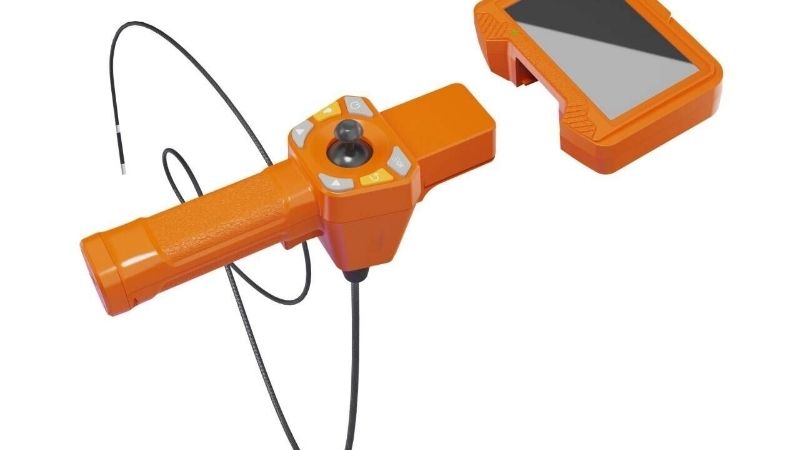
| Product | Best For | Key Spec | Listed Price (as of October 2026) | Watch Out For |
|---|---|---|---|---|
| Teslong NTS430 | Best Overall | 4.3-in LCD; dual lens; 5.5 or 8 mm probe | $139.99 | Base 3.2-ft cable may not reach far enough |
| Klein Tools ET16 | Best Budget Phone Scope | 9 mm head; 10-ft cable; 640 x 480 | $39.97 | Requires compatible Android/Windows device |
| Klein Tools ET20 | Best for Wireless Phone Viewing | 9 mm head; 6-ft cable; Wi-Fi output | $112.58 | Wi-Fi/app pairing and phone power matter |
| RIDGID micro CA-25 40043 | Best for Simple Viewing | 17 mm head; 4-ft cable; 2.7-in screen | $129.00 | Large head and no built-in photo storage |
| Milwaukee 2323-21 | Best for Jobsite Documentation | 10 mm head; 4-ft cable; 4.3-in LCD | $299.00 | Costs more and has shorter reach than some scopes |
Teslong NTS430: Best Overall
Best For: Household mechanics and remodelers who need a dedicated screen and side-looking images without using a phone.
The NTS430 suits several common inspection tasks because its dual-lens configuration can show forward and side views without repeatedly withdrawing a probe to attach a mirror. That is meaningful inside an engine or wall cavity where alignment is awkward. It also avoids phone software and offers a dedicated storage workflow. Its limitation is the default short cable: somebody seeking a deep sewer inspection should not infer that a small portable borescope replaces a push-camera reel.
Teslong’s NTS430 product page lists a 4.3-inch 480-by-272 monitor, dual-lens probe options of 5.5 and 8 mm, and selectable 3.2-, 9.8-, or 16.4-foot cable configurations. The $139.99 October 2026 listing was the base dual-lens option; longer probes and alternate diameters may cost more. Teslong states that a microSD card is included and the 3,000-mAh monitor battery operates for roughly four to five hours depending on use. Confirm the single checkout variant, since changing diameter can change your clearance.
The monitor measures 4.3 inches diagonally, and the standard probe extends 3.2 feet; these physical limits determine whether it will fit in a toolbox and reach the actual problem. Teslong rates the probe IP67, while its comparison documentation distinguishes the monitor from the probe; do not dunk the whole assembly. The listed straight-view focus range starts at about 1.18 inches, while the side-view range starts closer, so an object pressed against the lens may still appear blurry. The maker states a 12-month warranty, making replacement parts worth investigating before purchase.
Pros:
- Dual forward and side lenses change viewing direction without a mirror.
- Four-point-three-inch dedicated display works without a mobile app.
- IP67 probe rating applies to the camera tip, not the console.
Cons:
- Standard 3.2-foot probe is short for deep plumbing runs.
- Five-point-five-millimeter and eight-millimeter configurations require selection at checkout.
Who Should Buy It: Choose Teslong NTS430 for standalone household inspections; select Klein ET16 for the cheapest phone-assisted entry point.
Klein Tools ET16: Best Budget Phone Scope
Best For: Android users who already have a compatible port and need reach more than a dedicated display.
For a quick look behind an appliance or inside a wall, the ET16 offers a long flexible cable without charging another screen. Its main sacrifice is the display: the borescope depends on a compatible Android or Windows device and Klein’s viewing software. Do not buy it for an iPhone on the assumption that every USB-C connector guarantees application compatibility.
Klein’s ET16 sell sheet describes a nine-millimeter illuminated camera, a ten-foot armored gooseneck, and 640-by-480 image output. Its USB-C connector includes a micro-USB adapter and draws power from the host device rather than a separate borescope battery. Home Depot showed $39.97 in October 2026. The documentation specifies Android OTG compatibility and a Windows application; the exact supported operating systems should be checked before purchasing, as phone software changes faster than the probe hardware.
Klein’s model-specific sheet gives the ET16 body dimensions as 3.7 by 1.3 by 0.95 inches and an overall stated weight of 12.5 ounces. The ten-foot cable is useful in a long cavity but can be cumbersome to steer through sharp bends. Its IP67 designation covers the camera component rather than the connected phone, and the 640-by-480 output will not produce the detail of a larger dedicated inspection camera under all conditions. Keep the host device dry, and do not route a live cable through energized or rotating machinery.
Pros:
- Ten-foot gooseneck reach exceeds several costlier display units.
- Nine-millimeter camera tip fits many small inspection openings.
- USB-powered operation avoids replacing scope batteries.
Cons:
- Host-device app and Android OTG support are mandatory.
- Lower 640-by-480 imagery can hide small surface defects.
Who Should Buy It: Choose ET16 when price and cable reach dominate; choose Teslong NTS430 to inspect without a separate phone.
Klein Tools ET20: Best for Wireless Phone Viewing
Best For: Technicians who want a phone display without a direct USB connection near awkward equipment.
ET20 is an interesting middle choice for someone who wants to place the scope while watching images at a more comfortable angle. Its Wi-Fi connection removes the hardwired USB connection of ET16, although the scope still needs to stay within signal range and the viewer must have a suitable mobile device. The screen is only as usable as the phone’s display and app, so the extra price is paying for workflow flexibility rather than raw image resolution.
Klein’s ET20 product page specifies a nine-millimeter camera, six-foot armored gooseneck, and 640-by-480 output, with communication to iOS or Android via its local Wi-Fi signal. The company states a wireless viewing range up to 30 feet under suitable conditions and approximately 5.5 hours of battery life at full LED intensity. Home Depot listed ET20 at $112.58 as of October 2026. Pairing behavior and app availability should be verified with the buyer’s current phone version.
The ET20 body measures about 7.3 inches long, 2.3 inches high, and 1.5 inches wide, and weighs 20 ounces according to Klein. The camera and cable are rated IP67, but the body is only IP42; this distinction rules out treating the electronics as submersible. The six-foot cable can be more manageable than ET16’s ten feet when working behind a sink. Recharge the built-in battery before visiting a job where access will be lost once a panel is opened.
Pros:
- Wi-Fi viewing decouples the phone from the probe handle.
- Six-foot armored cable is manageable in short wall and HVAC inspections.
- Klein documents IP42 body and IP67 camera ratings separately.
Cons:
- Wi-Fi setup introduces phone-app compatibility and signal dependencies.
- Six-foot reach is shorter than ET16’s ten feet.
Who Should Buy It: Choose ET20 when wireless viewing helps the task; take Milwaukee 2323-21 for a dedicated professional monitor.
RIDGID micro CA-25 40043: Best for Simple Viewing
Best For: Homeowners checking shallow drains or cavities without recording images or relying on phone software.
RIDGID’s CA-25 is deliberately straightforward: it shows the image on its own screen and does not ask you to maintain an app or manage a rechargeable tool battery. That simplicity can be valuable when a pipe trap is open and you just need to identify where an obstruction sits. The downside is geometric rather than digital: a seventeen-millimeter head cannot pass through narrow openings that a Klein nine-millimeter camera can navigate.
RIDGID’s micro CA-25 product page and operator’s manual specify a 2.7-inch 320-by-240 display, a four-foot fixed cable, four adjustable LEDs, and an included RCA video-output lead. Home Depot listed item 40043 for $129.00 as of October 2026. The tool runs from four AA batteries, and RIDGID includes a hook, magnet, mirror, and carrying case. Because it is predominantly a live-view device, buyers needing saved reports should compare Teslong NTS430 or Milwaukee 2323-21.
The CA-25 operator’s manual gives a 1.35-pound device weight, with the manufacturer’s catalog listing a separate 4.7-pound ordering weight for the packed kit. Distinguishing operating weight from shipping weight avoids overstating what the hand actually supports. RIDGID specifies the head and fixed four-foot cable as waterproof to their stated limit, not the LCD body. The four-foot reach makes sense around a drain trap or appliance housing, not in a long sewer run where retrieval and cable steering demand other equipment.
Pros:
- Stand-alone 2.7-inch LCD does not need phone compatibility.
- Four AA batteries are easy to replace on a job.
- Mirror, hook, magnet, and hard case are included.
Cons:
- Seventeen-millimeter probe cannot fit many narrow access holes.
- No straightforward onboard photo storage for client reports.
Who Should Buy It: Buy CA-25 for occasional live viewing; choose Klein ET20 when a narrower camera and smartphone recording matter.
Milwaukee 2323-21: Best for Jobsite Documentation
Best For: Trade users documenting repeat inspections who already value Milwaukee M12 batteries and service support.
Milwaukee is the professional-leaning alternative for someone who must bring photos from an inspection to a service report. Its built-in screen rotates digitally and mechanically, while the SD-card workflow avoids dependence on a phone’s network settings. The four-foot cable remains a short-reach option; paying a premium does not turn this into a long sewer camera, and the lower-priced Teslong remains stronger value for an occasional homeowner.
Milwaukee’s 2323-21 product page documents a 4.3-inch display, 720p camera, ten-millimeter head, four-foot cable, three zoom levels, and adjustable LED brightness. The kit includes an M12 battery, charger, accessories, and a 32 GB SD card. Home Depot listed it for $299.00 as of October 2026. Its five-year tool warranty differs from the two-year battery warranty, and those terms should be read separately before assuming one period applies to every component.
The Milwaukee camera head measures about ten millimeters across and the flexible assembly reaches four feet, dimensions that determine the smallest practical entry hole and where the console can stand. Its 4.3-inch display is easier to share with a colleague than a tiny live-view screen, but longer investigations still depend on head positioning and focal distance. Avoid the temptation to insert it into energized panels or working machinery; the inspection scope is a viewing tool, not a non-contact electrical tester.
Pros:
- Four-point-three-inch display and 720p capture aid on-site documentation.
- Included 32 GB card supports photo and video transfer.
- Five-year tool warranty is specified separately from the battery.
Cons:
- The $299 kit is expensive for a rare home inspection.
- Four-foot cable cannot address long drain sections.
Who Should Buy It: Choose Milwaukee 2323-21 for repeat documented service calls; choose Teslong NTS430 for more economical standalone viewing.
How to Choose an Inspection Camera
Before inspecting any cavity, disconnect power and moving equipment where appropriate. Never push a borescope into a live electrical enclosure, a hot engine, or a gas appliance simply because its camera head is narrow. Verify manufacturer limits for moisture and temperature; an IP67 camera tip is not permission to immerse the handheld monitor. If an inspection suggests damaged wiring, a gas leak, or a blocked sewer line beyond safe access, use a qualified professional.
Measure probe diameter before buying
The probe is the part that must pass through an opening; screen size cannot compensate for an oversized head. RIDGID CA-25 uses a 17 mm camera, Milwaukee 2323-21 uses about 10 mm, Klein ET16 and ET20 use 9 mm, and the selected Teslong NTS430 can be configured with 5.5 or 8 mm probes.
Measure the intended entry point and allow space for bends and any mirror attachment. A tiny head is useful inside an engine, but an impossibly tight turn or dense insulation can stop the cable. Never drill blindly into a wall cavity that may contain wires, pipes, or gas lines.
Choose reach from the actual path
Cable lengths here range from the Teslong base configuration at 3.2 feet to the Klein ET16 at ten feet. A flexible cable that reaches a target in a straight line may not navigate a trapped elbow or vertical cavity. A stiffer armored gooseneck holds position differently from a professional push reel.
Trace the path from the access opening to the suspected issue, not simply the distance through the wall. The RIDGID four-foot fixed cable is reasonable for an appliance or short trap. Buy the longer Teslong probe variant or Klein ET16 for modest extra distance, but choose specialized drain equipment for substantial underground pipe runs.
Treat resolution, focus, and lighting together
A large recorded photo file does not guarantee a sharp image at an inch from the lens. Teslong publishes separate focal-distance ranges for straight and side views; Klein ET16 and ET20 list 640-by-480 output; Milwaukee emphasizes a 720p camera and screen. What you can identify depends on LED glare, focus distance, and the amount of oil or dust coating the lens.
For shiny pipes or engine parts, reduce LED brightness if highlights obscure detail. Side-looking optics can reveal a valve seat or pipe-wall defect without bending the gooseneck awkwardly. Ask whether the job requires a saved photo; RIDGID CA-25 concentrates on live viewing.
Read waterproof boundaries literally
Klein ET20 publishes IP67 for its head and cable but IP42 for the body, and Teslong separates the NTS430 probe from its monitor. Water resistance applies to specific parts and test conditions, not to unlimited fluid exposure. Petroleum products, solvents, hot coolant, and fuel introduce chemical and temperature limitations that an IP number alone does not resolve.
Keep chargers and phones away from wet work, and clean the probe as the manufacturer specifies. Do not use a camera in a live gas appliance or energized electrical cabinet. For a sewer or other contaminated line, plan cleaning and disinfection of the cable before it returns to the household toolbox.
Frequently Asked Questions
A borescope can show a hidden fault, but it cannot diagnose every cause or safely remove an obstruction. These questions focus on what the camera actually does.
Can I inspect inside a wall without drilling a hole?
Sometimes. An existing access panel, fixture cutout, or suitable opening may provide a safe path. If drilling is necessary, first locate utilities and follow safe procedures; a camera does not protect against hitting hidden wiring or pipes while making the access hole.
Will a waterproof camera work inside a full drainpipe?
Only within the exact probe and cable limits published by its manufacturer. Many products rate the camera tip IP67 while the monitor is not waterproof. A normal borescope is also not designed to force itself through large blockages or replace a professional drain reel.
Is a Wi-Fi borescope connected to the internet?
Usually not for basic viewing. Klein ET20 creates a local connection to a phone using its app, and internet service is not the underlying method of live image transfer. Check app permissions, device support, and the manufacturer’s setup guide before going to a worksite.
Can an inspection camera detect a live electrical wire?
No. A visual borescope only shows what the lens can see and is not a voltage detector. Shut off power where possible and have a qualified electrician evaluate suspected live conductors. Do not infer that a cable is safe because the camera image appears clear.
Final Thoughts
Teslong NTS430 is the best overall inspection camera for the owner who wants self-contained viewing, side-looking images, and saved records at a moderate price. But if the only planned job is viewing ten feet down an accessible dry cavity, the much cheaper Klein ET16 may be more appropriate with a compatible host device. Before buying any of these, measure the smallest opening and choose the exact cable length and probe diameter shown on the order page; that decision often matters more than image resolution.