why is my thermostat not working: A thermostat with Wi-Fi offline may still regulate temperature. A blank smart thermostat may reflect loss of power from the HVAC unit rather than thermostat failure. A reset is not the first troubleshooting step and does not repair a tripped safety switch or open C wire.
Quick Answer: If a thermostat is not working, check the display symptom first. For a blank screen, verify any replaceable batteries, HVAC circuit breaker and equipment power switch, and that the furnace access panel is closed. If the display works but there is no heating or cooling, confirm Heat/Cool mode and setpoint, and allow for a manufacturer-specified compressor delay. Repeated reboots or persistent blank screens may require a technician to inspect low-voltage power, C/R wiring and HVAC safety switches.
Never bridge wires, probe live 24 VAC terminals or open electrical HVAC panels to diagnose a blank thermostat; ask an HVAC professional.
As an Amazon Associate we earn from qualifying purchases.
By DIY Ideas 4 Home Editorial Team
Why This Happens: Causes and Warning Signs
Each line below ties a real-world decision to a visible outcome and an explicit limit. Start with the first check that fits the symptom rather than treating the whole list as required repairs.
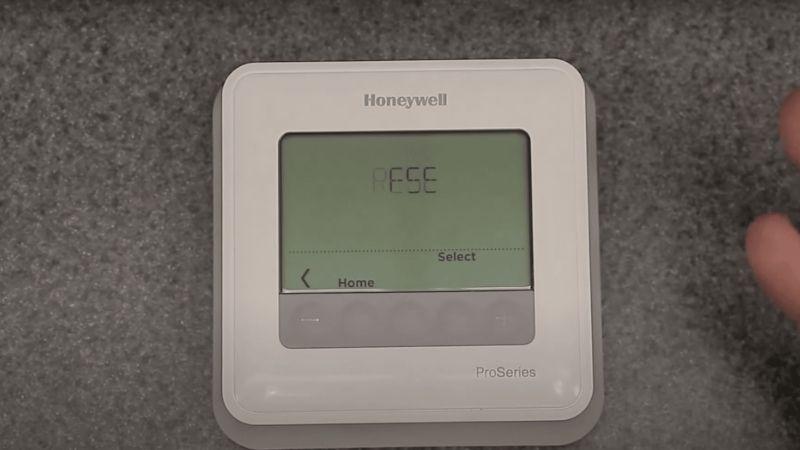
| Decision point | Owner action | Result to check | Stop or exception |
|---|---|---|---|
| Classify the failure before resetting | Decide whether the screen is blank, local controls work but Wi-Fi fails, or the display shows Heat On/Cool On without output. | Different symptoms lead to different external checks. | Do not assume a factory reset repairs HVAC power loss. |
| Check safe power and settings | Check user-accessible HVAC switch/breaker, securely closed furnace panel and replaceable batteries if the model has them. | Confirm HEAT or COOL mode and request a room temperature change. | Do not open live wiring compartments. |
| Respect model-specific delays and codes | Record the exact error code and follow the manufacturer manual for any normal compressor protection pause. | Honeywell T6 Pro II describes up to five minutes for its listed compressor delay case. | Do not interpret a model-specific code as universal or bypass protection. |
| Escalate unexplained power or equipment loss | For persistent blank screens, repeated reboots or suspected C-wire/float-switch issues, contact HVAC service. | Bring equipment model, power history and displayed messages. | Live 24 VAC testing, board checks and gas-system faults are professional work. |
Blank or dark thermostat screen
Honeywell Home T6 Pro II: blank display: breaker, HVAC switch, furnace door, fresh AA alkaline batteries correctly installed on battery-equipped model.
Define the problem more precisely than ‘the thermostat is broken.’ A completely blank screen, a screen that responds but does not call for heating, a reboot loop, and a lost phone-app connection lead to different checks. Note whether the thermostat has ever worked with the current HVAC equipment and whether the problem started after a power outage, battery replacement, software update, or wiring change. These details matter because the display, network connection, and controlled heating system may have separate power or communication conditions. Avoid resetting everything before you have described what is failing.
Screen works but heating/cooling does not respond
Honeywell T6 Pro II: verify Heat set above indoor temp or Cool below indoor temp; check power and furnace door.
If the display is dark, identify how the exact model is powered. Some use replaceable batteries for primary or backup power, while others depend on a connection to the heating and cooling system. Replacing batteries is useful only when the manual specifies that action. Check accessible switches or service alerts that the user is meant to inspect, but do not remove electrical panels or bridge terminals to see whether the screen lights. A thermostat that remains blank after approved basic checks may require a professional to trace the equipment power path.
Rebooting or losing power intermittently
Ecobee support: some smart thermostat models rely on power supplied by HVAC; a power interruption at the equipment can black out/reboot the display.
A working screen with no warm or cool air does not prove the thermostat’s sensing electronics are defective. Confirm the selected mode, active hold or schedule, and setpoint relative to the displayed room temperature. Then observe whether the thermostat indicates a request for heating or cooling and whether the corresponding equipment responds. Check only permitted accessible filter or power status information. If a heat-call message appears but the system does not run, the fault may be somewhere beyond the thermostat. Repeatedly adjusting the temperature to extreme values will not identify a missing equipment signal.
Wi-Fi failure versus thermostat power failure
Ecobee: AC condensate float switch, high-limit safety and other equipment protection circuits can interrupt thermostat power.
Wrong system mode, hold/schedule or room setpoint
Carrier furnace troubleshooting says setpoint, switch, breaker, filters and fuel/combustion systems are separate sources of heat failure; thermostat replacement is not automatic answer.
How to Interpret the Evidence
An HVAC-powered smart thermostat can lose display power because a furnace/air handler safety circuit opened.
Wrong mode/setpoint and a normal compressor protection delay can resemble malfunction.
C-wire is a low-voltage return path in compatible thermostat systems, not the entire power delivery explanation for all units.
How to Check the Problem Safely
Begin with observable conditions and proceed only through permitted user controls. A safety alarm, damaged part, live connection or inaccessible component ends the do-it-yourself path.
Step 1: classify the failure before resetting
Decide whether the screen is blank, local controls work but Wi-Fi fails, or the display shows Heat On/Cool On without output. Different symptoms lead to different external checks.
Do not assume a factory reset repairs HVAC power loss.
Honeywell T6 Pro II: flashing Heat On/Cool On can indicate compressor protection; allow up to 5 minutes for safe restart in the listed family.
Wi-Fi loss should be treated separately from local temperature control. If the thermostat still lets you select HEAT or COOL and the HVAC system responds normally from the wall unit, a disconnected phone app may be a network or account problem instead of a heating emergency. Consult the exact model’s connection instructions and avoid factory resetting equipment merely to reconnect a router. Note the error shown in the app and whether other household devices have internet service. If local heating control also fails, report both symptoms, since they can point to different underlying conditions.
Step 2: check safe power and settings
Check user-accessible HVAC switch/breaker, securely closed furnace panel and replaceable batteries if the model has them. Confirm HEAT or COOL mode and request a room temperature change.
Do not open live wiring compartments.
Google Nest support explains that turn HVAC power off before inspecting thermostat terminals or accessing equipment connections.
A final safe check is to document the observed power source, display behavior, setpoint, system response, and any code before contacting support. Take photographs of screen messages but leave wiring and sealed HVAC controls alone. If the system has a gas odor, a CO alarm, or repeated electrical faults, prioritize immediate safety measures instead of thermostat experimentation. A successful diagnosis should explain whether the problem is a screen, programming choice, connection, power supply, or response from downstream equipment; the appropriate repair depends on that distinction.
Step 3: respect model-specific delays and codes
Record the exact error code and follow the manufacturer manual for any normal compressor protection pause. Honeywell T6 Pro II describes up to five minutes for its listed compressor delay case.
Do not interpret a model-specific code as universal or bypass protection.
Honeywell T6 Pro II codes 405/407 correspond to low/critically low battery; exact display behavior is model-specific.
Step 4: escalate unexplained power or equipment loss
For persistent blank screens, repeated reboots or suspected C-wire/float-switch issues, contact HVAC service. Bring equipment model, power history and displayed messages.
Live 24 VAC testing, board checks and gas-system faults are professional work.
Ecobee C-wire troubleshooting distinguishes inadequate 24 VAC supply from loose wiring or controls; live probing should be professional for general readers.
Products That Help
Useful supplies for the specific checks above can include model-correct thermostat batteries and Honeywell Home T6 Pro II thermostat. Confirm the exact size, device compatibility and applicable maintenance instructions first. Equipment and tools do not remove the need to stop for a safety fault.
When to Call a Pro
Do not assume a factory reset repairs HVAC power loss. Live 24 VAC testing, board checks and gas-system faults are professional work.
Give the service provider the model number, the symptoms in time order, your observed operating conditions and any displayed fault code. Do not open sealed electrical, refrigerant or combustion components to collect this information.
Frequently Asked Questions
The answers below separate normal operation, owner-accessible checks and conditions that require manufacturer support or professional service.
Why is the thermostat screen blank even with new batteries?
The HVAC supply can be interrupted even with fresh batteries; check user-accessible breaker, equipment switch and furnace panel. Some smart thermostats depend entirely on HVAC power.
Does a thermostat need a C wire to work?
Only when the particular thermostat design requires a C wire or equivalent approved power adapter. Many battery-operated thermostats work differently.
Why does thermostat say Heat On but no heat comes?
A model-specific compressor protection pause, power problem or HVAC fault may prevent output. Honeywell T6 Pro II documents a delay of up to five minutes in specified cases.
Can a reset fix a thermostat with no power?
No. A reset cannot restore missing HVAC power. Check model-appropriate batteries and switches, then arrange qualified evaluation for persistent blank display or wiring issues.
Final Thoughts
Decide whether the screen is blank, local controls work but Wi-Fi fails, or the display shows Heat On/Cool On without output. Live 24 VAC testing, board checks and gas-system faults are professional work.
More from Amazon
Programs that pair well with the guide above. Offers and eligibility are set by Amazon and may change.
A free business account with business pricing and bulk-buying tools for work, shop or home office.
Create a business accountFree shipping on eligible items, Prime Video and more. Eligible new members can start with a free trial.
Start a Prime free trialAudiobooks and podcasts to listen to on the go. Eligible new members can start with a free trial.
Try Audible freeAd-free music streaming. Eligible new subscribers can start with a free trial.
Try Music Unlimited freeAs an Amazon Associate we earn from qualifying purchases.