Key takeaways
- Compare five USB fingerprint readers for Windows Hello sign-in, covering connectors, sensors, FIDO support and how many fingerprints each device holds.
Typing a long password every time you sit down at your desk gets old fast, and a PIN is only a small step up. A USB fingerprint reader gives a desktop or an older laptop the same one-touch sign-in that built-in sensors offer on newer machines: tap the pad, and Windows Hello lets you in. The five readers below all work with Windows Hello, but they split into clear camps. Two are compact dongles built by Kensington for laptop bags and shared PCs, one is a cabled desktop unit that sits where your hand naturally rests, and two are small third-party dongles that focus on quick matching and low fuss. Each entry sticks to specs the maker publishes, so you can match a reader to your desk setup instead of guessing.
Disclosure: As an Amazon Associate, we earn from qualifying purchases made through links on this page, at no extra cost to you.
How to Choose a USB Fingerprint Reader
Match the form factor to the computer
Dongles plug straight into a USB port and sit nearly flush, which suits a laptop you carry between rooms. The tradeoff is reach: on a tower PC under a desk, a flush dongle can be awkward to touch, while a cabled desktop reader is far easier to use many times a day. Check the connector as well. Most readers use USB-A, so a laptop with only USB-C ports needs either a USB-C model or an adapter, and some makers include that adapter in the box while others leave it to you.
Look at where the match happens
Better readers verify your print inside the sensor itself, a design often called match-in-sensor. Your fingerprint template stays on the device, and only an encrypted yes-or-no result travels to the PC. Kensington publishes false acceptance and false rejection figures for its VeriMark line, which gives you a concrete way to compare accuracy claims. A 360-degree sensor also matters in daily use, because it reads your finger at whatever angle your hand approaches.
Decide whether you need FIDO support
Windows Hello handles sign-in to the PC itself. FIDO U2F and FIDO2 support extends the same touch to websites and apps that accept security keys and passkeys, which is handy if you want one device for both your desktop login and your online accounts. Basic readers skip FIDO entirely and only unlock Windows, so decide up front whether web sign-in matters to you.
Check fingerprint capacity and shared use
Most readers here hold up to ten fingerprints. That is plenty for one person using two or three fingers, and it lets a shared family or office PC enroll several people on one device. If the reader will serve a whole household, capacity and multi-user support deserve a close look.
Confirm Windows support before you buy
Every pick below targets Windows Hello on Windows 10 or Windows 11, and none of them is a good fit for a Mac. Two caveats are worth knowing. Some Kensington models do not support Microsoft Enhanced Sign-in Security, a Windows 11 feature that newer builds may turn on by default, and Kensington notes that Windows on ARM processors is not supported on several of its keys. A quick check of the maker page for your exact model avoids a failed first setup.
The 5 Best Fingerprint Readers
1. Kensington VeriMark Desktop Fingerprint Key (K62330WW)

The VeriMark Desktop solves the reach problem that makes dongles clumsy on a tower PC. The sensor sits on a 3.9 ft cable, so it can live on the desk surface beside your keyboard while the computer stays on the floor. Matching happens in the sensor, with 360-degree readability and anti-spoofing protection, and Kensington publishes a false rejection figure of 2% and a false acceptance figure of 0.001% for the model. It is certified for Windows Hello and Windows Hello for Business, carries FIDO U2F certification with FIDO2 WebAuthn compatibility, and holds up to ten fingerprints. The current listing covers both port types, since the USB-A connection ships with a USB-C adapter in the box. Kensington is open about the limits: Windows on ARM is not supported, and this model does not support Microsoft Enhanced Sign-in Security. For a fixed desk with a PC tucked away, it is the most complete package here.
Specs
- Model: K62330WW
- Connector: USB-A with USB-C adapter included
- Cable length: 3.9 ft (1.2 m)
- Sensor: Match-in-sensor, 360-degree readability, anti-spoofing
- False rejection / false acceptance: 2% / 0.001%
- Fingerprint capacity: Up to 10
- FIDO: U2F certified, FIDO2 WebAuthn compatible
- System support: Windows Hello and Windows Hello for Business; Windows on ARM not supported
- Warranty: Limited 2-year
2. Kensington VeriMark IT Fingerprint Key (K64704WW)

The VeriMark IT packs the same match-in-sensor approach into a small USB-A dongle built for people who move between machines. Its Synaptics FS7600 sensor matches your print on the device itself, and Kensington secures the link with AES-256 and SHA-256 encryption plus TLS 1.2. Published accuracy matches the desktop model, at a 2% false rejection figure and 0.001% false acceptance, with 360-degree readability and anti-spoofing on board. Beyond Windows Hello, it supports Windows Hello for Business and is FIDO2 WebAuthn compatible, so the same touch can sign you in to work services. The zinc alloy body is compact at roughly 0.75 x 0.6 x 0.3 inches, small enough to leave in a laptop port full time. On Windows 10 the driver arrives through Windows Update, which keeps setup simple. Choose this one if you want business-grade features in a dongle you can forget is plugged in.
Specs
- Model: K64704WW
- Connector: USB-A
- Sensor: Synaptics FS7600, match-in-sensor, 360-degree readability, anti-spoofing
- Encryption: AES-256 / SHA-256, TLS 1.2
- False rejection / false acceptance: 2% / 0.001%
- FIDO: FIDO2 WebAuthn compatible
- System support: Windows Hello and Windows Hello for Business
- Housing: Zinc alloy
- Warranty: Limited 2-year
3. ARCANITE USB Fingerprint Reader (AKFSD-07)

ARCANITE keeps its reader simple and quick. The listing leads with a 0.05-second matching claim and a 360-degree sensor, so a touch at almost any angle unlocks the PC without a second attempt. It works with Windows Hello on Windows 10 and Windows 11 for both desktops and laptops, and it holds up to ten fingerprints, which makes it a sensible pick for a shared home office machine where two or three people sign in. There is no FIDO support here, and ARCANITE is clear that the reader does not work with Windows 7 or 8, macOS, or Linux, so it is a Windows-only tool. The maker does not publish full dimensions or a sensor resolution figure, which is why several spec lines below read as not published. If your goal is fast, plain Windows sign-in, this dongle covers it without extras you may never use.
Specs
- Model: AKFSD-07
- Connector: USB-A
- Sensor: 360-degree touch sensor; type not published
- Matching speed: 0.05 s (maker claim)
- Fingerprint capacity: Up to 10
- System support: Windows 10 and 11 with Windows Hello; not for Windows 7/8, macOS or Linux
- FIDO: Not supported
- Dimensions: Not published
4. TEC Mini USB Fingerprint Reader (TE-FPA2)
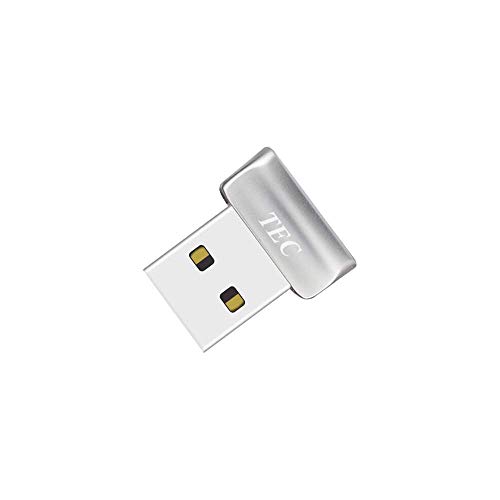
The TEC Mini adds a trick most plain sign-in dongles skip: bundled software that can lock files and folders behind your fingerprint, on top of Windows Hello login. Its sensor reads at 600 dpi with 360-degree touch matching, and the reader is built around an Elan chip, a common fingerprint platform in this category. It registers multiple fingerprints, so one dongle can serve more than one person at a shared desk. TEC sells it for Windows 10 and Windows 11, and owner guidance for the model notes that it does not suit ARM-based chipsets, which is worth checking if your laptop runs a Snapdragon processor. Setup involves the maker’s driver and software rather than pure plug-and-play, a small effort that buys the file encryption. Pick the TEC Mini if sign-in plus locked folders sounds more useful than sign-in alone.
Specs
- Model: TE-FPA2
- Connector: USB-A
- Sensor: 600 dpi, 360-degree touch matching, Elan chip
- Extra software: File and folder encryption
- Fingerprint capacity: Multiple fingerprints; exact count not published
- System support: Windows 10 and 11 with Windows Hello; not for ARM chipsets
- FIDO: Not published
5. Yoidesu USB Fingerprint Reader for Windows Hello

The Yoidesu reader is the no-fuss option in this group. It uses a capacitive sensor with 360-degree reading and a stated 0.5-second unlock, plugs into a USB-A port, and works with Windows Hello on Windows 10 and Windows 11 with no driver install step. Multi-user support means a family PC can enroll prints from several people on the one dongle. Yoidesu does not publish a model number, a FIDO certification, or detailed sensor figures, so this is a reader you buy for simple sign-in rather than for documented security standards. It is not made for Mac computers. For a home office desk where the goal is to skip the password prompt with minimal setup, it does that job in the plainest form here.
Specs
- Model: Not published
- Connector: USB-A
- Sensor: Capacitive, 360-degree reading
- Matching speed: 0.5 s (maker claim)
- Setup: Plug and play, no driver install
- Fingerprint capacity: Multi-user support; exact count not published
- System support: Windows 10 and 11 with Windows Hello; not for Mac
- FIDO: Not published
Comparison Table
| Product | Connector | Sensor | FIDO | Fingerprints | Best for |
|---|---|---|---|---|---|
| Kensington VeriMark Desktop (K62330WW) | USB-A plus USB-C adapter, 3.9 ft cable | Match-in-sensor, 360-degree | U2F and FIDO2 | Up to 10 | Tower PCs and fixed desks |
| Kensington VeriMark IT (K64704WW) | USB-A dongle | Synaptics FS7600, match-in-sensor | FIDO2 | Not published | Business sign-in on the move |
| ARCANITE AKFSD-07 | USB-A dongle | 360-degree touch | None | Up to 10 | Fast, plain Windows sign-in |
| TEC Mini (TE-FPA2) | USB-A dongle | 600 dpi, Elan chip | Not published | Multiple | Sign-in plus locked files |
| Yoidesu USB Fingerprint Reader | USB-A dongle | Capacitive, 360-degree | Not published | Multi-user | Simple plug-and-play login |
FAQ
Do these readers work with Windows 11 as well as Windows 10?
Yes. Every reader in this roundup lists Windows Hello support for Windows 10 and Windows 11. One caveat: some Kensington models do not support Microsoft Enhanced Sign-in Security, which newer Windows 11 builds may enable by default, so check the maker page if sign-in fails after an update.
Can one reader serve two people on the same PC?
In most cases, yes. Windows Hello lets each account enroll its own fingerprints, and readers that hold up to ten prints can cover several fingers from two or three people. The ARCANITE and both Kensington picks state a ten-fingerprint capacity, while the TEC Mini and Yoidesu list multi-user support without an exact count.
Will a USB fingerprint reader work on a Mac?
No, not the five gathered here. These models are built around Windows Hello, and their listings state Windows support only. Mac owners need a reader that names macOS support, which is a much smaller group of products.
What does match-in-sensor mean, and why does it matter?
It means the comparison between your live touch and the stored template happens inside the reader, not in Windows. The template never leaves the device, and the PC receives only an encrypted result. Both Kensington models use this design, which is a stronger privacy setup than readers that hand the fingerprint image to the computer.
Do I still need a PIN or password with a fingerprint reader?
Yes. Windows Hello asks you to set up a PIN as a fallback before you enroll a fingerprint, and your account password still exists behind it. The reader replaces the routine typing, but the PIN covers you if the sensor fails or the reader is unplugged.
Conclusion
For a desktop that stays in one place, the Kensington VeriMark Desktop is the strongest pick, thanks to its long cable, published accuracy figures, and FIDO support. Laptop users who want the same match-in-sensor design in a dongle should look at the VeriMark IT. The ARCANITE AKFSD-07 suits anyone who wants quick Windows sign-in and nothing more, the TEC Mini adds file locking for a shared desk, and the Yoidesu reader keeps setup as plain as it gets. Whichever you choose, confirm your Windows version and port type first, and a password you type many times a day becomes a touch that takes a second.
More from Amazon
Programs that pair well with the guide above. Offers and eligibility are set by Amazon and may change.
A free business account with business pricing and bulk-buying tools for work, shop or home office.
Create a business accountFree shipping on eligible items, Prime Video and more. Eligible new members can start with a free trial.
Start a Prime free trialAudiobooks and podcasts to listen to on the go. Eligible new members can start with a free trial.
Try Audible freeAd-free music streaming. Eligible new subscribers can start with a free trial.
Try Music Unlimited freeAs an Amazon Associate we earn from qualifying purchases.