
Key takeaways
- Pros: All-metal construction handles heavy enclosed printers; metal drawer resists dust and wear
- Cons: Assembly is multi-step and requires patience; 36-inch width may not fit tight corners
A 3D printer sitting directly on your desk is a mistake most hobbyists make once. The machine vibrates, the filament spool rolls off the edge, and you end up with a cluttered workspace that makes every print job feel like a negotiation. A proper 3D printer stand solves the immediate problem—elevating the printer to a workable height while giving filament, tools, and accessories a home—yet the market is flooded with options that range from solid steel frames to flimsy particleboard shelves that sag under a single Bambu Lab X1C.
What separates the best 3d printer stand options from the mediocre ones in 2026 comes down to three things: whether the construction handles the real weight of modern enclosed printers, whether storage is actually usable or just decorative, and whether the footprint fits the space you have without wasting square footage you could never recover. Owner feedback consistently highlights these pain points, and published specs make them straightforward to compare. Below, we lined up eight popular stands on exactly those dimensions so you can skip the guesswork.
Our top picks





As an Amazon Associate we earn from qualifying purchases at no extra cost to you.
Quick Picks
| Product | Best for | Price |
|---|---|---|
| ENOXEN 3-Tier Metal Stand | Heavy-duty single printer setups | $109.98 |
| Anrigeail Heavy Duty Stand | Workshops needing a built-in power hub | $119.99 |
| Bliesosfud 2-Printer Rack | Farm operators running two machines | $79.99 |
| Budget 3-Tier Stand with Tool Bag | Lowest-cost entry into organized printing | $69.99 |
| AHOWPD Filament Storage Table | Balanced drawer-and-rack organization | $109.89 |
| GUULIBERA 3-Tier with Power Outlet | Desk-level setups wanting integrated outlets | $109.99 |
| ENOXEN Fabric Drawer Stand | Lighter machines on a tighter budget | $89.99 |
| Dual-Zoned AMS System Table | Bambu AMS multi-filament workflows | $104.99 |
How We Picked
We filtered the available field on four criteria that owner reviews repeatedly flag as dealbreakers: load-bearing capacity relative to the printer it is meant to hold, the practicality of integrated filament and tool storage, overall build quality (metal frames versus particleboard, drawer glide mechanisms, weld points), and dimensional footprint so the stand fits a typical home office or garage corner without dominating the room. Price was treated as a constraint, not a ranking factor, since a stand that wobbles at any price is worthless and one that over-engineers a simple need wastes budget.
The 8 Best 3D Printer Stand in 2026
ENOXEN 3-Tier Metal Stand
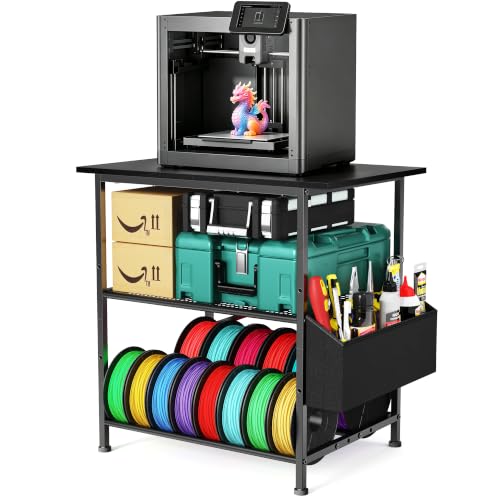
This is the default recommendation for anyone running a single enclosed printer like a Prusa XL or Bambu H2D who needs a no-nonsense, all-metal solution. The three-tier layout gives you a dedicated top shelf for the printer, a middle tier for filament spools, and a bottom shelf for larger accessories. The metal drawer is a genuine differentiator over fabric alternatives—it locks items away from dust and keeps small tools from migrating during heavy printing sessions. Owner feedback praises the rigidity, though some note assembly takes longer than advertised. Skip this if your space demands something narrower than a standard 36-inch width or if you are printing with only one small-format machine and do not need three tiers.
- Pros: All-metal construction handles heavy enclosed printers; metal drawer resists dust and wear
- Cons: Assembly is multi-step and requires patience; 36-inch width may not fit tight corners
Anrigeail Heavy Duty Stand
The standout feature here is the integrated power hub, which eliminates the extension-cord spaghetti that plagues most workshop setups. For users who want to plug in a printer, a lamp, and an adhesive cutter without reaching for a separate surge protector, this stand centralizes everything. The heavy-duty frame matches ENOXEN in perceived sturdiness, and the drawer provides enclosed storage for filament spools or tools. It carries the highest price tag in this roundup, which is reasonable if you value the power integration but hard to justify if you already have outlets within arm’s reach. Skip it if your workshop layout already solves power distribution and you would rather save the margin difference.
- Pros: Built-in power hub reduces cable clutter; robust metal frame supports demanding setups
- Cons: Highest price in the group; power hub ratings may not suit every regional plug standard
Bliesosfud 2-Printer Rack
For anyone operating a small print farm or running two machines simultaneously—say a resin printer paired with an FDM workhorse—this is the only option here explicitly designed for that scenario. The large footprint accommodates two printers while the dedicated filament organizer and spool holder keep materials accessible. At $79.99 it undercuts most single-printer competitors, making the value proposition compelling. The tradeoff is obvious: it is wide and heavy to move once loaded. Skip it if you only need a stand for one printer or if your room cannot spare the horizontal real estate it demands.
- Pros: Purpose-built for dual printers; aggressive price for the capacity it offers
- Cons: Large footprint limits placement options; heavier build makes repositioning difficult
Budget 3-Tier Stand with Tool Bag
At $69.99 this is the entry point, and the detachable tool storage bag is a clever touch for people who want portability without committing to a permanent drawer. The three-tier layout mirrors more expensive options, and owner feedback suggests adequate stability for lighter printers like the Ender 3 or Anycubic Kobra. Where it falls short is in perceived build thickness and the absence of a metal drawer or power features. Skip it if your printer exceeds mid-range weight or if you need enclosed dust protection for stored filament—this is a machine-first, storage-second stand.
- Pros: Lowest price in the group; detachable tool bag adds flexibility
- Cons: Lighter construction limits weight tolerance; no enclosed dust protection
AHOWPD Filament Storage Table
This model splits the difference between the drawer-and-rack approach and the open-shelf philosophy. The dedicated rack handles multiple spools while the drawer organizer keeps smaller items from floating away. Owner reviews highlight the clean visual profile—it looks more like furniture than industrial equipment—which matters if your printer lives in a shared office or living room. At $109.89 it sits in the same price band as the top metal options but without the integrated power features. Skip it if you need a power hub or if your workflow demands two or more printers on one platform.
- Pros: Furniture-grade appearance suits shared spaces; well-organized drawer and rack combo
- Cons: No power integration; single-printer capacity limits farm use
GUULIBERA 3-Tier with Power Outlet
Like the Anrigeail, this stand bakes a power outlet into the structure, making it a one-plug solution for your printing corner. The three-tier filament holder keeps spools visible and accessible, and the drawer adds enclosed storage. Owner feedback suggests the outlet placement is ergonomic at desk height, reducing the awkward reach-down that floor-standing units force. It matches the ENOXEN Metal Stand in price almost exactly, so your decision between them comes down to whether you prioritize the metal drawer or the integrated power. Skip it if you already have reliable outlet access nearby and would rather invest that margin difference elsewhere.
- Pros: Integrated power outlet at a practical height; three-tier design keeps filament organized
- Cons: Competes directly with similarly priced options; power outlet adds a potential failure point
ENOXEN Fabric Drawer Stand
This is ENOXEN’s lighter, less expensive sibling—the same three-tier philosophy but with two fabric drawers instead of a single metal one. The fabric construction shaves cost and weight while still keeping tools and filament off the floor. For users with smaller or mid-weight printers who want enclosed storage without paying for a full metal drawer system, this hits a sweet spot at $89.99. The limitation is durability: fabric drawers sag over time when loaded heavily, and they offer less dust protection than metal. Skip it if your printer is near the upper weight limit or if you store items that require rigid, dust-sealed containers.
- Pros: Two fabric drawers add flexible enclosed storage; lower price than the metal-drawer sibling
- Cons: Fabric drawers sag under heavy loads; less dust protection than metal alternatives
Dual-Zoned AMS System Table
The only option here engineered around Bambu Lab’s AMS (Automatic Material System) multi-filament setup, this table dedicates specific zones for the AMS hub and printer side by side. For users who found the AMS stacking awkward on generic shelves, the structured panel solves a real workflow problem. The dual-zoned layout also accommodates filament storage without the spools interfering with AMS loading paths. At $104.99 the price is competitive, though its specialization means limited value if you do not run an AMS system. Skip it if your workflow is single-filament or non-Bambu—this is a purpose-built accessory, not a generalist.
- Pros: Dedicated AMS panel eliminates stacking chaos; dual zones keep filament and machine separate
- Cons: Niche design only rewards AMS users; not as flexible for non-Bambu setups
Buying Guide
Load Capacity and Frame Material
Modern enclosed FDM printers like the Bambu H2D or Prusa XL exceed 40 pounds without filament. A stand rated for 20 pounds will visibly sag or wobble, degrading print quality on the upper layers. Prioritize metal frames with welded joints over tube-and-connector particleboard, and always check the top-shelf rating specifically rather than total unit capacity—those are different numbers.
Filament and Tool Storage Layout
Open shelves look clean but expose filament to dust, UV light, and moisture, all of which degrade print quality over weeks. Enclosed drawers or dedicated spool holders with side clearance protect material and reduce reload friction. Match the storage style to your actual inventory: someone with four active spools needs a different layout than someone juggling twelve colors.
Footprint and Placement Constraints
Measure your available corner before purchasing. A 36-inch-wide stand is excellent for garage workshops but unusable in a compact home office. Check depth as well—many stands are 16 to 18 inches deep, which pushes printers far from the user and makes touch-screen interaction awkward. Confirm the height fits under any window sills or shelving above your intended location.
Our Verdict
Our top pick is the ENOXEN 3-Tier Metal Stand at $109.98. Its all-metal construction, dust-resistant drawer, and three-tier organization deliver the most balanced package for the widest range of printers without gimmicks that raise price without raising utility. For a budget entry, the 3-Tier Stand with Tool Bag at $69.99 earns its place—it handles lighter machines capably and the detachable bag adds a flexibility that rigid drawers cannot. However, if you operate two or more printers simultaneously, the Bliesosfud 2-Printer Rack at $79.99 is the clear winner despite its larger footprint, because no other option in this group is designed for that workflow.
FAQ
How much weight can a 3D printer stand handle?
Published load ratings vary from under 25 pounds on budget particleboard models to over 80 pounds on heavy-duty steel frames. Always match the top-shelf rating—not the total unit rating—to your printer’s weight plus loaded filament and any accessories resting directly on it.
Do I need a stand with a drawer or is an open shelf enough?
Open shelves work for filament you cycle through weekly, but enclosed drawers protect material from dust and UV degradation over longer storage periods. If you keep multiple spools between uses, the drawer is worth the premium.
Can I use an IKEA-style desk instead of a dedicated printer stand?
You can, but you lose the vertical tier layout and filament-specific holders that make dedicated stands efficient. A flat desk forces you to solve storage separately and often increases your total footprint compared to a three-tier design.
Are integrated power outlets safe for 3D printers?
Stands with built-in outlets typically include overload protection, but verify the amperage rating matches your printer’s draw—most enclosed FDM machines peak near 10 to 15 amps during bed heating. If the rating is unclear, use an external surge protector instead.









