
Key takeaways
- Pro: Fully enclosed frame keeps chamber temperatures stable for engineering filaments.
- Pro: Bambu Studio software automates color segmentation from a simple image mask.
- Con: Purge blocks on small, single-object prints waste noticeable filament per color change.
Multi-color 3D printing used to mean either a tangled mess of manual filament swaps or a custom MMU retrofit that ate a weekend and half your patience. The AMS (Automatic Material System) changed that equation entirely, letting a single printer run four, eight, or even sixteen spools in one print session without babysitting. The problem now is choosing which AMS-compatible machine actually earns its price tag.
What separates a worthwhile AMS setup from a frustrating one comes down to three things: whether the printer’s enclosure and extrusion system handle the extra weight and thermal swings of multi-material work, how well the AMS unit feeds and dries filament over long runs, and whether the software coordinates color changes without generating blobs, strings, or layer shifts. A machine that nails all three lets you print a four-color figurine or a two-tone phone stand and walk away. One that misses on any of them produces output you would rather scrap.
Our top picks





As an Amazon Associate we earn from qualifying purchases at no extra cost to you.
Quick Picks
| Product | Best for | Price |
|---|---|---|
| Bambu Lab P1S Combo | Best overall AMS experience | $549 |
| Bambu Lab P2S Combo | Upgrade path for demanding users | $769 |
| Bambu Lab A1 Combo + LED Lamp Kit | Smallest footprint with multi-color | $419 |
| Bambu Lab P1S (no AMS) | Single-color enclosed printing | $399 |
| Bambu Lab AMS 2 Pro | Standalone dryer and feeder add-on | $319 |
| FLASHFORGE Adventurer 5M | Budget speed without multi-color | $249 |
| Creality K2 Combo (A) | Large-volume multicolor work | $521 |
| FLASHFORGE AD5X | Enclosed high-speed single color | $349 |
How We Picked
We narrowed this list by weighing published specifications against recurring owner themes: feed reliability over extended prints, how the AMS handles hygroscopic filaments like PA and TPU, whether color-change purge volumes stay reasonable on smaller objects, and whether the printer’s frame and hotend maintain dimensional stability when the machine is running at its rated speed. Price-per-feature and long-term consumable costs (nozzles, AMS spool holders, PTFE tubes) factored in as well.
The 8 Best Ams 3D Printer in 2026
Bambu Lab P1S Combo
The P1S Combo remains the default recommendation for anyone stepping into multi-color FDM without wanting to spend four figures. The enclosed CoreXY chassis handles ABS and ASA on a daily basis, and the included AMS feeds four filaments with purge volumes that most owners describe as acceptable on objects larger than a tennis ball.
- Pro: Fully enclosed frame keeps chamber temperatures stable for engineering filaments.
- Pro: Bambu Studio software automates color segmentation from a simple image mask.
- Con: Purge blocks on small, single-object prints waste noticeable filament per color change.
Skip it if you only ever print in one color—buy the P1S alone and pocket the difference.
Bambu Lab P2S Combo
The P2S Combo pairs Bambu’s mid-tier printer with the newer AMS 2 Pro, adding heated drying at 65 degrees Celsius directly inside the feeder housing. That matters most for nylon, PC, and TPU users who would otherwise buy a separate dryer. The printer itself gains a higher flow rate and improved auto-calibration routines over the P1S.
- Pro: Integrated drying eliminates a separate filament dryer for moisture-sensitive materials.
- Pro: Higher nozzle temperature ceiling expands the usable material range.
- Con: At $769 it sits uncomfortably close to machines with larger build volumes.
Skip it if you print exclusively PLA or PETG—those materials tolerate ambient storage, so the drying feature becomes dead weight.
Bambu Lab A1 Combo + LED Lamp Kit
The A1 Combo targets makers with limited desk space who still want four-color capability. Its open-frame, bed-slinger design keeps the footprint small and the price under $420, and the bundled LED lamp kit adds task lighting without stealing a USB port. Owners praise the setup time and the included filament samples.
- Pro: Smallest overall desk footprint in this roundup while retaining multi-color.
- Pro: Comes with an LED lamp kit that doubles as a practical workspace accessory.
- Con: Open frame means ABS, ASA, and nylon prints warp or delaminate reliably.
Skip it if you need an enclosure for high-temp filaments or live in a drafty room.
Bambu Lab P1S 3D Printer (no AMS)
Some buyers already own an AMS unit or simply print one color. The P1S on its own delivers the same enclosed CoreXY platform, the same high-speed motion system, and the same Bambu Studio workflow at $399. It is arguably the best single-material enclosed printer under four hundred dollars.
- Pro: Enclosed chamber at the lowest price point in the Bambu lineup.
- Pro: Identical software ecosystem means an AMS can be added later without relearning.
- Con: No multi-color out of the box; adding an AMS later erases most of the savings.
Skip it if you have no realistic plan to add an AMS within a few months.
Bambu Lab AMS 2 Pro
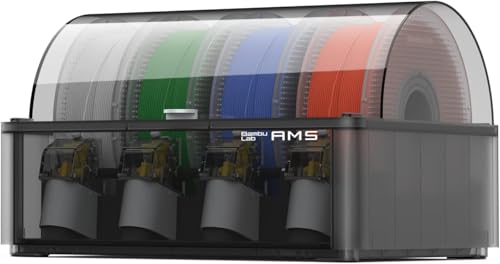
This is not a printer but a standalone Automatic Material System with built-in 65-degree-Celsius drying. Owners who upgraded from the first-generation AMS report measurably fewer feed jams with hygroscopic filaments, and the four-slot design is backward-compatible with any current Bambu printer. At $319 it is the most direct path to adding multi-color to an existing machine.
- Pro: Integrated drying solves moisture problems without a separate dryer box.
- Pro: Drop-in upgrade for every Bambu printer, no firmware workarounds needed.
- Con: Four slots only; serious multi-color users still want to stack two units.
Skip it if you already own a first-gen AMS and print nothing more exotic than PLA.
FLASHFORGE Adventurer 5M
The Adventurer 5M is a fast, affordable, single-color machine that FLASHFORGE markets as a speed-first printer with a 280-degree-Celsius direct extruder and a 3-second nozzle swap. It has no native multi-color system, so it appears here as a foil—proof that speed alone does not equal versatility.
- Pro: 600 mm/s rated speed with a detachable nozzle that simplifies maintenance.
- Pro: Auto-leveling and CoreXY structure at $249 undercut most competitors.
- Con: No AMS or equivalent; multi-color requires a third-party retrofit.
Skip it if multi-color is a requirement rather than a future nice-to-have.
Creality K2 Combo (A)
Creality answered the P2S Combo with the K2 Combo, bundling the CFS (Creality Filament System) for multi-color work, a 600 mm/s motion system, and a 260 mm cube build volume that exceeds every Bambu option listed here. At $521 it undercuts the P2S Combo while offering more physical printing space.
- Pro: Largest build volume in this roundup at 260 x 260 x 260 mm.
- Pro: AI camera for print monitoring included in the combo price.
- Con: CFS purge volumes and color-change logic lag behind Bambu Studio’s maturity.
Skip it if your objects fit within 220 mm and you value polished software over extra bed space.
FLASHFORGE AD5X
The AD5X adds a full enclosure and a 300-degree-Celsius direct-drive extruder to the Adventurer 5M’s speed-first platform, positioning it as a high-temp single-color workhorse. It does not include an AMS, but the enclosed chamber and higher nozzle ceiling make it suitable for PA-CF and PC prints that an open-frame machine cannot reliably handle.
- Pro: Enclosed chamber plus 300-degree-Celsius hotend covers most engineering filaments.
- Pro: 600 mm/s speed retained from the 5M platform at a modest price bump.
- Con: Still single-color; no bundled or native multi-material system available.
Skip it if you already know multi-color is non-negotiable for your workflow.
Buying Guide
Enclosure and Thermal Stability
Multi-color prints run longer than single-color jobs because the machine pauses to swap filaments, purge, and resume. A closed chamber keeps part temperatures consistent during those pauses, preventing the layer delamination and corner curling that open-frame machines produce on ABS, ASA, and nylon. If you plan to use the AMS with engineering materials, an enclosure is non-negotiable; if you print only PLA and PETG, an open frame saves weight and cost.
Drying Integration and Feed Reliability
Filament absorbs moisture from ambient air within hours of opening a spool. Damp filament causes stringing, under-extrusion, and surface roughness that color-change logic cannot compensate for. The AMS 2 Pro’s built-in 65-degree-Celsius drying addresses this at the feeder level, removing the need for a separate dryer box. First-generation AMS units without drying rely on the user to pre-dry spools, which is an extra step that owners frequently skip until quality drops.
Purge Volume and Material Waste
Every color change requires the extruder to purge old filament from the nozzle before the new color becomes visible. On large objects that waste is negligible; on small, multi-colored pieces it can rival the part’s own mass. Bambu Studio and Creality’s slicer both offer purge tuning, but the default settings favor reliability over economy. If you print many small objects, factor in filament cost at three to four times the model’s physical volume.
Our Verdict
The top pick is the Bambu Lab P1S Combo at $549: it balances enclosure, speed, software maturity, and multi-color capability at a price that is hard to argue against for most buyers. The budget pick is the Bambu Lab A1 Combo at $419, which delivers genuine four-color printing in the smallest footprint here. However, if your priority is raw build volume and you accept slightly rougher color-change logic, the Creality K2 Combo at $521 is the one product that beats the P1S Combo on size while costing less.
FAQ
What does AMS stand for in 3D printing?
AMS stands for Automatic Material System. It is a powered filament feeder and dryer unit that mounts beside the printer and switches between spools automatically during a print job, enabling multi-color and multi-material output from a single nozzle.
Can I add an AMS to a non-Bambu printer?
No. The AMS communicates with Bambu printers over a proprietary serial link and requires Bambu Studio for color assignment. Third-party multi-color systems exist for open-source printers, but they are separate projects with their own complexity.
How much extra filament does multi-color printing waste?
Each color change purges a short length of the outgoing filament to clear the nozzle. On a four-color print this can add twenty to forty percent to total material use, depending on part size and slicer purge settings. Small objects show the worst waste ratio.
Do I need the AMS 2 Pro if I already have an AMS?
Only if you print hygroscopic materials like nylon, TPU, or carbon-fiber blends and lack a separate filament dryer. The 2 Pro’s integrated 65-degree-Celsius drying is its main practical upgrade over the first generation; feed speed and reliability improvements are incremental.









