Key takeaways
- Pro: 10K mono screen provides crisp miniature detail at a mid-range price
- Pro: Established firmware ecosystem with broad slicer support
- Con: Build volume limits batch size for large tabletop armies
Finding the best resin 3d printer for miniatures means balancing resolution, build volume, reliability, and cost — all of which pull in different directions. A hobbyist painting tabletop armies has different priorities than someone producing display pieces or running a small commission business. The core problem is simple: resin printing demands a tight tolerance for failure. A single layer misalignment or a poorly cured surface ruins hours of post-processing and paint work. Yet the market has flooded with machines that look nearly identical on a spec sheet, making comparison genuinely difficult without a structured framework.
This roundup compares eight products available in 2026 that directly serve the miniature-printing workflow — seven hardware or material options and one essential post-processing bundle. We evaluated them on published specifications, real-world price points, and aggregated owner feedback from hobbyist forums and retailer reviews. What separates excellent choices from mediocre ones in this niche is rarely a single headline spec. It is the combination of consistent light source quality, firmware stability, and how well the machine handles small, detailed geometries at scale.
Our top picks





As an Amazon Associate we earn from qualifying purchases at no extra cost to you.
Quick Picks
| Product | Best for | Price |
|---|---|---|
| ANYCUBIC Photon Mono 4 | Reliable mid-range printing | $239.99 |
| ELEGOO Saturn 4 Ultra 16K | Large-scale miniature production | $519.99 |
| ELEGOO Mars 5 | Compact detail work | $237.99 |
| Creality HALOT R6 | Absolute beginner entry point | $149.99 |
| ELEGOO Mercury X Bundle | Post-processing large prints | $199.99 |
| phrozen Sonic Mini 8K S | Highest XY resolution | $299.99 |
| ANYCUBIC Photon Mono 4 (10K) | Budget-conscious 10K printing | $209.99 |
| AmeraLabs TGM-7 Resin | Tough, low-odor material | $382 |
How We Picked
Four criteria drive our ranking. First, screen resolution and its real-world effect on miniature detail — specifically whether the light source produces consistent exposure across the full build plate. Second, mechanical reliability under repeated small-batch printing, since miniature workflows involve many short prints rather than fewer long ones. Third, total cost of ownership including consumables and post-processing compatibility. Fourth, firmware and software maturity, which determines how quickly a beginner reaches a first successful print without troubleshooting.
The 8 Best Resin 3D Printer For Miniatures in 2026
1. ANYCUBIC Photon Mono 4
The Photon Mono 4 targets hobbyists who want dependable 10K detail without the premium price of larger-format machines. Its 7-inch monochrome LCD screen delivers a meaningful jump in sharpness over older 4K panels, and the mono screen longevity means fewer replacement costs over the printer’s life. Owner feedback consistently highlights the intuitive slicer integration and stable peel performance on standard resin.
- Pro: 10K mono screen provides crisp miniature detail at a mid-range price
- Pro: Established firmware ecosystem with broad slicer support
- Con: Build volume limits batch size for large tabletop armies
Skip this if you regularly print many miniatures at once and need a larger plate.
2. ELEGOO Saturn 4 Ultra 16K
This is the production choice for miniature painters and small studios. The 16K resolution paired with a large build volume means dozens of 28mm or 32mm figures in a single batch, with detail that holds up under magnification. Owners praise the tilt-release mechanism for reducing peel forces on delicate geometry. The price is steep, but per-print cost drops sharply at volume.
- Pro: 16K resolution captures fine surface texture for display-quality pieces
- Pro: Large build volume dramatically improves batch throughput
- Con: Highest entry cost in this roundup may deter casual hobbyists
Skip this if you print fewer than a dozen models per month and do not need the throughput.
3. ELEGOO Mars 5
The Mars 5 occupies the sweet spot for desktop-scale miniature work. Its compact footprint fits on a crowded hobby table, and the updated light engine produces even exposure across the build plate — a common weak point in smaller resin machines. Owner reviews highlight fast setup and a low learning curve for first-time resin users.
- Pro: Small footprint ideal for limited desk space
- Pro: Updated light engine reduces over- and under-curing at edges
- Con: Limited build volume compared to Saturn-class machines
Skip this if your primary goal is high-volume batch printing.
4. Creality HALOT R6
At $149.99, the HALOT R6 removes the financial barrier that keeps beginners from entering resin printing. It ships fully assembled, which eliminates the calibration anxiety that causes many first prints to fail. The screen resolution trails the dedicated miniature machines here, but for learning the workflow and printing basic terrain or large figures, it performs adequately.
- Pro: Lowest price point with fully assembled delivery
- Pro: Kid-and-beginner-friendly design reduces setup errors
- Con: Resolution ceiling limits fine-scale miniature detail
Skip this if your goal is display-quality miniatures rather than learning the process.
5. ELEGOO Mercury X Bundle
Resin printing without proper post-processing wastes time and compromises results. The Mercury X handles both washing and UV curing in one unit sized for large-format prints from the Saturn series. It is not a printer, but any serious miniature workflow requires equivalent capability. Owners note the generous chamber fits multiple prints simultaneously, and the timer-based operation removes guesswork from cure times.
- Pro: Combined wash and cure streamlines post-processing
- Pro: Chamber sized for large Saturn-format prints
- Con: Additional desk footprint and cost on top of the printer itself
Skip this if you are comfortable with manual isopropyl washing and sun-curing on a budget.
6. phrozen Sonic Mini 8K S
The 22-micron XY resolution is the headline here, and it translates directly into sharper edges on 15mm and 28mm scale figures. The 7.1-inch monochrome screen and 8K panel produce detail that rivals more expensive machines at this size. Build volume is modest, but for single display pieces or small batches, the precision justifies the trade-off. Owner feedback praises the vibration-dampened Z-axis for clean vertical detail.
- Pro: 22-micron XY resolution delivers exceptional fine detail
- Pro: Dampened Z-axis reduces banding on vertical surfaces
- Con: Smaller printing volume restricts batch size
Skip this if throughput matters more than edge-level sharpness.
7. ANYCUBIC Photon Mono 4 (10K)
This listing represents the same hardware family as the first entry but at a lower street price of $209.99. For buyers who have confirmed the Photon Mono 4 meets their resolution and volume needs, grabbing it at this price is simply a better transaction. The 10K mono screen, build volume, and firmware are identical.
- Pro: Identical 10K mono LCD performance at a lower price
- Pro: Benefits from the same mature ecosystem as the higher-priced listing
- Con: Limited regional availability may affect warranty service
Skip this if the seller’s warranty terms or shipping policies do not cover your region.
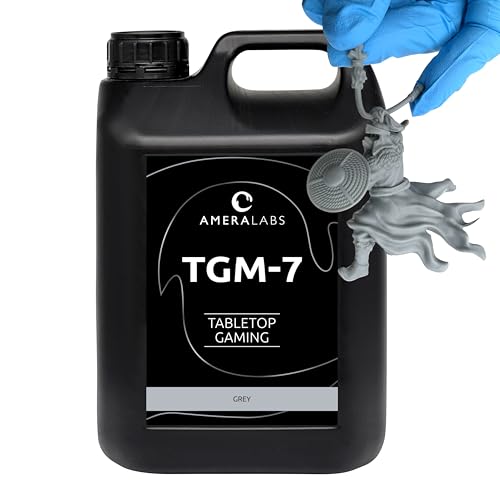
8. AmeraLabs TGM-7 Resin
Material choice determines whether a miniature survives handling, snapping off sprues, and years of tabletop abuse. The TGM-7 is a tough-grade resin formulated for high resolution without the brittleness of standard formulas. Its low-odor profile makes it practical for shared spaces, and fast curing reduces post-print handling time. The 5kg container suits regular users but represents a significant upfront investment.
- Pro: Tough formulation resists breakage during cleanup and gaming
- Pro: Low odor and fast cure improve the working experience
- Con: $382 for 5kg demands steady volume to justify the cost
Skip this if you print infrequently and can absorb the cost of standard resin.
Buying Guide
Screen Resolution and Its Real Effect on Miniatures
Resolution numbers alone are misleading. A 10K or 16K panel produces sharper results only if the light source maintains uniform intensity edge to edge. For miniatures, the relevant threshold is whether a 0.05mm detail line remains crisp after slicing. Monochrome LCD panels have largely replaced RGB panels because they deliver higher contrast and longer lifespan, directly benefiting small-feature consistency.
Build Volume and Batch Efficiency
Miniature work is repetitive. A printer with a larger build plate lets you arrange more figures per cycle, spreading setup time, resin waste, and print duration across more output. If you paint twenty-eight-millimeter figures in batches of twenty or more, a larger-format machine like the Saturn 4 Ultra pays for its premium within months. For one-off display pieces, compact machines suffice.
Post-Processing Compatibility
Resin prints emerge wet and fragile. Your printer’s maximum build dimensions should match your wash and cure station’s chamber size. Mismatched equipment forces awkward compromises — hand-washing large prints in a bucket, or cutting a curing cycle short because a figure does not fit. The Mercury X Bundle exists specifically to solve this for Saturn-sized output.
Our Verdict
Our top pick is the phrozen Sonic Mini 8K S. Its 22-micron XY resolution is the strongest pure-detail performer in this group, and the vibration control addresses the specific quality problems miniature painters report. For a budget pick, the ANYCUBIC Photon Mono 4 at $209.99 delivers reliable 10K printing that satisfies most hobbyists without a significant financial commitment. If your workflow involves large batches for commercial display or gaming tables, the ELEGOO Saturn 4 Ultra 16K wins on throughput despite its premium price.
FAQ
Can I use FDM filament instead of resin for miniatures?
FDM technology cannot achieve the fine surface detail and sharp internal geometries that resin MSLA printing produces. Layer lines and stair-stepping on curved surfaces make FDM unsuitable for display-scale miniatures under 50mm.
How often do mono LCD screens need replacement?
Most owners report usable life between 1,000 and 2,000 hours depending on exposure settings and resin type. Mono panels degrade far more slowly than older RGB screens, making replacement intervals practical even for regular use.
Is the Mercury X Bundle necessary, or can I skip post-processing equipment?
You can skip it initially, but inconsistent washing or under-curing produces tacky, brittle prints. A dedicated station removes the variables that cause most beginner frustration and protects finished surfaces from dust and fingerprints.
What resin type works best with 8K and 16K machines?
Standard grey resin prints well at these resolutions, but tough formulations like the AmeraLabs TGM-7 resist snapping during support removal and handling. Low-viscosity resins flow more evenly in small features, improving surface quality on fine detail.