Our Short List of 3

- Configuration: 2.0, two tethered speakers, no subwoofer
- Power: 8 W RMS total, 16 W peak (maker published)
- Connections: USB-C audio and power, Bluetooth 5.0, 3.5 mm aux input
- Volume control: knob on the right speaker, plus a gain switch
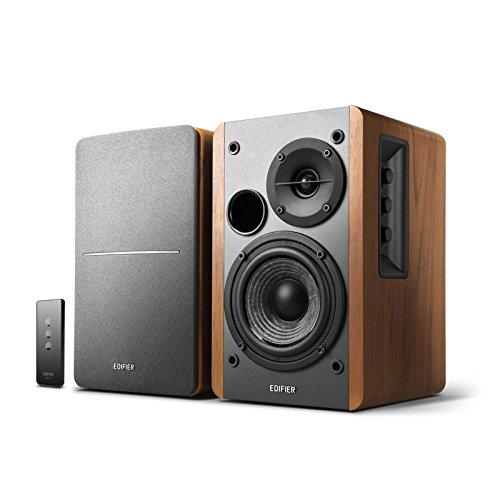
- Configuration: 2.0 powered (active) pair, no subwoofer
- Power: 42 W RMS total, 21 W per side (maker published)
- Connections: two RCA line inputs; no Bluetooth, no USB
- Volume control: side-panel dials for volume, bass and treble; infrared remote included
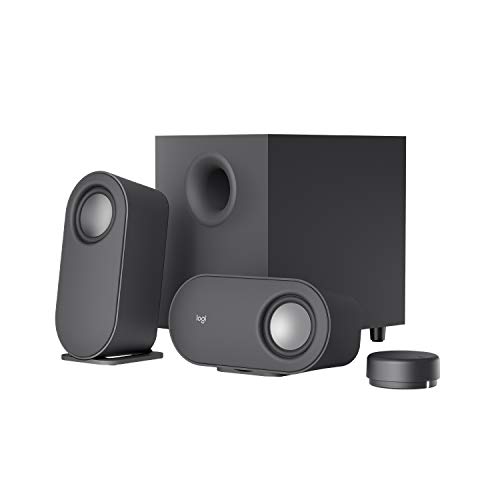
- Configuration: 2.1, two satellites plus a ported down-firing subwoofer
- Power: 40 W RMS total, 80 W peak (maker published); subwoofer 20 W, satellites 10 W each
- Connections: Bluetooth 5.0, micro-USB, 3.5 mm input
- Volume control: wireless control dial with volume, bass, play/pause, mute and source buttons
All 5 Picks at a Glance
| Product | Specs | Action |
|---|---|---|
| Creative Pebble V3 |
| Check price on Amazon |
| Edifier R1280T |
| Check price on Amazon |
| Logitech Z407 |
| Check price on Amazon |
 Audioengine A2+ |
| Check price on Amazon |
 Razer Nommo |
| Check price on Amazon |
Our Top Picks
- Edifier R1280T Powered Bookshelf Speakers -2.0 Near Field6.9 x 9.5 x 5.8 inches10.8 poundsCheck on Amazon
- Logitech Z407 Bluetooth Computer Speakers with Subwoofer and12.4 x 9.6 x 7.3 inches0 poundsCheck on Amazon
Laptop speakers are built to be thin, not to sound good. Voices on calls come out thin and harsh, music loses everything below the midrange, and a video during a break sounds like it is coming from the next room. A small set of desk speakers fixes all of that without taking over your workspace, and because you sit close to them all day, even a modest pair is a large step up.
The five sets below cover the main shapes a home office desk can take: a tiny USB-C pair on a single cable, a wooden bookshelf pair with tone controls, a 2.1 system with a subwoofer under the desk, a compact audiophile-leaning pair with a built-in DAC, and a gaming-born 2.0 set with its own bass dial. Each one is powered, so none needs a separate amplifier.
Disclosure: As an Amazon Associate, we earn from qualifying purchases made through links on this page, at no extra cost to you.
How to Choose Desk Speakers for a Home Office
Configuration: 2.0 or 2.1. A 2.0 set is two speakers and nothing else. It keeps the desktop clear and fits a small desk easily, but small cabinets cannot move much air at low frequencies, so bass stays light. A 2.1 set adds a subwoofer that usually lives on the floor under the desk. It fills in the low end for music and video, at the cost of one more box and one more cable run.
Power, read the right number. Makers publish two figures: RMS, which is continuous output, and peak, which is a short burst. Compare RMS to RMS. For nearfield listening, where the speakers sit an arm’s length away, 8 to 20 watts RMS per channel is plenty for calls and background music. Higher output matters if the set also has to fill a room after work.
Connections. USB audio is the cleanest route from a computer because the speaker handles the digital conversion itself. A 3.5 mm input works with almost anything, including older laptops and phones with a headphone jack. Bluetooth removes a cable and simplifies playing music from a phone. Dual analog inputs help when a work laptop and a personal machine share one desk.
Controls. Think about where the volume knob lives. A front knob is easy to reach all day; a rear knob is fine if you mostly set volume in software. A wireless dial is the most flexible option and tends to add play, pause and mute buttons. Separate bass and treble dials let you tame a boomy corner placement or lift dialogue clarity without opening an app.
The Five Picks
Creative Pebble V3
- Configuration: 2.0, two tethered speakers, no subwoofer
- Power: 8 W RMS total, 16 W peak (maker published)
- Connections: USB-C audio and power, Bluetooth 5.0, 3.5 mm aux input
- Volume control: knob on the right speaker, plus a gain switch
The Pebble V3 is the smallest set here and the simplest to live with. Each round speaker holds a 2.25-inch full-range driver tilted up at 45 degrees, so sound aims at your ears rather than the desk surface, and a passive radiator at the back helps the low end. One USB-C cable carries both audio and power from the computer, with a USB-A converter in the box for older ports. When the port can supply 10 watts, a high gain mode lifts output to the full published figure.
Bluetooth 5.0 covers phone playback, a 3.5 mm input covers anything wired, and Creative’s Clear Dialog processing keeps voices easy to follow on calls and in video. The knob on the right speaker handles power and volume. There is no subwoofer and no headphone jack, so bass stays modest, but for a compact desk that is mostly calls, podcasts and light music, this is the tidiest option of the five.
Edifier R1280T
- Configuration: 2.0 powered (active) pair, no subwoofer
- Power: 42 W RMS total, 21 W per side (maker published)
- Connections: two RCA line inputs; no Bluetooth, no USB
- Volume control: side-panel dials for volume, bass and treble; infrared remote included
The R1280T is a powered bookshelf pair in wooden enclosures, and it sounds like one: a 4-inch woofer and a 13 mm silk dome tweeter per side give it a fuller, warmer balance than the compact sets here. With 42 watts RMS on tap it also plays well beyond desk distance, suiting a home office that doubles as a listening corner in the evening.
Two RCA line inputs let you keep a computer and a second source, such as a turntable or a TV, plugged in at the same time. There is no Bluetooth and no USB input, which keeps the design simple but means a phone needs a cable and an adapter in most cases. Dials on the side of the active speaker adjust volume, bass and treble, and a small infrared remote covers across-the-room changes. At just over 9 inches tall per side, measure your desk depth before ordering.
Logitech Z407
- Configuration: 2.1, two satellites plus a ported down-firing subwoofer
- Power: 40 W RMS total, 80 W peak (maker published); subwoofer 20 W, satellites 10 W each
- Connections: Bluetooth 5.0, micro-USB, 3.5 mm input
- Volume control: wireless control dial with volume, bass, play/pause, mute and source buttons
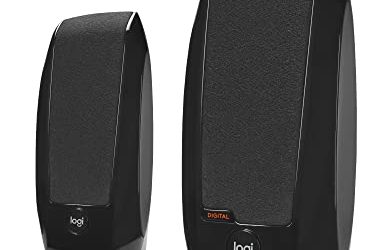
The Z407 is the only 2.1 system in this group. Two small satellites sit on the desk while a ported, down-firing subwoofer goes on the floor, which is where the set gets the low-end weight the 2.0 pairs cannot match. Output is 40 watts RMS in total, split between a 20-watt subwoofer and 10 watts per satellite, with digital signal processing keeping the balance even as volume changes.
Its standout feature is the wireless control dial. The dial sits anywhere on the desk and handles volume, bass level, play, pause, mute and input switching, so the speakers themselves can stay tucked beside the monitor. Inputs cover most setups: Bluetooth 5.0, micro-USB for computer audio, and a 3.5 mm jack for everything else. The dial runs on two included AAA batteries. If your floor space allows the subwoofer, this is the most complete all-rounder here.
Audioengine A2+
- Configuration: 2.0 powered pair, amplifiers in the left speaker; subwoofer output included
- Power: 30 W RMS total, 15 W per channel; 60 W peak (maker published)
- Connections: Bluetooth 5.3 with aptX-HD, USB-C, RCA, 3.5 mm aux input; RCA line output
- Volume control: knob on the rear of the left speaker; no remote
The A2+ is the pick for listeners who care most about detail. Each compact cabinet pairs a 2.75-inch aramid fiber woofer with a 3/4-inch silk dome tweeter, driven by class A/B amplifiers built into the left speaker. A built-in 24-bit DAC handles digital audio from the computer, and the published frequency response runs from 65 Hz to 22 kHz, honest figures for a cabinet this small that explain why the sound stays clean rather than boomy.
Connectivity is the widest here: Bluetooth 5.3 with aptX-HD, USB-C, RCA and a 3.5 mm input, plus an RCA line output that can feed a powered subwoofer later if you want to grow the system. The volume knob sits on the back of the left speaker, the one compromise for desk use; most owners set it once and adjust volume in software. The cabinets feel dense and well made in hand, with matte and gloss finishes offered.
Razer Nommo
- Configuration: 2.0 full-range pair, rear-facing bass ports, no subwoofer
- Power: not published by the maker
- Connections: 3.5 mm aux input, headphone output; no Bluetooth, no USB audio
- Volume control: knobs on the right speaker for volume and bass, with automatic gain control
The Nommo comes from Razer’s gaming line, and its tall, angled towers look the part. Each speaker uses a 3-inch woven fiberglass full-range driver with a rear-facing bass port, a layout Razer tuned for clear positional audio in games. That same clarity suits spoken content well, so calls and video sound crisp at the desk.
Two knobs on the right speaker give you volume and a dedicated bass control with automatic gain control, which keeps low frequencies from distorting as you turn the bass up. Connections are deliberately simple: a 3.5 mm input for the computer and a headphone output for late sessions. There is no Bluetooth and no USB audio, and Razer does not publish a wattage figure, so judge this set on tuning and controls rather than output numbers. Its footprint is tall rather than wide, suiting desks with clear space beside the monitor.
Comparison Table
| Product | Setup | Power (RMS) | Connections | Controls | Size per speaker |
|---|---|---|---|---|---|
| Creative Pebble V3 | 2.0 | 8 W | USB-C, Bluetooth 5.0, 3.5 mm | Knob on right speaker | 4.8 x 4.7 x 4.6 in |
| Edifier R1280T | 2.0 | 42 W | Dual RCA | Side dials plus remote | 5.7 x 9.2 x 7.7 in |
| Logitech Z407 | 2.1 with subwoofer | 40 W | Bluetooth 5.0, micro-USB, 3.5 mm | Wireless dial | 7.9 x 3.7 x 3.4 in |
| Audioengine A2+ | 2.0 | 30 W | Bluetooth 5.3, USB-C, RCA, 3.5 mm | Rear knob on left speaker | 4.2 x 6.3 x 6.6 in |
| Razer Nommo | 2.0 | Not published | 3.5 mm, headphone out | Volume and bass knobs | 6.7 x 5.5 x 8.7 in |
FAQ
Do desk speakers need an amplifier or a receiver?
No. Every set in this guide is powered, so the amplifiers are built into one of the speakers or the subwoofer. Connect the set to your computer or phone, plug it into power (or, for the Pebble V3, into USB), and it is ready.
Is a 2.1 system worth it for a home office?
If you watch video or listen to bass-heavy music at your desk, yes: the subwoofer adds low-end weight that small 2.0 cabinets cannot produce. If your day is mostly calls and spoken content, a 2.0 pair is enough and keeps floor and desktop clearer.
How much power do I need at desk distance?
Less than most people expect. At an arm’s length, even 8 to 15 watts RMS per channel plays louder than is comfortable. Higher output, like the R1280T’s 42 watts RMS, matters when the speakers also need to fill the room from across it.
Can one set serve both my work laptop and my phone?
Yes, if the inputs line up. Bluetooth sets such as the Z407, A2+ and Pebble V3 play from a phone while staying wired to the computer, and the R1280T’s dual RCA inputs accept two wired sources at once. The Nommo has one analog input, so switching sources means swapping a cable.
Where should I place the speakers on my desk?
Put them at equal distance from your seat, forming a rough triangle with your head, and keep them near ear height or angled up toward your ears. Pull them a few inches from the wall behind the desk if bass sounds heavy, and avoid corners, which exaggerate low frequencies.
Conclusion
For most home office desks, the Logitech Z407 is the easiest recommendation: the subwoofer adds real low end, the inputs cover almost any setup, and the wireless dial is the control you will reach for all day. If desk space is tight, the Creative Pebble V3 gives up bass but wins on simplicity, running audio and power over one USB-C cable. The Edifier R1280T suits anyone who wants a fuller bookshelf sound and tone dials, the Audioengine A2+ is the detail-first choice with the widest connectivity, and the Razer Nommo brings gaming-tuned clarity and a bass knob to a wired-only desk. Measure the space beside your monitor, pick the configuration that fits, and any of the five will be a clear upgrade over laptop speakers.
More from Amazon
Programs that pair well with the guide above. Offers and eligibility are set by Amazon and may change.
A free business account with business pricing and bulk-buying tools for work, shop or home office.
Create a business accountFree shipping on eligible items, Prime Video and more. Eligible new members can start with a free trial.
Start a Prime free trialAudiobooks and podcasts to listen to on the go. Eligible new members can start with a free trial.
Try Audible freeAd-free music streaming. Eligible new subscribers can start with a free trial.
Try Music Unlimited freeAs an Amazon Associate we earn from qualifying purchases.