Key takeaways
- Frame and leg count: Three-leg L-frames are the baseline; look for two-stage or three-stage steel columns with a stated load rating above 250 lbs. If the spec sheet omits stage count, assume single-stage and expect a shorter travel range and more sway at standing height.
- Tabletop construction: Nearly every L-shape in this price bracket uses a splice board, meaning two or three panels bolted to the frame rather than one continuous slab. What matters is the underside bracing at the seam. Run your hand along the joint after assembly, and if there’s a lip, shim it before you tighten everything down.
- Reach and depth: A 55-inch return sounds generous, but usable depth is often 24 inches or less after you subtract the monitor footprint. Tape the footprint on your floor before ordering. Corner desks eat more floor than the dimensions suggest.
- Power and cable routing: Built-in outlets and USB ports save you from a daisy chain of extension cords, but check whether the module is surface-mounted or recessed. Surface-mounted units block prime desktop real estate; recessed grommets are the better bet.
- Storage versus adjustability: Drawers and file cabinets add rigidity and utility, but they lock the desk at a fixed height. Decide which you value more before shopping, because very few desks deliver both without compromise.
What's inside
Anyone who has ever clamped a straightedge to a sheet of plywood knows the real problem with corner workstations: the corner itself. Two flat surfaces meeting at 90 degrees sounds simple until you try to sit at the joint, run cables through it, and keep a monitor arm from tipping the whole assembly. Most buyers discover this the hard way, after wrestling a flat-pack box up the stairs and finding a wobbly seam right where their elbows land. Deflection under load, undersized leg columns, and a spliced tabletop that flexes when you lean on it are the failure points that show up three months in, not on day one.
This guide approaches L-shaped desks the way you would evaluate a workbench: frame first, top second, features last. Below are six models worth a serious look for 2026, spanning electric sit-stand corner frames, executive desks with real file drawers, and reversible layouts for rooms where the corner isn’t where you want it. After the picks, there’s a checklist for judging build quality before you commit, short reviews of the top five, and answers to the questions that come up most often once the box is open.
As an Amazon Associate we earn from qualifying purchases.




🛒 Best Price Today on Amazon
Prime members get fast, free shipping on everything above, plus member-only deals. New members get a 30-day free trial — cancel anytime.
How to Choose a/an L-Shaped Desk For Home Office (2026)
- Frame and leg count: Three-leg L-frames are the baseline; look for two-stage or three-stage steel columns with a stated load rating above 250 lbs. If the spec sheet omits stage count, assume single-stage and expect a shorter travel range and more sway at standing height.
- Tabletop construction: Nearly every L-shape in this price bracket uses a splice board, meaning two or three panels bolted to the frame rather than one continuous slab. What matters is the underside bracing at the seam. Run your hand along the joint after assembly, and if there’s a lip, shim it before you tighten everything down.
- Reach and depth: A 55-inch return sounds generous, but usable depth is often 24 inches or less after you subtract the monitor footprint. Tape the footprint on your floor before ordering. Corner desks eat more floor than the dimensions suggest.
- Power and cable routing: Built-in outlets and USB ports save you from a daisy chain of extension cords, but check whether the module is surface-mounted or recessed. Surface-mounted units block prime desktop real estate; recessed grommets are the better bet.
- Storage versus adjustability: Drawers and file cabinets add rigidity and utility, but they lock the desk at a fixed height. Decide which you value more before shopping, because very few desks deliver both without compromise.
The Best L-Shaped Desks For Home Office (2026) Reviewed
SIAGO 63×55 L-Shaped Standing Desk with Charging Station
The integrated charging station and memory controller make this the most practical pick for a shared or multi-user setup, since preset heights mean no fiddling with a rocker switch each morning. Assembly rewards patience at the splice seam, so leave the top bolts finger-tight until every panel is aligned.
YIHAYO 63 x 55 Electric L-Shaped Standing Desk
A straightforward electric corner frame in black with a clean, unfussy top, this one prioritizes lift performance over extras. The motor runs quieter than most in its class, which matters more than you’d expect if you share a wall with a bedroom.
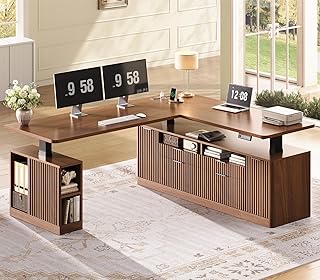
SEDETA Fluted L-Shaped Executive Desk with 4 Drawers
The fluted brown finish and drawer bank give this desk genuine presence, and the drawers add meaningful mass that helps damp vibration at standing height. It’s the heaviest install here, so recruit a second pair of hands and plan on an afternoon.
71″ L-Shaped Executive Standing Desk with Privacy Panel
The privacy panel and file cabinet make this the closest thing to a purpose-built executive setup, with AC and USB integrated where you actually need them. Black walnut hides scuffs well, which is a real advantage on a surface that will see clamps and tools.
Itaar Farmhouse Executive L-Shaped Desk
A fixed-height option for anyone who has decided storage beats sit-stand, with a file drawer, cabinet, and built-in outlet in a white farmhouse finish. Solid value, though you’ll want felt pads under the base if you’re installing over hardwood.
Frequently Asked Questions
Does the spliced tabletop weaken the desk?
Not if the underside bracing is adequate. The seam sits over a crossbar on well-designed frames, so load transfers to steel rather than particleboard. Problems appear when the panels are misaligned during assembly, which is why you should align before final torque.
Can I put a monitor arm on these desks?
Yes, but clamp near a frame member, not at the splice seam or an unsupported overhang. If your preferred spot is thin, a scrap of hardwood as a backing plate spreads the clamp load nicely.
How much clearance do I need behind the desk?
Allow four to six inches for cable slack and outlet access. Pushing an L-shape flush against two walls pinches power cords and can bind the lift on electric models.
Is a reversible layout worth paying for?
If you rent or rearrange often, absolutely. The Casaottima reversible design lets you flip the return without new hardware, which beats drilling fresh pilot holes in a year’s time.
Final Thoughts
For most home offices, the SIAGO 63×55 hits the best balance of sit-stand travel, memory presets, and integrated power without demanding a full-day install. If storage matters more than adjustability, the SEDETA Fluted executive desk brings drawers and mass that make the whole assembly feel considerably more solid, while the Casaottima 63-inch remains the smart choice for anyone whose room layout is still a work in progress.