Key takeaways
- Match the footprint to your room, not your laptop: A 40-inch top sounds modest until you measure the wall behind your outlet. Tape the dimensions onto the floor with painter’s tape and live with the outline for a day before buying. Compact workstations with vertical shelving win in small bedrooms; wide flat tops win if you dual-screen.
- Test the height range against your elbows: Sitting, your forearms should sit roughly parallel to the floor. Standing carts need to reach your elbow height without the top plate wobbling at full extension — check whether the column uses a gas lift, a crank, or pin holes, since pin systems are stiffer but only adjust in fixed increments.
- Look at the joinery, not the finish: Metal-to-metal brackets and pre-installed threaded inserts hold up far longer than bare cam locks in MDF. If a desk advertises no assembly, check the hinge quality instead — that’s the part that fails first on folding trays.
- Count your outlets before you buy an outlet: Built-in USB ports and power strips are genuinely useful, but verify the amperage and whether the cord reaches your wall. A 4-foot pigtail behind a desk pushed against baseboard trim is a daily annoyance.
- Weight capacity is about deflection, too: A 33-pound rating tells you what won’t collapse, not what won’t sag. Press down hard on the center of the top in the store, or check reviews for mid-panel bowing under a monitor arm.
What's inside
Anyone who has spent an afternoon hunched over a laptop balanced on a couch cushion knows the problem: laptops are portable, but the surfaces we put them on rarely are. Most of us end up cobbling together a workspace from whatever is nearby — a stack of books, an ironing board, the arm of a sofa — and then wonder why our necks ache by dinnertime. The fix isn’t complicated, but it does require picking a desk that matches how and where you actually work, not how you imagine you might work someday.
I’ve assembled, disassembled, and modified more flat-pack desks than I care to admit, and the differences that matter are usually invisible in product photos: whether the leg tubing flexes under a typing hand, whether the cam-lock hardware bites into particleboard on the first turn, whether a caster brake actually holds on hardwood. This guide breaks down six laptop desks across the main categories — bed trays, rolling sit-stand carts, and compact fixed desks with storage or lighting — and tells you which build details to inspect before you commit.
As an Amazon Associate we earn from qualifying purchases.


🛒 Best Price Today on Amazon
Prime members get fast, free shipping on everything above, plus member-only deals. New members get a 30-day free trial — cancel anytime.
How to Choose a/an Laptop Computer Desk (2026)
- Match the footprint to your room, not your laptop: A 40-inch top sounds modest until you measure the wall behind your outlet. Tape the dimensions onto the floor with painter’s tape and live with the outline for a day before buying. Compact workstations with vertical shelving win in small bedrooms; wide flat tops win if you dual-screen.
- Test the height range against your elbows: Sitting, your forearms should sit roughly parallel to the floor. Standing carts need to reach your elbow height without the top plate wobbling at full extension — check whether the column uses a gas lift, a crank, or pin holes, since pin systems are stiffer but only adjust in fixed increments.
- Look at the joinery, not the finish: Metal-to-metal brackets and pre-installed threaded inserts hold up far longer than bare cam locks in MDF. If a desk advertises no assembly, check the hinge quality instead — that’s the part that fails first on folding trays.
- Count your outlets before you buy an outlet: Built-in USB ports and power strips are genuinely useful, but verify the amperage and whether the cord reaches your wall. A 4-foot pigtail behind a desk pushed against baseboard trim is a daily annoyance.
- Weight capacity is about deflection, too: A 33-pound rating tells you what won’t collapse, not what won’t sag. Press down hard on the center of the top in the store, or check reviews for mid-panel bowing under a monitor arm.
The Best Laptop Computer Desk (2026)s Reviewed
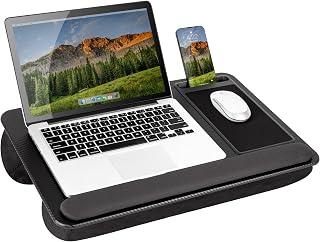
Adjustable Lap Desk with USB Port
This is the one I recommend to people who work from bed or a deep sofa, mostly because the 23.6-inch top gives your mouse hand somewhere to go — a rarity in lap desks. The tilting surface, storage drawer, and built-in USB hub cover the practical bases, and since it ships assembled, there’s no hardware to strip.
Mount-It! Rolling Laptop Desk
A 29.6-to-44.2-inch range means this genuinely works as both a seated and standing station, and the steel frame doesn’t develop the shimmy that plagues cheaper carts. Lock the casters before you type; the brakes are effective but easy to forget.
Tangkula Computer Desk with Bookshelf
The natural-wood finish and integrated shelving make this the best pick if the desk has to double as your only storage furniture, and the CPU stand keeps a tower off the carpet where it collects dust. Assembly is straightforward, though I’d add felt pads under the feet on hard floors.
BONTEC Mobile Standing Desk
Essentially a podium with a proper keyboard tray, this suits anyone who moves between rooms — teaching, streaming, or just chasing daylight. The 33-pound capacity is honest, so keep it to a laptop and a small accessory rather than a heavy monitor.
Lufeiya White Computer Desk with LED Lights
At 40 inches with a monitor riser, integrated outlets, and ambient LEDs, this covers a lot of ground for a teen’s room or a small home office. The white laminate shows fingerprints, so a microfiber cloth in the drawer isn’t a bad habit.
Frequently Asked Questions
Do I need a standing desk if I only work a few hours a day?
Not necessarily, but the ability to change position matters more than standing itself. A height-adjustable cart lets you shift posture mid-task, which is where the real ergonomic benefit comes from.
Will a 40-inch desk fit two monitors?
Two 24-inch displays fit if you use a dual monitor arm clamped to the rear edge; side-by-side stands will crowd you out. Check the top’s thickness first, since most clamps need between 0.4 and 2 inches.
Are built-in LED lights worth it?
They’re pleasant ambient lighting, not task lighting. Pair a desk like the DurayLoly RGB model with a proper adjustable lamp if you read or sketch at the surface.
How do I stop a rolling desk from drifting?
Use the brakes, and if the casters still creep on smooth floors, swap two of them for non-swivel locking replacements — a five-minute upgrade with a standard stem fitting.
Final Thoughts
For most people the Mount-It! Rolling Laptop Desk is the most flexible buy, since it handles sitting, standing, and relocating without compromise. If your desk needs to hold books and a tower as well, the Tangkula Computer Desk with Bookshelf earns its floor space, and for anyone working primarily from bed or the couch, the adjustable Lap Desk with USB Port solves the problem more elegantly than any full-size desk can.