Key takeaways
- Drawer weight budget: Loaded file drawers can add 40+ pounds before you place a monitor. Check the lift capacity, then subtract your storage contents from it — not just your gear. A dual-motor frame handles the math far better than single-motor budget lifts.
- Cable slack at full extension: Measure the height range, then confirm your power strip and monitor cables have that much give. Desks with integrated AC/USB outlets solve this since only one cord travels; everything else stays onboard.
- Depth versus monitor arm: A 24-inch top gets cramped once a clamp-on arm eats the rear two inches. If you run dual displays or a mount, look for 30 inches of depth and reinforced clamping zones.
- Drawer glide type: Fabric or plastic bin drawers cost less but sag under paper. Metal ball-bearing glides with a hanging file frame are the upgrade worth paying for if you actually file documents.
- Assembly reality: Storage-equipped desks arrive in two or three heavy boxes and take longer to build than plain frames. Clear real floor space, check whether pre-assembled drawer boxes are included, and plan on a helper for tops over 55 inches.
What's inside
Anyone who has retrofitted drawers onto a bare sit-stand frame knows the frustration: you add storage, and suddenly the whole thing rattles at standing height or the drawer box fouls the crossbar on the way down. Standing desks were built around empty space beneath the top, so bolting mass to that space fights the design. Meanwhile the alternative — a separate filing cabinet parked beside your knees — blocks the very travel path you paid for.
The desks below solve this from the factory, with drawer boxes engineered into the lift geometry rather than strapped on afterward. I looked at frame rigidity under load, how the storage clears the lifting columns, cable routing that survives 40 inches of vertical travel, and whether the built-in outlets are placed where a real workstation needs them. Below you will find the picks, then a buying checklist and reviews.
As an Amazon Associate we earn from qualifying purchases.




🛒 Best Price Today on Amazon
Prime members get fast, free shipping on everything above, plus member-only deals. New members get a 30-day free trial — cancel anytime.
How to Choose a Standing Desk With Drawers (2026)
- Drawer weight budget: Loaded file drawers can add 40+ pounds before you place a monitor. Check the lift capacity, then subtract your storage contents from it — not just your gear. A dual-motor frame handles the math far better than single-motor budget lifts.
- Cable slack at full extension: Measure the height range, then confirm your power strip and monitor cables have that much give. Desks with integrated AC/USB outlets solve this since only one cord travels; everything else stays onboard.
- Depth versus monitor arm: A 24-inch top gets cramped once a clamp-on arm eats the rear two inches. If you run dual displays or a mount, look for 30 inches of depth and reinforced clamping zones.
- Drawer glide type: Fabric or plastic bin drawers cost less but sag under paper. Metal ball-bearing glides with a hanging file frame are the upgrade worth paying for if you actually file documents.
- Assembly reality: Storage-equipped desks arrive in two or three heavy boxes and take longer to build than plain frames. Clear real floor space, check whether pre-assembled drawer boxes are included, and plan on a helper for tops over 55 inches.
The Best Standing Desk With Drawers (2026)s Reviewed
AODK 55 Inch Standing Desk with Drawers & Keyboard Tray
This one packs the most features per dollar: outlet, LED strip, monitor riser, keyboard tray, and cable tray all arrive in the box, so you skip the aftermarket shopping trip entirely. The 29.9 to 46.1 inch range with three memory presets covers most users comfortably, though the LED lighting is more ambience than task light.
55×24 Electric Stand Up Desk with File Drawers
The narrowest footprint here, which makes it the pick for a spare bedroom or alcove where 55 inches is the ceiling. File drawers plus an open shelf give you both hidden and grab-and-go storage, but at 24 inches deep you will want a low-profile monitor stand rather than a bulky arm.
SEDETA 55.1″ Farmhouse Executive Standing Desk
Three drawers and a storage cabinet in white farmhouse styling, aimed at people who want the desk to read as furniture rather than office equipment. The integrated power outlets are well positioned, and the cabinet swallows a printer or paper stock that would otherwise clutter the top.
HUANUO 55 x 30 inch Electric Standing Desk, Walnut
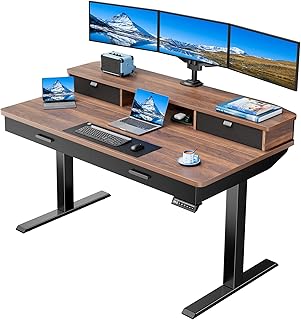
The 30-inch depth is the headline: it leaves genuine room behind your keyboard for a mounted display, and the reinforced monitor mount zone plus grommet routing means you can build a clean dual-screen setup without drilling. Four drawers and a 27.9 to 46.8 inch range make this the most flexible pick for taller and shorter users alike.
59 Inch Electric Standing Desk with 8 Drawers, Light Walnut
Eight drawers, a file cabinet, keyboard tray, and privacy panel add up to a full executive workstation rather than a desk you accessorize later. The fluted front panels look sharp, but confirm your lift capacity headroom before you load every drawer.
Frequently Asked Questions
Do drawers reduce standing desk stability?
Properly integrated drawers actually help by lowering the center of gravity, since the mass sits below the top rather than on it. Wobble at standing height comes from frame design and column tolerance, not storage.
Will the drawers hit my chair or knees?
Check the underside clearance spec against your chair armrest height. Desks with drawers on one side only, or a reversible L-shape, give you a clear knee zone on the opposite side.
Can I mount a monitor arm to these desktops?
Most handle a clamp arm fine, but verify the rear edge is solid rather than hollow-core and that the drawer box does not sit directly under your clamp point. Models advertising monitor mount support have that zone reinforced.
How long does assembly take?
Budget two to three hours for a storage-equipped desk versus under an hour for a bare frame. Pre-assembled drawer boxes cut that time significantly, so check the listing.
Final Thoughts
For most home offices the HUANUO 55 x 30 walnut is the smart buy, since the extra depth and wide height range solve problems you would otherwise fix with aftermarket parts. The AODK 55 inch delivers the strongest feature bundle for the money, and the 59 inch light walnut with eight drawers is worth the upgrade if you need a full filing setup in one piece of furniture.