Key takeaways
- Share one keyboard, mouse, printer and webcam between two computers with a single button. Five USB switches compared on ports, speed and controls.
Two computers on one desk usually means two keyboards, two mice, and a tangle of cables swapped back and forth all day. A USB hub switch solves that with one small box: your keyboard, mouse, printer, and webcam plug into the switch, the switch connects to both computers, and a single button press hands the whole set from one machine to the other.
This guide covers USB-only switches, sometimes sold as USB selectors or sharing switches. They move peripherals and data, nothing else. None of them carries a video signal, so each computer still needs its own display connection or a dock with display support. That narrower job separates them from full KVM switches, which switch a monitor along with the peripherals. If your desk runs a work laptop beside a personal desktop, a USB switch is the simpler and tidier half of that setup.
Disclosure: As an Amazon Associate, we earn from qualifying purchases made through links on this page, at no extra cost to you.
How to Choose a USB Hub Switch
Count the device ports before anything else
Most switches in this class offer four device ports, which covers the classic home office set: keyboard, mouse, printer, and one spare for a webcam or headset dongle. Count what truly needs to move between machines; phones and tablets that only visit the desk rarely belong on the switch.
Match the host connectors to your computers
Older switches take two USB-A host cables, which suits most desktops and docked laptops. Newer models take USB-C on the host side, the natural fit for two modern laptops with few ports. Adapters can bridge a mismatch, but each adapter adds a failure point and can cap your transfer speed, so pick the switch that matches the ports your computers already have.
Pick a speed class that fits your devices
Keyboards, mice, and printers barely sip bandwidth, and even a USB 2.0 switch at 480Mbps handles them without complaint. USB 3.0 models at 5Gbps add comfortable headroom for webcams, audio interfaces, and the odd flash drive. A 10Gbps USB-C switch earns its place when an external SSD or a fast card reader rides the switch and you move large files often. Paying for speed your devices cannot use adds nothing.
Plan for power-hungry devices
Every switch here runs on bus power from the connected computer, and that budget is shared across all four ports. A bus-powered hard drive or SSD can push a switch past what one host port supplies, so models with an optional 5V input let you add a phone charger you already own to steady things. Whatever you choose, eject any storage device in your OS before pressing the switch button; a switch press is the same as yanking the cable, and doing it mid-write can corrupt files.
Decide how you want to press the button
A button on top of the box is fine when the switch sits within reach. A wired remote on its own cable is better when the box hides behind a monitor or under the desk, because you can park the small controller beside your keyboard. Either way, look for clear indicator lights so you always know which computer currently owns the peripherals.
Check cable lengths against your desk layout
Host cables in the box run from 0.8 m to 1.5 m depending on the model. Measure the path from the switch to each computer before ordering, and remember that long USB runs and extra adapters both work against speed and reliability.
1. UGREEN USB 3.0 Switch (30768) — Best All-Round USB-A Switch
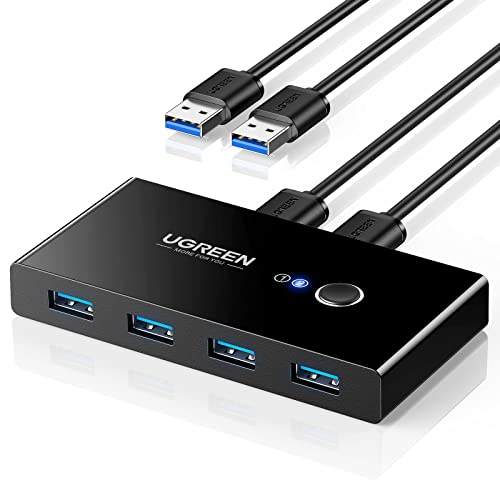
The UGREEN 30768 is the default recommendation for a mixed desk of USB-A machines. Two computers share four USB 3.0 ports at up to 5Gbps, fast enough for a webcam, a printer, and everyday file moves, and one press of the button on top swaps the set between hosts. LED indicators show which computer is active, and two 1.5 m USB-A host cables come in the box, longer than most rivals include. A micro USB port accepts optional 5V power when a bus-powered drive needs help.
Specs
- Host inputs: 2 x USB-A
- Device ports: 4 x USB-A 3.0
- Top speed: 5Gbps
- Switch method: button on top, LED indicators
- Power: bus powered, optional 5V via micro USB port
- Included cables: 2 x USB-A to USB-A, 1.5 m
- Dimensions: 4.09 x 2.01 x 0.59 in
- OS support: Windows, macOS, Linux, Chrome OS
2. UGREEN 10Gbps USB C Switch (25164) — Best for Two USB-C Laptops
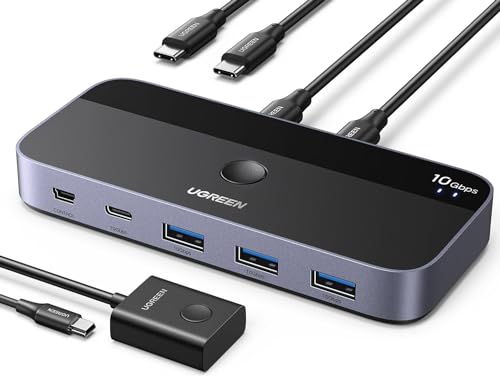
This UGREEN model is built for the all-laptop desk. Both host connections are USB-C, the four device ports (three USB-A and one USB-C) run at USB 3.2 speeds up to 10Gbps, and the aluminum shell sheds heat better than the plastic boxes here. That speed matters when an external SSD lives on the switch and moves between laptops all day. You can switch from the button on the unit or from the wired desktop controller on a 1.5 m lead, handy when the switch itself sits out of sight. Two 0.8 m USB-C host cables are included. Note the limits from its own manual: the USB-C ports carry data only, with no video output and no charging passed to the laptops.
Specs
- Host inputs: 2 x USB-C 3.2
- Device ports: 3 x USB-A 3.2, 1 x USB-C 3.2
- Top speed: 10Gbps
- Switch method: button on unit or wired desktop controller
- Power: bus powered, up to 2.4A output from a USB-C host
- Included cables: 2 x USB-C, 0.8 m; controller cable 1.5 m
- Dimensions: 4.8 x 2.1 x 0.7 in; 281 g
- OS support: Windows, macOS, Linux, Chrome OS
3. BENFEI USB 3.0 Switch (000354black) — Simple One-Button Simplicity

The BENFEI keeps the formula bare: two USB-A host inputs, four USB 3.0 device ports at up to 5Gbps, and a single round button on top that toggles between PC1 and PC2. Two blue LEDs mark the active computer, so there is never a guessing game about where your keyboard is pointed. It needs no drivers and no software on either machine, and it works across Windows, macOS, Linux, and Chrome OS, a good fit for a mixed household desk. There is no remote and no frills, and for a keyboard, mouse, printer, and scanner set, none are missed.
Specs
- Host inputs: 2 x USB-A
- Device ports: 4 x USB-A 3.0
- Top speed: 5Gbps
- Switch method: single button on top
- Indicators: 2 blue LEDs for PC1 and PC2
- Power: bus powered
- Dimensions: not published
- OS support: Windows, macOS, Linux, Chrome OS
4. Rybozen USB 3.0 Switch Selector (U309) — Compact Box, Generous Cable Bundle

The Rybozen U309 covers the same ground as the other USB-A boxes, four USB 3.0 device ports shared between two computers at up to 5Gbps, in one of the smallest shells in this guide. A silver push button on top handles switching, with LED indicators for the active host. Its bundle stands out: alongside the two 1.5 m USB-A host cables, Rybozen includes a micro USB cable for the optional 5V power input, the port you will want when a hard drive or camera joins the shared set.
Specs
- Host inputs: 2 x USB-A
- Device ports: 4 x USB-A 3.0
- Top speed: 5Gbps
- Switch method: push button on top, LED indicators
- Power: bus powered, micro USB 5V input for high-draw devices (adapter not included)
- Included cables: 2 x USB 3.0 A-to-A, 1.5 m; 1 x micro USB cable
- Dimensions: 3.54 x 1.97 x 0.59 in; 5.6 oz
- OS support: Windows, macOS, Linux, Chrome OS
5. IOGEAR GUS402 — Best for Basic Peripherals and Legacy Gear

The IOGEAR GUS402 is the USB 2.0 entry in this guide, and it earns its place honestly. At 480Mbps it is far too slow for modern storage, but a keyboard, mouse, printer, and scanner never come close to that ceiling, and many home offices share exactly that set. Two molded host cables are built into the unit, so there is nothing to lose or misplace, and the wired remote selector button on its own lead lets you bury the box behind the desk. Over-current protection guards the shared ports, an optional 5V DC input (adapter not included) adds power for charging a phone or tablet through the switch, and hot-plugging means you can connect or disconnect a computer without powering anything down.
Specs
- Host inputs: 2 x molded USB-A cables (built in)
- Device ports: 4 x USB-A 2.0
- Top speed: 480Mbps
- Switch method: wired remote selector button, LED indicators
- Power: bus powered, optional 5V DC input (adapter not included)
- Protection: over-current protection, hot-pluggable
- Dimensions: 3.03 x 3.23 x 0.98 in; 0.31 lb
- OS support: Windows, macOS, Linux, Chrome OS
Comparison Table
| Product | Host inputs | Device ports | Top speed | Switch control | Extra power input |
|---|---|---|---|---|---|
| UGREEN USB 3.0 Switch (30768) | 2 x USB-A | 4 x USB-A 3.0 | 5Gbps | Button on unit | Yes, micro USB 5V |
| UGREEN 10Gbps USB C Switch (25164) | 2 x USB-C | 3 x USB-A, 1 x USB-C | 10Gbps | Button or wired controller | No |
| BENFEI USB 3.0 Switch (000354black) | 2 x USB-A | 4 x USB-A 3.0 | 5Gbps | Button on unit | No |
| Rybozen USB 3.0 Switch Selector (U309) | 2 x USB-A | 4 x USB-A 3.0 | 5Gbps | Button on unit | Yes, micro USB 5V |
| IOGEAR GUS402 | 2 x USB-A (built in) | 4 x USB-A 2.0 | 480Mbps | Wired remote button | Yes, 5V DC |
Frequently Asked Questions
Can a USB switch share a monitor between two computers?
No. Every switch in this guide moves USB data and peripherals only; none of them carries a video signal. Each computer keeps its own display cable, dock, or direct monitor connection. If you need one button to move a screen plus your keyboard and mouse together, that is the job of a KVM switch with video ports, a different product class with its own guide on this site.
Do I need to install drivers or software to use a USB switch?
No. All five picks are plug and play: connect the host cables, plug in your peripherals, and press the button. Your computers see the shared devices as if they were plugged in directly, so any software a device itself needs, such as printer software, is installed on each computer just as it would be without a switch.
Is it safe to share an external drive through a USB switch?
Yes, with one habit: eject or safely remove the drive in your OS before pressing the switch button. A switch press disconnects the drive from one computer and hands it to the other, exactly like pulling the cable out, and doing that while files are being written can corrupt them.
Can I plug a USB hub into a switch to share more than four devices?
Yes. A hub plugged into one device port expands that port, and every device on the hub moves between computers together when you switch. A powered hub is the safer partner here, because the switch alone can only pass along the power budget of one host port, and several bus-powered devices on one hub can exceed it.
Will a USB switch charge my laptop while I work?
No. These switches share data lines, not laptop power, and none of them delivers charging to either connected computer. Your laptops keep their own chargers. The most power any model here offers is help for the peripherals themselves, through an optional 5V input or, on the IOGEAR, enough spare capacity to charge a phone or tablet when its optional adapter is connected.
Conclusion
For most two-computer desks, the UGREEN USB 3.0 Switch (30768) is the easy answer: four fast ports, long host cables, and an optional power input in a box that asks nothing of you after setup. Two USB-C laptops point to the faster UGREEN 25164 instead, while the BENFEI and Rybozen cover the same USB-A ground with simpler controls and a smaller footprint. The IOGEAR GUS402 closes the list as the honest budget path for desks that only share a keyboard, mouse, and printer. Whichever you pick, the daily win is the same: one desk set, two computers, and a single button between them.
More from Amazon
Programs that pair well with the guide above. Offers and eligibility are set by Amazon and may change.
A free business account with business pricing and bulk-buying tools for work, shop or home office.
Create a business accountFree shipping on eligible items, Prime Video and more. Eligible new members can start with a free trial.
Start a Prime free trialAudiobooks and podcasts to listen to on the go. Eligible new members can start with a free trial.
Try Audible freeAd-free music streaming. Eligible new subscribers can start with a free trial.
Try Music Unlimited freeAs an Amazon Associate we earn from qualifying purchases.