Understanding how to reset a garage door opener starts by defining what you want to fix. Reconnecting a remote, deleting a lost remote, changing a keypad PIN, resetting Wi-Fi, and recalibrating door travel are different procedures. Many homeowners use the word reset for all five, but pressing the wrong button can remove working remotes or change unrelated settings.
Quick Answer: Find the brand and model number on the motor unit, identify the LEARN or programming button, and choose the correct process. For many compatible Chamberlain and LiftMaster units, briefly pressing LEARN starts remote programming; holding it for about six seconds clears stored remote and keypad codes. These operations are model-dependent and do not replace travel setup or sensor repairs. Always consult the manual and test opener safety afterward.
If the garage door is crooked, jammed, or refuses to reverse when an object enters its path, resetting electronics is not a safe repair. Stop using the opener and correct the mechanical or safety fault first. Keep the doorway clear because a reprogrammed remote may activate the door during our research.
As an Amazon Associate we earn from qualifying purchases.
By DIY Ideas 4 Home Editorial Team
What Does It Mean to Reset a Garage Door Opener?
A garage-door opener is a motorized system with security memory, operating controls, travel settings, and sometimes a Wi-Fi connection. A power cycle is not a universal factory reset; the Chamberlain Group specifically notes that unplugging the opener for a long time does not normally erase its programmed remote-control memory.
| Your Goal | Usually Appropriate Action | Potential Consequence |
|---|---|---|
| Make a working remote connect again | Pair a compatible remote using the manual | Usually preserves other remotes |
| Remove access for a lost remote | Erase remote and keypad memory | Other registered controls need programming again |
| Change the wireless keypad PIN | Use the keypad’s model-specific PIN procedure | Old PIN may stop working |
| Restore app or Wi-Fi connection | Use the model’s connectivity reset process | May remove network or app pairing |
| Fix a door stopping short of the floor | Diagnose sensors, door mechanics, and travel settings | Incorrect travel changes may affect safety reversal |
| Recover from a temporary power issue | Verify safe power restoration and diagnostic status | Often does not require erasing any settings |
Find the Brand, Model, and LEARN Button
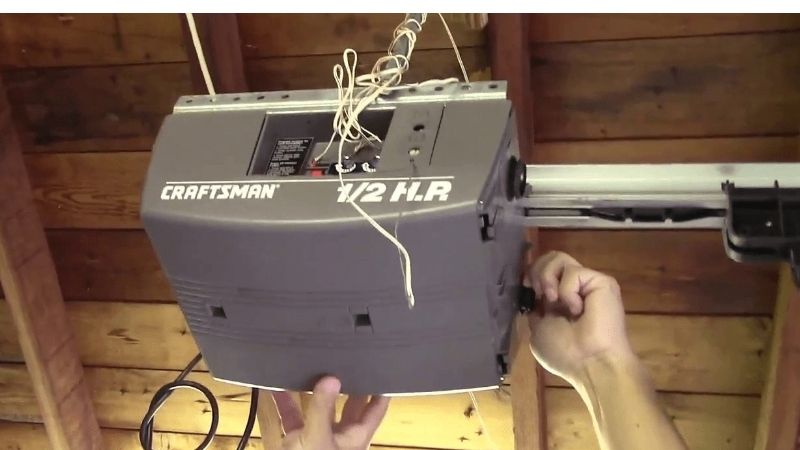
Look for the product label on the opener housing or its side, using a stable ladder if needed and without opening electrical covers. Record the model number and consult the owner’s manual. Chamberlain and LiftMaster models may have yellow, purple, red/orange, or green LEARN buttons, while other brands use different programming controls entirely.
The button color helps identify many Chamberlain-family systems, but it does not guarantee identical procedures across generations. Wall-mount and jackshaft openers may use a wall control instead of the motor housing for some operations. If the unit uses a white LEARN button or a newer app-driven interface, follow its specific documentation.
Know the Difference Between Pressing and Holding
On many Chamberlain and LiftMaster openers, a brief press and release of LEARN puts the system into a temporary programming window. A prolonged hold of roughly six seconds can erase remote and keypad codes. On certain Wi-Fi models, additional holds or button sequences clear other accessories or the network connection.
Never perform a long hold simply because a remote stopped working once. You could remove every stored entry code for family members, visitors, and a vehicle transmitter. Write down which devices need to work before choosing an erase procedure.
Prepare to Reset or Reprogram the Opener
Check the Door and Safety Sensors First
Make sure the garage door can operate without obvious mechanical defects. Look for broken springs, loose cables, crooked panels, displaced rollers, and blocked photo-eye sensors. If any of these appear, stop. Electronic resetting cannot safely restore a door with damaged counterbalance hardware.
Clear the opening of people, vehicles, bicycles, and tools. Keep a working wall control within reach and arrange a helper if a keypad is far from the motor unit. Read the entire procedure before beginning so you are not rushed during the programming window.
Verify Batteries and Lock Mode
A remote with a weak or incorrectly installed battery may not respond even when perfectly paired. Replace it with the compatible battery type stated on the remote. Some wall controls also include a LOCK or vacation mode that prevents remote operation; check its status before erasing memory.
If the wall button works consistently but one remote does not, begin with that remote’s battery and compatibility. If nothing works and the opener has no power, troubleshoot the outlet or circuit safely instead of repeatedly pressing programming buttons.
How to Reset a Garage Door Opener: Choose the Right Method
Method 1: Reprogram an Existing Remote
For many Chamberlain and LiftMaster openers, find the LEARN button and press and immediately release it. During the programming window, press and hold the chosen button on a compatible remote until the opener lights flash or two clicks are heard. A model-specific manual may prescribe a different number of button presses or use the wall control to enter programming mode.
Test the remote while standing where you can see the entire door. If it still does not work, check compatibility and the remote battery before repeating. Do not keep activating the door with anyone near the threshold. Chamberlain’s remote programming guide describes a typical 30-second pairing window for many supported models.
Method 2: Erase Lost or Unwanted Remote Access
If a remote was lost, stolen, or belongs to a previous occupant, clearing stored access codes can be appropriate. On many Chamberlain-family systems, press and hold the LEARN button for approximately six seconds until its LED turns off. The opener erases its handheld remote and keypad code memory according to the model’s documented procedure.
Expect to reconnect every authorized remote and keypad afterward. Note that some myQ accessories and Wi-Fi settings are stored separately. Erasing remotes does not necessarily constitute a complete factory reset. Consult the exact model guide if you need to remove additional app accounts or network links.
Method 3: Program or Change a Keypad PIN
For many compatible Chamberlain and LiftMaster keypads, briefly activate LEARN and follow the keypad’s PIN-entry steps during the allowed window. Some models require entering a new four-digit PIN and pressing ENTER; others involve programming or pound/star key combinations. Use the keypad’s model-specific manual rather than guessing.
After changing the PIN, test it from a location with full view of the door. Choose a unique code that is not easy to infer. If the home has multiple keypads or temporary access codes, confirm which credentials were affected and remove any obsolete codes as instructed by the system.
Method 4: Reconnect Wi-Fi or an App
A Wi-Fi connection problem is different from a failed remote. Before erasing anything, confirm that the home network and compatible opener have power, the app account is valid, and the device model still supports the desired service. Many openers have a separate Wi-Fi setup or network erase sequence.
Use the manufacturer’s connectivity instructions and be prepared to reconnect the app after a network reset. Avoid unnecessarily wiping the door’s entire security memory. For systems used by several household members, check whether account invitations or shared access need to be restored afterward.
Method 5: Reset Travel or Force Settings Only When Needed
If the door reaches the floor and reopens, stops high, or fails to reach the programmed open height, confirm there is no physical obstruction, bad sensor, or mechanical imbalance first. Some systems use travel-adjustment buttons; older systems may use screws. Travel and force programming depends heavily on model generation.
Incorrect settings can interfere with the safety-reversal system. Chamberlain explicitly requires a reversal test after any travel or force adjustment. Never turn force up until a door pushes through friction. If you cannot identify the correct controls or the door is binding, arrange qualified service.
What to Do After Reprogramming
Reconnect Authorized Controls One by One
After any memory erase, pair the household’s approved remotes, vehicle controls, and wireless keypads using their respective manuals. Different remote generations may require different programming modes. Test each device individually while observing the door from a safe location.
If the unit has a wireless camera, app hub, smart garage accessory, or other linked system, verify those connections separately. Do not assume that a successful handheld remote test proves all wireless access settings are correct.
Test the Photo-Eye and Contact-Reversal Systems
Check that both safety sensor units are unobstructed and properly aligned. Use the test described in your opener manual to verify the door stops or reverses when the beam is interrupted, without placing your body beneath the closing panel.
Then test contact reversal as instructed. Many Chamberlain openers require reversal when contacting a 1-1/2-inch obstruction or a 2×4 laid flat on the floor. Test monthly and after any adjustment. If the system fails, stop using automatic operation until repaired.
Troubleshooting a Reset That Did Not Work
The LEARN Light Never Turns On
Confirm the opener has power and that you located the correct button. Some units have a separate programming indicator or require entering a mode through the wall control. Do not remove electrical covers or probe internal terminals. If the control board appears unresponsive, contact the manufacturer or a qualified technician.
The Opener Clicks but Does Not Move
A click is not proof of a pairing problem. The motor may be inhibited by safety sensors, a disconnected drive, a mechanical lock, or a faulty component. Identify the symptom using the opener’s diagnostic chart, and look for obvious obstructions without touching tensioned hardware.
A Remote Works Only at Short Range
Replace a weak battery, check whether the antenna is present and undamaged where accessible, and remove potential sources of radio interference if identified by the manufacturer. Do not assume a full factory reset improves range. Compatibility and electrical noise can matter more than stored codes.
The Door Still Reverses Before Reaching the Floor
Look again for a blocked photo eye, debris, a too-thick weather seal, or a binding track. If the reversal persists, use the exact opener manual’s diagnostic and travel settings guidance or seek qualified service. Repeatedly changing electronic force without fixing resistance can make the door unsafe.
FAQs About Resetting Garage Door Openers
Does Unplugging a Garage Door Opener Reset It?
Unplugging may power-cycle electronics, but it generally does not erase registered remotes on many Chamberlain and LiftMaster products. It should not be treated as a factory reset. Check your model manual for any special recovery steps after power loss.
Where Is the Reset Button on a Garage Door Opener?
Many models use a button labeled LEARN, SMART, or PROGRAM rather than one labeled RESET. Its location varies by manufacturer, motor housing, or wall control. Find your model number before pressing or holding any button.
Will Resetting the Opener Delete Every Remote?
It depends on the action. A brief pairing process normally adds an authorized remote, while a memory erase removes previously learned remote and keypad codes. Some systems keep app and Wi-Fi data separately. Read the specific procedure before beginning.
How Long Do I Hold the LEARN Button?
For many Chamberlain and LiftMaster models, holding it for roughly six seconds until the LED turns off erases remote and keypad codes. That timing is not universal across all brands and generations; use the correct owner’s manual and avoid holding the button unless you intend to erase access.
Why Is My Garage Door Still Not Closing After a Reset?
Closing problems commonly arise from photo-eye obstructions, travel miscalibration, a manual lock, binding rollers, or dangerous mechanical faults. A security-memory reset cannot solve those issues. Stop if the door is crooked, unusually heavy, or fails required safety tests.
Final Thoughts
The safest answer to resetting a garage door opener is to choose the smallest action that matches the problem. Pair a remote when pairing is needed, erase all codes only when security requires it, change a keypad PIN with its own instructions, and treat Wi-Fi and travel settings as separate functions.
Record your model number, follow the manufacturer’s programming sequence, restore authorized devices, and finish with the required safety tests. A reset should never be used to work around sensor faults, an unbalanced door, or broken high-tension hardware.