Key takeaways
- Compare five document holders for home office typing, from in-line easels and desktop stands to monitor clips, on capacity, clips and line guides.
Typing from paper sounds simple until the page is lying flat beside your keyboard and you are looking down, then up, then down again for every line. A document holder lifts that page off the desk surface and parks it upright, close to the screen, so your eyes move a short distance between the paper and the monitor. In a home office the right holder depends on how much paper you handle: a single reference sheet needs only a small clip, while a thick report or an open book needs a wide easel with a deep ledge.
This guide compares five holders that cover the main desk layouts. Two are freestanding easels that sit beside the monitor, one is a wide in-line platform that slides between the keyboard and the screen, one is a flexible clip arm for tight spaces, and one sticks to the side of the monitor itself. Each entry lists the maker-stated type, material, adjustment range, sheet capacity and page-holding hardware, so you can match a holder to your desk depth and your paper load before you buy.
Disclosure: As an Amazon Associate, we earn from qualifying purchases made through links on this page, at no extra cost to you.
How to Choose a Document Holder
Pick the mounting style first. In-line holders sit between the keyboard and the monitor and keep the page directly under the screen; they suit deep desks and long typing sessions. Desktop easels stand beside the monitor and work on almost any desk. Monitor-mounted clips attach to the screen bezel with adhesive and hold a few sheets at eye level, which is handy when desk space is gone. Flexible clip arms bend into position and grip an edge, a shelf or the side of a laptop.
Match capacity to your paper. Makers state sheet capacity for each model, and the gap between models is wide: small monitor clips hold around 30 sheets, mid-size easels hold around 150, and the widest in-line platforms hold up to 300 sheets or an open book. If you type from bound material, look for a deep bottom ledge rather than a thin lip.
Check the page hardware. A top or side clip pins loose sheets so they stay put when you turn pages. A line guide is a sliding bar or elastic band that marks the line you are typing from and moves down the page as you work; it is the feature heavy typists miss most when it is absent. Portrait and landscape support matters if you switch between letters, spreadsheets and forms.
Measure your desk. An in-line holder pushes the keyboard a few inches toward you, so confirm you have the depth for it. Easels need a footprint roughly the width of the backplate. Monitor clips need a flat bezel edge wide enough for the adhesive pad.
The 5 Best Document Holders
1. 3M Desktop Document Holder (DH340MB)

The DH340MB is the classic desktop easel: a freestanding plastic stand that sits beside your monitor and holds pages upright at a tilt. Its clip adjusts to grip documents in portrait or landscape orientation, which makes it a flexible pick for mixed paperwork, from letters to wide forms. A ledge with a raised lip runs along the bottom of the backplate, so a stack rests against it instead of sliding onto the desk.
3M states a capacity of up to 150 sheets, which covers most reports and printouts a home office produces. A sliding line guide is built in, so you can mark your place on a long document and move the guide down as you type. The easel folds into a compact shape for storage, and the black finish suits most desks. If you want one holder that handles everyday typing tasks without taking over the desk, this is the balanced choice.
Specs
- Type: Freestanding desktop easel, placed beside the monitor
- Material: Plastic
- Angle and height adjustment: Tilting easel back; height adjustment not published by the maker
- Sheet capacity: Up to 150 sheets (maker-stated)
- Clip and line guide: Adjustable clip for portrait or landscape pages; sliding line guide included
2. 3M Adjustable In-Line Document Holder (DH640)

The DH640 takes the in-line approach: a wide platform that sits between the keyboard and the monitor, directly under the screen. The backplate is 18 inches wide, wide enough for open catalogs, books and two pages side by side, and 3M states a capacity of up to 300 sheets. The weighted base can straddle the foot of many flat-screen monitors, which saves desk depth, and the easel can also cantilever over the front edge of the desk.
Both the angle and the height adjust, so you can line the page up with the bottom of your screen. An elastic line guide stretches across the backplate; it marks your place on the page and holds bound material open while you type. The body is plastic with 40 percent pre-consumer recycled content, and the unit measures 11 x 18 x 4 inches. Choose this one if you type from thick stacks or open books and your desk is deep enough to give up a few inches in front of the monitor.
Specs
- Type: In-line freestanding holder, placed between keyboard and monitor
- Material: Plastic with 40 percent pre-consumer recycled content
- Angle and height adjustment: Angle and height both adjustable (maker-stated)
- Sheet capacity: Up to 300 sheets (maker-stated)
- Clip and line guide: Elastic line guide across the full width; deep ledge for books and catalogs
3. Fellowes Letter Size Non-Magnetic Copyholder (21106)

The Fellowes 21106 is a compact desktop easel sized for letter paper. The backplate is non-magnetic plastic, a detail worth noting if your desk holds media or tools you would rather keep away from magnets. The easel tilt adjusts so you can set the page angle to match your screen, and the stand folds flat when you want the desk clear.
A line guide is included and moves along the page as you work through a document, then swings aside when you do not need it. The footprint is modest at roughly 10 inches wide, so the 21106 fits desks where a wide in-line platform would crowd the keyboard. Fellowes does not publish a sheet capacity figure for this model, so treat it as a holder for everyday stacks of loose pages rather than bound reports. It is a simple, sturdy pick for letter-size typing work.
Specs
- Type: Freestanding desktop easel, placed beside the monitor
- Material: Non-magnetic plastic
- Angle and height adjustment: Adjustable easel tilt; height adjustment not published by the maker
- Sheet capacity: Not published by the maker
- Clip and line guide: Line guide included, moves down the page and swings aside; clip details not published by the maker
4. Kensington FlexClip Copyholder (K62081BF)
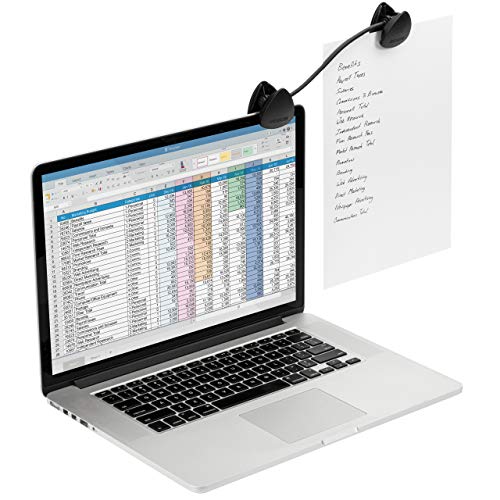
The FlexClip is the smallest holder in this guide. A flexible gooseneck arm ends in a spring clip that grips your document, and the other end clamps to a monitor, a laptop or a desk edge. Because the arm bends in any direction, you can park a single sheet or a small stack right beside the screen even on a shallow desk, then bend it out of the way when you finish.
The copy area is 9-3/4 inches wide, enough for letter pages held in portrait orientation. There is no line guide and no ledge; the clip alone holds the paper, so this design suits short reference sheets, forms and notes rather than long documents. Kensington does not publish a sheet capacity for the FlexClip. Pick it when desk space is the limiting factor and your paper load is light.
Specs
- Type: Flexible-arm clip holder; clamps to a monitor, laptop or desk edge
- Material: Plastic
- Angle and height adjustment: Gooseneck arm bends to position the page; no fixed angle stops published by the maker
- Sheet capacity: Not published by the maker
- Clip and line guide: Spring clip holds the page; no line guide
5. 3M Monitor Mount Document Clip (DH240MB)

The DH240MB removes the holder from the desk entirely. It mounts to the left or right side of a monitor or laptop with Command adhesive, so the page hangs at screen height and your desk surface stays clear. The clip swings to hold documents in portrait or landscape orientation, which covers both letters and wider forms.
3M states a capacity of up to 30 sheets, so this is a holder for the document you are working from right now, not for a full report. The adhesive mounting removes cleanly when you want to move it, and the clip folds flat against the screen when not in use. There is no line guide; for a handful of pages at eye level, most typists will not miss it. Choose the DH240MB if your desk is full and your typing work runs one document at a time.
Specs
- Type: Monitor-mounted clip; attaches to the side of a monitor or laptop with adhesive
- Material: Plastic
- Angle and height adjustment: Clip swings for portrait or landscape pages; position is set by the adhesive mount
- Sheet capacity: Up to 30 sheets (maker-stated)
- Clip and line guide: Spring clip holds the page; no line guide
Comparison Table
| Model | Type | Material | Adjustment | Sheet capacity | Line guide |
|---|---|---|---|---|---|
| 3M DH340MB | Desktop easel | Plastic | Tilting back | Up to 150 | Yes, sliding |
| 3M DH640 | In-line platform | Plastic, 40% recycled content | Angle and height | Up to 300 | Yes, elastic |
| Fellowes 21106 | Desktop easel | Non-magnetic plastic | Tilting back | Not published | Yes |
| Kensington FlexClip K62081BF | Flexible clip arm | Plastic | Bendable gooseneck | Not published | No |
| 3M DH240MB | Monitor-mounted clip | Plastic | Swing clip | Up to 30 | No |
FAQ
What is the difference between an in-line holder and a desktop easel?
An in-line holder sits between the keyboard and the monitor, directly under the screen, while an easel stands beside the monitor. In-line models need a deeper desk because they push the keyboard toward you; easels work on almost any desk but place the page off to one side.
How many sheets can a document holder handle?
It varies widely by model. In this guide, the maker-stated figures run from up to 30 sheets for the small monitor clip to up to 300 sheets for the wide in-line platform. Bound books and catalogs depend less on sheet count and more on a deep bottom ledge, like the one on the DH640.
Do I need a line guide?
If you type long documents line by line, a line guide helps you keep your place and move down the page in an orderly way. For short reference sheets, forms or notes that you glance at occasionally, a plain clip is usually enough.
Will a monitor-mounted clip damage my screen?
The DH240MB mounts with Command adhesive strips, which 3M designs for clean removal from the bezel. It attaches to the frame around the screen rather than the display surface itself. Check that your monitor has a flat bezel edge wide enough for the adhesive pad before ordering.
Can these holders handle landscape pages and wide forms?
The DH340MB and DH240MB both adjust their clips for portrait or landscape pages. The DH640 goes further with an 18-inch backplate that fits wide documents and open books. The FlexClip and the Fellowes 21106 are sized around letter pages in portrait orientation.
Conclusion
For most home office desks, the 3M DH340MB is the safest all-round pick: a 150-sheet capacity, a sliding line guide and a clip that handles portrait and landscape pages. If you type from thick stacks or open books, the wider DH640 adds height adjustment and double the capacity. The Fellowes 21106 covers letter-size work in a smaller footprint, the Kensington FlexClip solves the tightest desks with a bendable arm, and the 3M DH240MB lifts a single document to screen height when the desk itself has no room left. Match the mounting style to your desk first, then check capacity, and any of these five will keep your pages upright and easy to type from.
More from Amazon
Programs that pair well with the guide above. Offers and eligibility are set by Amazon and may change.
A free business account with business pricing and bulk-buying tools for work, shop or home office.
Create a business accountFree shipping on eligible items, Prime Video and more. Eligible new members can start with a free trial.
Start a Prime free trialAudiobooks and podcasts to listen to on the go. Eligible new members can start with a free trial.
Try Audible freeAd-free music streaming. Eligible new subscribers can start with a free trial.
Try Music Unlimited freeAs an Amazon Associate we earn from qualifying purchases.